I have just finished my second week of using the MJ. I have to say that, overall, i am very happy with it. The calls are clear, the incoming CID works, the softphone recognizes the dialed numbers from most of the phones I have tried, etc... My only complaint is that I can't get any phone to ring on incoming calls. I have tried 6 different phones (2 corded, 4 cordless) and 3 different computers. I have also tried a powered hub with no improvement One cordless phone (VTech ia5824) will light up with an incoming call but will not ring. Also, another weird issue is with the 2 corded phones. When attempting to dial out with either one, none of the numbers dialed with the phone are recognized by the softphone. In all instances, the blue light is on. I have tried to chat with tech support and had no success. They insist that I try a different phone. It doesn't seem realistic to buy/return every phone available to find one that works. Does anyone have any suggestions on what to tell the support people when I talk to them? They seem unwilling to consider that the MJ may have a hardware problem.
The phones I have tried:
Sony IT-B3 (corded)
GE Slimline 29253GE1 (corded)
VTech ia5824 (5.8 GHz cordless)
Uniden Win1200 Dual mode (5.8 GHz cordless)
Uniden DXAI5588-2 (5.8GHz cordless)
Lucent 4336 (2.4 GHZ cordless)
Computer setup:
Computer #1 (Primary Computer)
WinXP SP2 and all patches
AMD XP2500+
2GB RAM
Soyo SYKT880 motherboard
Other USB devices: keyboard, mouse, external hard drive,
Computer #2
Compaq TC1000 Tablet PC w/ docking station
WinXP Tablet Edition w/SP2 and all patches
768mb RAM
no external USB devices other than MJ
Computer #3
Shuttle Spacewalker SS50
WinXP SP2 and all patches
Intel P4 2.26 GHz
1GB RAM
other USB devices: Wireless USB Keyboard
I am connecting using wired DSL in all instances. I have tested my Voip connection to both Boston and San Jose and it has been rated consistently at around 4.2 on each computer. I have tried MagicFix and the upgrade with no notable changes in behavior. I have even tried reformatting the MJ. Anyone have other suggestions? I am wondering if I would be better getting an RMA for this one, returning it, and buying another one?
everything works great...except for the ring
Moderators: Bill Smith, Pilot
-
LikeMagic
- Dan Should Pay Me
- Posts: 613
- Joined: Tue Jan 01, 2008 9:11 pm
- Location: LikeMagic Pacific NW
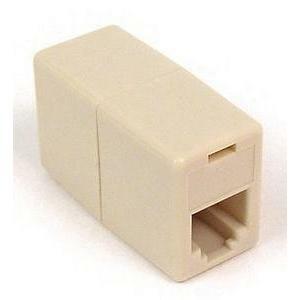
Did you try all the phones with the same phone cord connecting the phone to MJ? Please try another phone cord or two to see if you may have a bad cord. Your MJ device may also have a defective ringing circuit. If you have a DVM (digital volt-meter) handy, try to measure the AC voltage across the Red & Green (aka tip & ring) wires during an incoming call to see if the ringing voltage is present. On my MJ device, it puts out 65v AC during the ringing cycle. In order to get to the Red & Green wires to measure ringing voltage, you have to be creative. I suggest using an inline coupler, pop it open to see/access the wires.
Last edited by LikeMagic on Sun May 04, 2008 2:53 pm, edited 1 time in total.
Thanks for the reply. I had tried about 4 or 5 different cords in addition to the phones. Thanks for the info on checking the voltage. I took a surface mount phone jack and wired it up using one of the spare phone cords I had. I cut it in half, stripped the wires, and wired it up. I plugged it in to the MJ and then plugged my phone into the jack. The ring voltage during an incoming call starts at about 18 volts and peaks at 19.1 (one ring peaked at 19.74). So, it appears that I have a defective MJ. Now, how do I convince tech support? Or. do I RMA and repurchase? The current phone number I have isn't important since my home area code is "pending" and I just picked an area code to test with.
-
LikeMagic
- Dan Should Pay Me
- Posts: 613
- Joined: Tue Jan 01, 2008 9:11 pm
- Location: LikeMagic Pacific NW
Ok, I'd like for you to try again using the powered hub and measure the ringing voltage. For reference, the ringing voltage should be between 45-65v AC for a typical ATA (analog telephone adapter) to ring most newer electronic phones. PSTN (POTS) line will provide up to 90v AC to ring older mechanical bell phones.
-
HendersonMike
- Dan isn't smart enough to hire me
- Posts: 274
- Joined: Wed Apr 09, 2008 9:36 pm
- Location: Henderson, Nevada state, usA
-
LikeMagic
- Dan Should Pay Me
- Posts: 613
- Joined: Tue Jan 01, 2008 9:11 pm
- Location: LikeMagic Pacific NW
The powered hub has its own 5v AC adapter, right? If so, it seems your MJ device has defective ringing circuit. Search the forum for a Tigerjet USB device diagnostic software to see if it could perform a test on the ringing circuit to be sure.
Check the following discussion to see the download link:
http://www.phoneservicesupport.com/unab ... t=tigerjet
Check the following discussion to see the download link:
http://www.phoneservicesupport.com/unab ... t=tigerjet
Thanks for all of your help. The USB hub I am using does have a 5v ac adapter. I downloaded the SDK and killed the MJ from the task manager. The SDK ring test failed as well. The measured voltage is about the same as the voltages I measured earlier. Any suggestions on dealing with support? Are they going to be technical enough to see that there does seem to be a hardware problem with the ring circuit or will they give me a hard time for using the SDK to test the MJ (void warranty, etc)? Sorry for so many questions, but having dealt with various support people in the past, my experience is that they look for any excuse to not support the problem.
I tried contacting the online chat again and made it to level 2 but was still unsuccessful in convincing them I had a hardware problem. They also didn't like hearing that i tested the ringer using the TigerJet SDK. Ultimately, I gave up and followed your advice of emailing Dan the man. I received an answer in just under 18 hours (pretty impressive). The tech that replied agreed that it sounded like a hardware issue and had replacement on the way within just a couple of hours. i even received an order confirmation. I should have it in a few days. In addition, he tech is going to assist me in transferring my number to the new jack. Thanks for all the help in troubleshooting the problem.