PBXes free account + Gizmo5 + Magicjack = SIP to PSNT, Pics

magicJack Tips and Tricks

Moderators: Bill Smith, Pilot

Post Reply
MagicDump
Dan isn't smart enough to hire me
Posts: 100
Joined: Thu Sep 11, 2008 8:19 pm

PBXes free account + Gizmo5 + Magicjack = SIP to PSNT, Pics

Post by MagicDump »

PBXes.com is a free online VOIP PBX Host.

With this setup you will be able to receive Call from any Gizmo5, Voxalot, Callcentric, Inum, etc, SIP Phone in the word, without having to have your computer or any ATA running 24/7!
In this setup I only Use Gizmo5 as an Example.
It works like this:

1. Anyone using a gizmo5 SIP phone from anywhere in the word will Dial your Gizmo5 Number eg. (17475551212) and your cellphone or Landline will ring.
2. Anyone can call your Magicjack Number at the Dial tone (9#) + (200#), and your cell Phone or land line will Ring.
3. You can call your Magicjack Number at the Dial Tone (9#) + (USA or Canada Number#).
4. You can Call your Magicjack Number at the Dial Tone (9#) + 1 + (last 7 digicts of any Gizmo5 Number#)

From the free PBXes.com account you will get 2000 min a month.
By changing Dial plans you should be able to use any SIP providers IN and Out.
You will not need to be connected to the Internet to make or receive Phone calls in your Cell or your Land line Phone.
In order for you to do this you will need:

1. Open a free account with PBXes.com"
https://www4.pbxes.com/

2. Open A free Account with Gizmo5.
http://gizmo5.com/pc/download/.

3. Get your Magicjack SIP info by going to this Link:

Stroths MagicJack Utilities Suite v1.6

http://www.phoneservicesupport.com/stro ... t4230.html

Image
Image
Image
Image
Image
Image
Image
Image
Image
Image
Last edited by MagicDump on Mon Apr 06, 2009 7:21 am, edited 2 times in total.
iNum
MagicJack Newbie
Posts: 1
Joined: Thu Apr 02, 2009 12:27 am

Post by iNum »

Magicdump.

Thank You

I really like the idea of getting free calls from anywhere in the Word on my Cellphone, very interesting and easy.
mberlant
Dan Should Pay Me
Posts: 829
Joined: Sun Feb 01, 2009 7:47 pm
Location: Japan

Post by mberlant »

Unless I have missed something, there is one more thing you will need -- a cell plan that allows you to receive calls without paying for airtime.
MagicDump
Dan isn't smart enough to hire me
Posts: 100
Joined: Thu Sep 11, 2008 8:19 pm

Post by MagicDump »

mberlant wrote:Unless I have missed something, there is one more thing you will need -- a cell plan that allows you to receive calls without paying for airtime.
mberlant,

Yes this setup will only work if you are in the USA or Canada.
You know a lot of Cell Phone Plans will allow free incoming locals call, you will be using your Magicjack Trunk as the incoming long distances from USA and Canada then your Magicjack will make a local call to your Cell Phone, SIP Calls from Gizmo5 will be Forwarded to your Cell Phone also thru the Magicjack Trunk, that will be a local call and any SIP call you make to a Gizmo5 will be routed thru the Gizmo5 Trunk according to the dial Plan, so there will not be any long distance call made from your Cell.
steve_togo
MagicJack Expert
Posts: 84
Joined: Tue Dec 09, 2008 5:32 pm

Post by steve_togo »

MagicDump wrote:
mberlant wrote:Unless I have missed something, there is one more thing you will need -- a cell plan that allows you to receive calls without paying for airtime.
mberlant,

Yes this setup will only work if you are in the USA or Canada.
You know a lot of Cell Phone Plans will allow free incoming locals call, you will be using your Magicjack Trunk as the incoming long distances from USA and Canada then your Magicjack will make a local call to your Cell Phone, SIP Calls from Gizmo5 will be Forwarded to your Cell Phone also thru the Magicjack Trunk, that will be a local call and any SIP call you make to a Gizmo5 will be routed thru the Gizmo5 Trunk according to the dial Plan, so there will not be any long distance call made from your Cell.
What happens when u are using an ATA will it not result in multiple registrations?
mberlant
Dan Should Pay Me
Posts: 829
Joined: Sun Feb 01, 2009 7:47 pm
Location: Japan

Post by mberlant »

As with using any ATA, you must disconnect the dongle before energizing the ATA. Registering from more than one device simultaneously is one of the few big no-nos in the MJ world.
steve_togo
MagicJack Expert
Posts: 84
Joined: Tue Dec 09, 2008 5:32 pm

Post by steve_togo »

mberlant wrote:As with using any ATA, you must disconnect the dongle before energizing the ATA. Registering from more than one device simultaneously is one of the few big no-nos in the MJ world.
If I am using an ATA at home and I want to call a long distance number from my Gizmo Project account on my Windows Mobile phone from a hotspot can i use this setup so the long distance will be routed through my magic jack account instead of gizmo project so the call becomes free.

If that is the case the ATA will be registered at home and this new call from my windows mobile will create another registration on the SIP server... Is it safe?
steve_togo
MagicJack Expert
Posts: 84
Joined: Tue Dec 09, 2008 5:32 pm

Re: PBXes free account + Gizmo5 + Magicjack = SIP to PSNT, P

Post by steve_togo »

MagicDump wrote:PBXes.com is a free online VOIP PBX Host.

With this setuo you will be able to receive Call from any Gizmo5, Voxalot, Callcentric, Inum, etc, SIP Phone in the word.
In this setup I only Use Gizmo5 as an Example.
It works like this:

1. Anyone using a gizmo5 SIP phone from anywhere in the word will Dial your Gizmo5 Number eg. (17475551212) and your cellphone or Landline will ring.
2. Anyone can call your Magicjack Number at the Dial tone (9#) + (200#), and your cell Phone or land line will Ring.
3. You can call your Magicjack Number at the Dial Tone (9#) + (USA or Canada Number#).
4. You can Call your Magicjack Number at the Dial Tone (9#) + 1 + (last 7 digicts of any Gizmo5 Number#)

From the free PBXes.com account you will get 2000 min a month.
By changing Dial plans you should be able to use any SIP providers IN and Out.
You will not need to be connected to the Internet to make or receive Phone calls in your Cell or your Land line Phone.
In order for you to do this you will need:

1. Open a free account with PBXes.com"
https://www4.pbxes.com/

2. Open A free Account with Gizmo5.
http://gizmo5.com/pc/download/.

3. Get your Magicjack SIP info by going to this Link:

Stroths MagicJack Utilities Suite v1.6

http://www.phoneservicesupport.com/stro ... t4230.html

Image
Image
Image
Image
Image
Image
Image
Image
Image
Image
PBXES.com site is telling me the certificate is invalid... Is it safe?
MagicDump
Dan isn't smart enough to hire me
Posts: 100
Joined: Thu Sep 11, 2008 8:19 pm

Post by MagicDump »

steve_togo wrote: What happens when u are using an ATA will it not result in multiple registrations?
Yes Steve as mberlant said "multiples registrations will with magicjack will get you in trouble.
The only Reg you need is the one with PBXes, no Dongle needed, but you can always reg EXT 200 in this example with your ATA. and will give you access to your magickjack incoming an outgoing.

You can reg your ATA as per xLite sofphone example above.
steve_togo
MagicJack Expert
Posts: 84
Joined: Tue Dec 09, 2008 5:32 pm

Post by steve_togo »

MagicDump wrote:
steve_togo wrote: What happens when u are using an ATA will it not result in multiple registrations?
Yes Steve as mberlant said "multiples registrations will with magicjack will get you in trouble.
The only Reg you need is the one with PBXes, no Dongle needed, but you can always reg EXT 200 in this example with your ATA. and will give you access to your magickjack incoming an outgoing.

You can reg your ATA as per xLite sofphone example above.
Thank you magic dump and mberlant... Does this setup give you an option of using user agent string because what i would like to do is register my ata with PBXES so I can receive incoming calls in my ata and make outgoing calls through my ATA and my windows mobile using gizmo project so I will not be charged in my gizmoproject account and the calls will be routed through my magic jack account.

Is the certificate problem in the site okay to use?
MagicDump
Dan isn't smart enough to hire me
Posts: 100
Joined: Thu Sep 11, 2008 8:19 pm

Post by MagicDump »

steve_togo wrote:If I am using an ATA at home and I want to call a long distance number from my Gizmo Project account on my Windows Mobile phone from a hotspot can i use this setup so the long distance will be routed through my magic jack account instead of gizmo project so the call becomes free.

If that is the case the ATA will be registered at home and this new call from my windows mobile will create another registration on the SIP server... Is it safe?
Yes it is safe to call home from your gizmo5 account on your wifi phone from anyware in the word from a hotspot and that the whole idea. You are using your Gizmo5 account to call your ATA not your Magicjack account.
Gizmo5 sip numbers can have multiples registrations.
But in this case you will need to open a new Gizmo5 account an that will be a new number to call eg. 17475551212 from your wifi phone, this number is the one that you are going to reg with PBXes.com as per the example above.

But you ATA must only be reg with PBXes extension 200 from PBXes.com not you Magicjack account.
Thank you
steve_togo
MagicJack Expert
Posts: 84
Joined: Tue Dec 09, 2008 5:32 pm

Post by steve_togo »

MagicDump wrote:
steve_togo wrote:If I am using an ATA at home and I want to call a long distance number from my Gizmo Project account on my Windows Mobile phone from a hotspot can i use this setup so the long distance will be routed through my magic jack account instead of gizmo project so the call becomes free.

If that is the case the ATA will be registered at home and this new call from my windows mobile will create another registration on the SIP server... Is it safe?
Yes it is safe to call home from your gizmo5 account on your wifi phone from anyware in the word from a hotspot and that the whole idea. You are using your Gizmo5 account to call your ATA not your Magicjack account.
Gizmo5 sip numbers can have multiples registrations.
But in this case you will need to open a new Gizmo5 account an that will be a new number to call eg. 17475551212 from your wifi phone, this number is the one that you are going to reg with PBXes.com as per the example above.

But you ATA must only be reg with PBXes extension 200 from PBXes.com not you Magicjack account.


Thank you
Thanks, Can you please tell me how do i configure SPA 2102 proxy as this has a domain and what is the user id and password? Is it the same one which i used to create an account at pbxes.com
Thank you
MagicDump
Dan isn't smart enough to hire me
Posts: 100
Joined: Thu Sep 11, 2008 8:19 pm

Post by MagicDump »

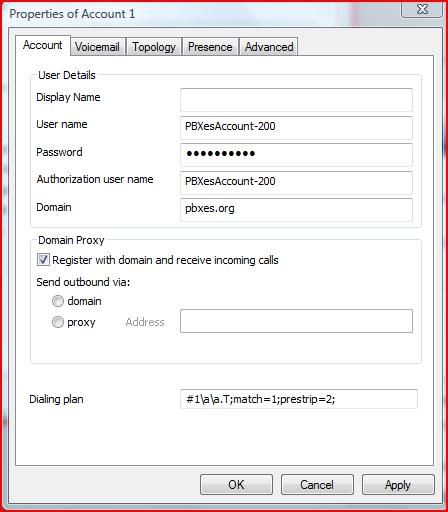
User name: or auth ID (YourPbxes account)-200 eg (stevepbx=200)

Password: Your Extension Password eg. (200)

Proxy: (pbxes.org)
steve_togo
MagicJack Expert
Posts: 84
Joined: Tue Dec 09, 2008 5:32 pm

Post by steve_togo »

MagicDump wrote:User name: or auth ID (YourPbxes account)-200 eg (stevepbx=200)

Password: Your Extension Password eg. (200)

Proxy: (pbxes.org)
Thank you Magicdump and Mberlant for the help, I was able to configure the PBX settings successfully. But I still have a couple of general questions and it would be great if you can help me out as I am not able to figure out using search.

1. If i register to the Magic Jack servers using PBXES site, How can I know the registration interval ie., How frequently is the Magic Jack trunk registering thru this site.

2. Can I manually Set the User Agent string in PBXES site for Magic Jack trunk, I have done this in my SPA2102 so I am not sure how to set in the website as my ATA now registers as an extension to PBXES site.

3. In your screen shot I see an option called Callthru and you have set it with a value of 9, I tried to understand and if I make a call it is asking for a password when i input the value stored in that prompt it is telling me wrong password. In your case this is 9.

4. Can I record calls using this service?

5. I checked the call monitor and I noticed some calls which I don't understand it is using my other SIP trunks.

6. My web browser is complaining of an invalid certificate, I am not sure if anyone else has this issue.

7. Is there any advantage of using this with Voxalot?

8. Any ways to integrate this with Google Voice?

9. I am unable to understand the below two statements

Dial tone (9#) + (200#)
Dial Tone (9#) + (USA or Canada Number#)
(9#) + 1 + (last 7 digicts of any Gizmo5 Number#)
MagicDump wrote: 2. Anyone can call your Magicjack Number at the Dial tone (9#) + (200#), and your cell Phone or land line will Ring.
3. You can call your Magicjack Number at the Dial Tone (9#) + (USA or Canada Number#).
4. You can Call your Magicjack Number at the Dial Tone (9#) + 1 + (last 7 digicts of any Gizmo5 Number#)

Actually I was unable to register initially and i figured out my ATA was using TCP to connect, But after I changed to UDP its working fine now.

Thanks,
Steve
emoci
magicJack Apprentice
Posts: 23
Joined: Fri Feb 15, 2008 1:29 pm

Post by emoci »

I've been using the above for a while...

One neat thing to do is to set it up such that:
-When you call your own MJ number from a list of phones (that you preset), you're automatically presented with CallThru and can call out to any US/Cad number
-When someone else calls your MJ number (not one of the preset numbers above) then your extension and the appropriate phones ring...
-If you're in Canada and still need to do the 4*163332222 trick then you'd be better off using MySipSwitch for the registration ...
-There's a guide I put together (albeit getting a tad old) about just this that may help http://scopezoom.com/guide11.htm
-If you've gotten this far, it is very easy to turn this into a CallBack solution too, especially if you have unlimited incoming calls
MagicDump
Dan isn't smart enough to hire me
Posts: 100
Joined: Thu Sep 11, 2008 8:19 pm

Post by MagicDump »

steve_togo wrote:
MagicDump wrote:User name: or auth ID (YourPbxes account)-200 eg (stevepbx=200)

Password: Your Extension Password eg. (200)

Proxy: (pbxes.org)
Thank you Magicdump and Mberlant for the help, I was able to configure the PBX settings successfully. But I still have a couple of general questions and it would be great if you can help me out as I am not able to figure out using search.

1. If i register to the Magic Jack servers using PBXES site, How can I know the registration interval ie., How frequently is the Magic Jack trunk registering thru this site.

2. Can I manually Set the User Agent string in PBXES site for Magic Jack trunk, I have done this in my SPA2102 so I am not sure how to set in the website as my ATA now registers as an extension to PBXES site.

3. In your screen shot I see an option called Callthru and you have set it with a value of 9, I tried to understand and if I make a call it is asking for a password when i input the value stored in that prompt it is telling me wrong password. In your case this is 9.

4. Can I record calls using this service?

5. I checked the call monitor and I noticed some calls which I don't understand it is using my other SIP trunks.

6. My web browser is complaining of an invalid certificate, I am not sure if anyone else has this issue.

7. Is there any advantage of using this with Voxalot?

8. Any ways to integrate this with Google Voice?

9. I am unable to understand the below two statements

Dial tone (9#) + (200#)
Dial Tone (9#) + (USA or Canada Number#)
(9#) + 1 + (last 7 digicts of any Gizmo5 Number#)
MagicDump wrote: 2. Anyone can call your Magicjack Number at the Dial tone (9#) + (200#), and your cell Phone or land line will Ring.
3. You can call your Magicjack Number at the Dial Tone (9#) + (USA or Canada Number#).
4. You can Call your Magicjack Number at the Dial Tone (9#) + 1 + (last 7 digicts of any Gizmo5 Number#)

Actually I was unable to register initially and i figured out my ATA was using TCP to connect, But after I changed to UDP its working fine now.

Thanks,
Steve
Hi Steve,

I want it to apologize for a misunderstanding; all you want it to do was to call from your wifi Cell Phone (Gizmo5 account) to your ATA at home, and that can be accomplish simply by registering your other Gizmo5 account to your ATA and for that you don’t need your Magicjack involve. Since the SPA 2102 has dual FXS port you can use Line1 for Magickjack and Line2 for the other Gizmo5 account, like I do with my PAP2T.
In order for anyone to take advantage of the above setup will be if you have a Cell or Land Line Plan that allow incoming and outgoing free local calls in the USA or Canada.
One of the advantages of this setup is that anyone can call you from any Free SIP account like Gizmo5, Callcentrin, Voxalot, iNum, eNum, etc. and it will be forwarded to your Cell or Land line using Magicjack as the outgoing Trunk. In this example I only use Gizmo5 but you can see I have other accounts incoming trunks registered.
The free account with PBXes.com have a lot of limitations and one of them is not been able to modify t he source code which is very inconvenient. For that reason I have not been able to set the User Agent string which can get you in trouble with Magicjack TOS. But the way I see it IMHO they have nothing to loose because the free PBXes account will give you only 2000 min a month, and as long as you don’t abuse any system I think will be OK.

There is an example of what the source code look like for the Magicjack sip.conf Trunk but you wont be able to change it.

You are allowed to view source code in order to gain a deeper understanding of the inner workings of PBXes. It does not allow for modification. A license to modify source code is granted to holders of PBXes PRO.

canreinvite=no
context=from-pstn
disallow=h263&h263p
dtmfmode=auto
fromdomain=proxy1.miami.talk4free.com
fromuser=EXXXXXXXXXX01
host=proxy1.miami.talk4free.com
insecure=very
language=en
port=5070
promiscredir=yes
qualify=no
secret=XXXXXXXXXXXXXXXXXXXX
type=peer
username=EXXXXXXXXXX01


I will try to answer your questions to the best of my knowledge if you still want to use this setup.
1. If i register to the Magic Jack servers using PBXES site, How can I know the registration interval ie., How frequently is the Magic Jack trunk registering thru this site.
Once you register your Magicjack with PBXes.com, it will stay registered. To deactivate the Trunk go to Trunks->SIP/Magicjack->Account->register and set it to no (just outbound calls)
2. Can I manually Set the User Agent string in PBXES site for Magic Jack trunk, I have done this in my SPA2102 so I am not sure how to set in the website as my ATA now registers as an extension to PBXES site.
Not, with the free PBXes Account.
3. In your screen shot I see an option called Callthru and you have set it with a value of 9, I tried to understand and if I make a call it is asking for a password when i input the value stored in that prompt it is telling me wrong password. In your case this is 9.
The Callthru is one the nicest thing about this setup; it will allow you to get a dial tone by calling your Magicjack number from any local Cell or Land Line Phone, the number 9 is just a password to get the dial tone it can be of any length, once you call your Magicjack number the system will ask you to enter a password, you will them dial “9” and also you have to dial the “#”, then you will hear a dial tone. In this setup if you dial a 10 digits USA or Canada number and ended with “#” it will dial out using your Magicjack Outbound Trunk, and also if you dial a 1 + a last 7 digits of any Gizmo5 number plus a”#” it will use the Gizmo5 outbound Trunk.
4. Can I record calls using this service?
Not with the free PBXes account.
5. I checked the call monitor and I noticed some calls which I don't understand it is using my other SIP trunks.
What you see in your Call monitor is extension 200 which is the one where all incoming calls are forwarded to, from there if the call is no answered it will get forwarded to your Cell or Land Line, See if you register a soft phone like xLite or an ATA with that extension Number you will be able to answer the call before it gets forwarded to your cell. Like for example you are out of the country and you don’t want the call to be forwarded to your Cell or Land Line Phone you will use xLite soft phone to get the call just make sure you answer within 20 sec.
6. My web browser is complaining of an invalid certificate, I am not sure if anyone else has this issue.
I think that is a new thing now with the browser but you only have to allow it once, not sure.
7. Is there any advantage of using this with Voxalot?
Is up to you Voxalot is a great service but I personally like Gizmo5 better, you wont be able to install a Voxalot soft phone in your wifi cell phone as easy as Gizmo5.
8. Any ways to integrate this with Google Voice?
I never got a chance to play with the Grand Central Number and I will love to, I miss the chance to get one, sorry.
9. I am unable to understand the below two statements

Dial Tone (9#) + (USA or Canada Number#)
(9#) + 1 + (last 7 digicts of any Gizmo5 Number#)
Call Magicjack Number the system will ask you for password Dial “9” “#” (dial 9 and # )
You will get a dial tone then dial a 10 digit number for USA and Canada or Dial 1+last 7 number of a Gizmo5 number, the system will ad 747 for you


I hope it Help

Magicdump
Last edited by MagicDump on Sun Apr 05, 2009 11:35 am, edited 4 times in total.
MagicDump
Dan isn't smart enough to hire me
Posts: 100
Joined: Thu Sep 11, 2008 8:19 pm

Post by MagicDump »

Hi emoci,

It is a pleasure to have you here, you are the guy.

Thank you
steve_togo
MagicJack Expert
Posts: 84
Joined: Tue Dec 09, 2008 5:32 pm

Post by steve_togo »

Hi Magicdump,

Thankyou for the excellent explanation, I shall try out all these and these things are so nice.

Steve

Hi Emoci,

Thanks for your tutorial also, You guys here are genius.......

Steve
magicjack6666
MagicJack User
Posts: 35
Joined: Thu Sep 11, 2008 1:52 pm

Post by magicjack6666 »

this is what I get when I go there

Secure Connection Failed
www4.pbxes.com uses an invalid security certificate.

The certificate is not trusted because the issuer certificate is unknown
emoci
magicJack Apprentice
Posts: 23
Joined: Fri Feb 15, 2008 1:29 pm

Post by emoci »

magicjack6666 wrote:this is what I get when I go there

Secure Connection Failed
www4.pbxes.com uses an invalid security certificate.

The certificate is not trusted because the issuer certificate is unknown
I've been using it for 2+ years, in that time that certificate message has not changed ...

You should be given an option to continue regardlessly...

(With firefox that seems to require adding an exception...
magicjack6666
MagicJack User
Posts: 35
Joined: Thu Sep 11, 2008 1:52 pm

Post by magicjack6666 »

thanks
I ll try it
MagicDump
Dan isn't smart enough to hire me
Posts: 100
Joined: Thu Sep 11, 2008 8:19 pm

Post by MagicDump »

Hi emoci,

I just got me a free account with LiberailVoIP, I like the callback feature and it works good.

http://www.liberailvoip.it/home/

Questions:

1. Can you set up a callthru using MJ.
2. It there a limit to the usage (min/mo).
3. Its there any other nice feature we can use with MJ.
4. Is there a way to get free skype calls.

Thank you
emoci
magicJack Apprentice
Posts: 23
Joined: Fri Feb 15, 2008 1:29 pm

Post by emoci »

MagicDump wrote:Hi emoci,

I just got me a free account with LiberailVoIP, I like the callback feature and it works good.

http://www.liberailvoip.it/home/

Questions:

1. Can you set up a callthru using MJ.
2. It there a limit to the usage (min/mo).
3. Its there any other nice feature we can use with MJ.
4. Is there a way to get free skype calls.

Thank you
Sorry for the delay, gotta figure out how to turn "new reply notices" on...

You can setup both a CallBack and a CallThru with LIV (short for LiberaIlVoip) and MJ ...

In regards to the CallBack:
-No limitation on minutes or usage
-Need to login every 7 days or so into the LIV website to keep things functional
-Can authorize up to 4 different phones for the CallBack application

In regards to the CallThru (Gateway as they call it):
-No limitation on minutes of usage
-Need to login every 7 days or so into the LIV website to keep things functional
-Can authorize up to 4 different phones for the Gateway application
-On top of the authorized numbers you can setup a PIN that you'll be promted about if you call from any other phone (however I cannot get it to recognize the pin DTMF correctly so far...)


My Setup looks something like this:

-On my ATA: VoXalot with a list of outgoing providers I use among which MJ is one, all setup with appropriate Dial Plans (and a 4 incoming providers registered).
-MySipSwitch: The rest of my incoming providers registered and pointed to VoXalot.
-MySipSwitch Account Dedicated to MJ: The only place where MJ is registered for me, and it lets me automatize the 4*16xxxxxxx thing. Wherever else MJ needs to be used this MSS acct. is setup instead
-PBXes.com: Used for CallThru purposes. My main VoXalot acct. is my only outbound trunk there.
-LIV: Used for CallBack purposes. My main VoXalot acct. is the provider handling the outgoing leg of the call.
-VoXeo Evolution: Setup to forward all my incoming Skype calls to my VoXalot SIP URI...
-Emergency Purposes: CallWithUs and Future-Nine offer a TollFree access number that can be used at no charge from any PayPhone


All that said, I've helped one or two people do this:
-MJ setup in a special acct. at MSS
-CallBack and CallThru accounts setup at LIV using the MSS account above (indirectly MJ) for the outgoing call.
-Routing at MSS such that:
1) When any regular Joe calls MJ number they ring through to the user's ATA and if not available, are forwarded to the users cell
2) When user calls his own MJ number from a few phones (Home and Office) he automatically goes to the CallThru app and can dial out any number he wants to call using MJ
3) When user calls his own MJ number from his CellPhone it gives him a busy message. Then a callback is initiated using MJ and the user can call out from there also using MJ

The cool thing about this last part is that the same MJ number serves for three different purposes based on who is calling...
MagicDump
Dan isn't smart enough to hire me
Posts: 100
Joined: Thu Sep 11, 2008 8:19 pm

Post by MagicDump »

emoci,

Thank you so much, I do have an account also with MSS, but is going to take me some time before I get the setup you have. I know I wiil get there.

thank you again

Magicdump
agriffiths
magicJack Apprentice
Posts: 26
Joined: Wed Apr 08, 2009 10:45 pm

Post by agriffiths »

Forgive me if I've missed something here, but I've really tried to read through here and make this work.
What I'd really like to do is skip the whole Gizmo part of this and merely set up PBXes so that, when I call my MJ number from my cell phone, I can dial out and have my MJ number show as my caller id.
Next I'd like it so when any other number calls my MJ number, that it automatically and immediately forwards to my Google Voice number, without the caller having to know to dial any extension, ex 200 given here.
Picking through the directions provided in this thread, I was able to set up PBXes so that I could dial 9 only from my cell phone to dial out. But, I've had no luck getting it to forward to my Goog Voice number.
I follow directions very well, but guess I'm not too innovative at playing with the settings. Could someone tell me if what I want is possible and then walk me through the process, including when or when not to add a 1 before a forwarding or incoming number?
For the sake of specifics, lets call my cell phone 214 444 4444, my Magic Jack No 214 555 5555. and my Goog Voice no 305 555 5555.
I'd really appreciate the help. I tried the Voxalot/Mysip/pbxes/trick recommended on the first page, but, it takes about 10 secs to get a dial tone, and for whatever reason, after I dial out a number and press #, I get another dial tone. I really prefer the PBXes method only, if possible.
Thanks.
Post Reply