I just purchased the product as a low-cost, low-power consumption device to support 24/7 MJ service. I was fortunate enough to connect with “xxM5xx” on this forum who was extremely knowledgeable of the setup requirements and quite willing to share them with me.
Again, many thanks to xxM5xx.
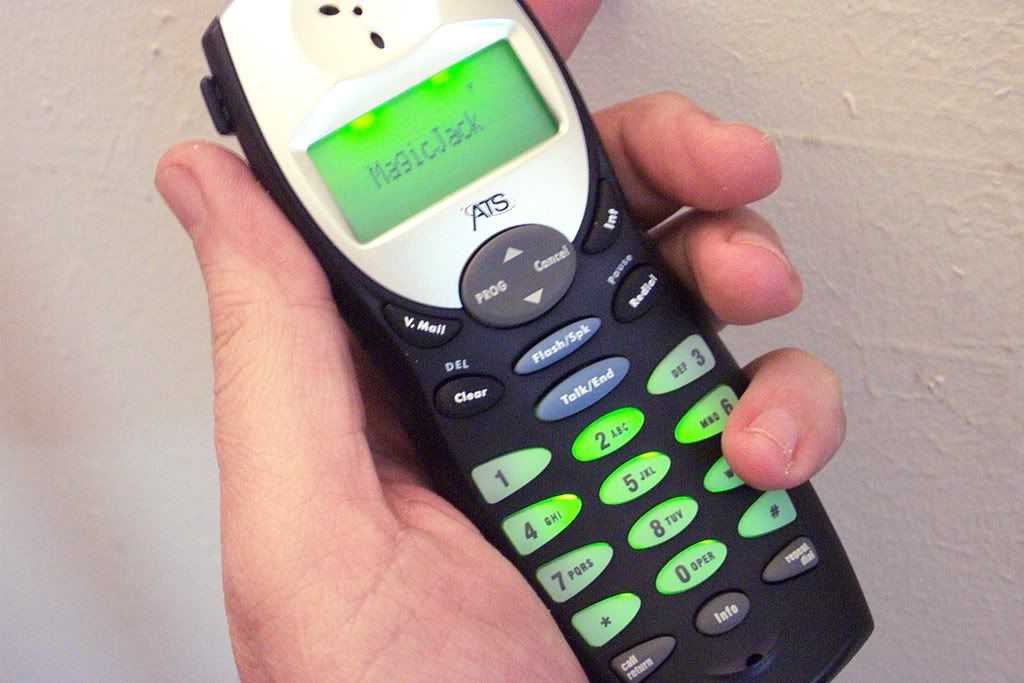
SunRocket ATS 6011S Digital Cordless Internet Phone - Router
Moderators: Bill Smith, Pilot
.
Thank you for the kind words dna.
I am happy I could help out a fellow forum member. Enjoy that Sunrocket 6011S with MJ. I have two of them running here. A very nice thing about them is the company who made them for Sunrocket (ATS) claims they are "WiFi Friendly". The 6011S is a wireless 2.4GHZ phone. They must have done something in the design so it doesn't spew 2.4GHZ around the room in ways that would trash your WLAN. I know it wasn't reducing RF power level because I can walk a long distance from the base and stay connected to my callers.
I have been using these for over a year and a half (first with GizmoProject/GrandCentral, now VoxOx and MagicJack) and I can substantiate that these do not cause interference on my 802.11 Wireless LAN.
Enjoy
xxM5xx
.
.
Thank you for the kind words dna.
I am happy I could help out a fellow forum member. Enjoy that Sunrocket 6011S with MJ. I have two of them running here. A very nice thing about them is the company who made them for Sunrocket (ATS) claims they are "WiFi Friendly". The 6011S is a wireless 2.4GHZ phone. They must have done something in the design so it doesn't spew 2.4GHZ around the room in ways that would trash your WLAN. I know it wasn't reducing RF power level because I can walk a long distance from the base and stay connected to my callers.
I have been using these for over a year and a half (first with GizmoProject/GrandCentral, now VoxOx and MagicJack) and I can substantiate that these do not cause interference on my 802.11 Wireless LAN.
Enjoy
xxM5xx
.
.
this is the info i need but can one of you who got this working post the actualy steps for my and everyone else's benifit? thanks a lot guys. cant wait to get this working. I have tried for hours playing with the diff fields but just cant get rid of "NO LINE". would love a list of fields to modify once "reset to factory". thanks
sunrocket 6011s
i have been strugling with 6011S, cannot get it to work, keep getting NOLINE. Would appriciate if you can help out with the settings.
thanks
Roy
thanks
Roy
roy
Got it
I got this one working, i am working on the documentation right now. I will be posting it tonight. There is only one issue i am trying to solve: When i get an incoming call from a non-MagicJack number they can not hear me, i do hear them but they cant hear me. And then when i call back the same number from my MJ it works ok. I know is an issue with the inbound, maybe a port needs to be open but at least it is working for all outbounds and mj to mj.

Dre
6011S help!!
this is my settings for 6011S. i keep getting NOLINE. any help will be greatly appriciated.
SIP Status Needs Restart
Number of Active Lines
Line 1
DID E214xxxyyyy01
Display Name MagicJack
SIP Name E214xxxyyyy01
SIP Password ******************
Proxy Server Address proxy1.Dallas.talk4free.com:5070
Proxy Server Port 5060
Registrar Server Address 67.107.71.134
Registrar Server Port 5060
Registrar Address of Record
Registration Retry Interval (s) 60
Outbound Proxy Address
Outbound Proxy Port 0
Dial Plan [1-9]xxxxxxx bla bla bla
Digit Timer (ms) 5000
IP Address Dialing
SIP Options
Local Port 0
DTMF Relay Method RFC2833
DTMF Relay MIME Type
User Agent Header Control SIP UA NAME
SIP User Agent Name MagicJack/1.80.466c
SIP Server Name proxy1.Dallas.talk4free.com:5070
SIP Accept Language
Session Expiration Timer (seconds) 0
Minimum Session Expiration Timer (seconds) 0
Registration Timer (seconds) 120
Proxy Require Header
Sip Protocol UDP
NAT Traversal
NAT Keep Alive Message Disable
NAT Keep Alive Interval (seconds) 60
NAT Keep Alive Destination
NAT WAN Address 0.0.0.0
NAT WAN Port 0
STUN Server Address 69.0.208.27
STUN Server Port 3478
Quality of Service Settings
Signalling TOS 0
thank you
SIP Status Needs Restart
Number of Active Lines
Line 1
DID E214xxxyyyy01
Display Name MagicJack
SIP Name E214xxxyyyy01
SIP Password ******************
Proxy Server Address proxy1.Dallas.talk4free.com:5070
Proxy Server Port 5060
Registrar Server Address 67.107.71.134
Registrar Server Port 5060
Registrar Address of Record
Registration Retry Interval (s) 60
Outbound Proxy Address
Outbound Proxy Port 0
Dial Plan [1-9]xxxxxxx bla bla bla
Digit Timer (ms) 5000
IP Address Dialing
SIP Options
Local Port 0
DTMF Relay Method RFC2833
DTMF Relay MIME Type
User Agent Header Control SIP UA NAME
SIP User Agent Name MagicJack/1.80.466c
SIP Server Name proxy1.Dallas.talk4free.com:5070
SIP Accept Language
Session Expiration Timer (seconds) 0
Minimum Session Expiration Timer (seconds) 0
Registration Timer (seconds) 120
Proxy Require Header
Sip Protocol UDP
NAT Traversal
NAT Keep Alive Message Disable
NAT Keep Alive Interval (seconds) 60
NAT Keep Alive Destination
NAT WAN Address 0.0.0.0
NAT WAN Port 0
STUN Server Address 69.0.208.27
STUN Server Port 3478
Quality of Service Settings
Signalling TOS 0
thank you
roy
ATS 6011S
Ok here are the 5 steps you need to get it working. Remeber i am still working on the inbound call issue (Can't hear you when they call from a non-mj number. But it works fine if you call back)
User: tech
Password: kaboom
This is so you can have the "voice" tab


Remember you need to get the info out of your MJ.
Enjoy. If you ever fix the "incoming call" issue please post.
Thanks,
@pDre
User: tech
Password: kaboom
This is so you can have the "voice" tab
Remember you need to get the info out of your MJ.
Enjoy. If you ever fix the "incoming call" issue please post.
Thanks,
@pDre
Dre
SunRocket ATS 6011S Voice/Time Server Settings
With unit at factory default, these are the only settings I changed or added (√).
Voice-Basic Screen Settings:
Line 1
DID Exxxyyyzzzz01 √
Display Name OPTIONAL
SIP Name Exxxyyyzzzz01 √
SIP Password ****************** √
Proxy Server Address proxy1.detroit.talk4free.com √
Proxy Server Port 5070 √
Registrar Server Address proxy1.detroit.talk4free.com √
Registrar Server Port 5070 √
Registrar Address of Record
Registration Retry Interval (s) 60
Outbound Proxy Address proxy1.detroit.talk4free.com √
Outbound Proxy Port 5070 √
Dial Plan default string OPTIONAL
Digit Timer (ms) 5000
IP Address Dialing DISABLED
Basic-Time Screen Settings:
Enable SNTP YES √
Time Server 1 64.90.182.55 √
Enable DST YES √
Voice-Basic Screen Settings:
Line 1
DID Exxxyyyzzzz01 √
Display Name OPTIONAL
SIP Name Exxxyyyzzzz01 √
SIP Password ****************** √
Proxy Server Address proxy1.detroit.talk4free.com √
Proxy Server Port 5070 √
Registrar Server Address proxy1.detroit.talk4free.com √
Registrar Server Port 5070 √
Registrar Address of Record
Registration Retry Interval (s) 60
Outbound Proxy Address proxy1.detroit.talk4free.com √
Outbound Proxy Port 5070 √
Dial Plan default string OPTIONAL
Digit Timer (ms) 5000
IP Address Dialing DISABLED
Basic-Time Screen Settings:
Enable SNTP YES √
Time Server 1 64.90.182.55 √
Enable DST YES √
Still NOLINE
Thank you DNA and thank you Dre for posting detail info for 6011S. I tried both of yours settings and still keep getting NOLINE. I know my sip info is correct as I am using it sucessfully with x-lite. Could it be that my unit was never activated by sunrocket and is new?
Any imput will be greatly appricated.
Thank you again
Any imput will be greatly appricated.
Thank you again
roy
Re: Still NOLINE
Roy,royroy wrote:Thank you DNA and thank you Dre for posting detail info for 6011S. I tried both of yours settings and still keep getting NOLINE. I know my sip info is correct as I am using it sucessfully with x-lite. Could it be that my unit was never activated by sunrocket and is new?
Any imput will be greatly appricated.
Thank you again
My unit was new and never activated by SunRocket so I don't believe that is your problem. Did you reset your phone to factory default before you applied my settings? Please explain how your 6011 is physically connected to the Internet. Are you using Cable or DSL? What OS are you using?
If you create a backup copy of your settings less your SIP and PM it to me, I could load your settings on my phone using my SIP and verify functionality or vise versa.
Yes I did a factory reset through security settings. I then turned the unit off for about a minute, then on. Then I applied your settings. Turned unit off and on. Connected the WAN on the unit to the router. After about a minute got NOLINE. I am using cablevision broadband. My cable modem is connected to a 5 port router and from the router to 6011S. I am using xp pro on a 2yr old Dell deminsion.
Thanks.
Thanks.
roy
Just as an experiment, can you connent your modem to the phone WAN and your Dell to the phone LAN. Try various combinations of powering modem and phone allowing a few minutes between iterations.royroy wrote:Yes I did a factory reset through security settings. I then turned the unit off for about a minute, then on. Then I applied your settings. Turned unit off and on. Connected the WAN on the unit to the router. After about a minute got NOLINE. I am using cablevision broadband. My cable modem is connected to a 5 port router and from the router to 6011S. I am using xp pro on a 2yr old Dell deminsion.
Thanks.
If that fails to yield any positive results, PM me your email and I will send you a copy of my backup file less my SIP. Do a factory reset, restore my backup, enter your SIP and retry powering sequence.
ATS 6011S NOT WORKING - NO LINE
I updated the password from MJ but still get No Line on the phone. My MJ works fine if i plug it into the computer. Any ideas ??? 
Dre
ATS 6011S settings
I read the previous posts but I still can't get my ATS 6011S to work w/ MJ. Will someone please help? You can email me at [email protected].
-
oldtimercurt
- Dan isn't smart enough to hire me
- Posts: 281
- Joined: Sat Feb 07, 2009 11:45 am
- Location: Pensacola
ATS 6011S
Thank you for the prompt and candid reply to my query, OTC. I really appreciate it. Now I know better than to buy a PAP2 VOIP phone adapter. I think I will be getting a powerline phone jack extension instead so as not to tie my phone to my PC.
Again, thank you.
duckthurr
Again, thank you.
duckthurr
Re: ATS 6011S NOT WORKING - NO LINE
Other than keeping it plugged into your computer, no clue.amartich wrote:I updated the password from MJ but still get No Line on the phone. My MJ works fine if i plug it into the computer. Any ideas ???