Noticed some people, including myself, lost incoming call after the hack, I think its better to start a new thread and share my findings. Though it can be fixed with a lower register expires value, or by forwarding to another PSTN# on the MJ web portal, I'd rather play by the rule and stick with the default 1800. So here is the trick(tested and working on my SPA1001+OpenWRT/mjproxy+Tomato router setup).
Assuming the machine with mjproxy running has an IP address of 192.168.1.100
1. In the ATA, set NAT Mapping Enable to No, NAT Keep Alive Enable to Yes and NAT Keep Alive Dest to 192.168.1.100:5070
2. On the router, forward port 5070 to 192.168.1.100
The gimmick here:
1. We usually do NAT keep alive or port forwarding and considering them working out equally, but here, we need both
2. Its not even "NAT" keep alive since the dest. is a LAN IP. And in my test, keep alive to MJ's proxy01....wouldn't work
3. Port forwarding to the local proxy machine instead of ATA.
Incoming call after MJMD5/MJPROXY hack
Moderators: Bill Smith, Pilot
-
oldtimercurt
- Dan isn't smart enough to hire me
- Posts: 281
- Joined: Sat Feb 07, 2009 11:45 am
- Location: Pensacola
Pageman Has a Winner!
pagemen
Looks like you have a winner. I set NAT Mapping Enable to NO. In the NAT Keep Alive Dest, I changed $PROXY to my actual proxy and now I can call MJ from my landline. I did not(nor have I ever) do any router port forwarding. I also set my register expires to 3600 which I believe was PAP2T default.
I hope this setup stays stable for a while. I'm running on a laptop now but I want to upgrade my Thin Client and have that run the MJMD5 proxy. Then I'll be back to out of sight out of mind.
Set up now is Toshiba laptop 1.5GHz Celeron w/512 MB RAM; PAP2T, D-Link DIR 615 wireless router/access point. The Toshiba is hard wired on the LAN. Desktop is Dell XPS 430 also hard wired on the LAN
OTC
Looks like you have a winner. I set NAT Mapping Enable to NO. In the NAT Keep Alive Dest, I changed $PROXY to my actual proxy and now I can call MJ from my landline. I did not(nor have I ever) do any router port forwarding. I also set my register expires to 3600 which I believe was PAP2T default.
I hope this setup stays stable for a while. I'm running on a laptop now but I want to upgrade my Thin Client and have that run the MJMD5 proxy. Then I'll be back to out of sight out of mind.
Set up now is Toshiba laptop 1.5GHz Celeron w/512 MB RAM; PAP2T, D-Link DIR 615 wireless router/access point. The Toshiba is hard wired on the LAN. Desktop is Dell XPS 430 also hard wired on the LAN
OTC
Last edited by oldtimercurt on Tue Jul 07, 2009 4:19 pm, edited 1 time in total.
Re: Pageman Has a Winner!
You shouldn't need to do any port forwarding, because you've given the ATA the exact IP address and port to go to.oldtimercurt wrote:pagemen
Looks like you have a winner. I set NAT Mapping Enable to NO. In the NAT Keep Alive Dest, I changed $PROXY to my actual proxy and now I can call MJ from my landline. I did not do any router port forwarding.
OTC
I also don't think you need to change the $PROXY if the proxy field in your ATA is set correctly. $PROXY tells the ATA to use the information stored in the proxy field.
-
oldtimercurt
- Dan isn't smart enough to hire me
- Posts: 281
- Joined: Sat Feb 07, 2009 11:45 am
- Location: Pensacola
-
Taken83oveR
- Dan isn't smart enough to hire me
- Posts: 119
- Joined: Wed Jun 11, 2008 2:07 pm
The keep alive dest. is $PROXY by default, which means the 192.168.x.x:5070 here, so oldtimercurt's experience makes perfect sense, and its the way how it should work -- by keeping alive to real proxy. But I'm also confused since if the ATA keep alive to local proxy, shall the mjproxy/mjmd5 forward the packet to real proxy and will the local proxy then forward the INVITE msg. to ATA for incoming calls? So if it works(NAT keep alive to whatever dest., local or remote proxy), that's great, if not, try port forward as well.
To MJuser403: I know how things should work in theory but that isn't the case here, I think I have made these very clear in my post.
To Taken83oveR: yes, port forward to local proxy, in your case, 192.168.1.1. Also keep alive. to 192.168.1.1. Sounds weird but this works for me. Feel free to try all the combinations and find the proper settings for you.
To MJuser403: I know how things should work in theory but that isn't the case here, I think I have made these very clear in my post.
To Taken83oveR: yes, port forward to local proxy, in your case, 192.168.1.1. Also keep alive. to 192.168.1.1. Sounds weird but this works for me. Feel free to try all the combinations and find the proper settings for you.
-
oldtimercurt
- Dan isn't smart enough to hire me
- Posts: 281
- Joined: Sat Feb 07, 2009 11:45 am
- Location: Pensacola
My Setup: (for what it's worth)Taken83oveR wrote:You are asking people to forward to 192.168.1.100, but what is this machines purpose in your setup? Is it your ATA? Is it your router?
For example, my setup.
Router = 192.168.1.1 (where I am running the proxy server)
ATA = 192.168.1.3
PC = 192.168.1.111 (where I am running the proxy server)
ATA = 192.168.1.112
Router = Internet Gateway set up DHCP = 192.168.1.1
My PC & ATA are cabled up behind the router so I don't think specifying 192.168.1.1:5070 in ATA would work.
Synchron

-
oldtimercurt
- Dan isn't smart enough to hire me
- Posts: 281
- Joined: Sat Feb 07, 2009 11:45 am
- Location: Pensacola
Synchron,synchron wrote:My Setup: (for what it's worth)Taken83oveR wrote:You are asking people to forward to 192.168.1.100, but what is this machines purpose in your setup? Is it your ATA? Is it your router?
For example, my setup.
Router = 192.168.1.1 (where I am running the proxy server)
ATA = 192.168.1.3
PC = 192.168.1.111 (where I am running the proxy server)
ATA = 192.168.1.112
Router = Internet Gateway set up DHCP = 192.168.1.1
My PC & ATA are cabled up behind the router so I don't think specifying 192.168.1.1:5070 in ATA would work.
Synchron
I think you are supposed to perform the following based on your setup-
1. In the ATA, set NAT Mapping Enable to No, NAT Keep Alive Enable to Yes and NAT Keep Alive Dest to 192.168.1.111:5070
2. On the router, forward port 5070 to 192.168.1.111
I had the same issue as everyone here with incoming calls going to voicemail even though I already had the register expires setting to 180.
My setup-
TC = 192.168.1.12 (fixed IP where I am running the proxy server)
ATA = 192.168.1.13 (fixed IP)
Router = 192.168.1.1
I just made the recommended changes below and so far so good.
1. In the ATA, set NAT Mapping Enable to No, NAT Keep Alive Enable to Yes and NAT Keep Alive Dest to 192.168.1.12:5070
2. On the router, forward port 5070 to 192.168.1.12
3. Set register expires to 1800
I need to verify if incoming calls still come in if I don't use the phone overnight.
Also, is anyone else getting the broken up ring for incoming calls?
My setup-
TC = 192.168.1.12 (fixed IP where I am running the proxy server)
ATA = 192.168.1.13 (fixed IP)
Router = 192.168.1.1
I just made the recommended changes below and so far so good.
1. In the ATA, set NAT Mapping Enable to No, NAT Keep Alive Enable to Yes and NAT Keep Alive Dest to 192.168.1.12:5070
2. On the router, forward port 5070 to 192.168.1.12
3. Set register expires to 1800
I need to verify if incoming calls still come in if I don't use the phone overnight.
Also, is anyone else getting the broken up ring for incoming calls?
I guess I wasn't clear, I've been up & running with MJMD5 for almost a week now. Since my PC running the proxy is behind the router there's no need to use the router address in the ATA. I would think to use the router address only if I had DDWRT F/W and ran MJMD5 CLI inside the router.noetic1 wrote:Synchron,synchron wrote:My Setup: (for what it's worth)Taken83oveR wrote:You are asking people to forward to 192.168.1.100, but what is this machines purpose in your setup? Is it your ATA? Is it your router?
For example, my setup.
Router = 192.168.1.1 (where I am running the proxy server)
ATA = 192.168.1.3
PC = 192.168.1.111 (where I am running the proxy server)
ATA = 192.168.1.112
Router = Internet Gateway set up DHCP = 192.168.1.1
My PC & ATA are cabled up behind the router so I don't think specifying 192.168.1.1:5070 in ATA would work.
Synchron
I think you are supposed to perform the following based on your setup-
1. In the ATA, set NAT Mapping Enable to No, NAT Keep Alive Enable to Yes and NAT Keep Alive Dest to 192.168.1.111:5070
2. On the router, forward port 5070 to 192.168.1.111
As far as my ATA, it's a Vonics/Sunrocket acquisition and has no NAT Mapping Enable, Keep Alive flags, etc., just a place to put in the proxy address, specify codecs, and, of course, un/pw SIP credentials. On the router, I don't need to forward port 5070 since it's specified in the ATA proxy address (:5070).
Synchron
Re: Incoming call after MJMD5/MJPROXY hack
If someone would be so kind to help out a distraught and sufferring MJ user. I've looked at all the post mentioning the MJMD5 proxy, and I cannot get mine to register, keeps saying can't connect to login server. My MJ password is correct, and verified. I plug dongle back in to my pc, and incoming and outgoing works, and password is the same, not changed. I am running the proxy on the same pc mj was installed, and then another machine still no dice. I REALLY REALLY NEED to get this working to stop the freaking bleeps during a call. I also have the proxy from philadelphia like MJUser403. I've spent weeks on this, since this fix first came, and it seem so easy. MY last resort is to wipe out all the info and start over again, and maybe use line 2 instead of one, if that makes any difference. Could someone please answer this question for me, since I"m tell the ata to look for the proxy on my pc, do I still need to have the dongle plugged with magicjack still running? Also do I need to change the user id, and password in the ATA, leave blank or what? Do I still need to leave my user id Exxxxxxxxx01 in the auth field, and select yes to authenticate? Thx for any insight or help!pagemen wrote:Noticed some people, including myself, lost incoming call after the hack, I think its better to start a new thread and share my findings. Though it can be fixed with a lower register expires value, or by forwarding to another PSTN# on the MJ web portal, I'd rather play by the rule and stick with the default 1800. So here is the trick(tested and working on my SPA1001+OpenWRT/mjproxy+Tomato router setup).
Assuming the machine with mjproxy running has an IP address of 192.168.1.100
1. In the ATA, set NAT Mapping Enable to No, NAT Keep Alive Enable to Yes and NAT Keep Alive Dest to 192.168.1.100:5070
2. On the router, forward port 5070 to 192.168.1.100
The gimmick here:
1. We usually do NAT keep alive or port forwarding and considering them working out equally, but here, we need both
2. Its not even "NAT" keep alive since the dest. is a LAN IP. And in my test, keep alive to MJ's proxy01....wouldn't work
3. Port forwarding to the local proxy machine instead of ATA.
MJMD5 Help still not working linksys ata
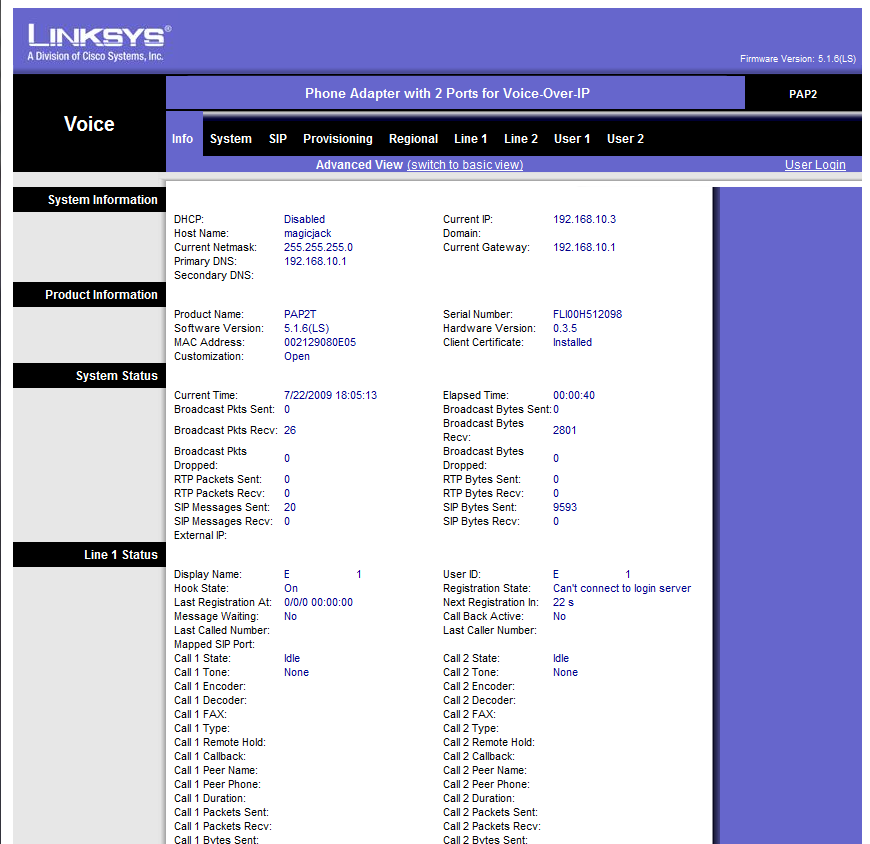
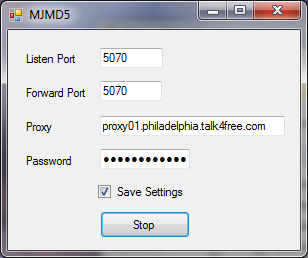
Here is my screen shots of my settings, could someone please tell me what I have wrong here to make the MJMD5 work? I might also mention that when sipsorcery was up, I was able to use that with the same password, and it worked till MJ caught on, and blocked sipsorcery.
Here is my info page:

And here is how I have my MJMD5 proxy server setup:
Here is my info page:
And here is how I have my MJMD5 proxy server setup:
Please delete your posts in the other threads. It's confusing to folks when users post the same message on multiple threads. You need to give people time to answer.
Based on your screenshots below, I gathered your current config is as follows. Can you confirm.
PC = 192.168.10.193 (where you are running MJMD5)
ATA = 192.168.10.3
Router = 192.168.10.1
1. How long ago did you check your MJ SIP password?
2. Verify that the IP of your PC running MJMD5 matches the IP:5070 in the ATA Proxy field.
3. Are you using the correct User Agent in the SIP page of the ATA? (MagicJack/1.80.484a (SJ Labs))
4. Try setting Register Expires to 180
5. I have use Auth ID = 'No'
My suggestion is to reset your ATA and reconfigure it for MJ again if the steps above don't work. Especially if you were using your ATA with another VOIP service.
I reset my PAP2NA to default settings by typing the following keys on my phone connected to the ATA - ****73738#
Based on your screenshots below, I gathered your current config is as follows. Can you confirm.
PC = 192.168.10.193 (where you are running MJMD5)
ATA = 192.168.10.3
Router = 192.168.10.1
1. How long ago did you check your MJ SIP password?
2. Verify that the IP of your PC running MJMD5 matches the IP:5070 in the ATA Proxy field.
3. Are you using the correct User Agent in the SIP page of the ATA? (MagicJack/1.80.484a (SJ Labs))
4. Try setting Register Expires to 180
5. I have use Auth ID = 'No'
My suggestion is to reset your ATA and reconfigure it for MJ again if the steps above don't work. Especially if you were using your ATA with another VOIP service.
I reset my PAP2NA to default settings by typing the following keys on my phone connected to the ATA - ****73738#
Yes, you are correct in regards to my settings above, and YES my password is correct. I've plugged the dongle back in, and retrieved it for the 10th time, and it has not changed. I did not use this ATA for another VoIP service, the sipsorcery that I mentioned before was just sip proxy service to reroute the ATA to make it work again with magicjace sort of like the same thing this MJMD5 is supposed to do. My user agent is set for 494D from the 6/19 upgrade to help me remove beeps during the call, so does that matter if it's 484a or 494d? I am going to through everything again with your suggestions. Thx again!noetic1 wrote:Please delete your posts in the other threads. It's confusing to folks when users post the same message on multiple threads. You need to give people time to answer.
Based on your screenshots below, I gathered your current config is as follows. Can you confirm.
PC = 192.168.10.193 (where you are running MJMD5)
ATA = 192.168.10.3
Router = 192.168.10.1
1. How long ago did you check your MJ SIP password?
2. Verify that the IP of your PC running MJMD5 matches the IP:5070 in the ATA Proxy field.
3. Are you using the correct User Agent in the SIP page of the ATA? (MagicJack/1.80.484a (SJ Labs))
4. Try setting Register Expires to 180
5. I have use Auth ID = 'No'
My suggestion is to reset your ATA and reconfigure it for MJ again if the steps above don't work. Especially if you were using your ATA with another VOIP service.
I reset my PAP2NA to default settings by typing the following keys on my phone connected to the ATA - ****73738#