Shey
What is your configuration? Are you trying to run with just the ATA or have you installed MJMDM5 on your computer and using that. ATA still won't run without a computer or some routers that have been doctored (as described in these forums).
OTC
ATA Start Working with following setting
Moderators: Bill Smith, Pilot
-
oldtimercurt
- Dan isn't smart enough to hire me
- Posts: 281
- Joined: Sat Feb 07, 2009 11:45 am
- Location: Pensacola
-
sachinagre
- MagicJack Newbie
- Posts: 7
- Joined: Sun Jun 14, 2009 8:42 pm
"Router which are doctored"...???oldtimercurt wrote:Shey
What is your configuration? Are you trying to run with just the ATA or have you installed MJMDM5 on your computer and using that. ATA still won't run without a computer or some routers that have been doctored (as described in these forums).
OTC
you mean making something on the internet router or the ATA device? And if we do it will it eliminate the need for PC...???
Anyone who configures the ATA device and posts here, kindly mention explicitly if it is "ONLY ATA" or "MJMDM5+ATA"
thanks a ton in adv.
-
oldtimercurt
- Dan isn't smart enough to hire me
- Posts: 281
- Joined: Sat Feb 07, 2009 11:45 am
- Location: Pensacola
sachinagre
As far as I know there are basically three MJ configurations that are in general use after the latest update.
1. Use MJ as intended, i.e., plugged into usb on computer. Dongle required.
1a. Use MJ on thin client with dongle.
1b. Run MJ as service on computer.
2. Use MJ creds on ATA with MJMDM5 running on computer. No dongle required.
3. Modify software of some routers with MJMDM5(?) and can then run without computer. I'm not real familiar with this option--only seen it discussed on several forums here.
My $.02
OTC
As far as I know there are basically three MJ configurations that are in general use after the latest update.
1. Use MJ as intended, i.e., plugged into usb on computer. Dongle required.
1a. Use MJ on thin client with dongle.
1b. Run MJ as service on computer.
2. Use MJ creds on ATA with MJMDM5 running on computer. No dongle required.
3. Modify software of some routers with MJMDM5(?) and can then run without computer. I'm not real familiar with this option--only seen it discussed on several forums here.
My $.02
OTC
-
sachinagre
- MagicJack Newbie
- Posts: 7
- Joined: Sun Jun 14, 2009 8:42 pm
thanks OTC,oldtimercurt wrote:sachinagre
As far as I know there are basically three MJ configurations that are in general use after the latest update.
1. Use MJ as intended, i.e., plugged into usb on computer. Dongle required.
1a. Use MJ on thin client with dongle.
1b. Run MJ as service on computer.
2. Use MJ creds on ATA with MJMDM5 running on computer. No dongle required.
3. Modify software of some routers with MJMDM5(?) and can then run without computer. I'm not real familiar with this option--only seen it discussed on several forums here.
My $.02
OTC
now only if someone can explain a bit more on how to modify the software on PAP2T or wireless router or some other device so that I need not keep the PC running that will be AMAZING...!!!
OTC[/quote]
thanks OTC,
now only if someone can explain a bit more on how to modify the software on PAP2T or wireless router or some other device so that I need not keep the PC running that will be AMAZING...!!![/quote]
Sachinagre you don't mod your PAP2T you mod your router to a modified firmware there are a few options OPEN WRT, DD WRT, Tomato and I think Sveasoft also works. There are a lot of posts that explain how to set routers up. Read through the forum, also not all routers work with the modded firmware. You have to go to their sites and see what equipment is supported. If you do this you will not have to have your pc on for your ata to work.
thanks OTC,
now only if someone can explain a bit more on how to modify the software on PAP2T or wireless router or some other device so that I need not keep the PC running that will be AMAZING...!!![/quote]
Sachinagre you don't mod your PAP2T you mod your router to a modified firmware there are a few options OPEN WRT, DD WRT, Tomato and I think Sveasoft also works. There are a lot of posts that explain how to set routers up. Read through the forum, also not all routers work with the modded firmware. You have to go to their sites and see what equipment is supported. If you do this you will not have to have your pc on for your ata to work.
-
shahidr100
- MagicJack Newbie
- Posts: 1
- Joined: Sat Feb 21, 2009 11:37 pm
Please help me
Hi,
I was using MJ in Sipura2001. It was working fine and then suddenly one day i noticed that it is not working anymore. I tried all the possible combination but in vain. I tried in Xlite also but that did no good.
proxy01.chicago.talk4free.com is my proxy.
One weird thing which I noted is that everytime when I run MagicJack utilities, I get a different password. I have 3-4 different passwords given by Magic Jack utilities at different times.
Please help.
Thanks
I was using MJ in Sipura2001. It was working fine and then suddenly one day i noticed that it is not working anymore. I tried all the possible combination but in vain. I tried in Xlite also but that did no good.
proxy01.chicago.talk4free.com is my proxy.
One weird thing which I noted is that everytime when I run MagicJack utilities, I get a different password. I have 3-4 different passwords given by Magic Jack utilities at different times.
Please help.
Thanks
-
sachinagre
- MagicJack Newbie
- Posts: 7
- Joined: Sun Jun 14, 2009 8:42 pm
thanks OTC,angel-78 wrote:OTC
now only if someone can explain a bit more on how to modify the software on PAP2T or wireless router or some other device so that I need not keep the PC running that will be AMAZING...!!![/quote]
Sachinagre you don't mod your PAP2T you mod your router to a modified firmware there are a few options OPEN WRT, DD WRT, Tomato and I think Sveasoft also works. There are a lot of posts that explain how to set routers up. Read through the forum, also not all routers work with the modded firmware. You have to go to their sites and see what equipment is supported. If you do this you will not have to have your pc on for your ata to work.[/quote]
Oh...
you rock man...

Let me hunt through the forum in search of those firmwares...
thanks again.
MJMD5 Help still not working linksys ata
If someone would be so kind to help out a distraught and sufferring MJ user. I've looked at all the post mentioning the MJMD5 proxy, and I cannot get mine to register, keeps saying can't connect to login server. My MJ password is correct, and verified. I plug dongle back in to my pc, and incoming and outgoing works, and password is the same, not changed. I am running the proxy on the same pc mj was installed, and then another machine still no dice. I REALLY REALLY NEED to get this working to stop the freaking bleeps during a call. I also have the proxy from philadelphia like MJUser403. I've spent weeks on this, since this fix first came, and it seem so easy. MY last resort is to wipe out all the info and start over again, and maybe use line 2 instead of one, if that makes any difference. Could someone please answer this question for me, since I"m tell the ata to look for the proxy on my pc, do I still need to have the dongle plugged with magicjack still running? Also do I need to change the user id, and password in the ATA, leave blank or what? Do I still need to leave my user id Exxxxxxxxx01 in the auth field, and select yes to authenticate? Thx for any insight or help!
MJMD5 Help still not working linksys ata
Because I am desparate, and I know different people are reading different posts, so looking for help from anyone, sorry to annoy you.srvctek wrote:Why do you keep posting the same thing in more than one thread?
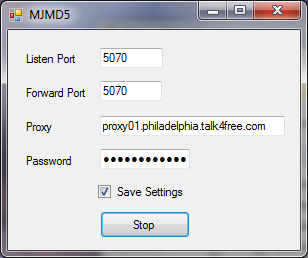
Here is my screen shots of my settings, could someone please tell me what I have wrong here to make the MJMD5 work? I might also mention that when sipsorcery was up, I was able to use that with the same password, and it worked till MJ caught on, and blocked sipsorcery.
Here is my info page:
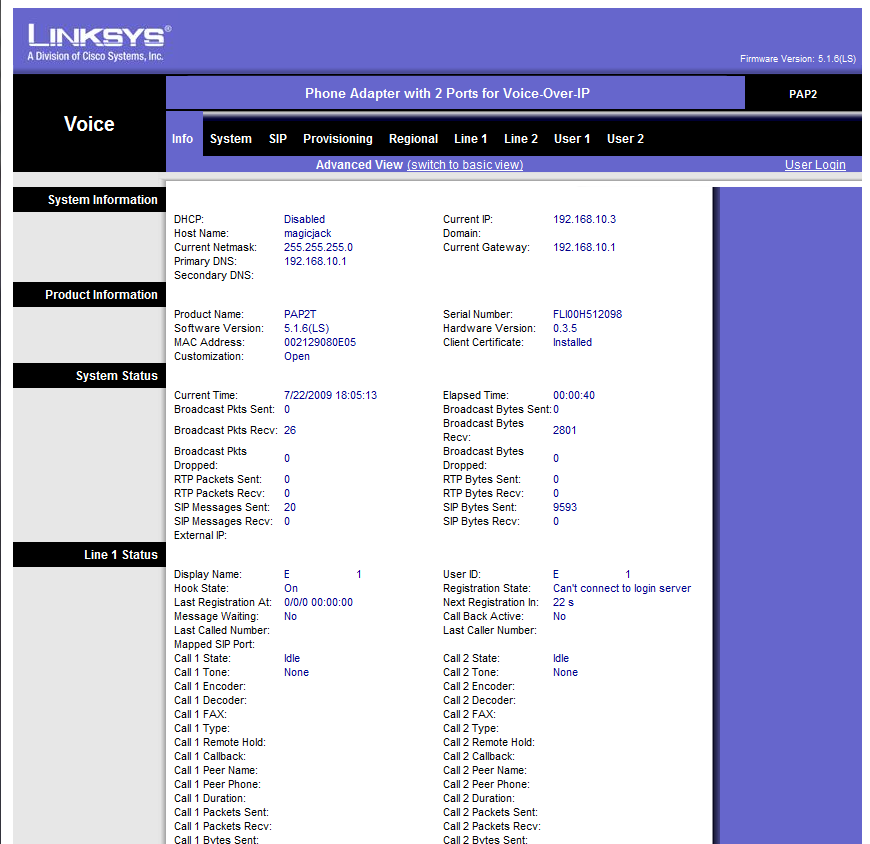

And here is how I have my MJMD5 proxy server setup:
Re: MJMD5 Help still not working linksys ata
The only thing that I can't verify is that the MJMD5 machine is not on IP address 192.168.193.10. If your machine running MJMD5 is "dynamically obtain IP address", then it could change whenever you reboot.
Re: MJMD5 Help still not working linksys ata
My home network is dynamic, but the IP don't change due to not being shutdown or rebooted. I can assign static, but it still won't make a difference. Plus my proxy server machine is 192.168.10.193 port 5070. So from your response I gather all my settings are correct, this sucks!MJuser403 wrote:The only thing that I can't verify is that the MJMD5 machine is not on IP address 192.168.193.10. If your machine running MJMD5 is "dynamically obtain IP address", then it could change whenever you reboot.
One quick question, I have everything working right but seening ppl screen shot of their ATA I see they have Current Time set correctly. But mine it say 1/06/03 and the time is way off. Any Idea how to set Time and Date on a SPA2102 because my caller ID is displaying those Date and Time even tho on regional it set for GMT -5:00. Thx for any information any of you may provide.
-
oldtimercurt
- Dan isn't smart enough to hire me
- Posts: 281
- Joined: Sat Feb 07, 2009 11:45 am
- Location: Pensacola
wondabwoy
You might try these changes:
NAT Mapping Enable: NO
NAT Keep alive Dest: Change $PROXY to the actual proxy. The $PROXY is supposed to pick it up but mine worked after I specifically put it in.
We get quite a few power outages where I live. Had one the other day and it was out long enough that when things repowered, my ip had changed. Just went into ATA and modified the two proxy settings and all was good.
Hope this helps.
OTC
You might try these changes:
NAT Mapping Enable: NO
NAT Keep alive Dest: Change $PROXY to the actual proxy. The $PROXY is supposed to pick it up but mine worked after I specifically put it in.
We get quite a few power outages where I live. Had one the other day and it was out long enough that when things repowered, my ip had changed. Just went into ATA and modified the two proxy settings and all was good.
Hope this helps.
OTC
-
DarwinPeru
- magicJack Apprentice
- Posts: 28
- Joined: Tue Feb 03, 2009 2:39 am
Dialpaln?
I got a dial tone in my PAP2T by changing Register Expire: 0 but, when I try to call a number for a test, i get a busy signal, WHY?
I am Using diferents Dialplans like this:
1.- (*xx|[3469]11|0|00|[2-9]xxxxxx|1xxx[2-9]xxxxxxS0|xxxxxxxxxxxx.)
2.- ([1235-9]11!|411S0|<:1850>[2-9]xxxxxxS0|1[2-9]xx[2-9]xxxxxxS0| 1441!|1473!|1649!|1758!|1767!|1784!|1876!|1[26][68]4!|1[28]68!| 124[26]!|134[05]!|167[01]!|18[06]9!|01149xxxxxxxS0|)
3.- (*xx|911|<411:18004664411>|[235678]11!|<:1818>[2-9]xxxxxx|1xxx[2-9]xxxxxxS0|<:1>[2-9]xx[2-9]xxxxxxS0)
or
4.- (xxx[2-9]xxxxxxS0|xxxxxxxxxx)
Can somebody help me?
Thanks
I am Using diferents Dialplans like this:
1.- (*xx|[3469]11|0|00|[2-9]xxxxxx|1xxx[2-9]xxxxxxS0|xxxxxxxxxxxx.)
2.- ([1235-9]11!|411S0|<:1850>[2-9]xxxxxxS0|1[2-9]xx[2-9]xxxxxxS0| 1441!|1473!|1649!|1758!|1767!|1784!|1876!|1[26][68]4!|1[28]68!| 124[26]!|134[05]!|167[01]!|18[06]9!|01149xxxxxxxS0|)
3.- (*xx|911|<411:18004664411>|[235678]11!|<:1818>[2-9]xxxxxx|1xxx[2-9]xxxxxxS0|<:1>[2-9]xx[2-9]xxxxxxS0)
or
4.- (xxx[2-9]xxxxxxS0|xxxxxxxxxx)
Can somebody help me?
Thanks