Tomato Version of MJMD5 (aka mjproxy)

magicJack Tips and Tricks

Moderators: Bill Smith, Pilot

noetic1
MagicJack Contributor
Posts: 65
Joined: Tue Oct 14, 2008 10:18 pm

Tomato Version of MJMD5 (aka mjproxy)

Post by noetic1 »

Now that I've got MJMD5 working on my Tomato flashed Linksys WRT54GL router, I thought I'd consolidate all of the information I found in this forum and from PMs to help other newb's.

Thanks to jeffnyc, qwer1304, and Taken83oveR's post on the following thread for guiding me- http://www.phoneservicesupport.com/ddwr ... t6913.html

Since I was totally new to this, it took me about 6 hours to figure everything out. The biggest hurdle being I am not familiar with linux commands that were available once telneted to my router. The following link lists all commands available for Busy Box which is what my router uses and is an excellent resource - http://en.wikipedia.org/wiki/BusyBox


Summary of steps that need to be completed:
1. Enable jffs in Tomato via the Administration section
2. Enable ssh in Tomato via the Administration section
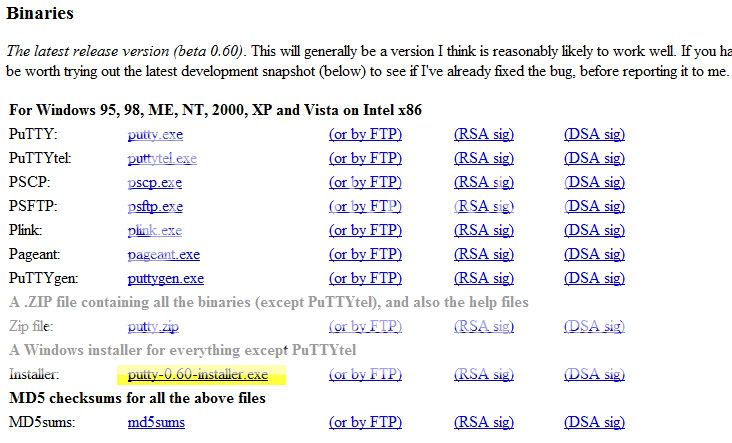
3. Install putty on PC (download the 'Windows installer for everything except PuTTYtel' version)
4. Download the Tomato version of mjproxy from teddy_b's post
5. Upload mjproxy to Tomato (jffs) with putty using Windows command prompt with -scp option
6. Telnet into your router via putty (login as 'root' and enter Tomato password)
7. Execute the following command while connected to your router via putty - 'Chmod mjproxy to 755'
8. Put command line in Tomato Administration/Scripts/Init tab
9. Change the proxy IP in your ATA Line 1 tab to that of your Tomato router
10. Verify that mjproxy is working using the top command


Detailed instructions with screenshots below:

1. Enable jffs in Tomato via the Administration section
I also clicked the 'Format/Erase' button so that I have a clean slate to work with.
I wasn't worried about deleting anything since I just enabled it.
Image

2. Enable ssh in Tomato via the Administration section
Image

3. Install putty on PC (download the 'Windows installer for everything except PuTTYtel' version)
Link to PuTTY download page-
http://www.chiark.greenend.org.uk/~sgta ... nload.html
Image

4. Download the Tomato version of mjproxy from teddy_b's post
Extract mjproxy to Program Files/Putty folder.
NOTE: I needed to unzip the file twice.
teddy_b wrote:I don't have a DD-WRT router either, but here are a couple binaries compiled using Tomato toolchain.
1. The first one is what I'm running on my Tomato router:
http://www.mediafire.com/file/twkmijnm3 ... ato.tar.gz
It might work on DD-WRT - I have no way to check myself.
2. If the 1st one doesn't work, try the other one:
http://www.mediafire.com/file/n2zzlmkiy ... tic.tar.gz
This one is statically linked with uclibc - the executable is larger but doesn't depend on the libc version - has better chances to run on dd-wrt (only on mipsel routers of course).
5. Upload mjproxy to Tomato (jffs) with putty using Windows command prompt with -scp option
Open a Windows command window (via Start/Run/Cmd) and navigate to the putty directory. Notice in the screenshot below I executed the command from the following directory- C:\Program Files\PuTTY
Then type in the following command-
"pscp -scp mjproxy [email protected]:/jffs" (assuming 192.168.1.1 is your router IP)
Image

6. Telnet into your router via putty (login as 'root' and enter Tomato password)
Open putty and enter the IP address of your Tomato router in the 'Host Name' textbox and then click open
Image

A telnet session window is created and log in as root and enter your Tomato password when prompted
(Note: when you enter your password the cursor doesn't move)
Image

7. Execute the following command while connected to your router via putty - 'chmod mjproxy to 755'
In my screenshot below I first looked for mjproxy to verify that I successfully uploaded it.
After I executed the chmod command I noticed that mjproxy changed to a green color.

For those not familiar with linux- I used the following commands to look for mjproxy
pwd = present working directory
ls = list files in this directory
cd = change directory
Image

8. Put the following command line in the Tomato Administration/Scripts/Init tab
sleep 30
/jffs/mjproxy 0.0.0.0 5070 proxy01.chicago.talk4free.com 5070 your_MJ_password
Image

9. Change the proxy IP in your ATA Line 1 tab to that of your Tomato router
I also enabled NAT Keepalive because I was having issues with incoming calls.
Image

10. Verify that mjproxy is working by using the 'top' command while connected to your router via putty. (Type ctrl-c to stop the top command)
This was really helpful for me in debugging because it turned out that mjproxy wasn't running on my router so I had to manually execute mjproxy.

Just enter 'top' at the telnet command prompt and ctrl-c to stop.

If mjproxy is running you should see a line similar to the one below in yellow-
Image


That should be all to it. Log into your ATA and confirm that your registration status is 'Online'. One thing I did notice is that it took about 3-5 minutes before my ATA registration status changed to 'Online' after manualy executing the mjproxy command.
tdave00
magicJack Apprentice
Posts: 10
Joined: Thu Jun 11, 2009 1:17 am

Post by tdave00 »

Very good detailed writeup. Had another user PM me asking how I did it and my instructions to him were a bit vague. Glad you took the time to do it in detail. Been working fine for me for almost a week.
nakamoniel
MagicJack Newbie
Posts: 9
Joined: Mon Dec 29, 2008 9:40 pm

MANNYYYYYY THANKSSSSS

Post by nakamoniel »

Oki, this is the perfact guide i have came across ever. For some reason with DD-wrt even after enabling JFFS2, I was unable to put mjproxy file in there. That made me switch to TOMATO and now i Absolutely love it. I am not familiar with linux either so i just simply followed wut you did and it all worked. Now only if I can figure ( AGAIN ) what my password for MJ is. In my router it shows as asterisk. do you know how to reveal it? i tried different softs for it but no go. otherwise i will go thru getting the password from dumped memory all over again. anyways Thank you and Two Thumbs UP for that perfact guide.
oldtimercurt
Dan isn't smart enough to hire me
Posts: 281
Joined: Sat Feb 07, 2009 11:45 am
Location: Pensacola

Post by oldtimercurt »

nakamoniel
Try Stroths utility. Works for everyone who read the directions.

OTC
noetic1
MagicJack Contributor
Posts: 65
Joined: Tue Oct 14, 2008 10:18 pm

Post by noetic1 »

nakamoniel-
I second OTC's recommendation since I use Stroths utility to get my MJ SIP information.

Below is a link to Stroths post which has with a link to download his utility-
http://www.phoneservicesupport.com/stro ... t4230.html
wang_12533
MagicJack Newbie
Posts: 5
Joined: Wed Jun 10, 2009 1:07 am

Re: Tomato Version of MJMD5 (aka mjproxy)

Post by wang_12533 »

Thanks noetic1. Are you able to take the ATA out of network?
Guide_timothy
magicJack Apprentice
Posts: 21
Joined: Mon Dec 15, 2008 9:22 pm

HELP

Post by Guide_timothy »

#5Upload mjproxy to Tomato (jffs) with putty using Windows command prompt with -scp option
Open a Windows command window (via Start/Run/Cmd) and navigate to the putty directory. Notice in the screenshot below I executed the command from the following directory- C:\Program Files\PuTTY
Then type in the following command-
"pscp -scp mjproxy [email protected]:/jffs" (assuming 192.168.1.1 is your router IP)

HELP im having trouble with step 5 :cry: :cry: what ever i enter into CMD thingy it says ts not recognised as an internal or external command or operable program or batch file.. i know it has something to do with pscp file on that puTTY thingy can someone help me plz :cry:
maybe you can do it with remote desktop connection on messenger or something anyways I got DDWRT version working perfectly but everyone says tomato firmware is best
ssudarshan75
magicJack Apprentice
Posts: 13
Joined: Fri May 22, 2009 6:10 pm

Post by ssudarshan75 »

noetic1 wrote:nakamoniel-
I second OTC's recommendation since I use Stroths utility to get my MJ SIP information.

Below is a link to Stroths post which has with a link to download his utility-
http://www.phoneservicesupport.com/stro ... t4230.html
V1.6 is no longer able to retrieve SIP info.how do we get it?
ssudarshan75
magicJack Apprentice
Posts: 13
Joined: Fri May 22, 2009 6:10 pm

Last step help plzzz

Post by ssudarshan75 »

So i got hold of my password from password retriever, I have Innomedia MTA6238Re. I entered the password there. Now after i connect this ATA, i still see as not registered, when i run top i cannot find mjproxy running?What is missing.

# mjproxy listen-ip|0.0.0.0 5070 proxy01.dallas.talk4free.com 5070 mypassword
-sh: 0.0.0.0: not found
fastrthnu
MagicJack Newbie
Posts: 2
Joined: Tue Aug 25, 2009 10:01 pm

Post by fastrthnu »

I'ved followed everything and it is perfectly laid out. However, I am a noob at this and cannot figure out how to get my Linsys pap2t to work with this.
The last step is to log into the ata and confirm that is is on line.
I think this is the crucial step I am missing and cannot figure out.
I assume with mjproxy i no longer need to have magic jack plugged into the cpu. but without it in I dont get a dial tone.
Can someone steer me in the right direction
Thanks
steve_togo
MagicJack Expert
Posts: 84
Joined: Tue Dec 09, 2008 5:32 pm

Post by steve_togo »

fastrthnu wrote:I'ved followed everything and it is perfectly laid out. However, I am a noob at this and cannot figure out how to get my Linsys pap2t to work with this.
The last step is to log into the ata and confirm that is is on line.
I think this is the crucial step I am missing and cannot figure out.
I assume with mjproxy i no longer need to have magic jack plugged into the cpu. but without it in I dont get a dial tone.
Can someone steer me in the right direction
Thanks
ATA is a device like ur linksys router... Do you have that device it is of the same size as a wireless router
steve_togo
MagicJack Expert
Posts: 84
Joined: Tue Dec 09, 2008 5:32 pm

Re: Last step help plzzz

Post by steve_togo »

ssudarshan75 wrote:So i got hold of my password from password retriever, I have Innomedia MTA6238Re. I entered the password there. Now after i connect this ATA, i still see as not registered, when i run top i cannot find mjproxy running?What is missing.

# mjproxy listen-ip|0.0.0.0 5070 proxy01.dallas.talk4free.com 5070 mypassword
-sh: 0.0.0.0: not found
You should find it... Where are u running it from? From a telnet session or have u saved it as a command?
fastrthnu
MagicJack Newbie
Posts: 2
Joined: Tue Aug 25, 2009 10:01 pm

Post by fastrthnu »

steve_togo wrote:
fastrthnu wrote:I'ved followed everything and it is perfectly laid out. However, I am a noob at this and cannot figure out how to get my Linsys pap2t to work with this.
The last step is to log into the ata and confirm that is is on line.
I think this is the crucial step I am missing and cannot figure out.
I assume with mjproxy i no longer need to have magic jack plugged into the cpu. but without it in I dont get a dial tone.
Can someone steer me in the right direction
Thanks
ATA is a device like ur linksys router... Do you have that device it is of the same size as a wireless router
Steve-
Thanks for helping.
I have a linksys pap2t that i recently purchased. I have this hooked into one of the ports of my Tomato router.
ssudarshan75
magicJack Apprentice
Posts: 13
Joined: Fri May 22, 2009 6:10 pm

Re: Last step help plzzz

Post by ssudarshan75 »

steve_togo wrote:
ssudarshan75 wrote:So i got hold of my password from password retriever, I have Innomedia MTA6238Re. I entered the password there. Now after i connect this ATA, i still see as not registered, when i run top i cannot find mjproxy running?What is missing.

# mjproxy listen-ip|0.0.0.0 5070 proxy01.dallas.talk4free.com 5070 mypassword
-sh: 0.0.0.0: not found
You should find it... Where are u running it from? From a telnet session or have u saved it as a command?
Running from a telnet session...
sarsipius
MagicJack Newbie
Posts: 1
Joined: Sat Aug 29, 2009 1:44 am

Re: Last step help plzzz

Post by sarsipius »

ssudarshan75 wrote:
steve_togo wrote:
ssudarshan75 wrote:So i got hold of my password from password retriever, I have Innomedia MTA6238Re. I entered the password there. Now after i connect this ATA, i still see as not registered, when i run top i cannot find mjproxy running?What is missing.

# mjproxy listen-ip|0.0.0.0 5070 proxy01.dallas.talk4free.com 5070 mypassword
-sh: 0.0.0.0: not found
You should find it... Where are u running it from? From a telnet session or have u saved it as a command?
Running from a telnet session...
ssudarshan75, take out the listen-ip| part. run:

Code: Select all

 mjproxy 0.0.0.0 5070 proxy01.dallas.talk4free.com 5070 mypassword
newwonder01
magicJack Apprentice
Posts: 21
Joined: Sat Feb 02, 2008 10:14 pm

Post by newwonder01 »

Hi, are u able to call and receive using innomedia device, I am having problem of calling, immediately is going to busy tone.
nakamoniel
MagicJack Newbie
Posts: 9
Joined: Mon Dec 29, 2008 9:40 pm

WRTP54G KEEPS REBOOTING

Post by nakamoniel »

HI GUYS, my router is acting up really weired, i have my tomato on wr859g at 192.168.1.1 and linksys router (wrtp54g) at 192.168.15.1 both have dhcp enabled. now when i dont have sip info everything works flow less as far as having my wr850g in CLIENT MODE running MJPROXY and linksys as router, but as soon as i try to register sip ( either majicjack or sipgate) all hell breaks loose and router would keep rebooting over and over and over again. however it would go stable after few minutes/hours, would keep working for few days and drop out again. Is it a known issue? Any one had troubleshot it or know the solution?
RobbyG
magicJack Apprentice
Posts: 17
Joined: Sat Dec 26, 2009 8:40 pm

Post by RobbyG »

Thanks noetic1 for the great guide. Was able to setup the proxy on my WRT54GL with Tomato yesterday and everything is working great! :P
mjc8870
MagicJack Contributor
Posts: 64
Joined: Wed Nov 12, 2008 8:59 pm

Stuck on step # 7

Post by mjc8870 »

I am using Linksys WRT54G-TM and using Tomato 1.27. I have run into a prolem on step number 7. I entered "chmod mjproxy to 755" (no quotes) and it says it can not be found. I am at a loss here, because I have no knowledge of programming linux. It appears that the mjproxy is not loading in router.

Also it says to Telnet, but doesn't show clicking telnet. I thought telnet used port 23. I am stumped at this level. Any help from here would be appreciated.

Thanks,


Mike
twice
MagicJack Newbie
Posts: 4
Joined: Sun Jun 01, 2008 11:34 am

chmod

Post by twice »

make sure u are in the jffs directory
and "chmod 755 mjproxy"
mjc8870
MagicJack Contributor
Posts: 64
Joined: Wed Nov 12, 2008 8:59 pm

Post by mjc8870 »

I think I see my mistake. In step 5, I uploaded to 192.168.1.1, but forgot to add /JFFS. I will try that when I go home and update my progress. Did I have to make a JFFS folder, or by enabling in router it is made automatically?


Thanks
mjc8870
MagicJack Contributor
Posts: 64
Joined: Wed Nov 12, 2008 8:59 pm

Post by mjc8870 »

I made it through to step 10, and this is the command that shows up in Putty.

/jffs/mjproxy 0.0.0.0 5070 proxy01.miami.talk4free.com 5070 MJpassword

In the tutorial it has same, except no jffs/ before mjproxyxxxxxxxx

I am not getting the line connected. Did I somehow load mj proxy in wrong directory?

Any ideas?


Thanks,


Mike
mjc8870
MagicJack Contributor
Posts: 64
Joined: Wed Nov 12, 2008 8:59 pm

Post by mjc8870 »

anyone?
mjc8870
MagicJack Contributor
Posts: 64
Joined: Wed Nov 12, 2008 8:59 pm

Post by mjc8870 »

Guys,

I got it working. I realized I had wrong setting in ATA . I had proxy setting set at 192.168.1.101. It should have been 192.168.1.1.

I appreciate all the help.


Thanks,

Mike
noetic1
MagicJack Contributor
Posts: 65
Joined: Tue Oct 14, 2008 10:18 pm

Post by noetic1 »

Mike - Glad you were able to work through the settings.

I've been using this setup since my original post and it has been running solid. I'm sure you won't be disappointed.
mjc8870
MagicJack Contributor
Posts: 64
Joined: Wed Nov 12, 2008 8:59 pm

Post by mjc8870 »

I am back. Everything was working great until I had to disconnect my router,ATA etc.. today to paint my computer room. I hooked everything back up and it is not working.

I telnet and used the top command, and I do not see MJ proxy command. I then started fresh with the instructions, and once again when I use top command, I don't see MJ proxy in list.

Am I missing something?


Thanks,

Mike
noetic1
MagicJack Contributor
Posts: 65
Joined: Tue Oct 14, 2008 10:18 pm

Post by noetic1 »

That is strange. I actually powered down my modem, router (running Tomato/MJMD5), PAP2NA, 1GB switch and NAS because my NAS was acting up and I couldn't access files in it.

I powered everything back up and verified I had a dial tone on my home phone and that I could ring my cell phone.

I recommend unplugging your router, waiting 30 seconds and then plugging it back in to see if it kicks off the MJMD5 command. If not, then just telnet to your router and manually enter the command and run the 'top' command to verify that mjproxy is running.
mjc8870
MagicJack Contributor
Posts: 64
Joined: Wed Nov 12, 2008 8:59 pm

Post by mjc8870 »

When you say manually enter command, could you tell me what to enter.


Thanks,


Mike
noetic1
MagicJack Contributor
Posts: 65
Joined: Tue Oct 14, 2008 10:18 pm

Post by noetic1 »

command = mjproxy 0.0.0.0 5070 proxy01.chicago.talk4free.com 5070 your_MJ_password (with your correct proxy and password)

Did you verify that you successfully completed step 8 where it says to 8. Put command line in Tomato Administration/Scripts/Init tab ?

This step automatically executes that command after the specified wait/sleep time when you reboot your router.

Don't forget that it might take 3-5 minutes before your ATA changes to 'Online' status.
mjc8870
MagicJack Contributor
Posts: 64
Joined: Wed Nov 12, 2008 8:59 pm

Post by mjc8870 »

This is what I have in my scripts - sleep 30
/jffs/mjproxy 0.0.0.0 5070 proxy01.miami.talk4free.com 5070 my password

Do I need that JFFS. That is what I had previously when it was working.

I appreciate your help. It is probably something simple, most likely operator error.
mjc8870
MagicJack Contributor
Posts: 64
Joined: Wed Nov 12, 2008 8:59 pm

Post by mjc8870 »

I manually typed command in, and now when I type "top", the command is listed. I will keep you posted if it works. I will wait 3-5 minutes.
mjc8870
MagicJack Contributor
Posts: 64
Joined: Wed Nov 12, 2008 8:59 pm

Got it working !!!

Post by mjc8870 »

It seems I had to manually load mjproxy in the putty program. Thanks, all is working well.
mjc8870
MagicJack Contributor
Posts: 64
Joined: Wed Nov 12, 2008 8:59 pm

automatically run script

Post by mjc8870 »

Whenever I need to reset my router my script does not automatically run. I have to manually put it in putty. Any ideas why this is happening?
noetic1
MagicJack Contributor
Posts: 65
Joined: Tue Oct 14, 2008 10:18 pm

Post by noetic1 »

This typically means that you are executing the command from the wrong folder (i.e., mjproxy is not in the jffs folder).

Telnet to your router, go to the 'jffs' directory and type ls to 'list the files in the directory'. and doublecheck that mjproxy is in the jffs folder. You should see mjproxy returned.
mjc8870
MagicJack Contributor
Posts: 64
Joined: Wed Nov 12, 2008 8:59 pm

Post by mjc8870 »

I figured it out. I was missing a backslash before JFFS in command.
p13482
MagicJack Newbie
Posts: 3
Joined: Sun Jan 31, 2010 1:26 pm

Post by p13482 »

:? OK OK I just joined this forum and have several questions.
1) Is the password I enter into the Tomato INIT script the password I get from the SIPDump ?
2) Is the User ID & pasword I enter into my ATA the info I get from the SIPDump ? ie. [email protected] & 0123456789abcdef0123456789abcdef

TNX for any help

P
noetic1
MagicJack Contributor
Posts: 65
Joined: Tue Oct 14, 2008 10:18 pm

Post by noetic1 »

p13482 wrote::? OK OK I just joined this forum and have several questions.
1) Is the password I enter into the Tomato INIT script the password I get from the SIPDump ?
2) Is the User ID & pasword I enter into my ATA the info I get from the SIPDump ? ie. [email protected] & 0123456789abcdef0123456789abcdef

TNX for any help

P
1) Is the password I enter into the Tomato INIT script the password I get from the SIPDump ? Yes
2) Is the User ID & pasword I enter into my ATA the info I get from the SIPDump? Yes ie. [email protected] & 0123456789abcdef0123456789abcdef
User ID = E727555555501 (you don't need the @talk4free.com)
Password = the password from the SIPDump
p13482
MagicJack Newbie
Posts: 3
Joined: Sun Jan 31, 2010 1:26 pm

Post by p13482 »

noetic1:

Thanks for your reply. No joy however. Could you look at the attached SPA-3102 screen dump and see if you can see any issues. (my phone is obviously not 555-5555)

I have confirmed that mjproxy is running on the router. I also read somewhere that people have gotten their ATAs to provision without it. (?)

thanks

P
Image
noetic1
MagicJack Contributor
Posts: 65
Joined: Tue Oct 14, 2008 10:18 pm

Post by noetic1 »

Differences I noticed compared to my settings.

NAT Mapping Enable: No
Outbound proxy: blank
Use Outbound proxy: No
Use Auth ID: No
p13482
MagicJack Newbie
Posts: 3
Joined: Sun Jan 31, 2010 1:26 pm

Post by p13482 »

:D :D :D

noetic1

Thanks for your help ! I fixed the discrepancies and also found I had the wrong password. (that 20 character sucker is elusive)

P
richardtaur
Dan isn't smart enough to hire me
Posts: 123
Joined: Mon Mar 17, 2008 5:02 pm

Hi~

Post by richardtaur »

This is the easiest way to use MJ w/o USB. From QOS, I notice that MJ uses a lot of bandwidth around 10K, not even using a lot of bandwidth, the quality is not that great. Do you guys experience the same thing?
silvereyes
MagicJack Newbie
Posts: 3
Joined: Fri Mar 12, 2010 2:20 am

Post by silvereyes »

I'm new to this. I have several questions if someone can help.
I do have two routers with tomato firmware on them.
What is the exact purpose of this guide? Does magic jack not work on tomato firmware otherwise?

My other question, I have two routers connected to eachother via a very long ethernet cable. I had to disable DHCP in router B to get this going. I'm planning to get 2 magic jacks, one for each computer that is next to the routers. Do I need to follow this guide to both routers or only router A?
(router A close to cable modem, router B is far away)

I appreciate any help out there
richardtaur
Dan isn't smart enough to hire me
Posts: 123
Joined: Mon Mar 17, 2008 5:02 pm

Post by richardtaur »

silvereyes wrote:I'm new to this. I have several questions if someone can help.
I do have two routers with tomato firmware on them.
What is the exact purpose of this guide? Does magic jack not work on tomato firmware otherwise?

My other question, I have two routers connected to eachother via a very long ethernet cable. I had to disable DHCP in router B to get this going. I'm planning to get 2 magic jacks, one for each computer that is next to the routers. Do I need to follow this guide to both routers or only router A?
(router A close to cable modem, router B is far away)

I appreciate any help out there
If you are using tomato on two routers. You can use Access Point + WDS. So, the 2nd router doesn't need to connect the cable from router 1 to router 2. You can search WDS on F&Q at http://www.polarcloud.com/tomatofaq for the configuration. This topic at the first post is to guide you how to use MJ without MJ plugged in to the PC. But you will have to get ATAs. This MJproxy only needs to be configured on router A.
silvereyes
MagicJack Newbie
Posts: 3
Joined: Fri Mar 12, 2010 2:20 am

Post by silvereyes »

thank you richardtaur for the help. I have no choice but to connect the two routers via ethernet cable as the distance is huge, about 200feet and several brick walls in between. I guess I'll have to do more reading as I'm still kind of lost. Are you suggesting the MJ can be connected to router only and not thru pc? And where do I get an ATA?
richardtaur
Dan isn't smart enough to hire me
Posts: 123
Joined: Mon Mar 17, 2008 5:02 pm

Post by richardtaur »

I use HT286. It is small size and does the job. You don't need to connect MJ at all. You will put SIP info on ATA then connect ATA to the router. Therefore, you don't need to leave computer on in order to make phone calls or receive phone calls.
richardtaur
Dan isn't smart enough to hire me
Posts: 123
Joined: Mon Mar 17, 2008 5:02 pm

Post by richardtaur »

Is there any tool for spoofing caller id for tomato version?
kuhntech
MagicJack Contributor
Posts: 63
Joined: Tue Dec 15, 2009 2:51 pm
Location: Chico, CA
Contact:

Post by kuhntech »

When I run the following command:

mjproxy 0.0.0.0 5070 vms3.sacramento.talk4free.com 5070 MJPassword

I get the error Network Address Invalid. This is what wireshark told me my proxy was. I also tried changing it to proxy01.sacramento and proxy01.chicago but it gives me the same error.
crackerjack
Dan Should Pay Me
Posts: 784
Joined: Fri Nov 16, 2007 9:32 pm

Post by crackerjack »

richardtaur wrote:Is there any tool for spoofing caller id for tomato version?
Your caller-id is hard coded on the MJ server side. Spoofing hasn't worked from MJ since at least 18 months ago. Thanks to the knuckleheads who abused the secret.
Good Luck

CrackerJack

MagicJack Customer #73
MagicJack user since May 2007
MagicJack abuser since June 2007
"I gots mo' numbers than a Lotto machine!!!"
richardtaur
Dan isn't smart enough to hire me
Posts: 123
Joined: Mon Mar 17, 2008 5:02 pm

Post by richardtaur »

I see. ~_~
richardtaur
Dan isn't smart enough to hire me
Posts: 123
Joined: Mon Mar 17, 2008 5:02 pm

Post by richardtaur »

kuhntech wrote:When I run the following command:

mjproxy 0.0.0.0 5070 vms3.sacramento.talk4free.com 5070 MJPassword

I get the error Network Address Invalid. This is what wireshark told me my proxy was. I also tried changing it to proxy01.sacramento and proxy01.chicago but it gives me the same error.
I use

Code: Select all

mjproxy 0.0.0.0 5070 proxy01.chicago.talk4free.com 5070 MJPassword
.
Post Reply