Just got my NT Duo

Discuss alternatives to magicJack - NetTalk, Ooma, Google Voice, etc

Moderators: Bill Smith, Pilot

johnlvs2run
MagicJack Contributor
Posts: 61
Joined: Wed May 07, 2008 10:41 pm
Location: western u.s.

Post by johnlvs2run »

newtoncd wrote:The speed tests are fine, but you want to measure for VoIP traffic.

Run a VoIP test (leave the default at G.711 codec) at: http://myspeed.visualware.com/indexvoip.php

What does it report?
Image
NT Duo x2 Nov 2010
MJ Aug 2007-09 waited for it to work with linux
how to convert a chest freezer to a fridge
johnlvs2run
MagicJack Contributor
Posts: 61
Joined: Wed May 07, 2008 10:41 pm
Location: western u.s.

Post by johnlvs2run »

gashliquor wrote:@ johnlvs2run, IMO your upstream is LOW however the device does'nt require a large amount of upstream so it is true your fine there, However if your jitter starts changing here and there during the day your gonna not sound that good.
I'm not concerned with the speed, as with the noise in the line, though more speed would be nice.

What I'm wondering too is if I should change to another ISP. I'm planning to cancel the land line by the end of the month, and either go month to month on a dryline with verizon or else change to someone else, maybe dslExtreme. It would probably take them a week or so to send a new modem, then hopefully no worse of a connection than now or else continue the same.
NT Duo x2 Nov 2010
MJ Aug 2007-09 waited for it to work with linux
how to convert a chest freezer to a fridge
gashliquor
Dan isn't smart enough to hire me
Posts: 447
Joined: Sat Apr 26, 2008 1:03 pm

Post by gashliquor »

johnlvs2run wrote:
newtoncd wrote:The speed tests are fine, but you want to measure for VoIP traffic.

Run a VoIP test (leave the default at G.711 codec) at: http://myspeed.visualware.com/indexvoip.php

What does it report?
Image


Where is the rest of the test?...Your jitter is "0", Mine is'nt even that. 0 is fantastic but where is the rest of the test!, MOS 4.2 is great also. Try this site let me see your results

http://www.whichvoip.com/voip/speed_test/ppspeed.html
MJ 4th Gen
MagicFeatures
NetTalk Duo ( I got it cheap, Thank You NT )
Ooma Telo ( Premium Service )
VoIP MY Way ( Custom Acct + INTL )
Linksys PAP2T ATA ( UnLocked )
Linksys WRT-310N Router ( Personal Firmware )
Motorola Modem DOCSIS 3.0 SBG6580
johnlvs2run
MagicJack Contributor
Posts: 61
Joined: Wed May 07, 2008 10:41 pm
Location: western u.s.

Post by johnlvs2run »

gashliquor wrote:Where is the rest of the test?...Your jitter is "0", Mine is'nt even that. 0 is fantastic but where is the rest of the test!, MOS 4.2 is great also
The link that I copied of results, went back to the start when clicked, and it wouldn't let me copy the pages, so I did them again and now it says I've done too many till tomorrow. I'm trying the second link now.

connection analysis
NT Duo x2 Nov 2010
MJ Aug 2007-09 waited for it to work with linux
how to convert a chest freezer to a fridge
gashliquor
Dan isn't smart enough to hire me
Posts: 447
Joined: Sat Apr 26, 2008 1:03 pm

Post by gashliquor »

johnlvs2run wrote:
gashliquor wrote:Where is the rest of the test?...Your jitter is "0", Mine is'nt even that. 0 is fantastic but where is the rest of the test!, MOS 4.2 is great also
The link that I copied of results, went back to the start when clicked, and it wouldn't let me copy the pages, so I did them again and now it says I've done too many till tomorrow. I'm trying the second link now.

connection analysis


There was nothing wrong with those results, Use the link i gave u let me see those results
MJ 4th Gen
MagicFeatures
NetTalk Duo ( I got it cheap, Thank You NT )
Ooma Telo ( Premium Service )
VoIP MY Way ( Custom Acct + INTL )
Linksys PAP2T ATA ( UnLocked )
Linksys WRT-310N Router ( Personal Firmware )
Motorola Modem DOCSIS 3.0 SBG6580
johnlvs2run
MagicJack Contributor
Posts: 61
Joined: Wed May 07, 2008 10:41 pm
Location: western u.s.

Post by johnlvs2run »

gashliquor wrote:There was nothing wrong with those results, Use the link i gave u let me see those results
They won't let me copy the results.

I can see them but there's no link to post them to here.

See, here are my results, but they don't show up, it just goes back to the start.
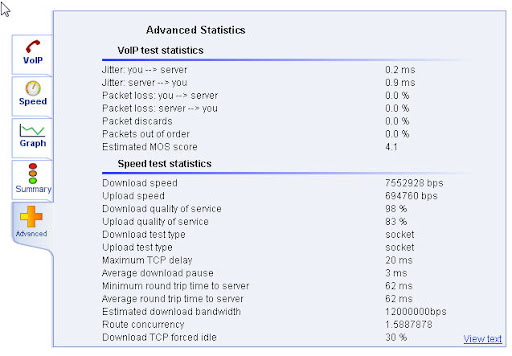
NT Duo x2 Nov 2010
MJ Aug 2007-09 waited for it to work with linux
how to convert a chest freezer to a fridge
newtoncd
Dan isn't smart enough to hire me
Posts: 216
Joined: Fri Jan 09, 2009 12:52 am

Post by newtoncd »

johnlvs2run wrote:
gashliquor wrote:There was nothing wrong with those results, Use the link i gave u let me see those results
They won't let me copy the results.

I can see them but there's no link to post them to here.

See, here are my results, but they don't show up, it just goes back to the start.

What was the QoS number, both upload/download from the advanced tab, when you ran the test?

Image
-Curt
--magicJack user since Oct 08 w/magicFeatures
--D-Link DIR-655
-NetTalk DUO since Dec 10
johnlvs2run
MagicJack Contributor
Posts: 61
Joined: Wed May 07, 2008 10:41 pm
Location: western u.s.

Post by johnlvs2run »

newtoncd wrote:What was the QoS number, both upload/download from the advanced tab, when you ran the test?
The test was 10 times slower than this just now, due to an always slow website that was open.
I closed the website and ran the test again for the result below, but did not notice a QoS number.

Image
NT Duo x2 Nov 2010
MJ Aug 2007-09 waited for it to work with linux
how to convert a chest freezer to a fridge
newtoncd
Dan isn't smart enough to hire me
Posts: 216
Joined: Fri Jan 09, 2009 12:52 am

Post by newtoncd »

About the only question I can think to ask is, do you have QoS enabled in your router and what kind of router do you have?
-Curt
--magicJack user since Oct 08 w/magicFeatures
--D-Link DIR-655
-NetTalk DUO since Dec 10
johnlvs2run
MagicJack Contributor
Posts: 61
Joined: Wed May 07, 2008 10:41 pm
Location: western u.s.

Post by johnlvs2run »

newtoncd wrote:About the only question I can think to ask is, do you have QoS enabled in your router and what kind of router do you have?
I don't know.

Westell Versalink Model 327W modem/router
NT Duo x2 Nov 2010
MJ Aug 2007-09 waited for it to work with linux
how to convert a chest freezer to a fridge
gashliquor
Dan isn't smart enough to hire me
Posts: 447
Joined: Sat Apr 26, 2008 1:03 pm

Post by gashliquor »

johnlvs2run wrote:
newtoncd wrote:About the only question I can think to ask is, do you have QoS enabled in your router and what kind of router do you have?
I don't know.

Westell Versalink Model 327W modem/router


In order to copy your results it's easy!, Just simply have your results on the screen and press ALT & PRINT SCREEN KEY, Then open up PAINT and paste the caputre in there and save as a JPG etc and upload it to like photobucket etc
MJ 4th Gen
MagicFeatures
NetTalk Duo ( I got it cheap, Thank You NT )
Ooma Telo ( Premium Service )
VoIP MY Way ( Custom Acct + INTL )
Linksys PAP2T ATA ( UnLocked )
Linksys WRT-310N Router ( Personal Firmware )
Motorola Modem DOCSIS 3.0 SBG6580
johnlvs2run
MagicJack Contributor
Posts: 61
Joined: Wed May 07, 2008 10:41 pm
Location: western u.s.

Post by johnlvs2run »

gashliquor wrote:In order to copy your results it's easy!, Just simply have your results on the screen and press ALT & PRINT SCREEN KEY, Then open up PAINT and paste the caputre in there and save as a JPG etc and upload it to like photobucket etc
It would be easier to just post a link. :)

Doesn't QoS refer to quaity of service, which are the results that I posted?

If not, where would the QoS number be on that site?
NT Duo x2 Nov 2010
MJ Aug 2007-09 waited for it to work with linux
how to convert a chest freezer to a fridge
gashliquor
Dan isn't smart enough to hire me
Posts: 447
Joined: Sat Apr 26, 2008 1:03 pm

Post by gashliquor »

johnlvs2run wrote:
gashliquor wrote:In order to copy your results it's easy!, Just simply have your results on the screen and press ALT & PRINT SCREEN KEY, Then open up PAINT and paste the caputre in there and save as a JPG etc and upload it to like photobucket etc
It would be easier to just post a link. :)

Doesn't QoS refer to quaity of service, which are the results that I posted?

If not, where would the QoS number be on that site?


If you can't post a link thats how you do it, I don't see any QoS for your upstream but IMO if your QoS is less then 85% for upstream i would not want it, I think i seen yours at 83%, Im so busy today im jumping in and out of here, Now its time for lunch and taking one of the Harleys for a ride.
MJ 4th Gen
MagicFeatures
NetTalk Duo ( I got it cheap, Thank You NT )
Ooma Telo ( Premium Service )
VoIP MY Way ( Custom Acct + INTL )
Linksys PAP2T ATA ( UnLocked )
Linksys WRT-310N Router ( Personal Firmware )
Motorola Modem DOCSIS 3.0 SBG6580
johnlvs2run
MagicJack Contributor
Posts: 61
Joined: Wed May 07, 2008 10:41 pm
Location: western u.s.

Post by johnlvs2run »

gashliquor wrote:If you can't post a link thats how you do it, I don't see any QoS for your upstream but IMO if your QoS is less then 85% for upstream i would not want it
Okay I see it now. I posted this at 8:03pm last night.
Download/Upload quality of service = 99 percent. I am plenty happy with that.

Image
NT Duo x2 Nov 2010
MJ Aug 2007-09 waited for it to work with linux
how to convert a chest freezer to a fridge
gashliquor
Dan isn't smart enough to hire me
Posts: 447
Joined: Sat Apr 26, 2008 1:03 pm

Post by gashliquor »

johnlvs2run wrote:
gashliquor wrote:If you can't post a link thats how you do it, I don't see any QoS for your upstream but IMO if your QoS is less then 85% for upstream i would not want it
Okay I see it now. I posted this at 8:03pm last night.
Download/Upload quality of service = 99 percent. I am plenty happy with that.

Image


Yep nothing wrong with that, But it don't stay that way
MJ 4th Gen
MagicFeatures
NetTalk Duo ( I got it cheap, Thank You NT )
Ooma Telo ( Premium Service )
VoIP MY Way ( Custom Acct + INTL )
Linksys PAP2T ATA ( UnLocked )
Linksys WRT-310N Router ( Personal Firmware )
Motorola Modem DOCSIS 3.0 SBG6580
johnlvs2run
MagicJack Contributor
Posts: 61
Joined: Wed May 07, 2008 10:41 pm
Location: western u.s.

Post by johnlvs2run »

gashliquor wrote:Yep nothing wrong with that, But it don't stay that way
What's your point.
NT Duo x2 Nov 2010
MJ Aug 2007-09 waited for it to work with linux
how to convert a chest freezer to a fridge
gashliquor
Dan isn't smart enough to hire me
Posts: 447
Joined: Sat Apr 26, 2008 1:03 pm

Post by gashliquor »

johnlvs2run wrote:
gashliquor wrote:Yep nothing wrong with that, But it don't stay that way
What's your point.


If you don't know by now im not going to tell you a 2nd time, Use search or better yet login to netTalks forum or call there CS and wait on hold forever
MJ 4th Gen
MagicFeatures
NetTalk Duo ( I got it cheap, Thank You NT )
Ooma Telo ( Premium Service )
VoIP MY Way ( Custom Acct + INTL )
Linksys PAP2T ATA ( UnLocked )
Linksys WRT-310N Router ( Personal Firmware )
Motorola Modem DOCSIS 3.0 SBG6580
gashliquor
Dan isn't smart enough to hire me
Posts: 447
Joined: Sat Apr 26, 2008 1:03 pm

Post by gashliquor »

oldtimercurt wrote:gash liquor

Had to modify my setup.

My brother-in-law, down closer to you, was trying to set the XYL up with Skype Video. She's using a notebook wirelessly off my network. After messing around for a while finally got the connection to work. However, quality was not good: stutter, freeze and dropouts. Came into the office and noticed that Hawking wasn't showing blue light So I went in to my router D-link 615 and turned on the QOS. For the next thirty minutes not a hiccup from Skype. Even though not seeing blue light from Hawking. Checked NT Duo and got normal Hawking blue flash then steady blue when called party picked up. Looks like the router QOS only applies to the wireless. I guess the Hawking blue light wasn't on for Skye because of Skype's proprietary protocol, correct?


Thought this might be interesting to anyone that runs into similar problem.
OTC


That depends on your router ( Remember i ONLY use Linksys), The answer to your question is rather simple. The HBB1 will ONLY work and boost WIRED connections. It does NOT do a thing for ANYTHING wireless. As far as your routers QoS goes if it's WMM QoS that is the wireless section for Quality Of Service. So if the XYL was using a laptop and trying to see a Skype Video and the performance was'nt good until you went into the routers setup i assume you changed the " WMM QoS " which is for wireless connections and would help however the HBB1 would do nothing for it and the reason for that is it was a wireless connection which the HBB1 was'nt designed to improve so that why the HBB1 is green instead of blue for BOOSTING when you are wireless. On a Off note i had a HBB1 almost 2 yrs and purchased another a few days B4 u, Yesterday a friend called me and after 2 days of using it he just rebooted his puter and the damn thing went up in smoke and burned out. They have a 2 yr warranty on them anyway. Hawkins does'nt make them no more but they do refurbish them and there only sold by 3rd party vendors if you find them :wink:
MJ 4th Gen
MagicFeatures
NetTalk Duo ( I got it cheap, Thank You NT )
Ooma Telo ( Premium Service )
VoIP MY Way ( Custom Acct + INTL )
Linksys PAP2T ATA ( UnLocked )
Linksys WRT-310N Router ( Personal Firmware )
Motorola Modem DOCSIS 3.0 SBG6580
gashliquor
Dan isn't smart enough to hire me
Posts: 447
Joined: Sat Apr 26, 2008 1:03 pm

Post by gashliquor »

@ Nugrl, Try this. Go into your routers setup and give medium priority to YOUR netTalks MAC address, The MAC address can be found on the sticker on the back of the netTalk Duo. Once you done that unplug the router for 15 secs and plug it back in. IF the netTalk Duo does'nt give you a ring back unplug it from the wall outlet for 30 secs and plug it back in and you should hear a ring back. Then give it a try. Do you want to improve your PING well your on your OWN here is some info 4u, And also i find your brand router does'nt really love netTalk, Next time think Linksys and even the $50.00 E1000 or more $ E2000 will do the job 4u but again those children can be causing u problems as i said b4 to you that u can't take 5 gallons of gas from a one gallon can. If u could i'd be doing it, Last of all make sure jitter is your friend!, The lower the jitter the better but sometimes it has nothing to do with u it's the ppl u pay ( ISP) :wink:

http://hubpages.com/hub/Reduce-Ping-on- ... -Windows-7
Last edited by gashliquor on Tue Nov 23, 2010 1:34 pm, edited 1 time in total.
MJ 4th Gen
MagicFeatures
NetTalk Duo ( I got it cheap, Thank You NT )
Ooma Telo ( Premium Service )
VoIP MY Way ( Custom Acct + INTL )
Linksys PAP2T ATA ( UnLocked )
Linksys WRT-310N Router ( Personal Firmware )
Motorola Modem DOCSIS 3.0 SBG6580
oldtimercurt
Dan isn't smart enough to hire me
Posts: 281
Joined: Sat Feb 07, 2009 11:45 am
Location: Pensacola

Post by oldtimercurt »

gashliquor

Once the router receives the wireless data doesn't that data become part of the bitstream that goes from the router to the HBB1. And don't the packets retain the header info which, I assume, would identify the packets as Skype/VOIP. I'll admit that I'm very much a novice at this but I want to understand.

Thanks

OTC
gashliquor
Dan isn't smart enough to hire me
Posts: 447
Joined: Sat Apr 26, 2008 1:03 pm

Post by gashliquor »

oldtimercurt wrote:gashliquor

Once the router receives the wireless data doesn't that data become part of the bitstream that goes from the router to the HBB1. And don't the packets retain the header info which, I assume, would identify the packets as Skype/VOIP. I'll admit that I'm very much a novice at this but I want to understand.

Thanks

OTC


The wireless data from your router is not LAN based, The wireless signal is because you'll understand it as actually a wireless " Transceiver ". The HBB1 only helps wired connections thru LAN ports it will not help or increase anything transmitted or received wireless. Thats why there is WMM and regular QoS settings as they are independant of each other. It is true that the total wired and wireless computers consume a total in bandwidth but the HBB1 is actually blind to the wireless, However when the HBB1 is introduced to the Router thru the Internet/WAN connection one might think what goes in stronger etc comes out stronger but wireless does'nt work the same as wired and actually wireless because aka WIFI is limited when the wired is not ( In Speed ), The speed there is actually a limit for even wired that why you have a 10/100 Nic card for wired and there is a wireless card for wifi. The RF output of wifi in most computers is around 50MW if THAT. I tested with wifi for free internet access using 10 watts and a external Panel beam. Yes i got 50 unsecured internet connections for nothing BUT it was no good to me because wireless is limited in speed. To get into it a little more with this 802.11g vs 802.11n the difference really is that the g signal will travel alot further then N but the N signal is faster. Even today there is more g routers in service then n, Even here i have a N router but my wireless laptops i only allow to connect at b because of more distance. Thats almost 100% the story OTC
MJ 4th Gen
MagicFeatures
NetTalk Duo ( I got it cheap, Thank You NT )
Ooma Telo ( Premium Service )
VoIP MY Way ( Custom Acct + INTL )
Linksys PAP2T ATA ( UnLocked )
Linksys WRT-310N Router ( Personal Firmware )
Motorola Modem DOCSIS 3.0 SBG6580
oldtimercurt
Dan isn't smart enough to hire me
Posts: 281
Joined: Sat Feb 07, 2009 11:45 am
Location: Pensacola

Post by oldtimercurt »

Gashliquor,
Thanks for that info.

I just picked up Ooma Telo at Best Buy for 179.99. Pretty good sale. Haven't hooked it up yet but hope I'm as thrilled with it as you seem to be. :D

OTC
gashliquor
Dan isn't smart enough to hire me
Posts: 447
Joined: Sat Apr 26, 2008 1:03 pm

Post by gashliquor »

oldtimercurt wrote:Gashliquor,
Thanks for that info.

I just picked up Ooma Telo at Best Buy for 179.99. Pretty good sale. Haven't hooked it up yet but hope I'm as thrilled with it as you seem to be. :D

OTC


Get the matching Telo Handset, You want to hear audio. Thats audio and it HD audio to another Ooma Telo. The Older Ooma's can't use the HD handset
MJ 4th Gen
MagicFeatures
NetTalk Duo ( I got it cheap, Thank You NT )
Ooma Telo ( Premium Service )
VoIP MY Way ( Custom Acct + INTL )
Linksys PAP2T ATA ( UnLocked )
Linksys WRT-310N Router ( Personal Firmware )
Motorola Modem DOCSIS 3.0 SBG6580
Nugrl
Dan isn't smart enough to hire me
Posts: 354
Joined: Tue Dec 01, 2009 4:04 pm

Post by Nugrl »

I'm back..... hey, I don't know if anyone here has ever heard of a thing called namebench, but a friend told me about it last night and I ran it and its pretty neat. It helps you find the fastest DNS server that you can connect to. here is the link to it, if you care to read about it and dld it.
http://www.howtogeek.com/howto/16372/fi ... namebench/
bummer for me though, because it said that I am already on the fastest server, so no increase in speed for me..... :( and imagine that, I still have problems here....
Nugrl
Dan isn't smart enough to hire me
Posts: 354
Joined: Tue Dec 01, 2009 4:04 pm

Post by Nugrl »

gashliquor wrote:@ Nugrl, Try this. Go into your routers setup and give medium priority to YOUR netTalks MAC address, The MAC address can be found on the sticker on the back of the netTalk Duo. Once you done that unplug the router for 15 secs and plug it back in. IF the netTalk Duo does'nt give you a ring back unplug it from the wall outlet for 30 secs and plug it back in and you should hear a ring back. Then give it a try. Do you want to improve your PING well your on your OWN here is some info 4u, And also i find your brand router does'nt really love netTalk, Next time think Linksys and even the $50.00 E1000 or more $ E2000 will do the job 4u but again those children can be causing u problems as i said b4 to you that u can't take 5 gallons of gas from a one gallon can. If u could i'd be doing it, Last of all make sure jitter is your friend!, The lower the jitter the better but sometimes it has nothing to do with u it's the ppl u pay ( ISP) :wink:

http://hubpages.com/hub/Reduce-Ping-on- ... -Windows-7
ok, I'm lost, where in the router settings do I find this? I found one that said MAC Address Cloning under Internet WAN and another that says Wireless > MAC Address Control, so what am I looking for in there?
Just take a deep breathe, count to 10 and explain it to me.... :roll:

update: just got my HBB1 in the mail. I am getting ready to hook it up so I will post back my results.
Last edited by Nugrl on Wed Nov 24, 2010 11:03 am, edited 1 time in total.
gashliquor
Dan isn't smart enough to hire me
Posts: 447
Joined: Sat Apr 26, 2008 1:03 pm

Post by gashliquor »

Nugrl wrote:
gashliquor wrote:@ Nugrl, Try this. Go into your routers setup and give medium priority to YOUR netTalks MAC address, The MAC address can be found on the sticker on the back of the netTalk Duo. Once you done that unplug the router for 15 secs and plug it back in. IF the netTalk Duo does'nt give you a ring back unplug it from the wall outlet for 30 secs and plug it back in and you should hear a ring back. Then give it a try. Do you want to improve your PING well your on your OWN here is some info 4u, And also i find your brand router does'nt really love netTalk, Next time think Linksys and even the $50.00 E1000 or more $ E2000 will do the job 4u but again those children can be causing u problems as i said b4 to you that u can't take 5 gallons of gas from a one gallon can. If u could i'd be doing it, Last of all make sure jitter is your friend!, The lower the jitter the better but sometimes it has nothing to do with u it's the ppl u pay ( ISP) :wink:

http://hubpages.com/hub/Reduce-Ping-on- ... -Windows-7
ok, I'm lost, where in the router settings do I find this? I found one that said MAC Address Cloning under Internet WAN and another that says Wireless > MAC Address Control, so what am I looking for in there?
Just take a deep breathe, count to 10 and explain it to me.... :roll:


Your router may not be able to do it as it's that Belkin, I don't use that brand. However if you have Applications in your QoS settings usually there is a drop down arrow and you'll see MAC ADDRESS in there and if there is then put the MAC address on the backof the NT in there, If not i don't know but replace the router. Again NT and Belkin routers don't really click together well. Think Linksys in the future..
MJ 4th Gen
MagicFeatures
NetTalk Duo ( I got it cheap, Thank You NT )
Ooma Telo ( Premium Service )
VoIP MY Way ( Custom Acct + INTL )
Linksys PAP2T ATA ( UnLocked )
Linksys WRT-310N Router ( Personal Firmware )
Motorola Modem DOCSIS 3.0 SBG6580
Nugrl
Dan isn't smart enough to hire me
Posts: 354
Joined: Tue Dec 01, 2009 4:04 pm

Post by Nugrl »

gashliquor wrote:
Nugrl wrote:
gashliquor wrote:@ Nugrl, Try this. Go into your routers setup and give medium priority to YOUR netTalks MAC address, The MAC address can be found on the sticker on the back of the netTalk Duo. Once you done that unplug the router for 15 secs and plug it back in. IF the netTalk Duo does'nt give you a ring back unplug it from the wall outlet for 30 secs and plug it back in and you should hear a ring back. Then give it a try. Do you want to improve your PING well your on your OWN here is some info 4u, And also i find your brand router does'nt really love netTalk, Next time think Linksys and even the $50.00 E1000 or more $ E2000 will do the job 4u but again those children can be causing u problems as i said b4 to you that u can't take 5 gallons of gas from a one gallon can. If u could i'd be doing it, Last of all make sure jitter is your friend!, The lower the jitter the better but sometimes it has nothing to do with u it's the ppl u pay ( ISP) :wink:

http://hubpages.com/hub/Reduce-Ping-on- ... -Windows-7
ok, I'm lost, where in the router settings do I find this? I found one that said MAC Address Cloning under Internet WAN and another that says Wireless > MAC Address Control, so what am I looking for in there?
Just take a deep breathe, count to 10 and explain it to me.... :roll:


Your router may not be able to do it as it's that Belkin, I don't use that brand. However if you have Applications in your QoS settings usually there is a drop down arrow and you'll see MAC ADDRESS in there and if there is then put the MAC address on the backof the NT in there, If not i don't know but replace the router. Again NT and Belkin routers don't really click together well. Think Linksys in the future..
I know, I know, but I can't afford a new router right now. So I have to make do, and the HBB1 just came so I am going to hook it inline and see what happens. I will post back once I get the internet back up and running. wish me luck! :wink:
The only QoS that I have seen there is the WMM QoS so I am still not sure where to enter this MAC address for the NT in there???
gashliquor
Dan isn't smart enough to hire me
Posts: 447
Joined: Sat Apr 26, 2008 1:03 pm

Post by gashliquor »

Nugrl wrote:
gashliquor wrote:
Nugrl wrote: ok, I'm lost, where in the router settings do I find this? I found one that said MAC Address Cloning under Internet WAN and another that says Wireless > MAC Address Control, so what am I looking for in there?
Just take a deep breathe, count to 10 and explain it to me.... :roll:


Your router may not be able to do it as it's that Belkin, I don't use that brand. However if you have Applications in your QoS settings usually there is a drop down arrow and you'll see MAC ADDRESS in there and if there is then put the MAC address on the backof the NT in there, If not i don't know but replace the router. Again NT and Belkin routers don't really click together well. Think Linksys in the future..
I know, I know, but I can't afford a new router right now. So I have to make do, and the HBB1 just came so I am going to hook it inline and see what happens. I will post back once I get the internet back up and running. wish me luck! :wink:
The only QoS that I have seen there is the WMM QoS so I am still not sure where to enter this MAC address for the NT in there???


Don't worry about the QoS with the HBB1 now, Im off for a M.C. ride with the club and off to buy a new Motorola 6120 Surf Board modem and retire this older surf board Modem.
MJ 4th Gen
MagicFeatures
NetTalk Duo ( I got it cheap, Thank You NT )
Ooma Telo ( Premium Service )
VoIP MY Way ( Custom Acct + INTL )
Linksys PAP2T ATA ( UnLocked )
Linksys WRT-310N Router ( Personal Firmware )
Motorola Modem DOCSIS 3.0 SBG6580
Nugrl
Dan isn't smart enough to hire me
Posts: 354
Joined: Tue Dec 01, 2009 4:04 pm

Post by Nugrl »

gashliquor wrote:
Nugrl wrote:
gashliquor wrote:


Your router may not be able to do it as it's that Belkin, I don't use that brand. However if you have Applications in your QoS settings usually there is a drop down arrow and you'll see MAC ADDRESS in there and if there is then put the MAC address on the backof the NT in there, If not i don't know but replace the router. Again NT and Belkin routers don't really click together well. Think Linksys in the future..
I know, I know, but I can't afford a new router right now. So I have to make do, and the HBB1 just came so I am going to hook it inline and see what happens. I will post back once I get the internet back up and running. wish me luck! :wink:
The only QoS that I have seen there is the WMM QoS so I am still not sure where to enter this MAC address for the NT in there???


Don't worry about the QoS with the HBB1 now, Im off for a M.C. ride with the club and off to buy a new Motorola 6120 Surf Board modem and retire this older surf board Modem.
so what are you saying? don't go in there any change any settings in the router now? I have the HBB1 hooked up and the installation was very simple! I just hope all it working with it to the best of its ability. I see there are things in there (HBB1) settings you can change. How about firmware? I know they don't make these anymore, but how do we know if we have the most recent release? I think it said it was Version 1.1.0 is that the newest one out there? As far as testing phone calls, I have made and received about 4 so far and yes, the NT does seem to be better, but I was not on that call for very long to really test it. There were no clicks and the call did not appear to be breaking up or cutting out. So that's great as far as I am concerned! I do hear a little what I would call hissing in the phone, but that very well could be the Panasonic Dect 6.0 KX-TGA101S that I am using, but as I said before it seems to be the best fit with the NT Duo out of all the phones I have here right now. I did also make and receive a couple of calls on the MJ and I really could not tell if it improved it or not. Once again, I was not on either of those phone calls for very long. I will test both the NT and the MJ out better later, and report back my findings. I see the little blue light is solid right now on the HBB1 and I am not even on the phone, but my son is on warcraft, so I assume it is because of him, and does that mean its doing its job? God I hope so!!!!

here are some results from speedtest.net and pingtest.net. I think this is the lowest my ping and jitter have ever been! is it because of the HBB1? Also, how many of these lights should be flashing blue and then staying solid blue? I have one solid green, two flashing green, and 1 that alternates between flashing green, then flashing blue to solid blue. Is that the way is should be to know its functioning properly?

Image

Image

does this have to be done on every computer here? http://hubpages.com/hub/Reduce-Ping-on- ... -Windows-7

Ok, you answered my question about the firmware version in this thread. http://www.phoneservicesupport.com/to-t ... 10179.html
gashliquor
Dan isn't smart enough to hire me
Posts: 447
Joined: Sat Apr 26, 2008 1:03 pm

Post by gashliquor »

gashliquor wrote:
Nugrl wrote:
gashliquor wrote:


Your router may not be able to do it as it's that Belkin, I don't use that brand. However if you have Applications in your QoS settings usually there is a drop down arrow and you'll see MAC ADDRESS in there and if there is then put the MAC address on the backof the NT in there, If not i don't know but replace the router. Again NT and Belkin routers don't really click together well. Think Linksys in the future..
I know, I know, but I can't afford a new router right now. So I have to make do, and the HBB1 just came so I am going to hook it inline and see what happens. I will post back once I get the internet back up and running. wish me luck! :wink:
The only QoS that I have seen there is the WMM QoS so I am still not sure where to enter this MAC address for the NT in there???


Don't worry about the QoS with the HBB1 now, Im off for a M.C. ride with the club and off to buy a new Motorola 6120 Surf Board modem and retire this older surf board Modem.


I did'nt read your entire message i jumped on for a sec online, The firmware you have is no good. I uploaded it here on the forum there is a link if u can't find the link i'll repost it, FUK it here is the firmware link and YOU CAN NOT upgrade it IF YOUR BS on the phone!. Going for another scooter ride 85 degrees and love it


http://www.mediafire.com/?gz1v3i01r8jprt3
MJ 4th Gen
MagicFeatures
NetTalk Duo ( I got it cheap, Thank You NT )
Ooma Telo ( Premium Service )
VoIP MY Way ( Custom Acct + INTL )
Linksys PAP2T ATA ( UnLocked )
Linksys WRT-310N Router ( Personal Firmware )
Motorola Modem DOCSIS 3.0 SBG6580
gashliquor
Dan isn't smart enough to hire me
Posts: 447
Joined: Sat Apr 26, 2008 1:03 pm

Post by gashliquor »

Nugrl wrote:
gashliquor wrote:
Nugrl wrote: I know, I know, but I can't afford a new router right now. So I have to make do, and the HBB1 just came so I am going to hook it inline and see what happens. I will post back once I get the internet back up and running. wish me luck! :wink:
The only QoS that I have seen there is the WMM QoS so I am still not sure where to enter this MAC address for the NT in there???


Don't worry about the QoS with the HBB1 now, Im off for a M.C. ride with the club and off to buy a new Motorola 6120 Surf Board modem and retire this older surf board Modem.
so what are you saying? don't go in there any change any settings in the router now? I have the HBB1 hooked up and the installation was very simple! I just hope all it working with it to the best of its ability. I see there are things in there (HBB1) settings you can change. How about firmware? I know they don't make these anymore, but how do we know if we have the most recent release? I think it said it was Version 1.1.0 is that the newest one out there? As far as testing phone calls, I have made and received about 4 so far and yes, the NT does seem to be better, but I was not on that call for very long to really test it. There were no clicks and the call did not appear to be breaking up or cutting out. So that's great as far as I am concerned! I do hear a little what I would call hissing in the phone, but that very well could be the Panasonic Dect 6.0 KX-TGA101S that I am using, but as I said before it seems to be the best fit with the NT Duo out of all the phones I have here right now. I did also make and receive a couple of calls on the MJ and I really could not tell if it improved it or not. Once again, I was not on either of those phone calls for very long. I will test both the NT and the MJ out better later, and report back my findings. I see the little blue light is solid right now on the HBB1 and I am not even on the phone, but my son is on warcraft, so I assume it is because of him, and does that mean its doing its job? God I hope so!!!!

here are some results from speedtest.net and pingtest.net. I think this is the lowest my ping and jitter have ever been! is it because of the HBB1? Also, how many of these lights should be flashing blue and then staying solid blue? I have one solid green, two flashing green, and 1 that alternates between flashing green, then flashing blue to solid blue. Is that the way is should be to know its functioning properly?

Image

Image

does this have to be done on every computer here? http://hubpages.com/hub/Reduce-Ping-on- ... -Windows-7

Ok, you answered my question about the firmware version in this thread. http://www.phoneservicesupport.com/to-t ... 10179.html


The dowload speed your posting is bogus, And i know why...Shut the kaspersky OFF and take the readings again
MJ 4th Gen
MagicFeatures
NetTalk Duo ( I got it cheap, Thank You NT )
Ooma Telo ( Premium Service )
VoIP MY Way ( Custom Acct + INTL )
Linksys PAP2T ATA ( UnLocked )
Linksys WRT-310N Router ( Personal Firmware )
Motorola Modem DOCSIS 3.0 SBG6580
Nugrl
Dan isn't smart enough to hire me
Posts: 354
Joined: Tue Dec 01, 2009 4:04 pm

Post by Nugrl »

here are some of my newest tests with Kaspersky off.
Image

Image

and that is with two kids on warcraft. overall I would have to say things are better with the HBB1.
gashliquor
Dan isn't smart enough to hire me
Posts: 447
Joined: Sat Apr 26, 2008 1:03 pm

Post by gashliquor »

Nugrl wrote:here are some of my newest tests with Kaspersky off.
Image

Image

and that is with two kids on warcraft. overall I would have to say things are better with the HBB1.


These results are real i see here, You have more then ENOUGH of upload for VoIP...Want advice?... ALWAYS turn OFF Kaspersky B4 doing tests or else Kaspersky will make bogus tests but usually in the download reading, Next get rid of the kids and buy a Linksys router and last of all in PLAIN english the Ooma Telo puts the MJ and the netTalk Duo to shame that they both are like toys in quality and audio :wink:
MJ 4th Gen
MagicFeatures
NetTalk Duo ( I got it cheap, Thank You NT )
Ooma Telo ( Premium Service )
VoIP MY Way ( Custom Acct + INTL )
Linksys PAP2T ATA ( UnLocked )
Linksys WRT-310N Router ( Personal Firmware )
Motorola Modem DOCSIS 3.0 SBG6580
gashliquor
Dan isn't smart enough to hire me
Posts: 447
Joined: Sat Apr 26, 2008 1:03 pm

Post by gashliquor »

Nugrl wrote:here are some of my newest tests with Kaspersky off.
Image

Image

and that is with two kids on warcraft. overall I would have to say things are better with the HBB1.


BTW this is in the wrong forum but!....In 8 days your in this forum for a yr, Congrats on your troubles and wish u a better yr to come :lol:
MJ 4th Gen
MagicFeatures
NetTalk Duo ( I got it cheap, Thank You NT )
Ooma Telo ( Premium Service )
VoIP MY Way ( Custom Acct + INTL )
Linksys PAP2T ATA ( UnLocked )
Linksys WRT-310N Router ( Personal Firmware )
Motorola Modem DOCSIS 3.0 SBG6580
Nugrl
Dan isn't smart enough to hire me
Posts: 354
Joined: Tue Dec 01, 2009 4:04 pm

Post by Nugrl »

gashliquor wrote:
Nugrl wrote:here are some of my newest tests with Kaspersky off.
Image

Image

and that is with two kids on warcraft. overall I would have to say things are better with the HBB1.


BTW this is in the wrong forum but!....In 8 days your in this forum for a yr, Congrats on your troubles and wish u a better yr to come :lol:
where does this need to be if this is the wrong forum? Hey I guess I didnt' notice that. Time is just a flyin by, I guess I lost track of it..... :( and thank you, I sure as hell hope I have a better year to come!!!!! :wink:
Nugrl
Dan isn't smart enough to hire me
Posts: 354
Joined: Tue Dec 01, 2009 4:04 pm

Post by Nugrl »

gashliquor wrote:
Nugrl wrote:here are some of my newest tests with Kaspersky off.
Image

Image

and that is with two kids on warcraft. overall I would have to say things are better with the HBB1.


These results are real i see here, You have more then ENOUGH of upload for VoIP...Want advice?... ALWAYS turn OFF Kaspersky B4 doing tests or else Kaspersky will make bogus tests but usually in the download reading, Next get rid of the kids and buy a Linksys router and last of all in PLAIN english the Ooma Telo puts the MJ and the netTalk Duo to shame that they both are like toys in quality and audio :wink:
well I can't afford the Ooma, so MJ and NT it is for now..... I have to try and make the best of it, and god knows I am!!!! :shock:
gashliquor
Dan isn't smart enough to hire me
Posts: 447
Joined: Sat Apr 26, 2008 1:03 pm

Post by gashliquor »

Nugrl wrote:
gashliquor wrote:
Nugrl wrote:here are some of my newest tests with Kaspersky off.
Image

Image

and that is with two kids on warcraft. overall I would have to say things are better with the HBB1.


BTW this is in the wrong forum but!....In 8 days your in this forum for a yr, Congrats on your troubles and wish u a better yr to come :lol:
where does this need to be if this is the wrong forum? Hey I guess I didnt' notice that. Time is just a flyin by, I guess I lost track of it..... :( and thank you, I sure as hell hope I have a better year to come!!!!! :wink:


I was talking about my post to u on congrats on a yr was in wrong forum.....Meaning in here :!:
MJ 4th Gen
MagicFeatures
NetTalk Duo ( I got it cheap, Thank You NT )
Ooma Telo ( Premium Service )
VoIP MY Way ( Custom Acct + INTL )
Linksys PAP2T ATA ( UnLocked )
Linksys WRT-310N Router ( Personal Firmware )
Motorola Modem DOCSIS 3.0 SBG6580
Nugrl
Dan isn't smart enough to hire me
Posts: 354
Joined: Tue Dec 01, 2009 4:04 pm

Post by Nugrl »

gashliquor wrote:
Nugrl wrote:
gashliquor wrote:

BTW this is in the wrong forum but!....In 8 days your in this forum for a yr, Congrats on your troubles and wish u a better yr to come :lol:
where does this need to be if this is the wrong forum? Hey I guess I didnt' notice that. Time is just a flyin by, I guess I lost track of it..... :( and thank you, I sure as hell hope I have a better year to come!!!!! :wink:


I was talking about my post to u on congrats on a yr was in wrong forum.....Meaning in here :!:
oh...ok, gotcha :wink:
Post Reply