I now realize that there is another telephony device on the market that is said to outweigh the MJ. i just want a pc phone that will not drop my call then pop up and say that my device is unplugged when in fact it is not. No one here seems to have a solution that works for me. One solution that i can not accomplish is to uninstall and reinstall mj but even the 'mjremover' will not 'completely' get rid of it....i am always left with a folder full of reg. entries that i cannot even manually remove. Now if someone would tell me how to gain permission in windows7 64bit so i can remove a ymax reg. folder so i can accomplish a complete uninstall and then to see if a reinstallation may fix it, i am switching to net duo.
kevin
No solution; may switch to Net Duo:(
Moderators: Bill Smith, Pilot
-
SteveHC
- Dan isn't smart enough to hire me
- Posts: 498
- Joined: Mon Dec 26, 2011 2:10 am
- Location: Southwest Florida
The NetTalk Duo is *not* more reliable than the MJ or MJ+. If you scour the Internet you'll find that there are even more complaints about the Duo than there are about the MJ+ (especially regarding call & voice quality, beeping during calls, etc.). The only consumer/home VOIP solution that's both very cheap and *consistently* reliable - and with excellent customer support as well, btw - is OOMA, no other device/service combo even comes close.
If you're using the original MJ device, I strongly recommend that you up grade to the MJ+ and set it up for use as a stand-alone device. Otherwise, I recommend switching to OOMA.
If you're using the original MJ device, I strongly recommend that you up grade to the MJ+ and set it up for use as a stand-alone device. Otherwise, I recommend switching to OOMA.

If you want to have something really cheap without hassle, get the GV Jack- the guy who developed it posts on this forum ( redpepper) . You can reuse your Magic Jack dongle for it and for $ 20.- one time fee you will be able to enjoy Google Voice for free.
Forget MJ, Nettalk, Ooma. or any other proprietary stuff.
Get something like Cisco 186 or even cheaper and better Obi 202 and explore the possibilities of good, inexpensive VOIP.
Forget MJ, Nettalk, Ooma. or any other proprietary stuff.
Get something like Cisco 186 or even cheaper and better Obi 202 and explore the possibilities of good, inexpensive VOIP.
The problem with this set up is that your PC has to be up and running to make calls.cell14 wrote:If you want to have something really cheap without hassle, get the GV Jack- the guy who developed it posts on this forum ( redpepper) . You can reuse your Magic Jack dongle for it and for $ 20.- one time fee you will be able to enjoy Google Voice for free.
Forget MJ, Nettalk, Ooma. or any other proprietary stuff.
Get something like Cisco 186 or even cheaper and better Obi 202 and explore the possibilities of good, inexpensive VOIP.
-
black_icon

- Dan isn't smart enough to hire me
- Posts: 191
- Joined: Tue Sep 27, 2011 11:33 am
- Location: out of nowhere
- Contact:
Well, I've been using MJ for over 2 years now and still a happy camper with the service. I'll be sounding stupid if I'll deny that I sometimes experience issues and problem with the device but hey!, with the MJ's price, I won't be asking for more. It seems to be a real hassle switching to another VoIP. If we'll understand the deeper meaning of Telecommunication, we, ourselves can conclude what we're whining of. Basically, we have the so-called communication with our family, relatives and even other people through this medium in which technically speaking, it's connection between our system configuration and ISP. Issue of the device (mj) maybe caused by these media. Let's not put the blame to the MJ device itself only by let's consider the things it's using to why it's working. peace
Never UnderEstimate the Power of your Finger
Getting out of bed every morning is a hassle too, but like switching to another VOIP it sometimes has it's benefits. What you do- and what I did- was establish and test the new service long before saying good bye to MJ. There was simply no reason to stay with MJ any more.Well, I've been using MJ for over 2 years now and still a happy camper with the service. I'll be sounding stupid if I'll deny that I sometimes experience issues and problem with the device but hey!, with the MJ's price, I won't be asking for more. It seems to be a real hassle switching to another VoIP. If we'll understand the deeper meaning of Telecommunication, we, ourselves can conclude what we're whining of. Basically, we have the so-called communication with our family, relatives and even other people through this medium in which technically speaking, it's connection between our system configuration and ISP. Issue of the device (mj) maybe caused by these media. Let's not put the blame to the MJ device itself only by let's consider the things it's using to why it's working. peace
________
Any VOIP service is only as good as the broadband service your ISP provides. However, some VOIP providers are more vulnerable to ISP problems than others and lot of things which we may see as an ISP problem is actually a VOIP provider problem. Testing different services and devices at the same time for several months in two different countries was a real eye opener and MJ seriously failed the test.
As far as the price goes : My yearly costs for the set up which I have ( I posted it in recent days on one of the threads) is $ 54.-/year and I spent a total of $ 4.50 for sign up fees and $ 75.- for hardware. Comparing my set up with MJ would be like comparing a room at Embassy Suites with a card board box under I-95 overpass.
BTW there are costs of using any VOIP often underestimated by most VOIP users. It is especially the costs of electric consumption for all the devices running and If you live in a hot climate like I do the costs of air conditioning down all the additional heat created. Ad the costs of wear and tear on routers/gateways and VOIP devices and the costs of hassle/ down time of any problem with VOIP. There is often the" penny wise, dollar foolish" thing present.
-
SteveHC
- Dan isn't smart enough to hire me
- Posts: 498
- Joined: Mon Dec 26, 2011 2:10 am
- Location: Southwest Florida
- I too live in a VERY hot and humid climate, and I have to say that running the MJ+ as a stand-alone devices seemingly uses a pretty much undetectable amount of electricity and generates so little "heat" that it doesn't affect my air conditioning costs at all - literally (I run the MJ+ off of a UPS and have it connected to its AC power adapter via the little USB extension cord that came with it). And it runs pretty much flawlessly, at least for me. If this continues to be the case as its renewal date arrives I'll *definitely* go for a 5-year renewal (I did just that on my kid's MJ and MJ app number and have never regretted it whatsoever).cell14 wrote:Getting out of bed every morning is a hassle too, but like switching to another VOIP it sometimes has it's benefits. What you do- and what I did- was establish and test the new service long before saying good bye to MJ. There was simply no reason to stay with MJ any more.
Any VOIP service is only as good as the broadband service your ISP provides. However, some VOIP providers are more vulnerable to ISP problems than others and lot of things which we may see as an ISP problem is actually a VOIP provider problem. Testing different services and devices at the same time for several months in two different countries was a real eye opener and MJ seriously failed the test.
As far as the price goes : My yearly costs for the set up which I have ( I posted it in recent days on one of the threads) is $ 54.-/year and I spent a total of $ 4.50 for sign up fees and $ 75.- for hardware. Comparing my set up with MJ would be like comparing a room at Embassy Suites with a card board box under I-95 overpass.
BTW there are costs of using any VOIP often underestimated by most VOIP users. It is especially the costs of electric consumption for all the devices running and If you live in a hot climate like I do the costs of air conditioning down all the additional heat created. Ad the costs of wear and tear on routers/gateways and VOIP devices and the costs of hassle/ down time of any problem with VOIP. There is often the" penny wise, dollar foolish" thing present.
Unless your device is truly magic it will( and it's AC/DC adapter) get warm thus emit heat. Even if the consumption is 10WW you multiply 10x24x365x...... you get your dollars and cents. And all the heat has to be cooled don, even a dog on the room will increase your AC costs. My ATT U-verse internet gateway is s true space heater.- I too live in a VERY hot and humid climate, and I have to say that running the MJ+ as a stand-alone devices seemingly uses a pretty much undetectable amount of electricity and generates so little "heat" that it doesn't affect my air conditioning costs at all - literally (I run the MJ+ off of a UPS and have it connected to its AC power adapter via the little USB extension cord that came with it). And it runs pretty much flawlessly, at least for me. If this continues to be the case as its renewal date arrives I'll *definitely* go for a 5-year renewal (I did just that on my kid's MJ and MJ app number and have never regretted it whatsoever).
I am not saying that those costs are prohibitive what I am saying that everyone has to understand that they are real before they start worrying sbout spending a few $ /year for the one or other service.
It is your personal choice to sign up for five years but considered all kinds of known ( and discussed on this forum) things I would not recommend anyone to do that and it never came up in my mind during the years as MJ customer. BTW I would not sign up with any VOIP provider for 5 years.
You're talking about 2 cents a year.cell14 wrote:Unless your device is truly magic it will( and it's AC/DC adapter) get warm thus emit heat. Even if the consumption is 10WW you multiply 10x24x365x...... you get your dollars and cents. And all the heat has to be cooled don, even a dog on the room will increase your AC costs. My ATT U-verse internet gateway is s true space heater.- I too live in a VERY hot and humid climate, and I have to say that running the MJ+ as a stand-alone devices seemingly uses a pretty much undetectable amount of electricity and generates so little "heat" that it doesn't affect my air conditioning costs at all - literally (I run the MJ+ off of a UPS and have it connected to its AC power adapter via the little USB extension cord that came with it). And it runs pretty much flawlessly, at least for me. If this continues to be the case as its renewal date arrives I'll *definitely* go for a 5-year renewal (I did just that on my kid's MJ and MJ app number and have never regretted it whatsoever).
I am not saying that those costs are prohibitive what I am saying that everyone has to understand that they are real before they start worrying sbout spending a few $ /year for the one or other service.
It is your personal choice to sign up for five years but considered all kinds of known ( and discussed on this forum) things I would not recommend anyone to do that and it never came up in my mind during the years as MJ customer. BTW I would not sign up with any VOIP provider for 5 years.
What an idiot ... I certainly can do the math and you're talking pennies which was the point.cell14 wrote:Get a cheap watt meter from Home Depot, take a calculator and do the math, if you can.
Tell us how much 10WW (whatever that is) x 24 x 365 is ... LOL
Better yet, tell us how to calculate watts and once you have that figure how much does it cost a year and what is the AC load as a result of the wattage.
No one would have known you are an idiot if you had not said something Keep it secret next time.
You think HD sells watt meters????? LOL
If you think this is a big heat sink causing your AC to run then you better not fart ...


-
black_icon
- Dan isn't smart enough to hire me
- Posts: 191
- Joined: Tue Sep 27, 2011 11:33 am
- Location: out of nowhere
- Contact:
-
radzkillah
- MagicJack Expert
- Posts: 91
- Joined: Wed Feb 22, 2012 11:03 pm
- Location: Rhode Island
- Contact:
Actually I live in SOUTH KOREA and I'm using a built in mini Nuclear Reactor --rexlan wrote:What an idiot ... I certainly can do the math and you're talking pennies which was the point.cell14 wrote:Get a cheap watt meter from Home Depot, take a calculator and do the math, if you can.
Tell us how much 10WW (whatever that is) x 24 x 365 is ... LOL
Better yet, tell us how to calculate watts and once you have that figure how much does it cost a year and what is the AC load as a result of the wattage.
No one would have known you are an idiot if you had not said something Keep it secret next time.
You think HD sells watt meters????? LOL
If you think this is a big heat sink causing your AC to run then you better not fart ...
 )
)10000000010010100000110000000001101101
00001011011011000110000000001000000010
0000010100000000001000010000000000000110
"Tag Team DDoS -- NeoCrystal" 08
00001011011011000110000000001000000010
0000010100000000001000010000000000000110
"Tag Team DDoS -- NeoCrystal" 08
Yea ... right. Maybe you can get a Wi-Fi link from radzkillah's reactor then you can get a bigger AC unit .... pitiful.cell14 wrote:Actually I looked at one at HD last month but it would be a real waste to discuss with you.
I think the Duo or MJ power usage is below the margin or error for you HD instrument.
-
radzkillah
- MagicJack Expert
- Posts: 91
- Joined: Wed Feb 22, 2012 11:03 pm
- Location: Rhode Island
- Contact:
rexlan wrote:Yea ... right. Maybe you can get a Wi-Fi link from radzkillah's reactor then you can get a bigger AC unit .... pitiful.cell14 wrote:Actually I looked at one at HD last month but it would be a real waste to discuss with you.
I think the Duo or MJ power usage is below the margin or error for you HD instrument.
Excuse me, it's a Nuclear Reactor not a NETGEAR 
10000000010010100000110000000001101101
00001011011011000110000000001000000010
0000010100000000001000010000000000000110
"Tag Team DDoS -- NeoCrystal" 08
00001011011011000110000000001000000010
0000010100000000001000010000000000000110
"Tag Team DDoS -- NeoCrystal" 08
-
black_icon
- Dan isn't smart enough to hire me
- Posts: 191
- Joined: Tue Sep 27, 2011 11:33 am
- Location: out of nowhere
- Contact:
According to my cost-calibrated Kill-A-Watt EZ*, We're spending $13.73/year for router, UPS, two Pogoplugs, two hard drives and one magickJack plus. The mJ+ is probably the smallest energy cost of the lot.
I've reset the Kill-A-Watt EZ and will test the magicJack plus separately for a week and report back.
* I got this either at Lowes or Home Depot several years ago for $15 on sale. I should have bought two.
I've reset the Kill-A-Watt EZ and will test the magicJack plus separately for a week and report back.
* I got this either at Lowes or Home Depot several years ago for $15 on sale. I should have bought two.
MJCheck - http://mjcheck.low.li
It's been less than a week, but the Killawatt EZ seems to have stabilized at around $1.71 per year. That means I leave it running all day and night for a year and that's what I'll pay for its electrical cost alone. That ends up being about 3.29 cents per week, or about 0.47 cent per day (less than half a cent per day.) I hope this helps.greenman wrote:...I've reset the Kill-A-Watt EZ and will test the magicJack plus separately for a week and report back...
MJCheck - http://mjcheck.low.li
Actually, I did some recalculation. I reset the cost per KWH because the price had risen since I first added it to the Kill-a-Watt EZ. We also started this funky new 'tier' system. Now, with the new cost per KWH (about $0.069), I can safely say we spend about $2.41 per year just for the electricity that goes to the magicJack plus. That's just over half a cent per day, almost a nickel per week, about twenty cents per month.greenman wrote:... the Kill-A-Watt EZ ... ends up being about 3.29 cents per week, or about 0.47 cent per day (less than half a cent per day.) I hope this helps.
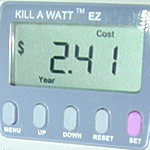
Last edited by greenman on Wed Jul 25, 2012 11:56 pm, edited 1 time in total.
MJCheck - http://mjcheck.low.li
-
Pilot

- Dan isn't smart enough to hire me
- Posts: 195
- Joined: Sun Jun 03, 2012 1:36 pm
- Location: West Coast
greenman wrote:Actually, I did some recalculation. I reset the cost per KWH because the price had risen since I first added it to the Kill-a-Watt EZ. We also started this funky new 'tier' system. Now, with the new cost per KWH (about $0.069), I can safely say we spend about $2.41 per year just for the electricity that goes to the magicJack plus. That's just over half a cent per day, almost a nickel per week, about twenty cents per month.greenman wrote:... the Kill-A-Watt EZ ... ends up being about 3.29 cents per week, or about 0.47 cent per day (less than half a cent per day.) I hope this helps.
OK, but, but, does that include any / all taxes?
Like the phone company, the air lines and the gas company, I thought I'd keep that out of the advertisement to make things easier for me and more confusing for others. If you want fries, you'll probably want ketchup. Mustard is extra.Pilot wrote:OK, but, but, does that include any / all taxes?


Incidentally, the word 'air lines' (no spaces) gets stripped out of my post. I'm guessing it's one of the spam triggers on this forum.
MJCheck - http://mjcheck.low.li
Actual watts?
Could you post the actual watts that the MJ+ consumes?
Also, how hot is your MJ+?
I tried to calculate it backwards from your costs and came up with 4 watts.
My MJ+ is running a surface temperature of 125 degrees F in a 75F room.
I am trying to figure out if that is normal.
If it is only consuming 4 watts, then I don't see how it can get that hot.
It is in the open air, not in the sun, etc.
I may need to buy my own watt meter, but thought I'd check to see if the info is already available.
Thanks
Also, how hot is your MJ+?
I tried to calculate it backwards from your costs and came up with 4 watts.
My MJ+ is running a surface temperature of 125 degrees F in a 75F room.
I am trying to figure out if that is normal.
If it is only consuming 4 watts, then I don't see how it can get that hot.
It is in the open air, not in the sun, etc.
I may need to buy my own watt meter, but thought I'd check to see if the info is already available.
Thanks
Thank you for that; i have glanced at that possibility but it seems really hard to figure out how it all fits together; have any clear instructions on a link you could let me have? thankscell14 wrote:If you want to have something really cheap without hassle, get the GV Jack- the guy who developed it posts on this forum ( redpepper) . You can reuse your Magic Jack dongle for it and for $ 20.- one time fee you will be able to enjoy Google Voice for free.
Forget MJ, Nettalk, Ooma. or any other proprietary stuff.
Get something like Cisco 186 or even cheaper and better Obi 202 and explore the possibilities of good, inexpensive VOIP.
- I too live in a VERY hot and humid climate, and I have to say that running the MJ+ as a stand-alone device[/quote]
I would love to try mine as a stand alone device...how? i use Cableone as my isp and the service is good here at 5mb; i just have one pc. sounds like i would need to split the cable between the mj and the pc and i didnt think you could do that.........?
I would love to try mine as a stand alone device...how? i use Cableone as my isp and the service is good here at 5mb; i just have one pc. sounds like i would need to split the cable between the mj and the pc and i didnt think you could do that.........?
update
Ok; thanks for all the great input. i had a mj tech on the live chat go in my pc remotely and for a day it worked fine; now the same problem which is that a screen pops up saying the device is unplugged....what are people doing about this issue? i've un/reinstalled, done upgrades, used the mj remover, usb scrub utility. whats a boy to do?
Pilot wrote:i had the same thing happen to me with my MJ plugged into desktop early this year, so i plugged it into my laptop and everything was ok. then i bought a MJ+ and plugged it into my desktop, set it up and everything was ok. now it's plugged into my modem/router working fine.
Thanks for that; i don't use a router but will plug straight into my pc; do you know if and what improvements were made to the device? improved circuitry? i thought the only diff was the ability to not need a pc to work?