Page 5 of 6
Posted: Sun Mar 28, 2010 12:31 pm
by dbean
JOFTAA wrote:I am going to go ahead and disable my anti virus software and run SIPdump 12 times from the time the MJ is inserted.
I'll report back.
Thanks.
Edit: More frustrated than before.
Here is the deal. Password Finder 2.2 is not working. PMdump is not working. I am unable to get my password.
There was ONE time yesterday that Password Finder 2.2 worked and gave me a password, but apparently I only wrote down 19 of the 20 characters. Is it possible to have a 19 character password? Or, are they all 20 characters?
At this point, I am stuck without a password.
My PC is Win7 x64 and the password utils won't even run on here. My son has Win7 x32, but when I run PMdump on his computer, there is an error message. My wife's computer is just deadly slow. But, her computer is the one that Password Finder 2.2 worked on yesterday, although I cannot get a repeat performance for some reason.
Unless someone has an idea to get the password, I am raising the white flag. I usually don't give up, but apparently this password is not forthcoming.
I am willing to give someone remote access to my system if they think it will work. I have to do it when my computer is not on the government secure network, so we'd have to setup a time to try.
While I do appreciate everyone's help, I feel stuck at this point.
i had success in finding pw with brand new mj, purchased from their site about a week ago.
set dump to 10, and hit "OK" as soon as mj usb dongle was inserted. When its finished, open the largest .txt file in wordpad. Mine was 17,800 KB in size. After SEVERAL dump tries, I NEVER got a file over 18,000 KB, and was successful in getting pw. All the guides say the file has to be over 22,000 KB in size, but this
wasn't what I found.
Also, the guides say to search for "sip.connection.refresh" and that pw will be within 5-10 lines of the search term. This also was not true in my experience. My PW was 47 lines below the search term.
In all dumps, my PW was withing 50-75 lines of "sip.connection.refresh". Also within this range, you could always find "ProgressContacts0004" or "ProgressContacts0005" or "ProgressContacts0006". Below, these "ProgressContacts" strings will be referred to as: "ProgressContacts000x"
So, if you see a 20-character string, on a line by itself, within 75 lines of BOTH "sip.connection.refresh" AND "ProgressContacts000x" its likely your pw.
Continued following the how to, and was able to make/receive calls using x-lite softphone, so my sip info is correct. Now, just waiting for my ATA to arrive!!!
good luck
Posted: Sun Mar 28, 2010 2:03 pm
by JOFTAA
mesamagic wrote:I'm sorry to hear that none of the recommended methods work for you, even you have already done everything possible. Yes its tricky to pull password from MJ, and to some people its a nightmare I guess.
I tried Password Finder 2.2 before and it refused to run on Windows 7 x64, it popped out error same like your, while SIPDum works and give me my MJ password wonderfully everytime. Its an amazing tool to many people.
To me, MJ password always comes out with exactly 20 characters, and by reading all the posts here, I assume its 20 characters all the time, never seen any report which says 19 or less ( or more ) characters.
You can go to this thread and search for a guy name neo2121, in his posts's signature you will see his email contact, and I think he can help you to get your password for 5 bucks or something if you decide to go that way.
http://www.phoneservicesupport.com/stro ... 0-435.html?
Good luck
LOL! I am one step ahead of you. He's been working on getting my password for about 90 minutes now. If it is taking him this long, I don't feel so badly anymore.
Posted: Sun Mar 28, 2010 2:48 pm
by JOFTAA
dbean wrote:JOFTAA wrote:I am going to go ahead and disable my anti virus software and run SIPdump 12 times from the time the MJ is inserted.
I'll report back.
Thanks.
Edit: More frustrated than before.
Here is the deal. Password Finder 2.2 is not working. PMdump is not working. I am unable to get my password.
There was ONE time yesterday that Password Finder 2.2 worked and gave me a password, but apparently I only wrote down 19 of the 20 characters. Is it possible to have a 19 character password? Or, are they all 20 characters?
At this point, I am stuck without a password.
My PC is Win7 x64 and the password utils won't even run on here. My son has Win7 x32, but when I run PMdump on his computer, there is an error message. My wife's computer is just deadly slow. But, her computer is the one that Password Finder 2.2 worked on yesterday, although I cannot get a repeat performance for some reason.
Unless someone has an idea to get the password, I am raising the white flag. I usually don't give up, but apparently this password is not forthcoming.
I am willing to give someone remote access to my system if they think it will work. I have to do it when my computer is not on the government secure network, so we'd have to setup a time to try.
While I do appreciate everyone's help, I feel stuck at this point.
i had success in finding pw with brand new mj, purchased from their site about a week ago.
set dump to 10, and hit "OK" as soon as mj usb dongle was inserted. When its finished, open the largest .txt file in wordpad. Mine was 17,800 KB in size. After SEVERAL dump tries, I NEVER got a file over 18,000 KB, and was successful in getting pw. All the guides say the file has to be over 22,000 KB in size, but this
wasn't what I found.
Also, the guides say to search for "sip.connection.refresh" and that pw will be within 5-10 lines of the search term. This also was not true in my experience. My PW was 47 lines below the search term.
In all dumps, my PW was withing 50-75 lines of "sip.connection.refresh". Also within this range, you could always find "ProgressContacts0004" or "ProgressContacts0005" or "ProgressContacts0006". Below, these "ProgressContacts" strings will be referred to as: "ProgressContacts000x"
So, if you see a 20-character string, on a line by itself, within 75 lines of BOTH "sip.connection.refresh" AND "ProgressContacts000x" its likely your pw.
Continued following the how to, and was able to make/receive calls using x-lite softphone, so my sip info is correct. Now, just waiting for my ATA to arrive!!!
good luck
Thank you for this info. I am not giving up. I did ask for help, so hopefully the password will be found soon.
Posted: Sun Mar 28, 2010 2:59 pm
by mesamagic
JOFTAA wrote:mesamagic wrote:
You can go to this thread and search for a guy name neo2121, in his posts's signature you will see his email contact, and I think he can help you to get your password for 5 bucks or something if you decide to go that way.
http://www.phoneservicesupport.com/stro ... 0-435.html?
Good luck
LOL! I am one step ahead of you. He's been working on getting my password for about 90 minutes now. If it is taking him this long, I don't feel so badly anymore.
Well whatever it is

as long as you find a way to get your MJ working on ATA then I'm happy. This will be the last solution I think of to offer. Good to hear you've had him working on it. Let us know your result.
Posted: Sun Mar 28, 2010 4:28 pm
by neo2121
Well, that was embarrassing took me a few hours to find the password for JOFTAA it normally takes about 30 min max that's counting on some lag factor. No new methods where used it was found using the SIPDUMP.exe method just so everyone knows.
Posted: Mon Mar 29, 2010 12:53 am
by JOFTAA
neo2121 wrote:Well, that was embarrassing took me a few hours to find the password for JOFTAA it normally takes about 30 min max that's counting on some lag factor. No new methods where used it was found using the SIPDUMP.exe method just so everyone knows.
Not to question your ability, especially since my ability here is very lacking... But, did you happen to test the password using Xlite or similar?
At this point, I am still unable to get the SPA2102 to register. I have mjproxy running in my router, and the configuration suggested in my SPA. Or, at least I think so.
Don't try using a soft phone with my password until we either email or talk because I may get it working and I'd hate to find out what happens if my account tries to login a second time.
Thank you!!
Posted: Mon Mar 29, 2010 4:19 am
by JOFTAA
A stellar morning... And, some interesting news.
First, and foremost, thank you to neo2121 for getting me the password from my Magicjack! I am back up and running.
Now, here is where things get weird. Or, at least as far as I know, this is weird.
I put my SPA2102 back to the exact same configuration as it was when it was working previous to last Tuesday. The only change I made was the password. I can tell you with 100% certainty that the password I had in my SPA2102 last week is NOT the same password that neo2121 obtained for me.
I am NOT running MJMD5. I am NOT running mjproxy in my router.
The ONLY thing I am running is my SPA2102 with the proper configuration. I am able to make and receive calls without a problem.
So, the bottom line is that my MJ password was changed on me last week. Again, I am 100% certain that the password that I was using last Tuesday just before the SPA2102 stopped working is NOT the same as the password that neo2121 was able to get for me.
Does MJ change passwords on people? If so, is this common?
And, neo2121, I would love to know where you looked to find the thing. If this happens to me again, I'd like to think I can do it myself.
A HUGE thank you to everyone here who stepped up to help!! You have all been amazing!
I only hope to be able to return the favor someday. If any of you ever need computer work, I am your guy. Don't let my lack of magicjack knowledge fool you. I am CompTIA A+ certified (I hear the collective laughing). I am also a CNE, MCSE, and MCDBA. I am more than happy to help any of you in any way that I can.
Posted: Mon Mar 29, 2010 10:13 am
by Everton
JOFTAA:
I'm glad you got your MJ back up and running!!!
I curious though as to why some individuals can run their MJ off their ATA without MJproxy running on their LAN. Is it due to the fact they are doing so outside the US? Is the vintage of their MJ unit?
Posted: Mon Mar 29, 2010 11:44 am
by JOFTAA
Everton wrote:JOFTAA:
I'm glad you got your MJ back up and running!!!
I curious though as to why some individuals can run their MJ off their ATA without MJproxy running on their LAN. Is it due to the fact they are doing so outside the US? Is the vintage of their MJ unit?
It has nothing to do with being outside of the U.S. Until January it was running in Miami for nearly a year the same way. It was only last Tuesday that my password changed and it all went to hell.
Go figure.
Posted: Mon Mar 29, 2010 12:08 pm
by mesamagic
Ah now its a GREAT news !!! I'm glad you and neo2121 have found a way to deal with your little MJ.
As thing's happenning to you, some people dont need MJMD5 or mjproxy, just " normal " way and MJ can be registered without problem. This is somethings I'm still not sure whats going on, it might just happens with some certain MJs. About password changing, I experienced twice in the past, one of my MJ kept changing password 2 times in a month, then once again the next month. After that, it holds its password steadily for almost a year. So I would say it happens now and then to some MJ units only, and this is unpredictable I guess.
Now you can put your little MJ back to your drawers, let it sleeps there for awhile, and enjoy the " magicjackless " feature again.
Posted: Mon Mar 29, 2010 1:17 pm
by JOFTAA
mesamagic wrote:Ah now its a GREAT news !!! I'm glad you and neo2121 have found a way to deal with your little MJ.
As thing's happenning to you, some people dont need MJMD5 or mjproxy, just " normal " way and MJ can be registered without problem. This is somethings I'm still not sure whats going on, it might just happens with some certain MJs. About password changing, I experienced twice in the past, one of my MJ kept changing password 2 times in a month, then once again the next month. After that, it holds its password steadily for almost a year. So I would say it happens now and then to some MJ units only, and this is unpredictable I guess.
Now you can put your little MJ back to your drawers, let it sleeps there for awhile, and enjoy the " magicjackless " feature again.
AMEN, Brother!
Posted: Wed Apr 07, 2010 4:33 pm
by luckyj
I am a little lost and don't know what I did wrong after many hours, "still file not found"
Here is my Log can some expert help me out please! Tia!
--------------------------------------------------------------------
root@WRT54gsv4:~# sleep 30
root@WRT54gsv4:~# ipkg update
http://www.xxx.xxx.xxx.com/mjproxy_mipsel.
ipk
Downloading
http://downloads.openwrt.org/whiterussi ... s/Packages ...
Connecting to downloads.openwrt.org (78.xxx.xxx.xxx:80)
Packages 100% |*******************************| 143k 00:00:00 ETA
Done.
Updated list of available packages in /jffs/usr/lib/ipkg/lists/whiterussian
Downloading
http://downloads.openwrt.org/whiterussi ... e/Packages
...
Connecting to downloads.openwrt.org (78.xxx.xxx.xxx:80)
Packages 100% |*******************************| 568 --:--:-- ETA
Done.
Updated list of available packages in /jffs/usr/lib/ipkg/lists/non-free
Downloading
http://downloads.openwrt.org/backports/rc5/Packages ...
Connecting to downloads.openwrt.org (78.xxx.xxx.xxx:80)
Packages 100% |*******************************| 98390 00:00:00 ETA
Done.
Updated list of available packages in /jffs/usr/lib/ipkg/lists/backports
root@WRT54gsv4:~# mjproxy 0.0.0.0 5070 proxy01.myCITY.talk4free.com 5070 mypassword
-sh: mjproxy: not found
root@WRT54gsv4:~# /jffs/bin/mjproxy 0.0.0.0 5070 proxy01.myCITY.talk4free.com 5070 mypassword
-sh: /jffs/bin/mjproxy: not found
--------------------------------------------------------------------
Taken83oveR wrote:
4: Now all we need to do is run mjproxy. Lets test it why we are are still in telnet.
Code: Select all
mjproxy 0.0.0.0 5070 proxy01.YOURCITY.talk4free.com 5070 YOURLONGASSPASSWORD
Once you hit enter, you should be thrown back to the command line. You can see if it is running via "top".
Just type top and hit enter and look for it. Once done, just hit ctrl+c to close it. Lets go head and kill it, so we can run it at startup.
5: Getting it to run at startup is very simple. Head back to your router's admin page, and click the command section. (Administration Tab, then the Command tab)
http://192.168.1.1/Diagnostics.asp
Now paste the following and click save startup. You may need to edit the path or sleep setting.
Code: Select all
sleep 30
/jffs/bin/mjproxy 0.0.0.0 5070 proxy01.YOURCITY.talk4free.com 5070 YOURLONGASSPASSWORD
only can call out - not received
Posted: Wed Apr 07, 2010 7:07 pm
by pedroradio
I followed all instruction read in this forum.. and only get to call out and nuthing reaceived from upside.: I using my PAP2 setup folown the intruction i read in this forum..behind my router dd-wrt micro so i use this code: sleep 30
cd /tmp/
wget
http://pagemen.110mb.com/mjproxy_mipsel.ipk.zip -O mjproxy_mipsel.ipk
ipkg -d /tmp/ install mjproxy_mipsel.ipk
/tmp/bin/mjproxy 0.0.0.0 5070 proxy01.xxxxxxxx.talk4free.com 5070 MY_PASSWORD
my linksys pap2 info said: Registration State: Online
my home phone has good tone , and i can call any number, with good communication ' but.. when i try to call to my MJ ..fail .nuthing respond. any sound , any error or feed back.
i need help with this ,if someone could be . please

Help! I've tried everything.
Posted: Tue Apr 13, 2010 10:37 pm
by mati02
I've read ALL of your posts. Have followed instructions as shown in posts. I am running ddwrt micro (Firmware: DD-WRT v24 (05/24/08) micro). Linksys WRT54GGSv7 / Ip address is 192.168.1.1
using the script below under Administration->commands, at startup.
sleep 30
cd /tmp/
wget
http://pagemen.110mb.com/mjproxy_mipsel.ipk.zip -O mjproxy_mipsel.ipk
ipkg -d /tmp/ install mjproxy_mipsel.ipk
/tmp/bin/mjproxy 0.0.0.0 5070 proxy01.denver.talk4free.com 5070 MYPASSWORD
I have also set up a port forwarding rule on my router giving all 5060-5070 to my pap2t A.T.A.
The pap2t-na proxy is pointing to my router's ip address (192,.168.1.1)
I'd like to give you brillian minds an idea of my setup.
From router (192.168.1.1) to pap2t (192.168.1.2).
settigs are same as link below, except proxy server is my router (192.168.1.1)
http://www.phoneservicesupport.com/magi ... t5066.html
Any ideas? I am getting the "can't connect to login server" on my pap2t. I have read other posts where users have successfully implemented, but i must be the read headed guy in the bunch.
Posted: Wed Apr 14, 2010 12:06 am
by mati02
nulland wrote:Telnet or SSH to your router and run command "mjproxy". Prefix full path to the command. If you get usage notes or messages from mjproxy, then mjproxy has been installed correctly in your router. Then all you need to do is run it with the correct parameters at startup.
Mjproxy needs only 20K to run.
I am having issues. I have telnetted into my router (running ddwrt micro), i have implemted the script below on startup. Not sure why it is not showing up.... Any ideas?
sleep 30
cd /tmp/
wget
http://pagemen.110mb.com/mjproxy_mipsel.ipk.zip -O mjproxy_mipsel.ipk
ipkg -d /tmp/ install mjproxy_mipsel.ipk
/tmp/bin/mjproxy 0.0.0.0 5070 proxy01.denver.talk4free.com 5070 MYPASSWORD
Posted: Thu Apr 29, 2010 10:05 am
by tdbone1
i am getting 2 us cellular ppc6800 (moguls i think) today.
i have a wrt54gl v1.1 router running latest eko dd-wrt
i have a majicjack ATA device.
i have already pulled all the SIP info off with SIPdump.exe
i ran mjproxy on the router and i can disconnect the magicjack device and make and recieve calls with X-Lite
now after my phones come today what do i need to do to get both cellphones working correctly over WIFI with the magicjack info for SIP?
will both cellphones ring when i recieve a call?
if i pickup a cellphone and press the talk button when the other cellphone is already in a conversation will i also hear it?
what is the best way to set this all up?
Posted: Sat May 01, 2010 9:44 pm
by winston154
OK I have a really stupid question that was probably answered several times that I can not find. I have a wrt160N, once I have MJ installed on my router (dd-wrt) how do I hook my phone up?
sorry for the noobie question but please help me.
Posted: Sat May 01, 2010 10:10 pm
by crackerjack
winston154 wrote:OK I have a really stupid question that was probably answered several times that I can not find. I have a wrt160N, once I have MJ installed on my router (dd-wrt) how do I hook my phone up?
sorry for the noobie question but please help me.
Sounds like you are in a little bit over your head. You should use the MJ as it was designed until your needs and/or your abilities are more advanced.
Once you have the mj proxy alternative installed on your router, you are partway toward a more elegant solution than using the MJ hardware dongle. Your next step is to obtain your MJ SIP credentials and use those credentials in conjunction with an ATA, softphone of your choosing, compatible smartphone, or a digital PBX of some sort.
Implementing dd-wrt and the mjproxy program avails you many options where you DON'T need the MJ hardware in order to make phone calls. It is also possible that the mjproxy approach is not needed with your specific MJ account.
mjproxy 2MB flash
Posted: Thu May 27, 2010 6:33 pm
by atulb
Has anyone been able to get mjproxy to work correctly on micro, if so how?
I encounter the htons error.
Posted: Wed Jun 16, 2010 12:21 am
by outofthesnow
Thank you so much for most excellent instructions!
With minimal hair pulling, I got the first mj working on my pap2 / wrt54gl v1.1 / dd-wrt MINI v24 sp1
WHEN IN DOUBT VERIFY IT WORKS USING X-LITE [or similar SIP phone]
Had some issues with the pap2, had to get all of the things correct the biggest was not having the proxy as 192.168.1.1:5070 [ the dd-wrt router]
The other one was not doing the ipkg update -- it told me to do that :0
Oddly enough v24 sp2 dis not have jffs button, go figure so I had to flash it with a MINI, the STD did not have enough room for mjproxy.
down loading the mjproxy is easier to to do it from the admin>command window since you can cut and paste.
Line 2 on the PAP is set to look for port 5071 on the router. Everything else is the same! [except for the username & pwd]
This is my start up script in admin>command
---
sleep 30
/jffs/bin/mjproxy 0.0.0.0 5070 proxy01.miami.talk4free.com 5070 24charpwd#1
/jffs/bin/mjproxy 0.0.0.0 5071 proxy01.miami.talk4free.com 5070 24charpwd#2
---
I even setup another wrt54g v2 w/ dd-wrt MINI v24 sp1 in Repeater Bridge [see dd-wrt wiki] with the PAP2 plugged in to the bridge on the other side of the house, and that is plugged into line 2 for the whole house! It is really cool to watch the bandwidth usage on the dd-wrt page
I will be setting up a MJ for Mom, so she call out without the PC being on.
Posted: Sun Jun 27, 2010 9:47 pm
by bijju
is there any way that mjmd5 on ddwrt will not work outside of my network

. it works only in my home network

. i did open the port but still its not working outside of my network.

plzzzz plzzz solve this problem
Posted: Sat Jul 31, 2010 7:16 pm
by Dynamito
I see some people running this on WRT54GL, how did you do it? Mine has no space available:
Filesystem 1K-blocks Used Available Use% Mounted on
/dev/root 2176 2176 0 100% /
I used the mini build for DDWRT. Please help!
Re: Help! I've tried everything.
Posted: Wed Aug 11, 2010 2:29 pm
by overclock
mati02 wrote:
Any ideas? I am getting the "can't connect to login server" on my pap2t. I have read other posts where users have successfully implemented, but i must be the read headed guy in the bunch.
I had the exact same issue. Turns out I had a new MJ password. Stroths tool wasn't able to obtain it the new credentials, but this did:
http://www.digitaloffensive.com/2010/06 ... retrieval/
It game me atleast 4 different passwords. I just used the one that was repeated the most. Success!
Good luck
Posted: Thu Aug 12, 2010 9:22 am
by stav
Dynamito wrote:I see some people running this on WRT54GL, how did you do it? Mine has no space available:
Filesystem 1K-blocks Used Available Use% Mounted on
/dev/root 2176 2176 0 100% /
I used the mini build for DDWRT. Please help!
try this command in your ddwrt:
sleep 60
cd /tmp/
wget
http://pagemen.110mb.com/mjproxy_mipsel.ipk.zip -O mjproxy_mipsel.ipk
ipkg -d /tmp/ install mjproxy_mipsel.ipk
/tmp/bin/mjproxy 0.0.0.0 5070 proxy01.urtown.talk4free.com 5070 yourmjpwhere.
It works on my linksys54g, ddwrt v24 micro that has no jffs either, thx to other gurus reporting in this forum, dont remember who, its been a long time now.
did you check your port is open ?
Posted: Sun Aug 29, 2010 10:08 pm
by raceway01
is there any way that mjmd5 on ddwrt will not work outside of my network Shocked . it works only in my home network Very Happy . i did open the port but still its not working outside of my network. Surprised plzzzz plzzz solve this problem
make sure your port 5070 is open
MagicJack stop working
Posted: Tue Aug 31, 2010 12:14 pm
by maa
can anyone shed some light on this?
It just stopped working yesterday all of the sudden.
I have not had any issues with it since January of 2009. I retrieved the password (It was different) and updated it on my dd-wrt router and PAP2t as well. It is still showing Registration State: Can't connect to login server.
I honestly ran out of options. Thanks in Advance.
Posted: Tue Aug 31, 2010 4:18 pm
by arcadia2uk
Can i use the DD-WRT and PAP2?
Posted: Sun Sep 12, 2010 8:03 am
by intenceice
is it possible to have mmj5 running on my linksys router(dd-wrt) and use the pap2?
with that config i could use a regular hardline phone to the pap2 or sipphon wireless right?
is the proccess as easy as follow instructions to install on DD-wrt then follow instructions to install on PAP2 and BAM im done?
please advise thanks
Re: Can i use the DD-WRT and PAP2?
Posted: Sun Sep 12, 2010 9:59 am
by stav
intenceice wrote:is it possible to have mmj5 running on my linksys router(dd-wrt) and use the pap2?
with that config i could use a regular hardline phone to the pap2 or sipphon wireless right?
is the proccess as easy as follow instructions to install on DD-wrt then follow instructions to install on PAP2 and BAM im done?
please advise thanks
dude, just read the link posted by arcadia2uk just above yours, mjmd5/ata dont work (well, most of them, the remaining its a matter of time) cuze rotating passwords
Posted: Sun Sep 12, 2010 8:56 pm
by naack
problem is the mjmd5 needs to stop when u disconnect or close the sip app.
and stoart again when u're going to connect. thats why people are having so much trouble with it.
is there a way to fix it with a script?
Posted: Sat Oct 23, 2010 5:07 pm
by JOFTAA
I am so close I can taste it.
I have it working. I have dial tone and I can make calls. I can also receive calls.
The problem is that the router does not seem to run the command automatically.
My screen looks like this:
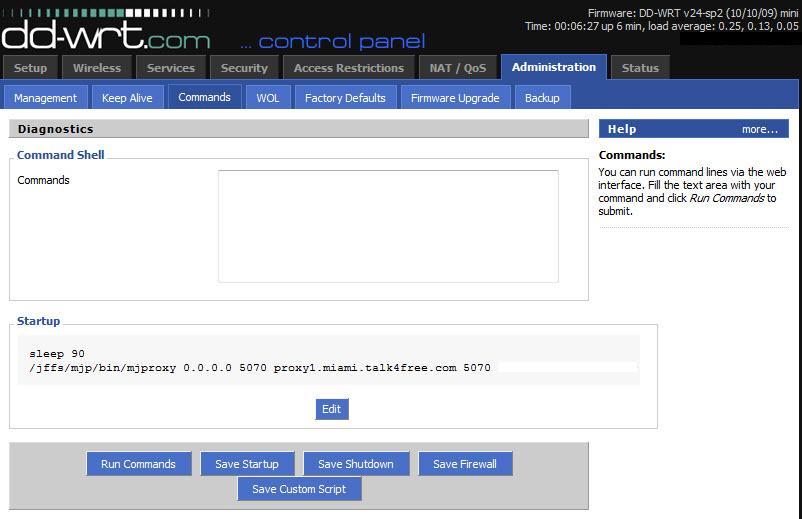
My password is there, I just edited it out for this screen shot.
Should the command not be running on its own?
If I copy the command into the COMMAND window above and then click on RUN COMMANDS, it works. I know the command line has to be right because of this.
Any ideas as to why the command is not auto running?
If it means anything, I am using firmware: DD-WRT v24-sp2 (10/10/09) mini
Thank you in advance!
Posted: Sat Oct 23, 2010 6:56 pm
by stav
Run the command and reboot router.
Posted: Sat Oct 23, 2010 10:44 pm
by nulland
Mjproxy runs only when there is internet connection. Perhaps "sleep 90" is too short a time for the router to connect to the internet? Try 120.
Posted: Sun Oct 24, 2010 2:20 am
by JOFTAA
Thank you both for your responses.
It seems the problem is a bit worse than I figured.
This morning, after making calls last night, I woke up to find no dial tone on my phone.
I checked the router using Putty to see if MJMD5 was running, and it was running. But, even so, no dialtone.
I rebooted ATA, no luck there, either.
A reboot of the network router proved pointless as well.
What I did notice is that the startup command is not running. Instead, when I reboot the router, instead of taking the usual 20-30 seconds to connect me to The Net, it is taking about the time I have set in the startup command. So, the router is not connecting to The Net until that time is expired.
Once connected, if I manually run the command, the MJ works again.
I am under the impression that the startup command should work in such a way as to not inhibit the router from connecting to The Net so that once connected the MJMD5 is run.
I am very green to all of this, but I am learning quickly. Just no quickly enough.
Additional info: I updated to the latest version of the same firmware. The proxy still works if I run it manually, but will not run automatically with the command being in the startup window.
Posted: Sun Oct 24, 2010 8:03 am
by stav
If you run sp2, check and see if your modem is supporting it. In particular, check jffs see if enabled. If still doesnt load automatically, I would reset to factory defaults and reconfigure.
I would also try v24, sp1 mini
Posted: Sun Oct 24, 2010 1:20 pm
by stav
stav wrote:If you run sp2, check and see if your modem is supporting it. In particular, check jffs see if enabled. If still doesnt load automatically, I would reset to factory defaults and reconfigure.
I would also try v24, sp1 mini
"if your modem is supporting it" I mean router, sorry ..
Posted: Sun Oct 24, 2010 1:50 pm
by JOFTAA
stav wrote:If you run sp2, check and see if your modem is supporting it. In particular, check jffs see if enabled. If still doesnt load automatically, I would reset to factory defaults and reconfigure.
I would also try v24, sp1 mini
The DD-WRT site specifically says NOT to use this version. Thanks, though.
I'm still plugging at this.
Posted: Sun Oct 24, 2010 6:20 pm
by neo2121
Well the router is embedded Linux so SSH to it and see if you have this
directory. If so put the proxy script in there and use this command
Code: Select all
update-rc.d Name of script defaults
then change the permissions
see if that works if now just move everything back. I have no clue if that will work for the router but it will work for linux.[/code]
Posted: Sun Oct 31, 2010 9:01 pm
by bisbebri
I think they changed something the windows mjmd5.exe stopped working as well.. When i look at it on wireshark is says something about the md5 not matching.
Asus WL-500G Premium V2 - Dial Tone but can't dial in or out
Posted: Sun Oct 31, 2010 10:34 pm
by arg3r0th79
Greetings!
I've been at this for a number of hours now. I seem to be out of options.
When looking at my 'top' list heres what I got:
Mem: 13284K used, 15928K free, 0K shrd, 1748K buff, 5604K cached
CPU: 4.3% usr 4.5% sys 0.0% nic 91.0% idle 0.0% io 0.0% irq 0.0% sirq
Load average: 0.04 0.07 0.08 2/27 1841
PID PPID USER STAT VSZ %MEM %CPU COMMAND
288 1 root S 2932 10.0 5.3 httpd -p 80
1828 1823 root R 1516 5.1 0.7 top
14 1 root S 1836 6.2 0.0 watchdog
1 0 root S 1800 6.1 0.0 /sbin/init noinitrd
131 1 root S 1796 6.1 0.0 resetbutton
890 1 root S 1792 6.1 0.0 wland
561 1 root S 1792 6.1 0.0 process_monitor
248 1 root S 1792 6.1 0.0 ttraff
1823 189 root S 1528 5.2 0.0 -sh
466 1 root S 1520 5.2 0.0 /bin/sh /etc/config/proxywatchdog.sh
189 1 root S 1508 5.1 0.0 telnetd
1803 466 root S 1508 5.1 0.0 sleep 60
205 1 root S 1144 3.9 0.0 dnsmasq --conf-file=/tmp/dnsmasq.conf
915 1 root S 1072 3.6 0.0 /jffs/bin/mjproxy 0.0.0.0 5070 proxy01.newyork.talk4free.com 5070 xxxxxxxx
900 1 root S 1032 3.5 0.0 udhcpc -i vlan1 -p /var/run/udhcpc.pid -s /tmp/udhcpc
669 1 root S 1028 3.5 0.0 cron
10 1 root SW 0 0.0 0.0 [mtdblockd]
21 1 root SW 0 0.0 0.0 [khubd]
96 1 root SWN 0 0.0 0.0 [jffs2_gcd_mtd4]
3 1 root RWN 0 0.0 0.0 [ksoftirqd_CPU0]
4 1 root SW 0 0.0 0.0 [kswapd]
5 1 root SW 0 0.0 0.0 [bdflush]
2 1 root SW 0 0.0 0.0 [keventd]
43 1 root SW 0 0.0 0.0 [usb-storage-0]
44 1 root SW 0 0.0 0.0 [scsi_eh_0]
In the administration -> Commands menu I have the following:
Startup
sleep 90
/jffs/bin/mjproxy 0.0.0.0 5070 proxy01.newyork.talk4free.com 5070 xxxxxxxx
I can hear dial tone, but I cannot dial out... or receive calls. Anyone have any suggestions?
Posted: Thu Sep 06, 2012 12:32 pm
by greenman
If this solution no longer works, perhaps it could be 'unstickied' and something can be added to the top of the original post suggesting this hack is no longer viable.
Cheers.