Page 6 of 6
MagicJack stop working
Posted: Tue Aug 31, 2010 12:14 pm
by maa
can anyone shed some light on this?
It just stopped working yesterday all of the sudden.
I have not had any issues with it since January of 2009. I retrieved the password (It was different) and updated it on my dd-wrt router and PAP2t as well. It is still showing Registration State: Can't connect to login server.
I honestly ran out of options. Thanks in Advance.
Posted: Tue Aug 31, 2010 4:18 pm
by arcadia2uk
Can i use the DD-WRT and PAP2?
Posted: Sun Sep 12, 2010 8:03 am
by intenceice
is it possible to have mmj5 running on my linksys router(dd-wrt) and use the pap2?
with that config i could use a regular hardline phone to the pap2 or sipphon wireless right?
is the proccess as easy as follow instructions to install on DD-wrt then follow instructions to install on PAP2 and BAM im done?
please advise thanks
Re: Can i use the DD-WRT and PAP2?
Posted: Sun Sep 12, 2010 9:59 am
by stav
intenceice wrote:is it possible to have mmj5 running on my linksys router(dd-wrt) and use the pap2?
with that config i could use a regular hardline phone to the pap2 or sipphon wireless right?
is the proccess as easy as follow instructions to install on DD-wrt then follow instructions to install on PAP2 and BAM im done?
please advise thanks
dude, just read the link posted by arcadia2uk just above yours, mjmd5/ata dont work (well, most of them, the remaining its a matter of time) cuze rotating passwords
Posted: Sun Sep 12, 2010 8:56 pm
by naack
problem is the mjmd5 needs to stop when u disconnect or close the sip app.
and stoart again when u're going to connect. thats why people are having so much trouble with it.
is there a way to fix it with a script?
Posted: Sat Oct 23, 2010 5:07 pm
by JOFTAA
I am so close I can taste it.
I have it working. I have dial tone and I can make calls. I can also receive calls.
The problem is that the router does not seem to run the command automatically.
My screen looks like this:
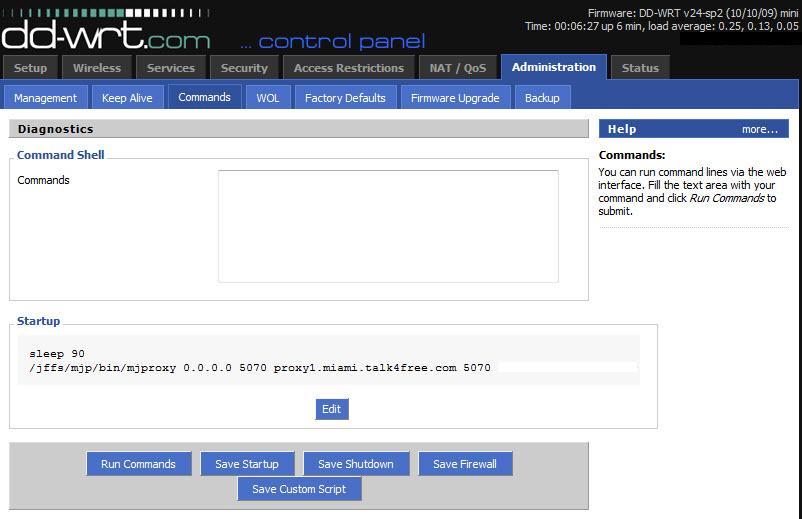
My password is there, I just edited it out for this screen shot.
Should the command not be running on its own?
If I copy the command into the COMMAND window above and then click on RUN COMMANDS, it works. I know the command line has to be right because of this.
Any ideas as to why the command is not auto running?
If it means anything, I am using firmware: DD-WRT v24-sp2 (10/10/09) mini
Thank you in advance!
Posted: Sat Oct 23, 2010 6:56 pm
by stav
Run the command and reboot router.
Posted: Sat Oct 23, 2010 10:44 pm
by nulland
Mjproxy runs only when there is internet connection. Perhaps "sleep 90" is too short a time for the router to connect to the internet? Try 120.
Posted: Sun Oct 24, 2010 2:20 am
by JOFTAA
Thank you both for your responses.
It seems the problem is a bit worse than I figured.
This morning, after making calls last night, I woke up to find no dial tone on my phone.
I checked the router using Putty to see if MJMD5 was running, and it was running. But, even so, no dialtone.
I rebooted ATA, no luck there, either.
A reboot of the network router proved pointless as well.
What I did notice is that the startup command is not running. Instead, when I reboot the router, instead of taking the usual 20-30 seconds to connect me to The Net, it is taking about the time I have set in the startup command. So, the router is not connecting to The Net until that time is expired.
Once connected, if I manually run the command, the MJ works again.
I am under the impression that the startup command should work in such a way as to not inhibit the router from connecting to The Net so that once connected the MJMD5 is run.
I am very green to all of this, but I am learning quickly. Just no quickly enough.
Additional info: I updated to the latest version of the same firmware. The proxy still works if I run it manually, but will not run automatically with the command being in the startup window.
Posted: Sun Oct 24, 2010 8:03 am
by stav
If you run sp2, check and see if your modem is supporting it. In particular, check jffs see if enabled. If still doesnt load automatically, I would reset to factory defaults and reconfigure.
I would also try v24, sp1 mini
Posted: Sun Oct 24, 2010 1:20 pm
by stav
stav wrote:If you run sp2, check and see if your modem is supporting it. In particular, check jffs see if enabled. If still doesnt load automatically, I would reset to factory defaults and reconfigure.
I would also try v24, sp1 mini
"if your modem is supporting it" I mean router, sorry ..
Posted: Sun Oct 24, 2010 1:50 pm
by JOFTAA
stav wrote:If you run sp2, check and see if your modem is supporting it. In particular, check jffs see if enabled. If still doesnt load automatically, I would reset to factory defaults and reconfigure.
I would also try v24, sp1 mini
The DD-WRT site specifically says NOT to use this version. Thanks, though.
I'm still plugging at this.
Posted: Sun Oct 24, 2010 6:20 pm
by neo2121
Well the router is embedded Linux so SSH to it and see if you have this
directory. If so put the proxy script in there and use this command
Code: Select all
update-rc.d Name of script defaults
then change the permissions
see if that works if now just move everything back. I have no clue if that will work for the router but it will work for linux.[/code]
Posted: Sun Oct 31, 2010 9:01 pm
by bisbebri
I think they changed something the windows mjmd5.exe stopped working as well.. When i look at it on wireshark is says something about the md5 not matching.
Asus WL-500G Premium V2 - Dial Tone but can't dial in or out
Posted: Sun Oct 31, 2010 10:34 pm
by arg3r0th79
Greetings!
I've been at this for a number of hours now. I seem to be out of options.
When looking at my 'top' list heres what I got:
Mem: 13284K used, 15928K free, 0K shrd, 1748K buff, 5604K cached
CPU: 4.3% usr 4.5% sys 0.0% nic 91.0% idle 0.0% io 0.0% irq 0.0% sirq
Load average: 0.04 0.07 0.08 2/27 1841
PID PPID USER STAT VSZ %MEM %CPU COMMAND
288 1 root S 2932 10.0 5.3 httpd -p 80
1828 1823 root R 1516 5.1 0.7 top
14 1 root S 1836 6.2 0.0 watchdog
1 0 root S 1800 6.1 0.0 /sbin/init noinitrd
131 1 root S 1796 6.1 0.0 resetbutton
890 1 root S 1792 6.1 0.0 wland
561 1 root S 1792 6.1 0.0 process_monitor
248 1 root S 1792 6.1 0.0 ttraff
1823 189 root S 1528 5.2 0.0 -sh
466 1 root S 1520 5.2 0.0 /bin/sh /etc/config/proxywatchdog.sh
189 1 root S 1508 5.1 0.0 telnetd
1803 466 root S 1508 5.1 0.0 sleep 60
205 1 root S 1144 3.9 0.0 dnsmasq --conf-file=/tmp/dnsmasq.conf
915 1 root S 1072 3.6 0.0 /jffs/bin/mjproxy 0.0.0.0 5070 proxy01.newyork.talk4free.com 5070 xxxxxxxx
900 1 root S 1032 3.5 0.0 udhcpc -i vlan1 -p /var/run/udhcpc.pid -s /tmp/udhcpc
669 1 root S 1028 3.5 0.0 cron
10 1 root SW 0 0.0 0.0 [mtdblockd]
21 1 root SW 0 0.0 0.0 [khubd]
96 1 root SWN 0 0.0 0.0 [jffs2_gcd_mtd4]
3 1 root RWN 0 0.0 0.0 [ksoftirqd_CPU0]
4 1 root SW 0 0.0 0.0 [kswapd]
5 1 root SW 0 0.0 0.0 [bdflush]
2 1 root SW 0 0.0 0.0 [keventd]
43 1 root SW 0 0.0 0.0 [usb-storage-0]
44 1 root SW 0 0.0 0.0 [scsi_eh_0]
In the administration -> Commands menu I have the following:
Startup
sleep 90
/jffs/bin/mjproxy 0.0.0.0 5070 proxy01.newyork.talk4free.com 5070 xxxxxxxx
I can hear dial tone, but I cannot dial out... or receive calls. Anyone have any suggestions?
Posted: Thu Sep 06, 2012 12:32 pm
by greenman
If this solution no longer works, perhaps it could be 'unstickied' and something can be added to the top of the original post suggesting this hack is no longer viable.
Cheers.