Posted: Sun Nov 21, 2010 8:35 pm
newtoncd wrote:The speed tests are fine, but you want to measure for VoIP traffic.
Run a VoIP test (leave the default at G.711 codec) at: http://myspeed.visualware.com/indexvoip.php
What does it report?

The Unofficial Support Forum For Your Magic Jack
https://phoneservicesupport.com/
newtoncd wrote:The speed tests are fine, but you want to measure for VoIP traffic.
Run a VoIP test (leave the default at G.711 codec) at: http://myspeed.visualware.com/indexvoip.php
What does it report?
I'm not concerned with the speed, as with the noise in the line, though more speed would be nice.gashliquor wrote:@ johnlvs2run, IMO your upstream is LOW however the device does'nt require a large amount of upstream so it is true your fine there, However if your jitter starts changing here and there during the day your gonna not sound that good.
johnlvs2run wrote:newtoncd wrote:The speed tests are fine, but you want to measure for VoIP traffic.
Run a VoIP test (leave the default at G.711 codec) at: http://myspeed.visualware.com/indexvoip.php
What does it report?
The link that I copied of results, went back to the start when clicked, and it wouldn't let me copy the pages, so I did them again and now it says I've done too many till tomorrow. I'm trying the second link now.gashliquor wrote:Where is the rest of the test?...Your jitter is "0", Mine is'nt even that. 0 is fantastic but where is the rest of the test!, MOS 4.2 is great also
johnlvs2run wrote:The link that I copied of results, went back to the start when clicked, and it wouldn't let me copy the pages, so I did them again and now it says I've done too many till tomorrow. I'm trying the second link now.gashliquor wrote:Where is the rest of the test?...Your jitter is "0", Mine is'nt even that. 0 is fantastic but where is the rest of the test!, MOS 4.2 is great also
connection analysis
They won't let me copy the results.gashliquor wrote:There was nothing wrong with those results, Use the link i gave u let me see those results
johnlvs2run wrote:They won't let me copy the results.gashliquor wrote:There was nothing wrong with those results, Use the link i gave u let me see those results
I can see them but there's no link to post them to here.
See, here are my results, but they don't show up, it just goes back to the start.
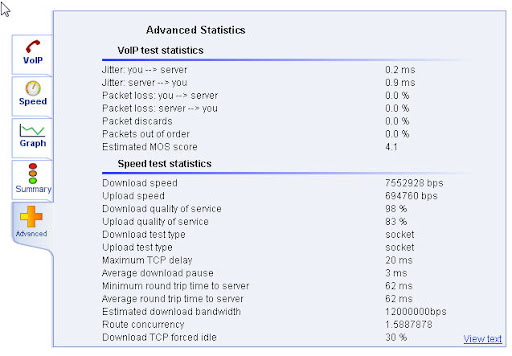
The test was 10 times slower than this just now, due to an always slow website that was open.newtoncd wrote:What was the QoS number, both upload/download from the advanced tab, when you ran the test?

I don't know.newtoncd wrote:About the only question I can think to ask is, do you have QoS enabled in your router and what kind of router do you have?
johnlvs2run wrote:I don't know.newtoncd wrote:About the only question I can think to ask is, do you have QoS enabled in your router and what kind of router do you have?
Westell Versalink Model 327W modem/router
It would be easier to just post a link.gashliquor wrote:In order to copy your results it's easy!, Just simply have your results on the screen and press ALT & PRINT SCREEN KEY, Then open up PAINT and paste the caputre in there and save as a JPG etc and upload it to like photobucket etc

johnlvs2run wrote:It would be easier to just post a link.gashliquor wrote:In order to copy your results it's easy!, Just simply have your results on the screen and press ALT & PRINT SCREEN KEY, Then open up PAINT and paste the caputre in there and save as a JPG etc and upload it to like photobucket etc
Doesn't QoS refer to quaity of service, which are the results that I posted?
If not, where would the QoS number be on that site?
Okay I see it now. I posted this at 8:03pm last night.gashliquor wrote:If you can't post a link thats how you do it, I don't see any QoS for your upstream but IMO if your QoS is less then 85% for upstream i would not want it
johnlvs2run wrote:Okay I see it now. I posted this at 8:03pm last night.gashliquor wrote:If you can't post a link thats how you do it, I don't see any QoS for your upstream but IMO if your QoS is less then 85% for upstream i would not want it
Download/Upload quality of service = 99 percent. I am plenty happy with that.
What's your point.gashliquor wrote:Yep nothing wrong with that, But it don't stay that way
johnlvs2run wrote:What's your point.gashliquor wrote:Yep nothing wrong with that, But it don't stay that way
oldtimercurt wrote:gash liquor
Had to modify my setup.
My brother-in-law, down closer to you, was trying to set the XYL up with Skype Video. She's using a notebook wirelessly off my network. After messing around for a while finally got the connection to work. However, quality was not good: stutter, freeze and dropouts. Came into the office and noticed that Hawking wasn't showing blue light So I went in to my router D-link 615 and turned on the QOS. For the next thirty minutes not a hiccup from Skype. Even though not seeing blue light from Hawking. Checked NT Duo and got normal Hawking blue flash then steady blue when called party picked up. Looks like the router QOS only applies to the wireless. I guess the Hawking blue light wasn't on for Skye because of Skype's proprietary protocol, correct?
Thought this might be interesting to anyone that runs into similar problem.
OTC

oldtimercurt wrote:gashliquor
Once the router receives the wireless data doesn't that data become part of the bitstream that goes from the router to the HBB1. And don't the packets retain the header info which, I assume, would identify the packets as Skype/VOIP. I'll admit that I'm very much a novice at this but I want to understand.
Thanks
OTC

oldtimercurt wrote:Gashliquor,
Thanks for that info.
I just picked up Ooma Telo at Best Buy for 179.99. Pretty good sale. Haven't hooked it up yet but hope I'm as thrilled with it as you seem to be.
OTC
 and imagine that, I still have problems here....
ok, I'm lost, where in the router settings do I find this? I found one that said MAC Address Cloning under Internet WAN and another that says Wireless > MAC Address Control, so what am I looking for in there?gashliquor wrote:@ Nugrl, Try this. Go into your routers setup and give medium priority to YOUR netTalks MAC address, The MAC address can be found on the sticker on the back of the netTalk Duo. Once you done that unplug the router for 15 secs and plug it back in. IF the netTalk Duo does'nt give you a ring back unplug it from the wall outlet for 30 secs and plug it back in and you should hear a ring back. Then give it a try. Do you want to improve your PING well your on your OWN here is some info 4u, And also i find your brand router does'nt really love netTalk, Next time think Linksys and even the $50.00 E1000 or more $ E2000 will do the job 4u but again those children can be causing u problems as i said b4 to you that u can't take 5 gallons of gas from a one gallon can. If u could i'd be doing it, Last of all make sure jitter is your friend!, The lower the jitter the better but sometimes it has nothing to do with u it's the ppl u pay ( ISP)
http://hubpages.com/hub/Reduce-Ping-on- ... -Windows-7

Nugrl wrote:ok, I'm lost, where in the router settings do I find this? I found one that said MAC Address Cloning under Internet WAN and another that says Wireless > MAC Address Control, so what am I looking for in there?gashliquor wrote:@ Nugrl, Try this. Go into your routers setup and give medium priority to YOUR netTalks MAC address, The MAC address can be found on the sticker on the back of the netTalk Duo. Once you done that unplug the router for 15 secs and plug it back in. IF the netTalk Duo does'nt give you a ring back unplug it from the wall outlet for 30 secs and plug it back in and you should hear a ring back. Then give it a try. Do you want to improve your PING well your on your OWN here is some info 4u, And also i find your brand router does'nt really love netTalk, Next time think Linksys and even the $50.00 E1000 or more $ E2000 will do the job 4u but again those children can be causing u problems as i said b4 to you that u can't take 5 gallons of gas from a one gallon can. If u could i'd be doing it, Last of all make sure jitter is your friend!, The lower the jitter the better but sometimes it has nothing to do with u it's the ppl u pay ( ISP)
http://hubpages.com/hub/Reduce-Ping-on- ... -Windows-7
Just take a deep breathe, count to 10 and explain it to me....
I know, I know, but I can't afford a new router right now. So I have to make do, and the HBB1 just came so I am going to hook it inline and see what happens. I will post back once I get the internet back up and running. wish me luck!gashliquor wrote:Nugrl wrote:ok, I'm lost, where in the router settings do I find this? I found one that said MAC Address Cloning under Internet WAN and another that says Wireless > MAC Address Control, so what am I looking for in there?gashliquor wrote:@ Nugrl, Try this. Go into your routers setup and give medium priority to YOUR netTalks MAC address, The MAC address can be found on the sticker on the back of the netTalk Duo. Once you done that unplug the router for 15 secs and plug it back in. IF the netTalk Duo does'nt give you a ring back unplug it from the wall outlet for 30 secs and plug it back in and you should hear a ring back. Then give it a try. Do you want to improve your PING well your on your OWN here is some info 4u, And also i find your brand router does'nt really love netTalk, Next time think Linksys and even the $50.00 E1000 or more $ E2000 will do the job 4u but again those children can be causing u problems as i said b4 to you that u can't take 5 gallons of gas from a one gallon can. If u could i'd be doing it, Last of all make sure jitter is your friend!, The lower the jitter the better but sometimes it has nothing to do with u it's the ppl u pay ( ISP)
http://hubpages.com/hub/Reduce-Ping-on- ... -Windows-7
Just take a deep breathe, count to 10 and explain it to me....
Your router may not be able to do it as it's that Belkin, I don't use that brand. However if you have Applications in your QoS settings usually there is a drop down arrow and you'll see MAC ADDRESS in there and if there is then put the MAC address on the backof the NT in there, If not i don't know but replace the router. Again NT and Belkin routers don't really click together well. Think Linksys in the future..
Nugrl wrote:I know, I know, but I can't afford a new router right now. So I have to make do, and the HBB1 just came so I am going to hook it inline and see what happens. I will post back once I get the internet back up and running. wish me luck!gashliquor wrote:Nugrl wrote: ok, I'm lost, where in the router settings do I find this? I found one that said MAC Address Cloning under Internet WAN and another that says Wireless > MAC Address Control, so what am I looking for in there?
Just take a deep breathe, count to 10 and explain it to me....
Your router may not be able to do it as it's that Belkin, I don't use that brand. However if you have Applications in your QoS settings usually there is a drop down arrow and you'll see MAC ADDRESS in there and if there is then put the MAC address on the backof the NT in there, If not i don't know but replace the router. Again NT and Belkin routers don't really click together well. Think Linksys in the future..
The only QoS that I have seen there is the WMM QoS so I am still not sure where to enter this MAC address for the NT in there???
so what are you saying? don't go in there any change any settings in the router now? I have the HBB1 hooked up and the installation was very simple! I just hope all it working with it to the best of its ability. I see there are things in there (HBB1) settings you can change. How about firmware? I know they don't make these anymore, but how do we know if we have the most recent release? I think it said it was Version 1.1.0 is that the newest one out there? As far as testing phone calls, I have made and received about 4 so far and yes, the NT does seem to be better, but I was not on that call for very long to really test it. There were no clicks and the call did not appear to be breaking up or cutting out. So that's great as far as I am concerned! I do hear a little what I would call hissing in the phone, but that very well could be the Panasonic Dect 6.0 KX-TGA101S that I am using, but as I said before it seems to be the best fit with the NT Duo out of all the phones I have here right now. I did also make and receive a couple of calls on the MJ and I really could not tell if it improved it or not. Once again, I was not on either of those phone calls for very long. I will test both the NT and the MJ out better later, and report back my findings. I see the little blue light is solid right now on the HBB1 and I am not even on the phone, but my son is on warcraft, so I assume it is because of him, and does that mean its doing its job? God I hope so!!!!gashliquor wrote:Nugrl wrote:I know, I know, but I can't afford a new router right now. So I have to make do, and the HBB1 just came so I am going to hook it inline and see what happens. I will post back once I get the internet back up and running. wish me luck!gashliquor wrote:
Your router may not be able to do it as it's that Belkin, I don't use that brand. However if you have Applications in your QoS settings usually there is a drop down arrow and you'll see MAC ADDRESS in there and if there is then put the MAC address on the backof the NT in there, If not i don't know but replace the router. Again NT and Belkin routers don't really click together well. Think Linksys in the future..
The only QoS that I have seen there is the WMM QoS so I am still not sure where to enter this MAC address for the NT in there???
Don't worry about the QoS with the HBB1 now, Im off for a M.C. ride with the club and off to buy a new Motorola 6120 Surf Board modem and retire this older surf board Modem.


gashliquor wrote:Nugrl wrote:I know, I know, but I can't afford a new router right now. So I have to make do, and the HBB1 just came so I am going to hook it inline and see what happens. I will post back once I get the internet back up and running. wish me luck!gashliquor wrote:
Your router may not be able to do it as it's that Belkin, I don't use that brand. However if you have Applications in your QoS settings usually there is a drop down arrow and you'll see MAC ADDRESS in there and if there is then put the MAC address on the backof the NT in there, If not i don't know but replace the router. Again NT and Belkin routers don't really click together well. Think Linksys in the future..
The only QoS that I have seen there is the WMM QoS so I am still not sure where to enter this MAC address for the NT in there???
Don't worry about the QoS with the HBB1 now, Im off for a M.C. ride with the club and off to buy a new Motorola 6120 Surf Board modem and retire this older surf board Modem.
Nugrl wrote:so what are you saying? don't go in there any change any settings in the router now? I have the HBB1 hooked up and the installation was very simple! I just hope all it working with it to the best of its ability. I see there are things in there (HBB1) settings you can change. How about firmware? I know they don't make these anymore, but how do we know if we have the most recent release? I think it said it was Version 1.1.0 is that the newest one out there? As far as testing phone calls, I have made and received about 4 so far and yes, the NT does seem to be better, but I was not on that call for very long to really test it. There were no clicks and the call did not appear to be breaking up or cutting out. So that's great as far as I am concerned! I do hear a little what I would call hissing in the phone, but that very well could be the Panasonic Dect 6.0 KX-TGA101S that I am using, but as I said before it seems to be the best fit with the NT Duo out of all the phones I have here right now. I did also make and receive a couple of calls on the MJ and I really could not tell if it improved it or not. Once again, I was not on either of those phone calls for very long. I will test both the NT and the MJ out better later, and report back my findings. I see the little blue light is solid right now on the HBB1 and I am not even on the phone, but my son is on warcraft, so I assume it is because of him, and does that mean its doing its job? God I hope so!!!!gashliquor wrote:Nugrl wrote: I know, I know, but I can't afford a new router right now. So I have to make do, and the HBB1 just came so I am going to hook it inline and see what happens. I will post back once I get the internet back up and running. wish me luck!
The only QoS that I have seen there is the WMM QoS so I am still not sure where to enter this MAC address for the NT in there???
Don't worry about the QoS with the HBB1 now, Im off for a M.C. ride with the club and off to buy a new Motorola 6120 Surf Board modem and retire this older surf board Modem.
here are some results from speedtest.net and pingtest.net. I think this is the lowest my ping and jitter have ever been! is it because of the HBB1? Also, how many of these lights should be flashing blue and then staying solid blue? I have one solid green, two flashing green, and 1 that alternates between flashing green, then flashing blue to solid blue. Is that the way is should be to know its functioning properly?
does this have to be done on every computer here? http://hubpages.com/hub/Reduce-Ping-on- ... -Windows-7
Ok, you answered my question about the firmware version in this thread. http://www.phoneservicesupport.com/to-t ... 10179.html


Nugrl wrote:here are some of my newest tests with Kaspersky off.
and that is with two kids on warcraft. overall I would have to say things are better with the HBB1.
Nugrl wrote:here are some of my newest tests with Kaspersky off.
and that is with two kids on warcraft. overall I would have to say things are better with the HBB1.

where does this need to be if this is the wrong forum? Hey I guess I didnt' notice that. Time is just a flyin by, I guess I lost track of it.....gashliquor wrote:Nugrl wrote:here are some of my newest tests with Kaspersky off.
and that is with two kids on warcraft. overall I would have to say things are better with the HBB1.
BTW this is in the wrong forum but!....In 8 days your in this forum for a yr, Congrats on your troubles and wish u a better yr to come
and thank you, I sure as hell hope I have a better year to come!!!!! well I can't afford the Ooma, so MJ and NT it is for now..... I have to try and make the best of it, and god knows I am!!!!gashliquor wrote:Nugrl wrote:here are some of my newest tests with Kaspersky off.
and that is with two kids on warcraft. overall I would have to say things are better with the HBB1.
These results are real i see here, You have more then ENOUGH of upload for VoIP...Want advice?... ALWAYS turn OFF Kaspersky B4 doing tests or else Kaspersky will make bogus tests but usually in the download reading, Next get rid of the kids and buy a Linksys router and last of all in PLAIN english the Ooma Telo puts the MJ and the netTalk Duo to shame that they both are like toys in quality and audio

Nugrl wrote:where does this need to be if this is the wrong forum? Hey I guess I didnt' notice that. Time is just a flyin by, I guess I lost track of it.....gashliquor wrote:Nugrl wrote:here are some of my newest tests with Kaspersky off.
and that is with two kids on warcraft. overall I would have to say things are better with the HBB1.
BTW this is in the wrong forum but!....In 8 days your in this forum for a yr, Congrats on your troubles and wish u a better yr to come

oh...ok, gotchagashliquor wrote:Nugrl wrote:where does this need to be if this is the wrong forum? Hey I guess I didnt' notice that. Time is just a flyin by, I guess I lost track of it.....gashliquor wrote:
BTW this is in the wrong forum but!....In 8 days your in this forum for a yr, Congrats on your troubles and wish u a better yr to come
I was talking about my post to u on congrats on a yr was in wrong forum.....Meaning in here