Page 2 of 2
Posted: Wed Apr 21, 2010 5:36 am
by xxxquandomxxx
Hey, I am so sorry if this question is stupid and noobie.
But..
I have been trying to figure out why would people install mjproxy on thier router? What does it do? In addition, why did OP install mjproxy on his/her WRT54GL? It doesn't even have a USB port, so you can't plug in the MJ and use VOIP without a computer, assuming that this is what mjproxy does in the first place.
---
Ohh dammit, I knew I asked a stupid question. I think I understand now. We need to buy an extra PAP2T-NA, connect it to the internet by using the mjproxy router, then add a phone to PAP2T-NA. I guess there is no such thing as buying a open source router with USB inputs and then connecting the MJ into that router via USB.
---
On second thought, I think I am wrong again. I now have no idea with what people with their routers, the PAP2T ATA, or their MJ. Can someone please enlighten me?
Posted: Sat Apr 24, 2010 2:35 am
by richardtaur
The router will run mjproxy, ATA will connect from router to MJ server through mjproxy on the router. So, you don't use MJ USB any more. All you need is a router with tomato firmware + mjproxy as service on the router and a ATA.
Posted: Fri Apr 30, 2010 9:03 am
by tdbone1
ok here it goes
i have the magicjack service.
i put mjproxy on my wrt54gl v1.1 running latest eko dd-wrt
i did the command "mjproxy 0.0.0.0 5070 proxy01.minneapolis.talk4free.com 5070 PASSWORD"
and i have it saved in a startup script with a 'sleep 30' in front of it.
anyhow if i reboot router mjproxy works fine.
i can verify this by unplugging the usb magicjack device and by running xlite on the laptop with my magicjack SIP info entered into it.
i can then make and recieve calls.
OK Now here is my real problem.
i bought a PPC6800 and installed fring onto it.
i enter my SIP info into it but for the love of god it will not make or recieve calls.
it gets stuck on the SIP info screen after i enter it i hit ok but it never works.
can someone tell me another app to use instead of fring or help me get it working?
thanks
Posted: Mon May 10, 2010 6:07 pm
by tdbone1
bump
Posted: Mon May 10, 2010 9:39 pm
by neo2121
I don't think that there is a solution for windows smart phones, other than local wifi network and using MJMD5.
I guess Siphon could be ported but would need someone much better at development than I to dedicate the time to work on a release. Sorry for the bad news
**Update**
actually seems that you can use Google Android on HTC PPC6800 so just install android then install siphon
Posted: Tue May 11, 2010 9:22 am
by crackerjack
tdbone1 wrote:ok here it goes
i have the magicjack service.
i put mjproxy on my wrt54gl v1.1 running latest eko dd-wrt
i did the command "mjproxy 0.0.0.0 5070 proxy01.minneapolis.talk4free.com 5070 PASSWORD"
and i have it saved in a startup script with a 'sleep 30' in front of it.
anyhow if i reboot router mjproxy works fine.
i can verify this by unplugging the usb magicjack device and by running xlite on the laptop with my magicjack SIP info entered into it.
i can then make and recieve calls.
OK Now here is my real problem.
i bought a PPC6800 and installed fring onto it.
i enter my SIP info into it but for the love of god it will not make or recieve calls.
it gets stuck on the SIP info screen after i enter it i hit ok but it never works.
can someone tell me another app to use instead of fring or help me get it working?
thanks
Hike on over to xda-developers.com and there are many posts containing solid info on employing generic sip/voip support files in WM5/6 compatible smartphones. You will even find a discussion group specific to your exact hardware but the info you need resides in the more generic forums. BTW, most of these solutions require 'unlocking' your phone but, again, the info is all laid out clearly and you will have access to a savvy crew who inhabit the threads.
Let us know how it goes
Posted: Thu May 13, 2010 12:21 pm
by tdbone1
crackerjack:
im over on xda forums also
what exact forums/threads are you talking about?
yea my phone is already unlocked.
i will be trying android on my ppc 6800 soon.
i just need to get a good sd card.
So close....yet so far!
Posted: Sun Jul 04, 2010 10:56 pm
by vzlarwpx
Thank you so much....noetic1!!! You went the extra 1,000 miles with your post.
Here is my setup:
Internet-->SPA2102-->WRT54GSv1.1(Tomato 1.23)-->Laptop
SPA2102-WAN IP-comcast ip
SPA2102-LAN IP-192.168.0.1
WRT54G-WAN IP-192.168.0.2
WRT54G-LAN IP-192.168.1.1
Laptop-LAN DHCP IP-192.168.1.23
I was able to successfully load the mjproxy on my WRT router (I ran xlite on my laptop directing it to the router mjproxy and could make calls).
However, I can't get the SPA2102 to register, (I will need to learn how to attach screens here!)
NAT Keep Alive Dest: 192.168.1.1:5070
Proxy: 192.168.1.1:5070
Not much luck on the registration, can anyone help?
Thanks....
Re: So close....yet so far!
Posted: Tue Jul 06, 2010 4:38 pm
by nulland
vzlarwpx wrote:
Here is my setup:
Internet-->SPA2102-->WRT54GSv1.1(Tomato 1.23)-->Laptop
SPA2102-WAN IP-comcast ip
SPA2102-LAN IP-192.168.0.1
WRT54G-WAN IP-192.168.0.2
WRT54G-LAN IP-192.168.1.1
Laptop-LAN DHCP IP-192.168.1.23
Place SPA2102 behind WRT54GS, put it in bridge mode with DHCP enabled, enable WAN access and then have it point to the router as the mjproxy server. Configuring the SPA 2102 as bridge between router and laptop will avoid double NAT. Laptop will still get its IP address from router, not from SPA2102. Setup:
Internet<--WRT54GS<--SPA2102<--Laptop
In bridge mode, webpage of SPA2102 is not accessible from LAN side, only from the WAN address which should be 192.168.1.x. So it's important to have access to WAN side enabled.
A better setup is to connect the SPA2102 and the Laptop to different ports of the router.
<--SPA2102
/
Internet<--WRT54GS
\
<--Laptop
In both setups, use the Internet (blue) port of the SPA2102 to connect to router. Hope this helps.
SPA2102 --> better QOS before or after the WRT54G?
Posted: Tue Jul 06, 2010 9:15 pm
by vzlarwpx
OK....thanks...will try your suggested configuration to see if I have any luck.
My mistake though, my laptop is wireless connected to the WRT54G
One question though, I read on one or two of the posts, that I recall, that you get much better QOS if you put the SPA2102 before the WRT54G instead of after....any truth to that? What is your experience?
Works behind the router!!!
Posted: Thu Jul 08, 2010 7:37 pm
by vzlarwpx
Ok,,,I tried and it works great behind the router.
Here is my config: (MJProxy is running on the WRT54GS)
__________________ /--->SPA2102
__________________/
Internet-->WRT54GS
_________________\/\/\/\/\/\/\->wireless laptop
I still wonder what the QOS will be like, so far so good, however, I have not done any p2p downloads while I talk....I will let everyone know how that goes.
Anyone having running an SPA2101 self contained, e.g. no mjproxy running anywhere, if so please provide a sample config.
Thanks!!!
HELP?!
Posted: Fri Jul 09, 2010 2:19 pm
by matt1985
Hey guys,
Loving this site so far. Bought a magic jack and a WRT54GL router and the PAP2T adapter.....took me forever to find the info needed via dumps but yesterday I managed to get it.
I'm having trouble right now linking everything together. I uploaded the MJMD5 file into my router, but when I putty back in and run "top" this is what I get (PAP2 and Tomato Script Images Included):
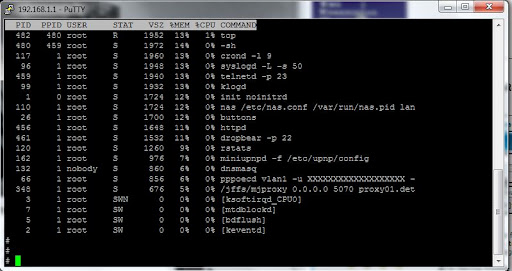
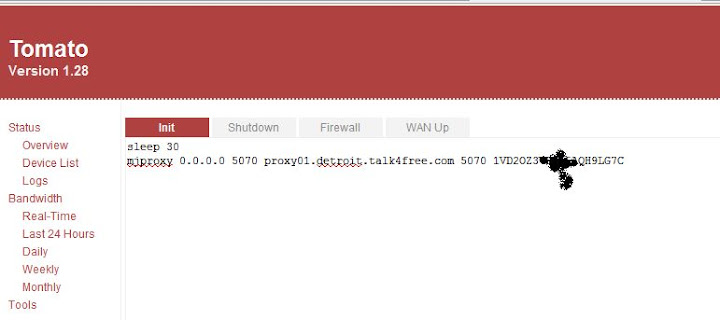
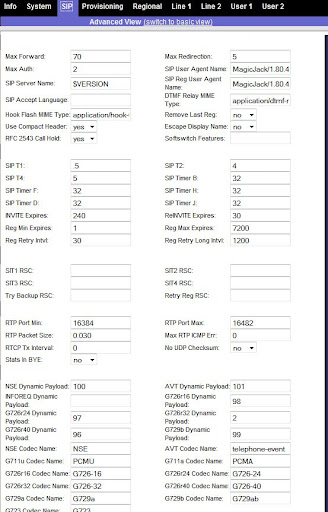
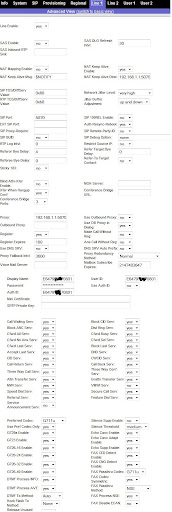
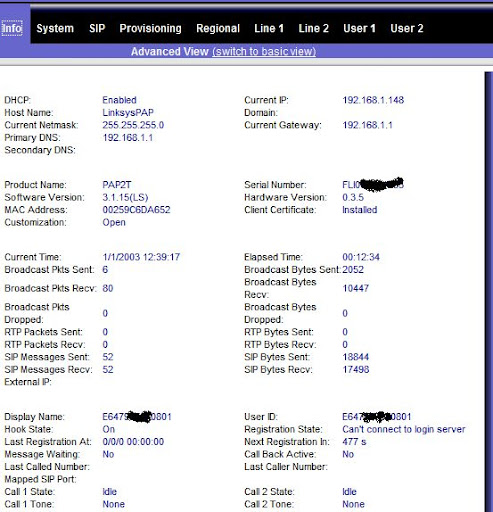
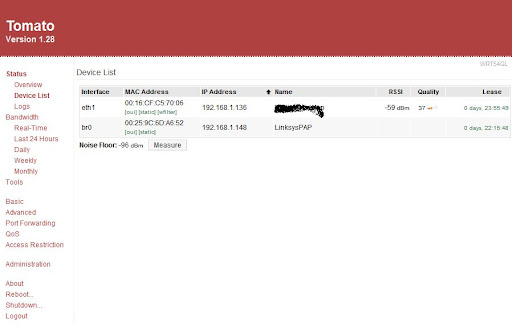
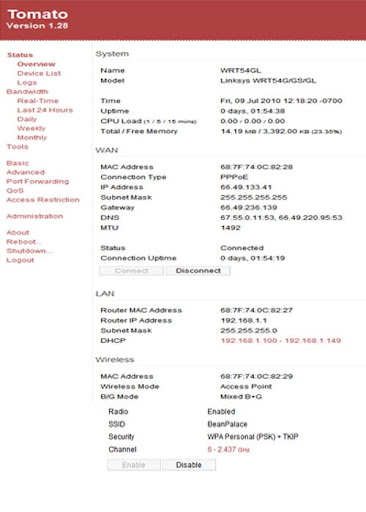
My WRT52GL is set to 192.168.1.1
and my PAP2T CURRENT IP is 192.168.1.148 with a primary DNS and Current Gateway to 192.168.1.1
ANY help is greatly appreciated, thank you in advance. I've been at this steady for a couple days now and just can't seem to get it ....

If anyone requires any additional info or pics just let me know, i'll be checking back pretty much hourly, gotta get this up and running...
MJMD5 on Tomato
Posted: Fri Jul 09, 2010 4:40 pm
by vade64
I am having the same problem. Once I copy the myproxy file to the JFFS directory on the router and then reboot to get it to load, it disappears. Something is deleting it. I load it, do the chmod and then reboot to see if the top command reveals that it is a running process and it is not. I then go back to check the file in the JFFS directory and it is gone. I've tried both versions of the mjproxy binary.
Posted: Fri Jul 09, 2010 4:57 pm
by matt1985
yeah something is going on here....
My router still has the jffs partition, but I guess mjproxy isn't actually loading? I'm so confused at this point...
Posted: Fri Jul 09, 2010 8:54 pm
by matt1985
i've bricked two routers now....fml
Tomato and MJMD5
Posted: Sat Jul 10, 2010 5:41 am
by vade64
I did get it working though. Just copy the mjproxy file as instructed, telnet in to the router using Putty, chmod the file, then just enter the script string at the command prompt "/jffs/mjproxy 0.0.0.0.0 5070 ......". Enter the "top" command and you will see the process running. As soon as I did that, my Line 1 status light pops on on the RTP300 and I've got dial tone! Just concerned that once I have a power outage and my router resets, I'll lose the mjproxy process/file, my MJ stops working and enough time will have gone by that I will have forgotten why

I think that I will do some digging on Tomoto firmware and the use of jffs.
How to open port 5070 on wan side
Posted: Mon Aug 09, 2010 3:18 pm
by raceway01
Hi
My wrt54gs with tomato 1.28 and magic jack sip info linksys rtp 300 works fine from lan but i like to connnect ATA from outside of my home ( office)
can some one please give me step by step direction to open port 5070 on wan side ? (Please no comment about port forwarding..)
Thanks
Please hekp me setting Magic Jack UP
Posted: Mon Aug 09, 2010 10:01 pm
by khanmohammad123
Greetings,
Thank you very much for the excellent step by step procedure, I am a newbe, I have one query, Please,
I got the Magic Jack username and password,
How do i find out what proxy to put in, i mean, I have a IP
These are the details
Proxy=216.234.69.8
ListenPort=5070
ForwardPort=5070
E773741381557
Pass: xxxxxxxxx
Could you tell me what do i put here
/jffs/mjproxy 0.0.0.0 5070 WHAT SHOULDBE THE PROXY HERE 5070 your_MJ_password
do i need to enter ip in place of 0.0.0.0 ? as i dont know what my proxy is ?
please help,
regards khan,
thanks in advance
Posted: Wed Aug 18, 2010 6:33 pm
by nostrodamus
Just installed my new ASUS WL520GU router this morning, flashed it with Tomato, and now just successfully installed mjproxy on the router.
Out of the three processes, getting the router fired up with the crappy stock firmware was the most difficult of the three. Thanks to noetic1's instructions, this was comparatively easy.
Now I can let my PC sleep again once in a while!
Posted: Sun Aug 29, 2010 3:11 pm
by kosodo
Is it still working, guys? mine suddenly stop working. My magicjack unit is still working though.
PAP2T says Can't connect to login server.
I noticed when I plug my unit in, I have to register again with my email and password.
Thanks!
Posted: Tue Aug 31, 2010 4:18 pm
by arcadia2uk
Posted: Thu Oct 21, 2010 11:44 am
by Toink
Followed the instuctions to the T on page one.... I was already pulling my hair for a couple of hours. It turned out I plugged the LAN cord in the 'Ethernet' socket of my SPA3102 instead of the 'Internet' part.
It now works!!
My Setup:
ADSL Modem-> Linksys WRT320N -> SPA3102 | Desktops | Laptops
Thank you very much for the tutorial. I'm glad to rid one of my desktops that ugly Magicjack USB and no more 27/7 powered up desktop!

 EDIT: I guess I spoke too soon.... My SPA3102 now wont work with this setup.
MJ decided to change my password each time it get's disconnected from the internet...
And I'm deciding to finally stop using MJ any longer...
You can shove it DAN!
Posted: Tue Nov 02, 2010 11:30 pm
by jeffnyc
While people are working on a fix for this (please pm me if you have one), I want to get Google Voice working with my ata.
This script is written for asterisk in Python. However is it possible for someone with programming skills to rewrite it, like mjproxy, to run on tomato - or even ddwrt if possible. The script does what sipsorcery does, sipsorcery is closed for free accounts.mmm
http://www.pmarks.net/posted_links/goog ... ialout.agi
Another cool option would to be getting gvtoy to run.
Problem step 7
Posted: Thu Sep 15, 2011 9:55 pm
by german-ukr
Hello all , I have problem with 7 step - with putty I cann't make a command chmod mjproxy to 755. Error - no such file or directory. What's a problem? I have tomato 1.28, D-link DIR-320. Thanks
Re: Problem step 7
Posted: Thu Sep 15, 2011 11:44 pm
by VaHam
german-ukr wrote:Hello all , I have problem with 7 step - with putty I cann't make a command chmod mjproxy to 755. Error - no such file or directory. What's a problem? I have tomato 1.28, D-link DIR-320. Thanks
Sorry this thread is way old. The MJ Proxy solution no longer works anyway so your wasting your time trying to get it loaded.
Re: Problem step 7
Posted: Fri Sep 16, 2011 2:24 am
by german-ukr
VaHam wrote:german-ukr wrote:Hello all , I have problem with 7 step - with putty I cann't make a command chmod mjproxy to 755. Error - no such file or directory. What's a problem? I have tomato 1.28, D-link DIR-320. Thanks
Sorry this thread is way old. The MJ Proxy solution no longer works anyway so your wasting your time trying to get it loaded.
Thank you so much. Upcoming updates crashes perfect solution?
Posted: Thu Sep 06, 2012 12:27 pm
by greenman
If this solution is no longer correct, perhaps it could be 'un-stickied' and set so that the original post includes the fact that it no longer works as of a particular date.