i have had my mj for several days, and have been unable to register.
have tried on several computers
running ie xp 2
using huawei wireless modem from alltel
please help
doug
cowboysdad
registration
Moderators: Bill Smith, Pilot

Run the test at http://www.testyourvoip.com/
Hmmmmm.....
I, too am here for the same problem. I was told by 'MJ chat' that they know there is a problem in this application, but they don't have a solution.
They basically threw their hands in the air.
I am still looking for an answer to this one.
They basically threw their hands in the air.
I am still looking for an answer to this one.
-
OurRCspace
- magicJack Apprentice
- Posts: 18
- Joined: Wed Nov 26, 2008 6:25 pm
- Location: USA Michigan
- Contact:
Im here for this fix also. I just got mine today and the paper say's
under requirements, DSL, Wireless..etc..
I have the Alltel Wireless USB High Speed UM175. And Vista
MJ support told me i needed a 150 on speed test down and i hit 685 with a 300 Up...
This thing Still says Cannot connect to the Register Server, They walked me threw the Firewall stuff and the Format, and Reboot. Then they tell me its not compatible with wireless.... What The ***... I told them that Wireless was Printed on the Paper in the BOX and all they said is they would forward my concern to the Techinal department...
All i got to say is I can Run Xbox Live with the Moble Alltel USB So I Know it would be Fast Enulf For This Thing !!!! For Good Lord I can Download Almost 1 GIG in One Hour !! Im getting the REv A Single..
Anyways, If Anyone has a Fix to this Please Contact me! Or if i find a Fix Ill make a Reply Back here.
under requirements, DSL, Wireless..etc..
I have the Alltel Wireless USB High Speed UM175. And Vista
MJ support told me i needed a 150 on speed test down and i hit 685 with a 300 Up...
This thing Still says Cannot connect to the Register Server, They walked me threw the Firewall stuff and the Format, and Reboot. Then they tell me its not compatible with wireless.... What The ***... I told them that Wireless was Printed on the Paper in the BOX and all they said is they would forward my concern to the Techinal department...
All i got to say is I can Run Xbox Live with the Moble Alltel USB So I Know it would be Fast Enulf For This Thing !!!! For Good Lord I can Download Almost 1 GIG in One Hour !! Im getting the REv A Single..
Anyways, If Anyone has a Fix to this Please Contact me! Or if i find a Fix Ill make a Reply Back here.
-
OurRCspace
- magicJack Apprentice
- Posts: 18
- Joined: Wed Nov 26, 2008 6:25 pm
- Location: USA Michigan
- Contact:
ok after 8 hours... Tomarrow i need to call Alltel. My Alltel wireless is the UM175, i picked this due to Unlimited Data! After Many People i chated to in support, Here is what i needed to do.
They told me:
Please exit this chat site first then chat us back. Just tell the agent to transfer you to a Remote support. Then type in error 3
So I DId
He surffed around checking everything and the speed and checked the Ports i had open.
And told me Alltel Must Open the Ports on there side also..
Here is his message:
I'm afraid to tell you but you have to contact your Internet service provider which is Alltel. They need to open the magicjack ports 5060-5070 on their end. Because as of now those ports are not opened and the magicjack cannot connect to our server properly.
Granted i think this is strange, I opened the ports on my pc, UDM i think it was and nothing, i just get this error:
------------------------------------
magicJack was unable to contact our registration server.
Please check your internet connection.
If you can browse other web pages, it means our server is temporarily down. Please restart the phone again in a few minutes if it is not ready to call.
We apologize for any inconvenience
---------------------------------------
Ill know tomarrow, But when i Shared the connection with a router i was able to get on xbox live Just fine with my xbox360.. And i had to open ports on my pc to do that also,, why dont it work this time???
Any way's happy thanks Giving! im going to bed its 2:45am
They told me:
Please exit this chat site first then chat us back. Just tell the agent to transfer you to a Remote support. Then type in error 3
So I DId
He surffed around checking everything and the speed and checked the Ports i had open.
And told me Alltel Must Open the Ports on there side also..
Here is his message:
I'm afraid to tell you but you have to contact your Internet service provider which is Alltel. They need to open the magicjack ports 5060-5070 on their end. Because as of now those ports are not opened and the magicjack cannot connect to our server properly.
Granted i think this is strange, I opened the ports on my pc, UDM i think it was and nothing, i just get this error:
------------------------------------
magicJack was unable to contact our registration server.
Please check your internet connection.
If you can browse other web pages, it means our server is temporarily down. Please restart the phone again in a few minutes if it is not ready to call.
We apologize for any inconvenience
---------------------------------------
Ill know tomarrow, But when i Shared the connection with a router i was able to get on xbox live Just fine with my xbox360.. And i had to open ports on my pc to do that also,, why dont it work this time???
Any way's happy thanks Giving! im going to bed its 2:45am
-
crackerjack
- Dan Should Pay Me
- Posts: 784
- Joined: Fri Nov 16, 2007 9:32 pm
good advice from laserjobs
Have you run the test at www.testmyvoip.com as Laserjobs has suggested?
Let us know the details from clicking 'see detailed results'
I predict your latency values will be 350-450ms and such lag will sabotage your attempts to use ANY VOIP product
This is not a speed issue but one of latency. Are you in a native Alltel coverage area? What PRL are you running on your CELLULAR wireless card? Cellular wireless ≠ Wifi and is fraught with latency and responsiveness problems, almost as if by design!
Let us know the details from clicking 'see detailed results'
I predict your latency values will be 350-450ms and such lag will sabotage your attempts to use ANY VOIP product
This is not a speed issue but one of latency. Are you in a native Alltel coverage area? What PRL are you running on your CELLULAR wireless card? Cellular wireless ≠ Wifi and is fraught with latency and responsiveness problems, almost as if by design!
Good Luck
CrackerJack
MagicJack Customer #73
MagicJack user since May 2007
MagicJack abuser since June 2007
"I gots mo' numbers than a Lotto machine!!!"
CrackerJack
MagicJack Customer #73
MagicJack user since May 2007
MagicJack abuser since June 2007
"I gots mo' numbers than a Lotto machine!!!"
-
OurRCspace
- magicJack Apprentice
- Posts: 18
- Joined: Wed Nov 26, 2008 6:25 pm
- Location: USA Michigan
- Contact:
Happy thanks giving.. My speed net is 250ms, and magicjack support said it was alright. I played with the possition of the UM175 and re done a speed test, 902Up and 204 down Ping 204ms.
I did the Voip test and i shout forget the phone and try pony Express.
Ill try an Antenia for my USB UM175 next week to see if i can get a better Ping Time..
MJ to MJ is said it can be done on Dialup ONLY, No land line calls.
So Im to The Point Thinking i need the better Ping just for Registering as alltel told me. Alltel must get this alot, they knew the answer before i aksed, all i had to say is MagicJack.
And for the Record Alltel dont Block any of the Ports.
The part that keeps me working on this MJ insted of taking it back to the store is, On Xbox Live every thing EVEN Voice Chat Works Just Fine, The Only time i had Lag was when MANY players was in the same MAP of Hallo.
Needles to say I died ALOT in that Match!!!!
-----------------------
So To Summ things Up Im needing a Better Ping Time for Voip.
If anyone has any ideas how to do this with a moble Wirless internet Card/USB Please share. If i find anything Ill post it here.
OH P.S what is the Best Ping Time a Moble USB wirelless can get?
I did the Voip test and i shout forget the phone and try pony Express.
Ill try an Antenia for my USB UM175 next week to see if i can get a better Ping Time..
MJ to MJ is said it can be done on Dialup ONLY, No land line calls.
So Im to The Point Thinking i need the better Ping just for Registering as alltel told me. Alltel must get this alot, they knew the answer before i aksed, all i had to say is MagicJack.
And for the Record Alltel dont Block any of the Ports.
The part that keeps me working on this MJ insted of taking it back to the store is, On Xbox Live every thing EVEN Voice Chat Works Just Fine, The Only time i had Lag was when MANY players was in the same MAP of Hallo.
Needles to say I died ALOT in that Match!!!!
-----------------------
So To Summ things Up Im needing a Better Ping Time for Voip.
If anyone has any ideas how to do this with a moble Wirless internet Card/USB Please share. If i find anything Ill post it here.
OH P.S what is the Best Ping Time a Moble USB wirelless can get?
-
OurRCspace
- magicJack Apprentice
- Posts: 18
- Joined: Wed Nov 26, 2008 6:25 pm
- Location: USA Michigan
- Contact:
Here is what im going to try this week: http://binarywolf.com/249/parabolic.htm
Alltel said i can get alot better Ping Time with an Antena.
And everything in that DIY i Already have, So ill give it a try.
Here is More DIY antenna projects
is any one wants to play around.
http://binarywolf.com/249/
Alltel said i can get alot better Ping Time with an Antena.
And everything in that DIY i Already have, So ill give it a try.
Here is More DIY antenna projects
is any one wants to play around.
http://binarywolf.com/249/
-
OurRCspace
- magicJack Apprentice
- Posts: 18
- Joined: Wed Nov 26, 2008 6:25 pm
- Location: USA Michigan
- Contact:
Your connection should work fine. No special drivers are required.OurRCspace wrote:Voip is a 3.6 Usign a Tin can antenia
Ping is 75ms
My Down is 1.3Mbps
and Up 300Kbps
Somthing is wrong if MJ will not work on that !!
With that connection i can chat with live Video with No Problem!!
Any Special files MJ requires from Vista?
What files /Drivers does it need from Vista?
-
OurRCspace
- magicJack Apprentice
- Posts: 18
- Joined: Wed Nov 26, 2008 6:25 pm
- Location: USA Michigan
- Contact:
Well I was Playing around on my websites adding the Dj script to them, and now i do a live Web Raido station to my sites. Users say it comes threw clean..
The Part that Bugs me Is i found where Some People say they have been able to register a MJ on a Dialup connection, I will keep Building my Dish Antenia because I Love the Extra Speed of just using the Tin Coffie Can.
But im not giving up yet This weekend ill try to register it on a Dialup connection Since Rev A and Evdo have issues with it.
This Really has me Stumped.. Its Probly somthing really small and stupid that im missing, altho its not saying very much but MJ support missed it also when i granted them axcess to my PC to Double check all the settings.
My Last Result will be a Fress install of Xp and or Vista..
The Part that Bugs me Is i found where Some People say they have been able to register a MJ on a Dialup connection, I will keep Building my Dish Antenia because I Love the Extra Speed of just using the Tin Coffie Can.
But im not giving up yet This weekend ill try to register it on a Dialup connection
Since Rev A and Evdo have issues with it.This Really has me Stumped.. Its Probly somthing really small and stupid that im missing, altho its not saying very much but MJ support missed it also when i granted them axcess to my PC to Double check all the settings.
My Last Result will be a Fress install of Xp and or Vista..
-
OurRCspace
- magicJack Apprentice
- Posts: 18
- Joined: Wed Nov 26, 2008 6:25 pm
- Location: USA Michigan
- Contact:
Ok ive still got the good Rev-A conection
Ports are open in Vista, Not using a Router or Hub, and Fire wall off.
Alltel UM175 Plugged in to USB jack.
MJ pluged into USB Jack with the vista upgrade, and all the Icons on the dialer MJ software works ( Google, Yahoo, Weather..etc )
----------------------------------------------------
This is my thoughts and Questions:
Im running my alltel connection shared, This is how my xbox360 needed to be in order to connect to live, I had a few issues and many attemps i finaly got it to connect to Live.
Q: I needed to have a style of Bridge (Shared) between the 2 inorder to work. Would there need to be a simular way needed to connect the MJ to the internet??
Q: Xbox360 kept failing on DNS so it would not connect to live..
Would the MJ work the same way?
Q: How do people register it on dialup??
I have seen on the net and had support tell me that it will work but ONLY from MJ to MJ.
Q: is the Registration server more of a Pain to use than the MJ Operating server ??
Update: I also tryed a new MJ and i get the same results. ( swaped MJ out for diffrent one)
Ports are open in Vista, Not using a Router or Hub, and Fire wall off.
Alltel UM175 Plugged in to USB jack.
MJ pluged into USB Jack with the vista upgrade, and all the Icons on the dialer MJ software works ( Google, Yahoo, Weather..etc )
----------------------------------------------------
This is my thoughts and Questions:
Im running my alltel connection shared, This is how my xbox360 needed to be in order to connect to live, I had a few issues and many attemps i finaly got it to connect to Live.
Q: I needed to have a style of Bridge (Shared) between the 2 inorder to work. Would there need to be a simular way needed to connect the MJ to the internet??
Q: Xbox360 kept failing on DNS so it would not connect to live..
Would the MJ work the same way?
Q: How do people register it on dialup??
I have seen on the net and had support tell me that it will work but ONLY from MJ to MJ.
Q: is the Registration server more of a Pain to use than the MJ Operating server ??
Update: I also tryed a new MJ and i get the same results. ( swaped MJ out for diffrent one)
If it has 4 tires with a remote and runs on Nitro, ill Race It!
-
OurRCspace
- magicJack Apprentice
- Posts: 18
- Joined: Wed Nov 26, 2008 6:25 pm
- Location: USA Michigan
- Contact:

I see the Weather does affect the PING, im alot higher today than i was a few days ago at 75ms
Man I Love This Tin Coffie Can Trick to Get More Speed, Its real Touchy tho.
Ill waight untill its warmer out to use my directTV dish as a antennia
IN TeamSpeak it is hosted in canada and i still have a 78ms as a ping to him, a few hundred miles away.

and in www.testmyvoip.com

If it has 4 tires with a remote and runs on Nitro, ill Race It!
-
OurRCspace
- magicJack Apprentice
- Posts: 18
- Joined: Wed Nov 26, 2008 6:25 pm
- Location: USA Michigan
- Contact:
I started thinking, Alltel USB UM175 mobile wireless Dial's in just like a dialup service But High Speed.
Im now running Vista not xp anymore But this is how i made my xbox360 connect to live: ( the xbox could not connect to the live sever, same as the MJ cannot connect to the registration server)
Ill try this later But here were the steps to take to connect my xbox360 to xbox live for gamming.:::
---------------------------------------------
Access Xbox Live via Dial-up 56k Connect OR Mobile wireless High Speed.
Introduction
This tutorial will explain to you how to setup your computer to share its 56k dial-up modem connection to your xbox 360 console so you can download dashboard updates, game updates and other content.
Required Items
- Windows ME, XP, Vista
- PC with dial-up connection working
- Ethernet Cable (RJ45) cable or CROSSOVER CABLE
- Xbox 360
Let's Get Started
1. First connect the Xbox 360 and the PC using the Ethernet cable.
2. Double Click your Dial-up Network connection and wait for it to connect.
3. Choose "Start Menu" and then choose "Settings" then "Control Panel".
4. Select "Network and Internet Connections".
5. Open the "Network Setup Wizard" and then press "Next".
6. On the next screen Ignore the checklist and press "Next" again.
7. Select "This Computer connects directly to the internet." and press "Next".
8. Now Select your dial-up internet connection as your default connection to the Internet and press "Next".
9. Select "Local Area Connection" as your private connection and leave all other areas untouched and click "Next".
10. On the Workgroup screen leave all settings alone and click the "Next" button.
11. On the next screen Turn on "File and Printer Sharing" if you want to share your files, mp3's, divx files with your xbox 360 and click "Next".
12. Now review the settings and click "Next" to apply the changes.
13. You do not need to run the Network Setup Wizard on any other pc's so just click "Next" and continue.
Now that the wizard has completed you may need to reboot your PC and dial your internet connection again.
Xbox 360 Setup
Now we have configured your PC to share its internet connection and files to your Xbox 360 we need to configure the Xbox 360.
1. Go to the "Xbox 360 Dashboard".
2. Select the "System" Blade.
3. Select the "Network Settings" Option
4. Now choose "Test Xbox LIVE Connection".
Your Xbox 360 will now attempt to contact your home network. It will check to make sure it can assign itself a IP ADDRESS from your PC and then it will also check DNS server information and XBOX LIVE.
-------------------------------------------------------------------------
Everyone having the same problem connecting the MJ and using a Mobile wireless card or usb Give This A try and let me know if you MJ connects..
(( no you dont need a xbox360, im just thinking the MJ connects the same way ) where the MJ looks for a High-Speed connection only )
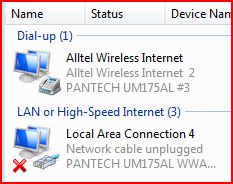
If My alltel would show up under the Lan or high-speed Insted of under Dial-up I dont think there would be a problem at all.
Im now running Vista not xp anymore But this is how i made my xbox360 connect to live: ( the xbox could not connect to the live sever, same as the MJ cannot connect to the registration server)
Ill try this later But here were the steps to take to connect my xbox360 to xbox live for gamming.:::
---------------------------------------------
Access Xbox Live via Dial-up 56k Connect OR Mobile wireless High Speed.
Introduction
This tutorial will explain to you how to setup your computer to share its 56k dial-up modem connection to your xbox 360 console so you can download dashboard updates, game updates and other content.
Required Items
- Windows ME, XP, Vista
- PC with dial-up connection working
- Ethernet Cable (RJ45) cable or CROSSOVER CABLE
- Xbox 360
Let's Get Started
1. First connect the Xbox 360 and the PC using the Ethernet cable.
2. Double Click your Dial-up Network connection and wait for it to connect.
3. Choose "Start Menu" and then choose "Settings" then "Control Panel".
4. Select "Network and Internet Connections".
5. Open the "Network Setup Wizard" and then press "Next".
6. On the next screen Ignore the checklist and press "Next" again.
7. Select "This Computer connects directly to the internet." and press "Next".
8. Now Select your dial-up internet connection as your default connection to the Internet and press "Next".
9. Select "Local Area Connection" as your private connection and leave all other areas untouched and click "Next".
10. On the Workgroup screen leave all settings alone and click the "Next" button.
11. On the next screen Turn on "File and Printer Sharing" if you want to share your files, mp3's, divx files with your xbox 360 and click "Next".
12. Now review the settings and click "Next" to apply the changes.
13. You do not need to run the Network Setup Wizard on any other pc's so just click "Next" and continue.
Now that the wizard has completed you may need to reboot your PC and dial your internet connection again.
Xbox 360 Setup
Now we have configured your PC to share its internet connection and files to your Xbox 360 we need to configure the Xbox 360.
1. Go to the "Xbox 360 Dashboard".
2. Select the "System" Blade.
3. Select the "Network Settings" Option
4. Now choose "Test Xbox LIVE Connection".
Your Xbox 360 will now attempt to contact your home network. It will check to make sure it can assign itself a IP ADDRESS from your PC and then it will also check DNS server information and XBOX LIVE.
-------------------------------------------------------------------------
Everyone having the same problem connecting the MJ and using a Mobile wireless card or usb Give This A try and let me know if you MJ connects..
(( no you dont need a xbox360, im just thinking the MJ connects the same way ) where the MJ looks for a High-Speed connection only )
If My alltel would show up under the Lan or high-speed Insted of under Dial-up I dont think there would be a problem at all.
If it has 4 tires with a remote and runs on Nitro, ill Race It!
-
OurRCspace
- magicJack Apprentice
- Posts: 18
- Joined: Wed Nov 26, 2008 6:25 pm
- Location: USA Michigan
- Contact:
..... 
Network Update:
Well MJ still will not connect, I have even setup a network with 2 pc's and used my Alltel on one and the MJ on the other PC, This method works to trick the Xbox360 into thinking it is true broadband to connect to xboxLive and works without a flaw!
I have also run a Ping to talk4free.com and found MTU 1470 is the best i can get,(maby 1472) So I went into registery and set it up, it was running at 1500 But i am at 100% loss and 0% loss at 1470.
Still same Error Cannot connect to registration server.
BUT: I delete a file called WROFFLINE.html and was able to register and a profile was made in My.magicjack.com and a phone # was assigned to it ... IT did CONNECT !!! ,,If it was not connected then how did it make a profile and register the MJ on there server ???????
Still same Error Cannot connect to registration server.
I went back threw to double check Ports:
5060,5070,5061,80,88,444,,,, They are set to exactly what support told me to do, Even tho it looks that the MJ works for some people with only 5060-5070 open
Well im going to give it a rest for a few days, im getting burned out on options to try... Any ideas or questions please contact me!
Network Update:
Well MJ still will not connect, I have even setup a network with 2 pc's and used my Alltel on one and the MJ on the other PC, This method works to trick the Xbox360 into thinking it is true broadband to connect to xboxLive and works without a flaw!
I have also run a Ping to talk4free.com and found MTU 1470 is the best i can get,(maby 1472) So I went into registery and set it up, it was running at 1500 But i am at 100% loss and 0% loss at 1470.
Still same Error Cannot connect to registration server.
BUT: I delete a file called WROFFLINE.html and was able to register and a profile was made in My.magicjack.com and a phone # was assigned to it ... IT did CONNECT !!! ,,If it was not connected then how did it make a profile and register the MJ on there server ???????
Still same Error Cannot connect to registration server.
I went back threw to double check Ports:
5060,5070,5061,80,88,444,,,, They are set to exactly what support told me to do, Even tho it looks that the MJ works for some people with only 5060-5070 open
Well im going to give it a rest for a few days, im getting burned out on options to try... Any ideas or questions please contact me!
If it has 4 tires with a remote and runs on Nitro, ill Race It!
You don't need to open any ports unless you have outgoing ports closed. MJ doesn't connect to your computer. Your computer connects to MJ's servers.OurRCspace wrote:I went back threw to double check Ports:
5060,5070,5061,80,88,444,,,, They are set to exactly what support told me to do, Even tho it looks that the MJ works for some people with only 5060-5070 open
I don't know what dead chat is telling people to do, but it seems like people are getting the impression they need to open 5060-5070 so the MJ server can open a connect to the computer running the MJ client software. From everything I've seen, that's not true.
Mark
-
OurRCspace
- magicJack Apprentice
- Posts: 18
- Joined: Wed Nov 26, 2008 6:25 pm
- Location: USA Michigan
- Contact:
-
OurRCspace
- magicJack Apprentice
- Posts: 18
- Joined: Wed Nov 26, 2008 6:25 pm
- Location: USA Michigan
- Contact:
I really am starting to think nothing is wrong on my pc, I have tryed More than needed.
I almost bet its somthing in the MJ software that is a little 2 touchy
Not in my Jack But on there sever side. My MJ Dial box is up and i get this... (Saying its connected to Not connected )
I even see my address at the bottom of the box where the 911 info is.
But it happens FAST, Bloop,, gone
Im having fun on xbox live atleast with no problems, 0 packets lost.
Well Im going to give alltel another try on the phone and double check again that they do not block anything.
I think i could love the magic jack,,, IF it would work!!
And i cant just change my ISP service i have a 2 year contract with Alltel. Becides I like alltel due to they are Unlimited Data!! NO MONTHLY CAP!
I almost bet its somthing in the MJ software that is a little 2 touchy
Not in my Jack But on there sever side. My MJ Dial box is up and i get this... (Saying its connected to Not connected )
I even see my address at the bottom of the box where the 911 info is.
But it happens FAST, Bloop,, gone
Im having fun on xbox live atleast with no problems, 0 packets lost.
Well Im going to give alltel another try on the phone and double check again that they do not block anything.
I think i could love the magic jack,,, IF it would work!!
And i cant just change my ISP service i have a 2 year contract with Alltel. Becides I like alltel due to they are Unlimited Data!! NO MONTHLY CAP!
If it has 4 tires with a remote and runs on Nitro, ill Race It!
-
OurRCspace
- magicJack Apprentice
- Posts: 18
- Joined: Wed Nov 26, 2008 6:25 pm
- Location: USA Michigan
- Contact:
-
OurRCspace
- magicJack Apprentice
- Posts: 18
- Joined: Wed Nov 26, 2008 6:25 pm
- Location: USA Michigan
- Contact:
I was reading the forum's and tryed the:
how to use the magicJack service without plugging in the dongle
It did work but i get the same error " cannot connect "
Well at least now i know its not my USB !
No word back yet from the big guys yet... " Figures"
Anyways im going to run a few tests and see Exactly what URL's the MJ connects to in the sys managment.
how to use the magicJack service without plugging in the dongle
It did work but i get the same error " cannot connect "
Well at least now i know its not my USB !
No word back yet from the big guys yet... " Figures"
Anyways im going to run a few tests and see Exactly what URL's the MJ connects to in the sys managment.
If it has 4 tires with a remote and runs on Nitro, ill Race It!
If you're getting that error, you should follow the suggestion in this thread: http://www.phoneservicesupport.com/erro ... t3858.htmlOurRCspace wrote:It did work but i get the same error " cannot connect "
That user found absolutely nothing from MJ was making it to the network card. Probably something like ZoneAlarm was blocking the application from even accessing the network. S/he had to reinstall Windows to fix it.
You can reply to that thread if you have questions about what's said there.
Mark
-
OurRCspace
- magicJack Apprentice
- Posts: 18
- Joined: Wed Nov 26, 2008 6:25 pm
- Location: USA Michigan
- Contact:
I tryed a few things on that post, No luck!

I give my MJ for My Ma to try on her laptop with dialup, And she called me with it, She had to talk real slow for me to under stand what she was saying but it did work.
her speed test is down 43 kb/s up 445 kb/s and 265 Ping
............THIS SUCKS................
i have a better speed test up,down,ping and voip..
ok tomarrow im trying my alltel usb UM175 on her laptop and see it it works ...
IF it DOES it Throwing my PC out the WINDOW !!!!!!!!!!
I take that back.. im kepping my quadro video card out of it..
If it Dont Work with her laptop and my UM175,,, Im not sue what i will do..
I tryed that anylizer software in her post, and it would not read my Alltel, it could see my wireless G card and eathernet card But no alltel USB.
I give my MJ for My Ma to try on her laptop with dialup, And she called me with it, She had to talk real slow for me to under stand what she was saying but it did work.
her speed test is down 43 kb/s up 445 kb/s and 265 Ping
............THIS SUCKS................
i have a better speed test up,down,ping and voip..
ok tomarrow im trying my alltel usb UM175 on her laptop and see it it works ...
IF it DOES it Throwing my PC out the WINDOW !!!!!!!!!!
I take that back.. im kepping my quadro video card out of it..
If it Dont Work with her laptop and my UM175,,, Im not sue what i will do..
I tryed that anylizer software in her post, and it would not read my Alltel, it could see my wireless G card and eathernet card But no alltel USB.
If it has 4 tires with a remote and runs on Nitro, ill Race It!
-
OurRCspace
- magicJack Apprentice
- Posts: 18
- Joined: Wed Nov 26, 2008 6:25 pm
- Location: USA Michigan
- Contact:
 ok , i got my MJ back and tryed it on this pc again, and now it works,,, But for outgoing calls only. the sound quality is exclent !!!!!
But here is a stranger thing yet! it still says not connected and no 911 info, but i just pick up the phone and dial and it works!
I looked up the IE history on the laptop, and found the sites it connects to, and pasted all that info to my thumb drive, and opened it up on this pc, when i goto the 911.talk4free.com/location_picker.php?dbkey=*********** my info shows up in IE...
There MUST be somthing in Vista Blocking part of the connection.. I have no clue what, Every thing is uninstalled, dissconected, or turned off..
Any ideas ???? i have tripple checked the ports and trusted sites.
If it has 4 tires with a remote and runs on Nitro, ill Race It!