Runing Magicjack on XLite. How to enter the User Agent.

magicJack Tips and Tricks

Moderators: Bill Smith, Pilot

Post Reply
MagicDump
Dan isn't smart enough to hire me
Posts: 100
Joined: Thu Sep 11, 2008 8:19 pm

Runing Magicjack on XLite. How to enter the User Agent.

Post by MagicDump »

Go to Stroths MagicJack Utilities Suite v1.5
http://www.phoneservicesupport.com/stro ... t4230.html

Download the file and get your SIP info.


Image

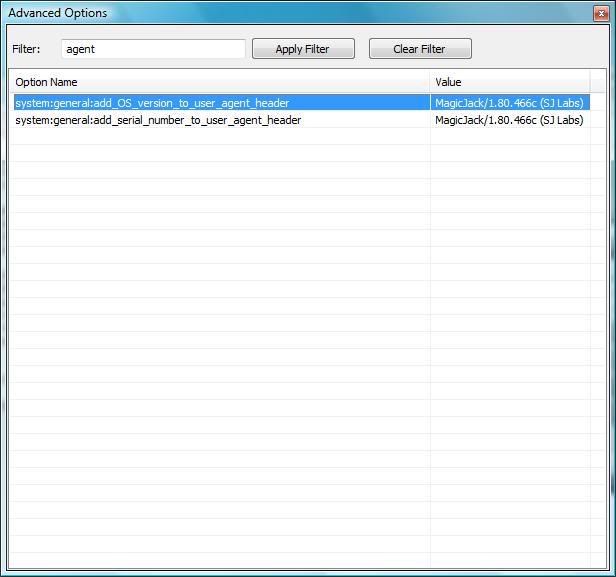
Yes you can input the eg. User-Agent = MagicJack/1.80.466c (SJ Labs)
The Trick is to go to the advance user menu in XLite by dialing (***7469)
and then filter for Agent and copy your current User-Agent Version.

Image

You can change the proxy server if you want to, it does not really matter
but keep the Port Number as 5070.

For a list of proxy servers go tho this link:

http://www.phoneservicesupport.com/walk ... 6-270.html


You may want to give it a try
Last edited by MagicDump on Thu Jan 08, 2009 10:13 am, edited 3 times in total.
gnimsh
Dan isn't smart enough to hire me
Posts: 165
Joined: Sun Nov 25, 2007 11:00 am
Location: Minneapolis, MN

Post by gnimsh »

This works in windows but not in linux. Please advise on how to reach the advanced settings in the linux x-lite softphone.
User avatar
JohnnyFreightTRAIN
Dan isn't smart enough to hire me
Posts: 313
Joined: Fri Aug 08, 2008 3:09 am

Post by JohnnyFreightTRAIN »

I had this working yesterday but for some reason after about 10 minutes of talking the sound got REALLY bad.
Screeching, choppy, robotic sounding... you name it

I also cant get it to hang up when I hang up the phone, and it also cuts me off randomly
(which the magicjack also does since the newest upgrade so who knows).
I was trying to test the 60 minute call limit to see if it's just the softphone provided with MJ that is imposing that
but I can never get to 60 minutes without it randomly deciding to hang up on me.
That also happens when I try to test it on the magicjack softphone itself,
I can rarely get to 60 minutes without being disconnected beforehand.
Does anyone else have this problem? Perhaps it's the phone number I have been calling...

Honestly, that's the only reason I would use another softphone aside from the fact that it won't pop up
every time I use it and there is no splash screen.
Which doesn't really bother me that much and that alone is not worth
risking my account.

I'd like to try an ATA, It would be nice having a device that isn't relying on your computer being on and all that crap.
But again the only reason I'm considering breaking the TOS is because of this call cap.
I feel like I am either being forced to break the TOS, put up with the call cap, or find another VOIP provider.
Damn you Dan Borislow... :x

Does anyone who has an ATA or is using a different softphone have the 60 minute limit?
It is my understanding that this is only a problem with the newest upgrade.
Is this correct?
Image
MagicDump
Dan isn't smart enough to hire me
Posts: 100
Joined: Thu Sep 11, 2008 8:19 pm

Post by MagicDump »

Hi Johnny
JohnnyFreightTRAIN wrote:Does anyone who has an ATA or is using a different soft phone have the 60 minute limit?
It is my understanding that this is only a problem with the newest upgrade.
Is this correct?
I don't have any issues with, the time, I have use it for over two hrs, no problem. you may be right about the newest upgrade, it will be nice to know.
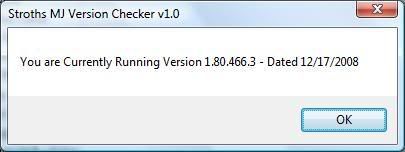
This is my current running version in case you want to compare.

Image
I had this working yesterday but for some reason after about 10 minutes of talking the sound got REALLY bad.
Screeching, choppy, robotic sounding... you name it
As far as the choppy sound it could be your routers, make sure you are forwarding ports 5070 and 5060 to your computer.

Also if you want to you can change your Proxy server.

Ex: proxy1.miami.talk4free.com:5070 this is the proxy I am suppose to use but if I use proxy1.atlanta.talk4free.com:5070 my connection is faster
and better audio quality. there is no problem on changing proxy.

Image

As you can see it takes les time to connect to the proxy in Atlanta, that will it take to the Miami proxy but my phone is in Miami.

BTW you can't change Proxy with the MJ software.

You may want to try this also, it works good for the people getting one way audio only, but it may work for you.

Dial ***7469 (SEND)
This will bring up the advanced settings window
Filter for honor
Double click on the honor entry and change the value to 1.

I also cant get it to hang up when I hang up the phone
That I will like to know how is done, I can't never get my phone to hang up, I am using the USB adapter from MJ.

Thank you
MagicDump
Dan isn't smart enough to hire me
Posts: 100
Joined: Thu Sep 11, 2008 8:19 pm

Post by MagicDump »

Bump.
djwishbone
MagicJack Newbie
Posts: 1
Joined: Tue May 26, 2009 5:16 pm

Post by djwishbone »

I'm pretty sure this does not work. The value you are editing is a boolean made to send additional information (OS and serial) with the user agent string, not define your own string. This is probably why it does't appear to save. I'd still love to figure out how to set the user agent string, but I'm pretty sure this won't work.
Post Reply