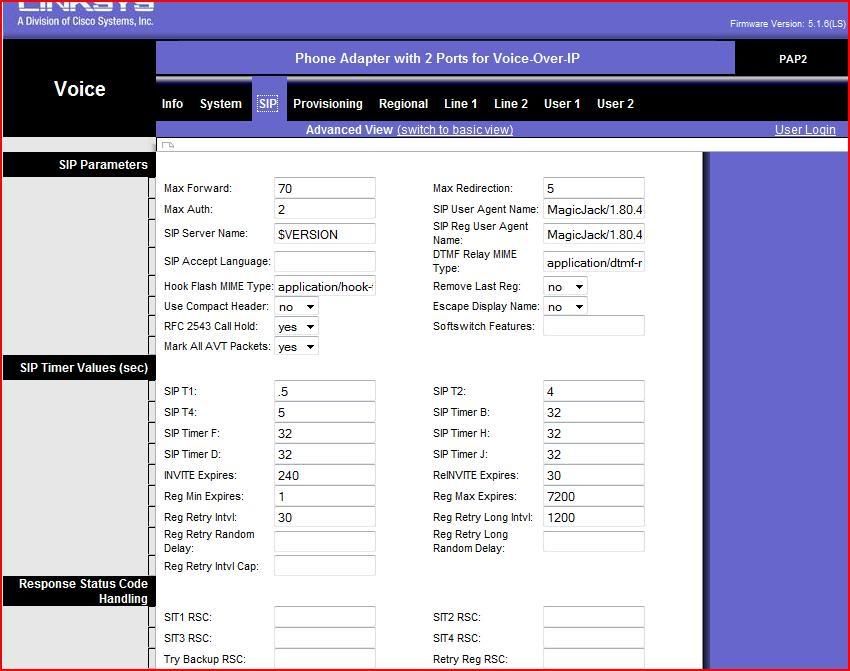
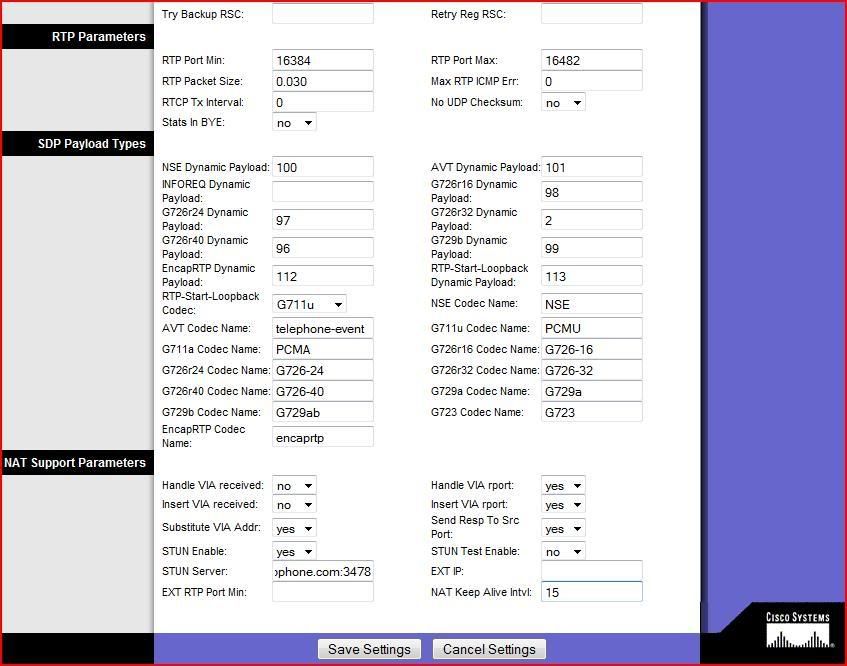
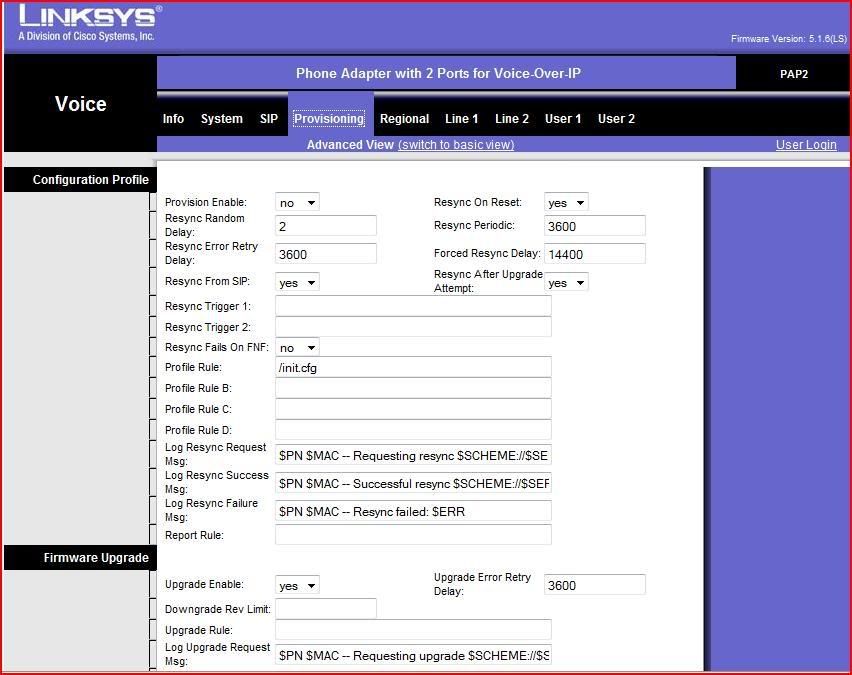
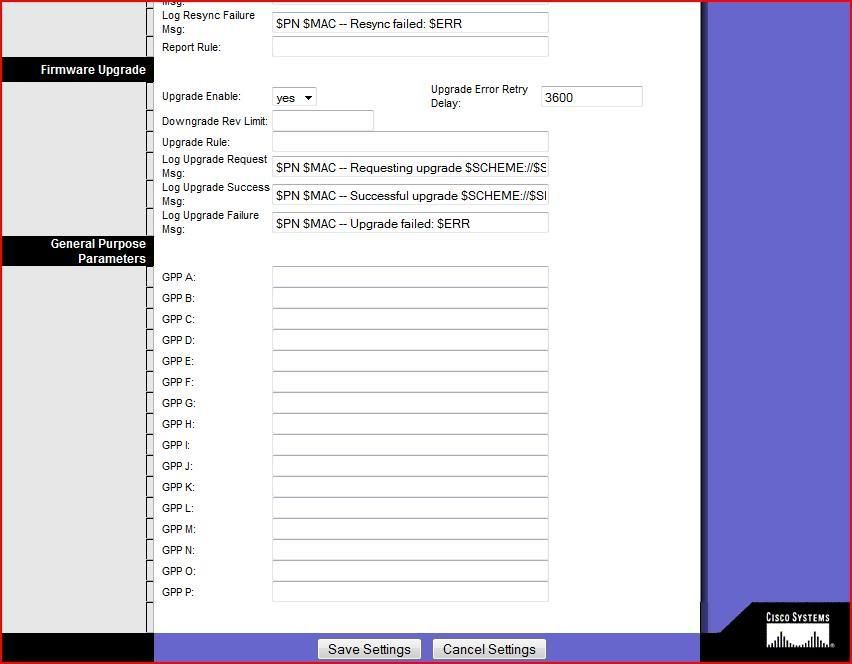
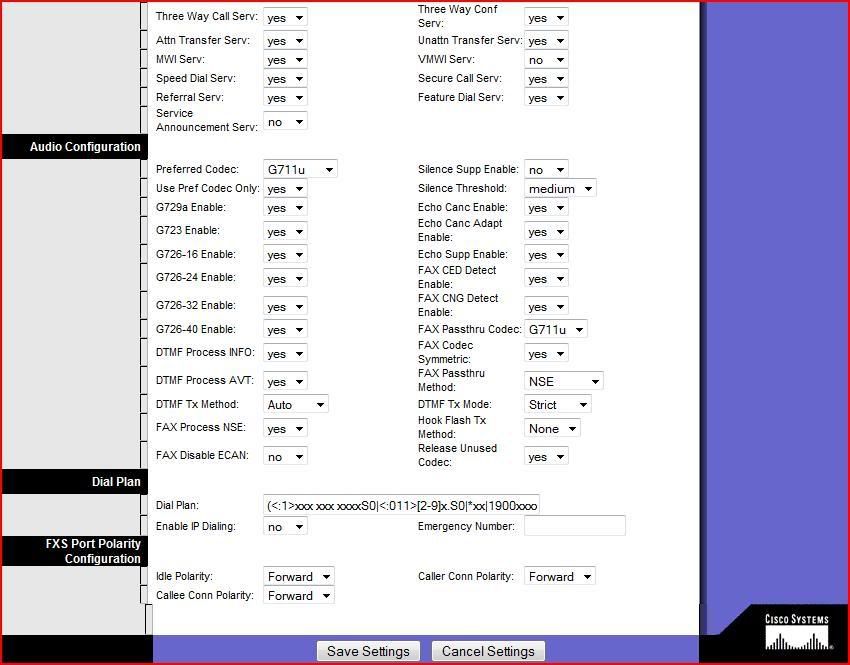
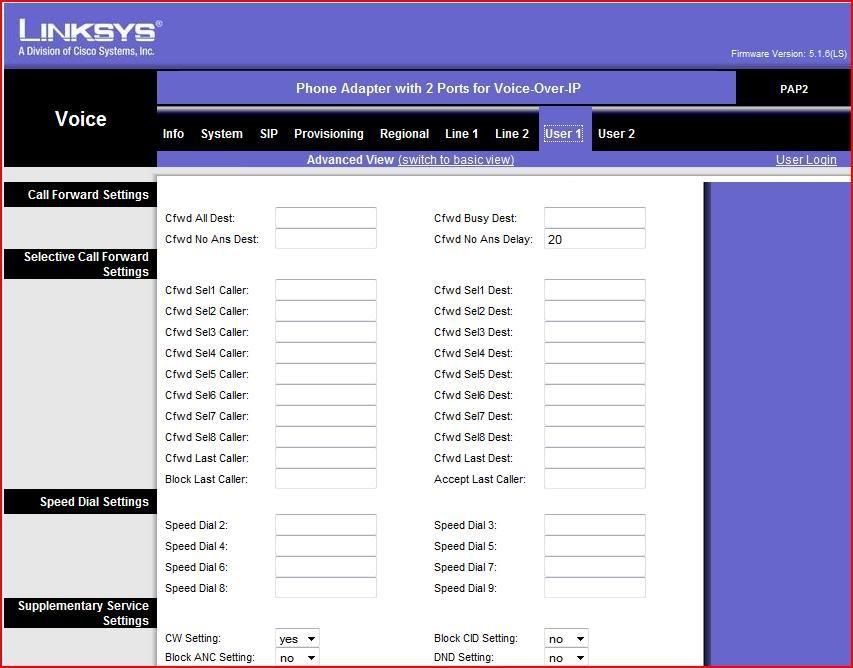
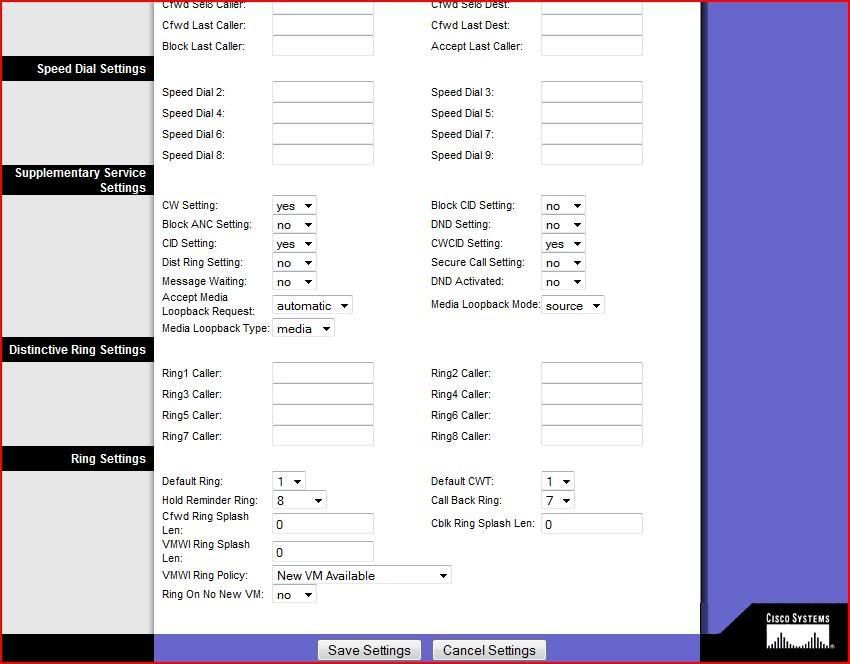
Magicjack in a PAP2T Configuration Pics

magicJack Tips and Tricks

Moderators: Bill Smith, Pilot

MagicDump
Dan isn't smart enough to hire me
Posts: 100
Joined: Thu Sep 11, 2008 8:19 pm

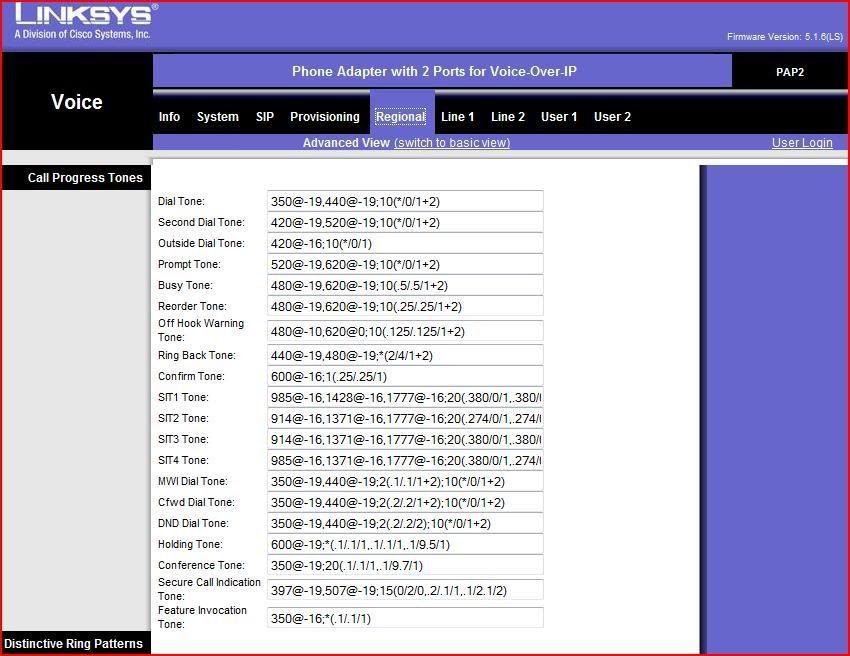
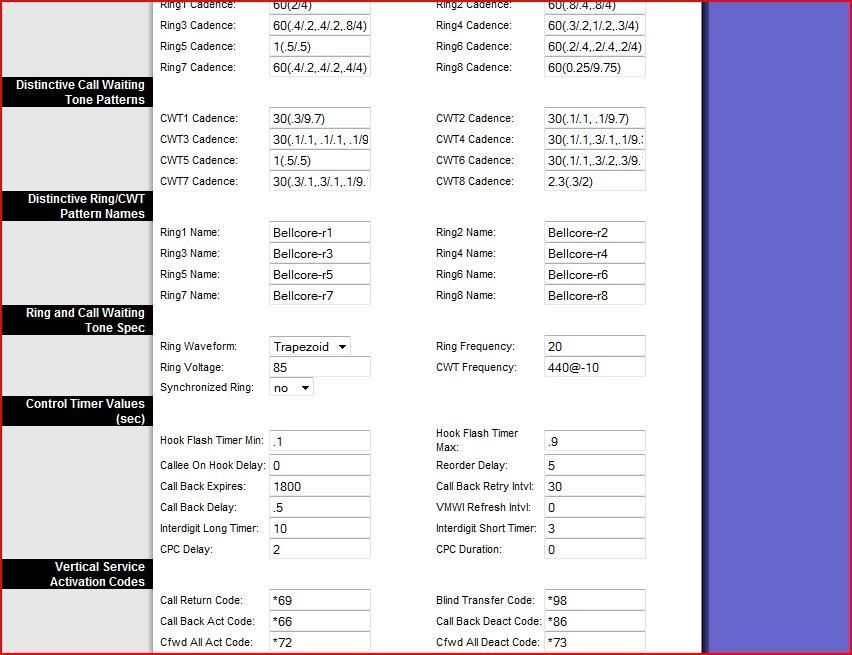
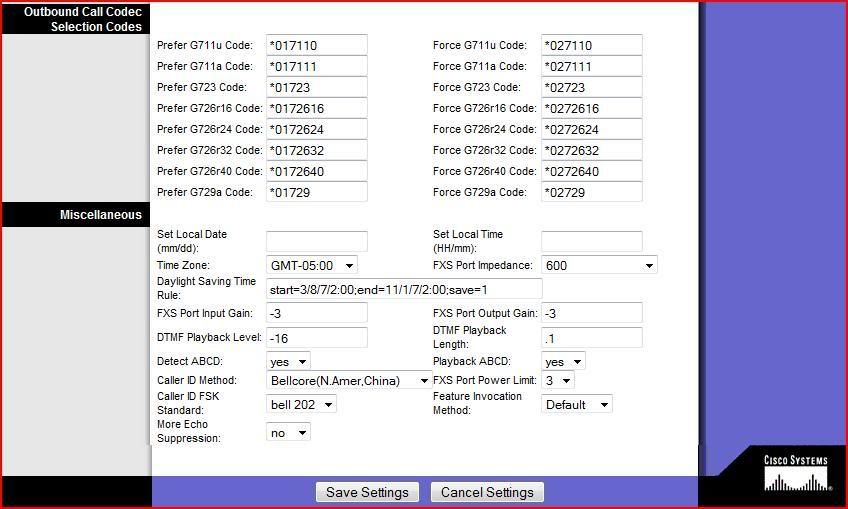
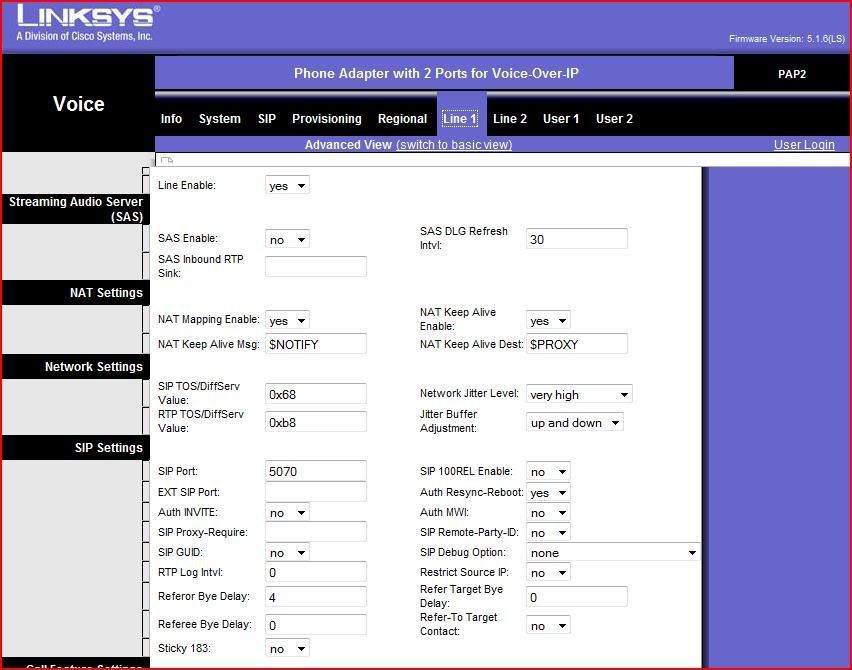
Magicjack in a PAP2T Configuration Pics

Post by MagicDump »

Image
Image
Image
Image
Image
Image
Image
Image
Image
Image
Image
Image[/img]
Image
Image

10 Digits Linksys PAP2T USA and Canada Dial Plan no Long Distance:

Code: Select all

([49]11S0|[2-9]xx[2-9]xxxxxxS0|011!)

Code: Select all

[49]11S0
[49]: Anything enclosed within '[]' brackets represents 1 number. In the above case, it's a number range allowing either a 4 or 9 to fit the dial plan.
In other words, You can dial 411 or 911

S0: (S followed by the number 0) represents 'Straight Out'. So this part of the dial plan is saying to your PAP2 that should a person dial a sequence of keys that 'fit' the above portion of the dial plan, process the call immediately (i.e., without waiting for more digits to be pressed on the keypad).

Code: Select all

|[2-9]xx[2-9]xxxxxxS0|
This part of the Dial Plan will allow yo to dial your 10 digits number without waiting for more digits to be pressed on the keypad.

Code: Select all

|011!
This part of the Dial Plan will prohibit any long distance calling.


(: The entire dial plan must be enclosed within a pair of brackets '()'.

|: The '|' in a dial plan separates each component of that dial plan.


This next calling Plan will avoid any accidental calling to 911.

Code: Select all

(411S0|911!|[2-9]xx[2-9]xxxxxxS0|011!)
!: The '!' at the end of the number will prevent the number for been dialed.

Magicjack in a PAP2T Configuration Text Version.

http://rapidshare.com/files/208210096/PAP2TMJ.config

The above Link is a text version configuration for the PAP2T with Magicjack, just download the file and open it up as a text, with Notepad or any text editor, cut and paste as you need and change your Dial Plan and Sip info accordingly.There is also a program mentioned in this Post (Spaconf) that will allow you to backup and also restore your PAP2T configuration using this or any or your own file fast an easy, but that will be another Post discussion.

You can download Spaconf from this following link:

http://www.opensky.ca/~jdhildeb/softwar ... downloads/
Last edited by MagicDump on Wed May 13, 2009 7:06 pm, edited 9 times in total.
mberlant
Dan Should Pay Me
Posts: 829
Joined: Sun Feb 01, 2009 7:47 pm
Location: Japan

Post by mberlant »

Everything in this configuration looks wonderful except the Dial Plan. The Dial Plan, from the parts that I can see, will not work as desired and will not prevent calls to 1-900 services because of the ambiguities introduced in the first clause. This code, which I published in a thread dedicated to Linksys/Sipura Dial Plans, has no ambiguities in it, and will prevent calls to 900 and 976 services.

Code: Select all

([1235-9]11!|411S0|<:1311>[2-9]xxxxxxS0|1[2-9]xx[2-9]xxxxxxS0| 1441!|1473!|1649!|1758!|1767!|1784!|1876!|1[26][68]4!|1[28]68!| 124[26]!|134[05]!|167[01]!|18[06]9!|011!)
MagicDump
Dan isn't smart enough to hire me
Posts: 100
Joined: Thu Sep 11, 2008 8:19 pm

Post by MagicDump »

mberlant wrote:Everything in this configuration looks wonderful except the Dial Plan. The Dial Plan, from the parts that I can see, will not work as desired and will not prevent calls to 1-900 services because of the ambiguities introduced in the first clause. This code, which I published in a thread dedicated to Linksys/Sipura Dial Plans, has no ambiguities in it, and will prevent calls to 900 and 976 services.

Code: Select all

([1235-9]11!|411S0|<:1311>[2-9]xxxxxxS0|1[2-9]xx[2-9]xxxxxxS0| 1441!|1473!|1649!|1758!|1767!|1784!|1876!|1[26][68]4!|1[28]68!| 124[26]!|134[05]!|167[01]!|18[06]9!|011!)
Thank you mberlan

I think Dan should pay you LOL :lol:
msiam
Dan isn't smart enough to hire me
Posts: 474
Joined: Thu Nov 15, 2007 2:42 pm
Location: WI

Post by msiam »

mberlantm, what would cause a lot of calls to come in on the PAP2 NA or the InnoMedia (SR) to have a one way audio?? I call the MJ number from the Cell, I hear me on the cell but cant hear the cell.. :? then I call back from the other and the audio is fine.. :?
Last edited by msiam on Thu Mar 05, 2009 1:15 pm, edited 1 time in total.
ImageImage
freebie916
MagicJack Newbie
Posts: 7
Joined: Sat Feb 21, 2009 6:36 pm

User 1

Post by freebie916 »

Did you have to configure anything in the User 1 option menu?
I matched kumar's config as much as possible but this one
was more concise because it was for my model ATA.

I matched all of the settings on this one (I included my account info of course) and I get the same results, no incoming calls. They all
go straight to voice mail. I've been going over all the posts
in this forum. I've set my reg exp from 840 to 60 and still no avail.
I also put the PAP2t into DMZ and still no incoming calls.
Any help would be appreciated. thanks.
msiam
Dan isn't smart enough to hire me
Posts: 474
Joined: Thu Nov 15, 2007 2:42 pm
Location: WI

Post by msiam »

Magicdump, I might suggest you disable the Provisioning , choose "no" In all the other posts on this it is one of the first things to perform.. Correct me if I am wrong, mberlant :? Also, I question in the "line 1" sip port, shouldn't that be "5060"? The 5070 is entered in the proxy1, Just asking here, I have mine set at 5060 and it is working fine with that, except for that question about the on and off one way audio that I am suspecting is a universal MJ on ATA problem. mberlant, .Please correct me on that if I am wrong..
ImageImage
MagicDump
Dan isn't smart enough to hire me
Posts: 100
Joined: Thu Sep 11, 2008 8:19 pm

Post by MagicDump »

msiam wrote:Magicdump, I might suggest you disable the Provisioning , choose "no" In all the other posts on this it is one of the first things to perform.. Correct me if I am wrong, mberlant :? Also, I question in the "line 1" sip port, shouldn't that be "5060"? The 5070 is entered in the proxy1, Just asking here, I have mine set at 5060 and it is working fine with that, except for that question about the on and off one way audio that I am suspecting is a universal MJ on ATA problem. mberlant, .Please correct me on that if I am wrong..
This is getting interesting I know I will probably be able to improve my settings, but my Pap2t is working very good, no problems with audio now after mberlan point out in one of the threads of the use of just G711u audio codec. I will probably change my Provisioning to "no" but as far as the port I will keep it as 5070.
May be mberlan will like to advise better. :wink:
Poo619
MagicJack Expert
Posts: 96
Joined: Tue Nov 20, 2007 9:27 am

Post by Poo619 »

I'm using a SPA-2102 and I have both in and out audio. My SIP port is set to 5060. My proxy is set to xxx.xxx.xxx.xxx:5070 (xxx is the IP address for my proxy followed by 5070 for the port.) If you are having 1 way audio please check the Codecs you are using along with your router settigns. Be sure to forward ports 5060-5070 to your sip device.
mberlant
Dan Should Pay Me
Posts: 829
Joined: Sun Feb 01, 2009 7:47 pm
Location: Japan

Post by mberlant »

Poo619 wrote:I'm using a SPA-2102 and I have both in and out audio. My SIP port is set to 5060. My proxy is set to xxx.xxx.xxx.xxx:5070 (xxx is the IP address for my proxy followed by 5070 for the port.) If you are having 1 way audio please check the Codecs you are using along with your router settigns. Be sure to forward ports 5060-5070 to your sip device.
Many people here are confusing the SIP server's "hailing" port with the client device's "listening" port. MJ has defined that all of their proxy servers listen on Port 5070, so that is what you must hail them on, as in "xxx.xxx.xxx.xxx:5070" for the appropriate proxy field. Your own port, "Line1|SIP Settings|SIP Port:" in this example, may be anything you wish, as long as each of the Lines (and features, like web access) within the same ATA is assigned a different port number. It is only convention that says that Line 1 is normally assigned 5060, Line 2 is normally assigned 5061, web access is normally assigned 80, etc. No matter whether you choose 5060, 5070 or 12345 as your own listening port number, your router in doing its job will reassign that transaction to any available Port number as it does its NAT function to send the call out into the public internet.

I am also a firm believer that it is never a good idea to open inbound ports in a router in support of any SIP client, and is only a necessary evil when your router is the second NAT router sitting behind another NAT router (your ISP's or your hotel's or your apartment building's) that you cannot control. There are other threads here that discuss the intricacies of that topic.

By the way, for the purposes of this thread's topic, all of this discussion is applicable to any Linksys or Sipura ATA or SIP phone. As far as one-way audio problems, I recommend addressing those problems in a thread already devoted to that topic, and only bringing the solution back to this thread if it turns out to be a parameter setting in a Linksys/Sipura ATA.
freebie916
MagicJack Newbie
Posts: 7
Joined: Sat Feb 21, 2009 6:36 pm

Post by freebie916 »

So are we to assume that nothing is changed in the User 1 menu?
mberlant
Dan Should Pay Me
Posts: 829
Joined: Sun Feb 01, 2009 7:47 pm
Location: Japan

Post by mberlant »

I can only recommend that you do not program any of the automated Call Forwarding features, because MJ's servers will not honor a REDIRECT message and if you send them one it is a good way to flag your account for fraud and have it banned.

What feature on the User page are you thinking about?
freebie916
MagicJack Newbie
Posts: 7
Joined: Sat Feb 21, 2009 6:36 pm

Post by freebie916 »

Thanks for your help guys! I finally got it to work correctly. I am able to make calls as well as receive them. The settings I had to change were in the User 1 menu.

I had to change the default settings in the User 1 menu's Supplementary Service Settings. I matched them up to Magicdump's settings and it worked perfectly! Thanks again!
MagicDump
Dan isn't smart enough to hire me
Posts: 100
Joined: Thu Sep 11, 2008 8:19 pm

Post by MagicDump »

freebie916 wrote:Thanks for your help guys! I finally got it to work correctly. I am able to make calls as well as receive them. The settings I had to change were in the User 1 menu.

I had to change the default settings in the User 1 menu's Supplementary Service Settings. I matched them up to Magicdump's settings and it worked perfectly! Thanks again!
freebie916

The settings posted in here for the User1 are the default settings. I didn't post them before because I never change anything in it, but them I realized someone may have changed something accidentally.

I glad I could help :)
freebie916
MagicJack Newbie
Posts: 7
Joined: Sat Feb 21, 2009 6:36 pm

Post by freebie916 »

mberlant wrote:I can only recommend that you do not program any of the automated Call Forwarding features, because MJ's servers will not honor a REDIRECT message and if you send them one it is a good way to flag your account for fraud and have it banned.
I'm a little worried about this one now. Are these call forwarding features on by default? Also what menu are they located on in the PAP2T configs?
pagemen
Dan isn't smart enough to hire me
Posts: 128
Joined: Mon Dec 15, 2008 6:36 am

Post by pagemen »

the correct daylight saving rule should be

start=3/8/7/2:00;end=11/1/7/2:00;save=1
mberlant
Dan Should Pay Me
Posts: 829
Joined: Sun Feb 01, 2009 7:47 pm
Location: Japan

Post by mberlant »

They may be elsewhere on a PAP2 (I don't have one nearby), but on all SPA devices these are fill-in boxes at the top of the User page.

The first section of boxes lets you fill in the destination telephone numbers for CFA, CFB and CFNA and the ring delay for CFNA. The second section of boxes lets you fill in a Caller ID number or pattern in the left-hand box and the destination phone number for that pattern in the right-hand box.

These functions of the ATA work by intercepting the Incoming Call packet and sending it back to the SIP server as a Redirect packet containing the new destination telephone number.

Since the MJ softphone does not work this way (Call Forwarding is performed by registering the request inside MJ's server), causing your ATA to send this illegal packet to the MJ server is an invitation to be identified as a fraudulent user.

There is another reason I would not like to see you tempt the fates by trying this feature. One of the ways we get to continue using our own ATAs with the MJ service is by staying under MJ's radar. I don't recommend anything that has a high probability of waking that sleeping bear.
MagicDump
Dan isn't smart enough to hire me
Posts: 100
Joined: Thu Sep 11, 2008 8:19 pm

Post by MagicDump »

Thanks mberlant:

I have edited the first post and posted the screen shot of the User Menu and as you said is in the first part of the User Menu as Cfwd options.
So just don't put anything in there.
MagicDump
Dan isn't smart enough to hire me
Posts: 100
Joined: Thu Sep 11, 2008 8:19 pm

Post by MagicDump »

pagemen wrote:the correct daylight saving rule should be

start=3/8/7/2:00;end=11/1/7/2:00;save=1
Thanks pegemen, the correction have been made.
FrankPepe
magicJack Apprentice
Posts: 13
Joined: Sun Feb 15, 2009 2:58 pm

Post by FrankPepe »

Hi Msiam
, My RTP300 was working great untill 3 days ago and then I started experiencing this intermittent one way audio you describe. have you found a solution in the settings yet? If not in the settng is ther a thread devoted to this topic elsewhere? thanks!
-Frank
msiam wrote:Magicdump, I might suggest you disable the Provisioning , choose "no" In all the other posts on this it is one of the first things to perform.. Correct me if I am wrong, mberlant :? Also, I question in the "line 1" sip port, shouldn't that be "5060"? The 5070 is entered in the proxy1, Just asking here, I have mine set at 5060 and it is working fine with that, except for that question about the on and off one way audio that I am suspecting is a universal MJ on ATA problem. mberlant, .Please correct me on that if I am wrong..
mberlant
Dan Should Pay Me
Posts: 829
Joined: Sun Feb 01, 2009 7:47 pm
Location: Japan

Post by mberlant »

Yes, someone in another thread said that he had success by changing which proxy server he pointed to. Search for "proxy" and scan the titles for that recent posting if you want to read that discussion.
AlpineMan
magicJack Apprentice
Posts: 12
Joined: Sun Mar 02, 2008 2:02 am

Post by AlpineMan »

mberlant wrote:Everything in this configuration looks wonderful except the Dial Plan. The Dial Plan, from the parts that I can see, will not work as desired and will not prevent calls to 1-900 services because of the ambiguities introduced in the first clause. This code, which I published in a thread dedicated to Linksys/Sipura Dial Plans, has no ambiguities in it, and will prevent calls to 900 and 976 services.

Code: Select all

([1235-9]11!|411S0|<:1311>[2-9]xxxxxxS0|1[2-9]xx[2-9]xxxxxxS0| 1441!|1473!|1649!|1758!|1767!|1784!|1876!|1[26][68]4!|1[28]68!| 124[26]!|134[05]!|167[01]!|18[06]9!|011!)
Does this dial plan require the caller to enter area code first even if the number they're calling is in the same area code? Example, my area code is 626...and I want to call a friend in the 626 area code. Will I need to dial 1-626-xxx-xxxx or can I just dial xxx-xxxx using this dial plan. Thanks!
msiam
Dan isn't smart enough to hire me
Posts: 474
Joined: Thu Nov 15, 2007 2:42 pm
Location: WI

Post by msiam »

Frank, It seems that my problems have disappeared, so far, ever since I changed the proxy location, I will monitor and if I run into more difficulties, I will try to change the proxy again. So, it's " So Far, So Good", although, It just could have just been an upgrade issue from MJ for the last week or two.. :? Anyway.. we'll see.
ImageImage
mberlant
Dan Should Pay Me
Posts: 829
Joined: Sun Feb 01, 2009 7:47 pm
Location: Japan

Post by mberlant »

Discussion in another thread caused me to notice that there is no STUN setting in this configuration. While the ATA has other tricks to discover its public information in order to give that information to the SIP server, STUN is a very reliable method when these tricks fail for one reason or another.

I recommend the following settings at the bottom of the SIP page:

STUN Enable: Yes
STUN Test Enable: No
STUN Server: stun.ekiga.net:3478
NAT Keep Alive Intvl: 15

If this helps anyone close up the security exposure of forwarded ports, that would make me very happy.
mberlant
Dan Should Pay Me
Posts: 829
Joined: Sun Feb 01, 2009 7:47 pm
Location: Japan

Post by mberlant »

AlpineMan wrote:Does this dial plan require the caller to enter area code first even if the number they're calling is in the same area code? Example, my area code is 626...and I want to call a friend in the 626 area code. Will I need to dial 1-626-xxx-xxxx or can I just dial xxx-xxxx using this dial plan. Thanks!
Replace 311 in the third entry of the Dial Plan with 626. I explained this in the original thread, but didn't carry the whole discussion here.
MagicDump
Dan isn't smart enough to hire me
Posts: 100
Joined: Thu Sep 11, 2008 8:19 pm

Post by MagicDump »

Public STUN servers

* stun.ekiga.net
* stun.fwdnet.net (no XOR_MAPPED_ADDRESS support)
* stun.ideasip.com (no XOR_MAPPED_ADDRESS support)
* stun01.sipphone.com (no DNS SRV record)
* stun.softjoys.com (no DNS SRV record) (no XOR_MAPPED_ADDRESS support)
* stun.voipbuster.com (no DNS SRV record) (no XOR_MAPPED_ADDRESS support)
* stun.voxgratia.org (no DNS SRV record) (no XOR_MAPPED_ADDRESS support)
* stun.xten.com
* stunserver.org see their usage policy
* stun.sipgate.net:10000
* numb.viagenie.ca (http://numb.viagenie.ca) (XOR_MAPPED_ADDRESS only with rfc3489bis magic number in transaction ID)
* stun.ipshka.com inside UA-IX zone russsian explanation at http://www.ipshka.com/main/help/hlp_stun.php
VoipDude
Dan isn't smart enough to hire me
Posts: 129
Joined: Fri Mar 06, 2009 8:16 pm

Post by VoipDude »

Problem configuring my ATA. It's probably something simple I am overlooking. I'll try again later.
Last edited by VoipDude on Wed Mar 11, 2009 10:09 pm, edited 1 time in total.
VoipDude
Dan isn't smart enough to hire me
Posts: 129
Joined: Fri Mar 06, 2009 8:16 pm

Post by VoipDude »

I must say you surely have to have patience when your working with this kind of stuff :x
Last edited by VoipDude on Wed Mar 11, 2009 10:11 pm, edited 2 times in total.
pagemen
Dan isn't smart enough to hire me
Posts: 128
Joined: Mon Dec 15, 2008 6:36 am

Post by pagemen »

It would be great if someone could upload the configuration file backupped by this utility

http://www.opensky.ca/~jdhildeb/software/spaconf/

just make sure to remove the phone#.
you can back up your configuration to a computer
you can more easily swap configurations with other users
you can compare configurations easily (using diff)
you can use this tool to update your configuration programmatically (for different times of day, etc.)
you can store your configuration in a source control system
you prefer editing text files to using web interfaces
VoipDude
Dan isn't smart enough to hire me
Posts: 129
Joined: Fri Mar 06, 2009 8:16 pm

Post by VoipDude »

Problem solved.

Thanks to MagicDump for his excellent configuration picture post.

Thanks to mberlant for encouraging me to not give up.

VoipDude
MagicDump
Dan isn't smart enough to hire me
Posts: 100
Joined: Thu Sep 11, 2008 8:19 pm

Post by MagicDump »

pagemen wrote:It would be great if someone could upload the configuration file backupped by this utility
Thanks pagemen, excellent program, here is a backup file:

http://rapidshare.com/files/208210096/PAP2TMJ.config

You can open it as a text file.

Just ignore line2, and replace your SIP Credentials.

Enjoy
momo
Dan Should Pay Me
Posts: 541
Joined: Tue Aug 26, 2008 12:36 pm

Post by momo »

if i may ask, what is STUN, what does it do for the connection, my WiFi phone has this feature, OFF by default, but will it make any difference to the connection or service to use it on a dedicated WiFi phone?
mberlant wrote:Discussion in another thread caused me to notice that there is no STUN setting in this configuration. While the ATA has other tricks to discover its public information in order to give that information to the SIP server, STUN is a very reliable method when these tricks fail for one reason or another.

I recommend the following settings at the bottom of the SIP page:

STUN Enable: Yes
STUN Test Enable: No
STUN Server: stun.ekiga.net:3478
NAT Keep Alive Intvl: 15

If this helps anyone close up the security exposure of forwarded ports, that would make me very happy.
HP T5730 - AMD Turion 64 x2 Dual-Core 2.4GHz CPU
(TMDTL68HAX5DM)
320GB WD 2.5" H.D. / 2GB RAM
(Windows 8.1 Pro 64-bit)
EVGA GeForce 7600 GT PCIe x16 card, (in x1 speed)
New 12vdc 16 amp (192w) PSU
Kif Kroker
Dan isn't smart enough to hire me
Posts: 177
Joined: Mon Oct 20, 2008 12:47 am
Location: Sioux City, IA
Contact:

Post by Kif Kroker »

Here is some info about STUN.

http://www.voip-info.org/wiki-STUN
momo
Dan Should Pay Me
Posts: 541
Joined: Tue Aug 26, 2008 12:36 pm

Post by momo »

thanks
reading the page, STUN is mainly to "see thru" a NAT firewall?
Kif Kroker wrote:Here is some info about STUN.

http://www.voip-info.org/wiki-STUN
HP T5730 - AMD Turion 64 x2 Dual-Core 2.4GHz CPU
(TMDTL68HAX5DM)
320GB WD 2.5" H.D. / 2GB RAM
(Windows 8.1 Pro 64-bit)
EVGA GeForce 7600 GT PCIe x16 card, (in x1 speed)
New 12vdc 16 amp (192w) PSU
MJtricks
MagicJack Newbie
Posts: 1
Joined: Tue Mar 17, 2009 2:05 pm

Post by MJtricks »

MagicDump wrote:
pagemen wrote:It would be great if someone could upload the configuration file backupped by this utility
Thanks pagemen, excellent program, here is a backup file:

http://rapidshare.com/files/208210096/PAP2TMJ.config

You can open it as a text file.

Just ignore line2, and replace your SIP Credentials.

Enjoy

What do I do with this file?
mberlant
Dan Should Pay Me
Posts: 829
Joined: Sun Feb 01, 2009 7:47 pm
Location: Japan

Post by mberlant »

You use it as a reference when programming your own ATA.
cyberma007
magicJack Apprentice
Posts: 19
Joined: Sat Mar 14, 2009 12:57 am

Post by cyberma007 »

Hi all, I just got a PAP2 v2, unlocked it already, but I cant get it to work with my MJ info, does anyone have write up on it by any chance?
Will PAP2 v2 work with MJ?
Thanks
mberlant
Dan Should Pay Me
Posts: 829
Joined: Sun Feb 01, 2009 7:47 pm
Location: Japan

Post by mberlant »

What advice in this thread did not work for you? Please tell us what indication message you get on the Info page. Also, please confirm that you have unplugged your MJ dongle before applying power to your PAP2. The more details you can give, the better the chances that someone here will understand your situation and help you to get your PAP2 working.
cyberma007
magicJack Apprentice
Posts: 19
Joined: Sat Mar 14, 2009 12:57 am

Post by cyberma007 »

Ok i got it to work now, my next problem is when i dail a number i have to hit # for the number to go through, but i can call and recive just fine.
what can i do to skit hitting # in the end of dailing the number?
Thanks
sobaka
MagicJack Newbie
Posts: 1
Joined: Fri Sep 19, 2008 2:57 pm

Post by sobaka »

I got unlocked PAP-2 from ebay. Had connected to ac and network, did not program it yet. In about 30 min came back to it and picked it up in order to plug into the phone line. Discovered that the unit got really-really hot. can barely keep it in my hands. I am afraid the plastic case is going to melt. It does not feel normal. Disconnected it. This looks like a fire hazard. Do you guys find your PAP2 getting hot?
cyberma007
magicJack Apprentice
Posts: 19
Joined: Sat Mar 14, 2009 12:57 am

Post by cyberma007 »

Mine has been on for over 2 days and not hot.
it maybe your phone shorting it, unplug the phone and see how it goes,
msiam
Dan isn't smart enough to hire me
Posts: 474
Joined: Thu Nov 15, 2007 2:42 pm
Location: WI

Post by msiam »

cyberma007, You say you have the PAP2 v2, In most cases that PAP wouldn't take any alpha characters in one of the entries, I forget which, seems I recall where the Auth ID goes, anyway, did you change the Firm ware?? How did you get it to take the ID?? I have a v2 and I couldn't get it to fire up even tho, I was able to unlock it. How did you accomplish this?? I would like to turn one up that I've been using as a book end for about 6 months, knowing that someday, somehow, someone would come up with a good method of making this thing easier to work with.
ImageImage
cyberma007
magicJack Apprentice
Posts: 19
Joined: Sat Mar 14, 2009 12:57 am

msiam

Post by cyberma007 »

I found some links in this forum to DSLresport that had files on how to do it, I can give you the firmware if you like , so you dont have to go throgh the same pain i went throgh, it was painful i think.
there is no place with all info on how to do it.
but once you got the firmware you can just use the web interface to updated.
propizza
MagicJack User
Posts: 46
Joined: Mon Jan 28, 2008 11:45 am

Post by propizza »

I would like the firmware as well as the detail to get it on the pap2 v2. I already have it unlocked
cyberma007
magicJack Apprentice
Posts: 19
Joined: Sat Mar 14, 2009 12:57 am

Post by cyberma007 »

Guy in order to Login to Webgui username and password is admin\admin
if you need to get to SSH and Firmware section username is Admin
Password in blank so leave it empty and hit enter
cyberma007
magicJack Apprentice
Posts: 19
Joined: Sat Mar 14, 2009 12:57 am

Post by cyberma007 »

Ok
it looks like i missed the part that says advanced mode Opps
to see the Dail Plan and additional Sip changes.
mpwebster
MagicJack Newbie
Posts: 8
Joined: Tue Aug 26, 2008 8:55 am

Post by mpwebster »

I have a pap2t-na I purchased. I pulled all my sip info and followed this guide exactly (except adding in my info) and I keep getting "can't connect to login server"
I have search the forum throughly before asking for help. can anyone point me in the correct direction. Any help is appriciated.
Thanks
mberlant
Dan Should Pay Me
Posts: 829
Joined: Sun Feb 01, 2009 7:47 pm
Location: Japan

Post by mberlant »

mpwebster wrote:I have a pap2t-na I purchased. I pulled all my sip info and followed this guide exactly (except adding in my info) and I keep getting "can't connect to login server"
I have search the forum throughly before asking for help.
I put your "can't connect to login server" into the Search button and came up with this thread from just a few days ago. It is second on the list of threads returned (It would have been first on the list before your posting to this thread.). I recommend you try the advice in that thread and then post an update there if that advice does not work for you.
robatino
MagicJack Expert
Posts: 97
Joined: Fri Aug 29, 2008 9:38 pm

Post by robatino »

I have this working on my PAP2T. But accessing its configuration menu requires dialing ****, which no longer works with the magicJack settings (it did with the factory default settings). Presumably this is a dial plan issue?
mberlant
Dan Should Pay Me
Posts: 829
Joined: Sun Feb 01, 2009 7:47 pm
Location: Japan

Post by mberlant »

**** should always work. You might try dialing # once before ****. If you post your Dial Plan, we can have a look at it.
robatino
MagicJack Expert
Posts: 97
Joined: Fri Aug 29, 2008 9:38 pm

Post by robatino »

Actually, it does work. I was getting a fast beep after the first two *'s. But by ignoring that and entering all four, I get the menu. Sorry for the false alarm. BTW, I'm using your dial plan, with 311 replaced with my area code and 911 dialing enabled.
Post Reply