It may due to this but how should we set reg time. Is it 1800?
Please any advice would be appreciated.

Also thank you to everyone that has spent allot time on time and for their help..
Moderators: Bill Smith, Pilot
1.Enable jffs in Tomato (Admin)emoci wrote:Any chance you could write some basic steps about how you got it to run on Tomato...?teddy_b wrote:I don't have a DD-WRT router either, but here are a couple binaries compiled using Tomato toolchain.
1. The first one is what I'm running on my Tomato router:
http://www.mediafire.com/file/twkmijnm3 ... ato.tar.gz
It might work on DD-WRT - I have no way to check myself.
2. If the 1st one doesn't work, try the other one:
http://www.mediafire.com/file/n2zzlmkiy ... tic.tar.gz
This one is statically linked with uclibc - the executable is larger but doesn't depend on the libc version - has better chances to run on dd-wrt (only on mipsel routers of course).
az1324 wrote:Ok here you go. If you save your settings next time you run it it will start minimized to system tray and automatically start the proxy.hesantos2004 wrote:hello az1324. this program works great. is there a way you can edit the program to remember the proxy and password because i'm trying to run it as a service but it forgets the proxy and password.
http://www.mediafire.com/?mmmt4wcnqyb
what is the command line?qwer1304 wrote:1.Enable jffs in Tomato (Admin)emoci wrote:Any chance you could write some basic steps about how you got it to run on Tomato...?teddy_b wrote:I don't have a DD-WRT router either, but here are a couple binaries compiled using Tomato toolchain.
1. The first one is what I'm running on my Tomato router:
http://www.mediafire.com/file/twkmijnm3 ... ato.tar.gz
It might work on DD-WRT - I have no way to check myself.
2. If the 1st one doesn't work, try the other one:
http://www.mediafire.com/file/n2zzlmkiy ... tic.tar.gz
This one is statically linked with uclibc - the executable is larger but doesn't depend on the libc version - has better chances to run on dd-wrt (only on mipsel routers of course).
2.Install putty on PC
3.Upload mjproxy to Tomato (jffs) with putty. You need to use the scp method.
4.Chmod mjproxy to 755
5.Put the command line in Tomato scripts (Admin)
6.Change the proxy IP in ATA to that of Tomato
Enjoy your ATA
/jffs/mjproxy 0.0.0.0 5070 <yourmjproxy> 5070 <yourpassword>propizza wrote:what is the command line?qwer1304 wrote:1.Enable jffs in Tomato (Admin)emoci wrote: Any chance you could write some basic steps about how you got it to run on Tomato...?
2.Install putty on PC
3.Upload mjproxy to Tomato (jffs) with putty. You need to use the scp method.
4.Chmod mjproxy to 755
5.Put the command line in Tomato scripts (Admin)
6.Change the proxy IP in ATA to that of Tomato
Enjoy your ATA
qwer1304-qwer1304 wrote:1.Enable jffs in Tomato (Admin)emoci wrote:Any chance you could write some basic steps about how you got it to run on Tomato...?teddy_b wrote:I don't have a DD-WRT router either, but here are a couple binaries compiled using Tomato toolchain.
1. The first one is what I'm running on my Tomato router:
http://www.mediafire.com/file/twkmijnm3 ... ato.tar.gz
It might work on DD-WRT - I have no way to check myself.
2. If the 1st one doesn't work, try the other one:
http://www.mediafire.com/file/n2zzlmkiy ... tic.tar.gz
This one is statically linked with uclibc - the executable is larger but doesn't depend on the libc version - has better chances to run on dd-wrt (only on mipsel routers of course).
2.Install putty on PC
3.Upload mjproxy to Tomato (jffs) with putty. You need to use the scp method.
4.Chmod mjproxy to 755
5.Put the command line in Tomato scripts (Admin)
6.Change the proxy IP in ATA to that of Tomato
Enjoy your ATA
See answers in the body in blue.noetic1 wrote:qwer1304-qwer1304 wrote:1.Enable jffs in Tomato (Admin)emoci wrote: Any chance you could write some basic steps about how you got it to run on Tomato...?
2.Install putty on PC
3.Upload mjproxy to Tomato (jffs) with putty. You need to use the scp method.
4.Chmod mjproxy to 755
5.Put the command line in Tomato scripts (Admin)
6.Change the proxy IP in ATA to that of Tomato
Enjoy your ATA
I have a Linksys WRT54GL flashed with Tomato but unfortunately I am not familiar with how to execute the first 5 steps you mentioned in your post. Could you please help me with my questions in red below. Thanks!
1.Enable jffs in Tomato (Admin)- I see the checkbox to enable jffs in the Admin section but am I supposed to enter something in the textbox that says 'Execute When Mounted'?
No, just tick it
2.Install putty on PC I installed puTTY but have no idea how to use it.
Read the help file. You need the pscp command line utility to copy mjproxy to tomato.
3.Upload mjproxy to Tomato (jffs) with putty. You need to use the scp method. Could you provide more details on this step. I am not familiar with Telnet features so I'm looking for the exact proper syntax I need to enter after opening up a telnet session.
You run pscp from command line with -scp option.
4.Chmod mjproxy to 755 Where/How is this change made?
Telnet into your tomato, then chmod.
5.Put the command line in Tomato scripts (Admin) Where do I put the following command line? In the Admin-Scripts-Init tab? -->/jffs/mjproxy 0.0.0.0 5070 <yourmjproxy> 5070 <yourpassword>
Yes.
If ssh is not enabled by default in your tomato enable it in admin.
jeffnyc wrote:When I run putty I put in the the ip of my router and I get network error, connection refused???
Check that ssh daemon is enabled in tomato
Also when you upload the file to tomato, should I upload it in gz format or extract it first and upload the tar file?
Unzip and untar it before uploading to tomato
thanks for quick replyqwer1304 wrote:jeffnyc wrote:When I run putty I put in the the ip of my router and I get network error, connection refused???
Check that ssh daemon is enabled in tomato
Also when you upload the file to tomato, should I upload it in gz format or extract it first and upload the tar file?
Unzip and untar it before uploading to tomato
jeffnyc wrote:thanks for quick replyqwer1304 wrote:jeffnyc wrote:When I run putty I put in the the ip of my router and I get network error, connection refused???
Check that ssh daemon is enabled in tomato
Also when you upload the file to tomato, should I upload it in gz format or extract it first and upload the tar file?
Unzip and untar it before uploading to tomato
by this statement
/jffs/mjproxy 0.0.0.0 5070 <yourmjproxy> 5070 <yourpassword>
it appears that mjproxy should be in the jffs directory
yes
(that dir is read only)- i have it in the root directory - is that correct?
jffs shouldn't be r/o. login with root. in any case, you can put mjproxy anywhere and update the command line accordingly
also do i need to change the proxy in my ata to point to my router?
yes
thanks again
Code: Select all
sleep 5
/jffs/mjproxy 0.0.0.0 5070 proxy01.newyork.talk4free.com 5070 mypassword

If someone wants to volunteer to create a summary of this topic and an appropriate title we can either replace this thread with a new one or rename this one and fix up the first post then make it a sticky.RonV wrote:Is there any way the moderator of this site could make this thread "sticky" or consolidate the information of this thead with the ATA thread? I hate to see this information roll off the first page since it contains the information on the proxy and how to use it in routers, pbx's, etc.


Sure, definitely no problem, and I might mention that when sipsorcery was up, I was able to use that with the same password, and it worked till MJ caught on, and blocked sipsorcery.MJuser403 wrote:You don't have to leave the MJ in the dongle. It probably is a bad idea to have it in the dongle. If you can take a screenshot of your LINE 1 page in your router and post it here, we can all look at it to see if you have it set right. It shouldn't matter if your user id is visible, just as long as the password is not (it probably will show up as asterisks, which is good).
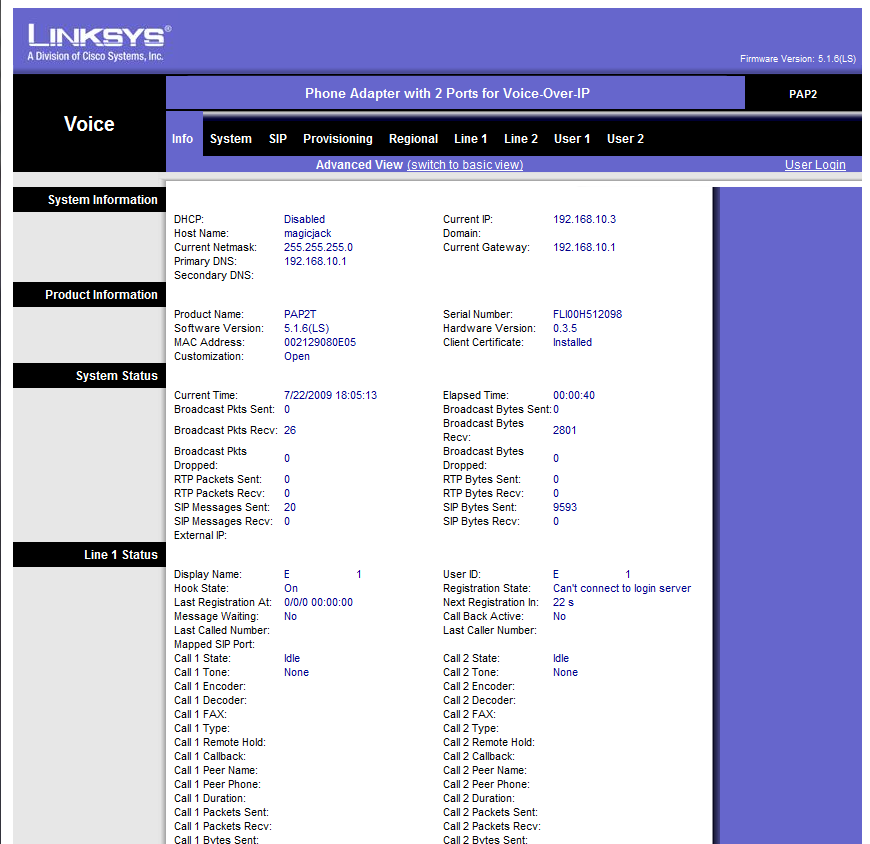

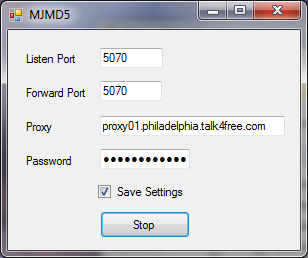
I am having a similar problem using the same proxy as this user. I get the same error message. I use the command line version for linux and also tried the windows one. I get the same cannot connect to the login server message. I have not verified that all my settings are exactly the same as this user, but I know mine had worked before they changed stuff and cant seem to get it to work with the philly proxy.wondabwoy wrote: And here is how I have my MJMD5 proxy server setup:
compiled this using ubuntu.teddy_b wrote:Ok, here's the plain C version of the simple MJ proxy:
http://www.mediafire.com/file/yzwmjzotm ... y.c.tar.gz.
It works exactly the same as the az1324's app - the only difference is that it doesn't need mono to run on Linux - can be compiled for [almost] any linux distribution, including embedded systems like OpenWRT.
Of course, you need to know how to compile applications from sources for your linux system. You can create a Makefile, or just run gcc to compile it, somethig like:
gcc -o mjproxy md5.c mjproxy.c
Run it using the following command:
mjproxy listen-ip(can use 0.0.0.0) listen-port your-preferred-mj-proxy-server-addr mj-proxy-port(should be 5070) your-mj-password
The listen port should also be 5070 for incoming calls to work, however outgoing should work with any listen port.
Then configure your client the same way as you did for az1324's proxy - specify the listening IP and port of the proxy as the outbound proxy on your ATA or * trunc. Just remember not to expose this proxy to the Internet without additional protection, as anybody who can connect to it will only need to know your MJ phone number to be able to register and make calls using your MJ account.
You can modify the app as you wish - clean up the mess in my code (I've been doing .NET stuff for too long), add more console output or logging, add support for config file, make it to replace user-agent, etc etc... But I suggest you don't spend too much time on it - MJ seems to be determined to screw up any attempts to use MJ service without the dongle, so I bet it's not going to last long... And the next time dtm may not be around to discover the changed algorithm, or it will take someone too long to figure it out...
Code: Select all
./mjproxy 0.0.0.0 5070 proxy01.mycity.talk4free.com 5070 xxxxxxxxxxxxxxxxxxxx