PCI Expansion Bay + Video Card
Moderators: Bill Smith, Pilot
PCI Expansion Bay + Video Card
Has anyone tried this? Will it stream Youtube without stuttering? Is it worth the investment?
-
lockmaster
- MagicJack User
- Posts: 33
- Joined: Sat Feb 21, 2009 11:54 am
- Location: Columbus, Ohio
64 mB video card
It would be interesting to see if someone is able to connect a video card to a tc to speed up video. My tc 5710 with 1.2gh processor,1 Gb internal flash and 1 mb ram is just too slow for You tube videos (especially at full screen). However, My tc works great with MJ and I can even surf the net at moderate speeds. If the Z-Ram could be adjusted higher than 64Mb the response would be much better for videos. But I understand there is no way to alter the Z Ram.
Joe in Columbus,Ohio
-
stroths
- Dan isn't smart enough to hire me
- Posts: 470
- Joined: Wed Apr 02, 2008 11:45 pm
- Location: Dallas, TX
There are a few posts scattered throughout this forum, but you can find some of them in this thread
http://phoneservicesupport.com/60-gb-on ... t3587.html
From what I remember, the stuttering will still continue. I never tried it myself, so I can't really say that for sure.
http://phoneservicesupport.com/60-gb-on ... t3587.html
From what I remember, the stuttering will still continue. I never tried it myself, so I can't really say that for sure.
He's comparing the perfarmance to an NV 8800. I'm realistic. I'm not setting my sights that high.stroths wrote:There are a few posts scattered throughout this forum, but you can find some of them in this thread
http://phoneservicesupport.com/60-gb-on ... t3587.html
From what I remember, the stuttering will still continue. I never tried it myself, so I can't really say that for sure.
I would scour ebay. You're going to pay through the nose through a parts house. I picked the expansion kit up for $24 shipped.richedkid wrote:I guess just need an expansion bay here, I would try to look for the expansion bay at my local suppliers of peripherals... if I could use a VGA that is higher and that would be fine for me...
manasota-manasota wrote:OK, I got it all set up with the Quadro. It's definately leaps and bounds over the stock 8mb. With streaming video, it depends on the source. I'm happy with the upgrade. The resolutions and refresh rates are insane.
I'm thinking of doing the same thing for my t5720. You got a great deal on the expansion kit. I just ordered one and the best price I could find on the web was a vendor from eBay at $40 w/ shipping.
I've got a bunch of questions for you that I hope you don't mind answering-
1. What kind of thin client do you have?
2. Just to confirm, you got the HP DY599A Nvidia Quadro4 280 NVS 64MB PCI Graphics Card, right?
3. How much did you get your video card for?
4. Could you recommend a vendor to buy it from?
5. Did the thin client BIOS pickup the new video card after you installed it?
6. What config changes did you have to do to get your video card working?
7. Do you have a link to the latest drivers for the video card?
8. What is the max resolution can you set it to without the picture breaking up?
9. How are you connecting your video card to your tv/monitor?
Thanks in advance!
I have a HP 5700 thin client. I bought the expansion kit and video card on ebay. If memory serves, I paid $25 for the expansion and $20 for the VGA including shipping. I'm a patient shopper so I wait until I find a deal. The VGA should come with a dongle to hook up two standard monitors. The drivers are available from Nvidia. There's a setting in the bios for the add in video but I think it's automatic. I'm running XP, not XPE so it did have plug and play for the card. I don't believe XPe has that so you'll have to just install the driver package. Just remember that you need a PCI card, not PCI-e. In theory, any PCI low profile card should work. The max resolution for the Quadro is 1600x1200 so it's no good for high definition. Half height high definition cards are very expensive if you can even find one.
-
jimisbell
- Dan isn't smart enough to hire me
- Posts: 153
- Joined: Thu Mar 19, 2009 7:29 pm
- Location: Third Coast
I just completed the mechanical install paying $25 for the card with a software disk and adapter cord to VGA and $40 for the expansion kit,... that includes shipping. I had to relocate the HD which had been mounted on the cover that was now discarded with the expansion mod. I have not yet tried the machine after physically installing it. I am running a TC5700 with a 10 GB hard drive and full up XP. My reason for installation was because I run it in the car and also run GPS on it. The GPS was freezing up the computer with its massive computational demands for video. I also run a 0.5 watt WiFi with a high gain receiver so I can drive down the street and the WiFi constantly updates to the next available unlocked station. It rarely drops out of lock and I can run the MJ continuously, as long as the GPS isnt running. I dont know how it can move from one ISP to another without dropping out, but it does.
Tomorrow or the next day I will see if the S280 video card solved the GPS problem.
Tomorrow or the next day I will see if the S280 video card solved the GPS problem.
Jim Isbell
If you are not living on the edge then you are just taking up too much space.
If you are not living on the edge then you are just taking up too much space.
-
didaboston
- magicJack Apprentice
- Posts: 18
- Joined: Sat Jul 18, 2009 10:47 pm
are you kidding ?jimisbell wrote:I have an account at Picasa that I can use. How do I send the URL to this site?
simply go to one of these websites and upload your pictures , you will get a link , just post that link on your next post :
http://imageshack.us/
http://tinypic.com/
these websites host your pics , simply "copy and paste link"
and post it here .
-
jimisbell
- Dan isn't smart enough to hire me
- Posts: 153
- Joined: Thu Mar 19, 2009 7:29 pm
- Location: Third Coast
Yes, that I understand. But I thought there was a way to place photos into these posts??
If you will go to http://picasaweb.google.com/jim.isbell/HondaInsight you can see the pictures. They are the last four pictures of the 50 pictures in that album.
I tested the unit today and it works in ALL modes, GPS in 3-D mode, Music Manager, OBD-II and Virtual Dash, MagicJack, and Wi-Fi connection.
As to it getting too hot...well, its in the cabin with me so if I can take it, I assume it can take it. Honda made that assumption about the high voltage battery. Its a NiMh battery and is sensitive to heat so they just ducted the cabin air to the battery on the assumption that if the occupants were happy it was cool enough for the batteries. Whether or not that is a valid assumption remains to be seen.
If you will go to http://picasaweb.google.com/jim.isbell/HondaInsight you can see the pictures. They are the last four pictures of the 50 pictures in that album.
I tested the unit today and it works in ALL modes, GPS in 3-D mode, Music Manager, OBD-II and Virtual Dash, MagicJack, and Wi-Fi connection.
As to it getting too hot...well, its in the cabin with me so if I can take it, I assume it can take it. Honda made that assumption about the high voltage battery. Its a NiMh battery and is sensitive to heat so they just ducted the cabin air to the battery on the assumption that if the occupants were happy it was cool enough for the batteries. Whether or not that is a valid assumption remains to be seen.
Jim Isbell
If you are not living on the edge then you are just taking up too much space.
If you are not living on the edge then you are just taking up too much space.
-
didaboston
- magicJack Apprentice
- Posts: 18
- Joined: Sat Jul 18, 2009 10:47 pm
You put these codes before and after the adress link:
 [/img]
http://lh5.ggpht.com/_iBR0z2bk1uw/SnZrk ... 20card.JPG
To get the correct adress link: right click on the picture + click properties.
http://picasaweb.google.com/jim.isbell/HondaInsight#
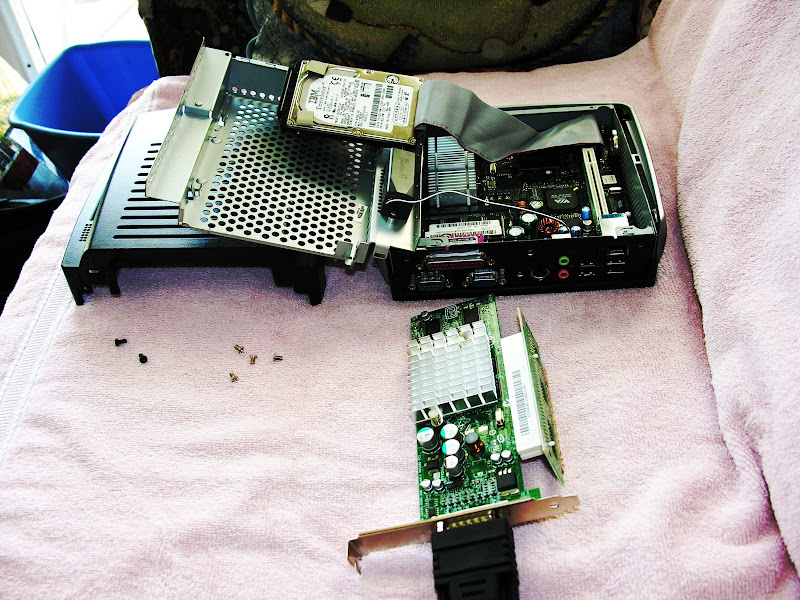
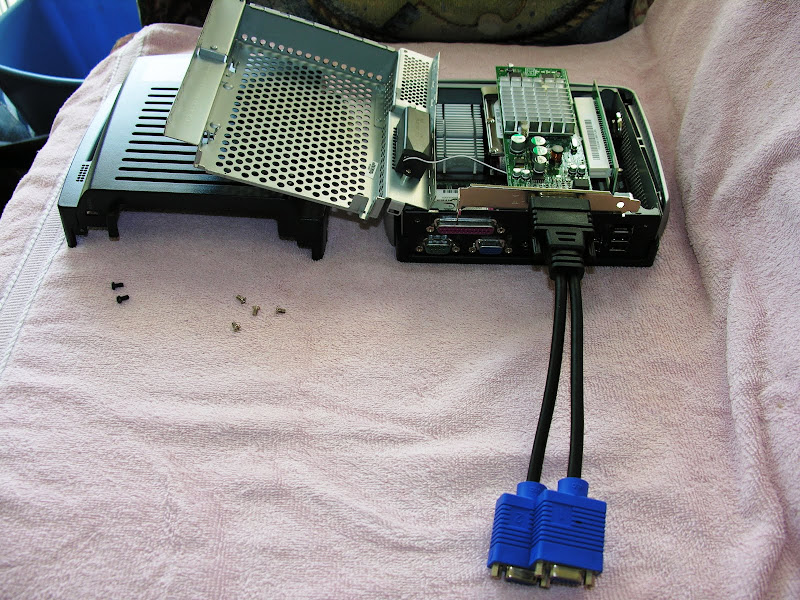
http://lh5.ggpht.com/_iBR0z2bk1uw/SnZrk ... 20card.JPG
To get the correct adress link: right click on the picture + click properties.
http://picasaweb.google.com/jim.isbell/HondaInsight#
-
jimisbell
- Dan isn't smart enough to hire me
- Posts: 153
- Joined: Thu Mar 19, 2009 7:29 pm
- Location: Third Coast
I am a bit worried about the temperature. But the heat on the VGA will be on the outside and near the vents...and I will be driving with the AC on anytime that it is really hot outside anyway. I think I will try it that way for now and if I start having strange symptoms I will reconsider the fan idea. I did take it on a 2000 mile tour without the VGA card and had no problems. The VGA is the most recent addition.
Jim Isbell
If you are not living on the edge then you are just taking up too much space.
If you are not living on the edge then you are just taking up too much space.