NetTalk Duo SIP: a Tutorial
Moderators: Bill Smith, Pilot
-
Nobody beats the Whiz!
- Dan Should Pay Me
- Posts: 559
- Joined: Mon Oct 26, 2009 5:04 pm

-
bitstopjoe
- Future magicJack CEO
- Posts: 2844
- Joined: Sat Sep 13, 2008 5:25 pm
- Location: North East Pennsylvania
Or just watch the Geico commercial and instead of a tissue box being thrown picture a bullet ot two.. Because yellow makes me sad...sabresfan wrote:Great movie. Now I'm gonna have to watch it this weekend.Nobody beats the Whiz! wrote:You're thinking of Full Metal Jacket.
Love that commercial....
Joe Sica
-
gashliquor
- Dan isn't smart enough to hire me
- Posts: 447
- Joined: Sat Apr 26, 2008 1:03 pm
Nobody beats the Whiz! wrote:You're thinking of Full Metal Jacket.
Yes it was 100% Full Metal Jacket, Great Flic too. Now im gonna have to watch the DVD this week
MJ 4th Gen
MagicFeatures
NetTalk Duo ( I got it cheap, Thank You NT )
Ooma Telo ( Premium Service )
VoIP MY Way ( Custom Acct + INTL )
Linksys PAP2T ATA ( UnLocked )
Linksys WRT-310N Router ( Personal Firmware )
Motorola Modem DOCSIS 3.0 SBG6580
MagicFeatures
NetTalk Duo ( I got it cheap, Thank You NT )
Ooma Telo ( Premium Service )
VoIP MY Way ( Custom Acct + INTL )
Linksys PAP2T ATA ( UnLocked )
Linksys WRT-310N Router ( Personal Firmware )
Motorola Modem DOCSIS 3.0 SBG6580
-
Canadiangrujee
- MagicJack Newbie
- Posts: 1
- Joined: Sat Oct 15, 2011 1:09 am
- Location: Canada
Got SIP credentials but unable to use it
@ Newbie
Hi, you are really a genius. I tried finding the SIP and got it without any issue. Now when I tried using it on some of SIP based applications in PC and IPhone, these credentials don't work and I am unable to login and use those applications. I tried X-Lite4, QuteCom on PC running Windows 7 (32bit) and Acrobits SIP Phone on IPhone4.
Can anyone guide me what exactly I am missing?
I also found that MJ has released their iPhone App through iTunes Store (Free download) and you can use it with your existing account. I mean, you can use your existing MJ number to make and receive calls (as long as your account is good). I wana use NT Duo in the same way. I tried using NT Duo App for iPhone but it does not allow me to configure it as my NT Duo's phone number. I wish if NT staff make some changes in their app to make it work for existing NT Duo users.
Hi, you are really a genius. I tried finding the SIP and got it without any issue. Now when I tried using it on some of SIP based applications in PC and IPhone, these credentials don't work and I am unable to login and use those applications. I tried X-Lite4, QuteCom on PC running Windows 7 (32bit) and Acrobits SIP Phone on IPhone4.
Can anyone guide me what exactly I am missing?
I also found that MJ has released their iPhone App through iTunes Store (Free download) and you can use it with your existing account. I mean, you can use your existing MJ number to make and receive calls (as long as your account is good). I wana use NT Duo in the same way. I tried using NT Duo App for iPhone but it does not allow me to configure it as my NT Duo's phone number. I wish if NT staff make some changes in their app to make it work for existing NT Duo users.
I've tried voip over wifi and it's ok as long as it's at home and it's a good internet connection. Voip over 3g sucks. The call quality is piss poor and constantly breaks up no matter how good a signal it is. I've tried the g 729 codec that works better with 3g but to me it's just not worth it. GV has decent rates internationally and the voice quality is good. To save $2 every 6 months is just not worth the hassle of voip on a smartphone.Pablo123 wrote:That's the plan, supposedly in the next smartphone app release you will
Be able to link up your duo account with your app.
Re: NetTalk Duo SIP: a Tutorial
Is this still the proper way to get your NetTalk SIP credentials? I am wanting to pull the cred from my TK6000 and use it on my Android.newbie wrote:How to get your NetTalk SIP Credentials
- Download and install Fiddler, NetTalk USB Drivers, and NetTalk Video phone
- Start up fiddler, and enable decrypting https (Tools->Fiddler Options->HTTPS->check "Decrypt HTTPS traffic")
- Install NetTalk USB Drivers, and connect NetTalk to your PC rather than your router
- Once NetTalk is operational, start NetTalk Video Phone
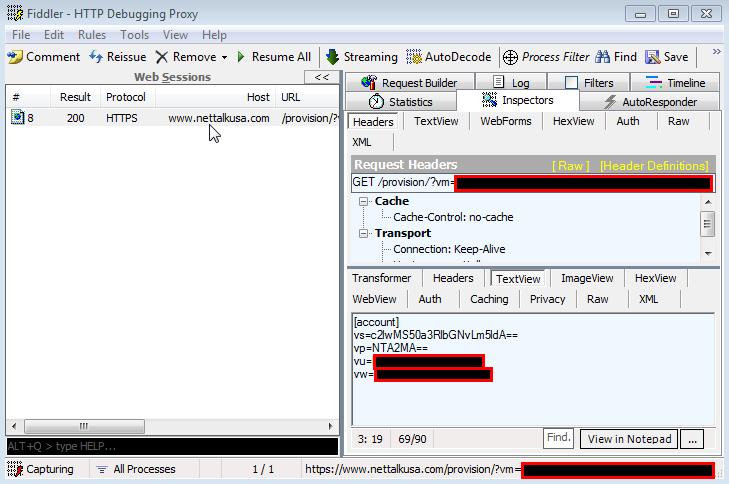
- Your credentials will appear in a packet to https://www.nettalkusa.com/provision/?vm=...
- Your credentials are Base64 Encoded:
vs is the servername, vp is the server port, vu is the user name, vw is the passwordCode: Select all
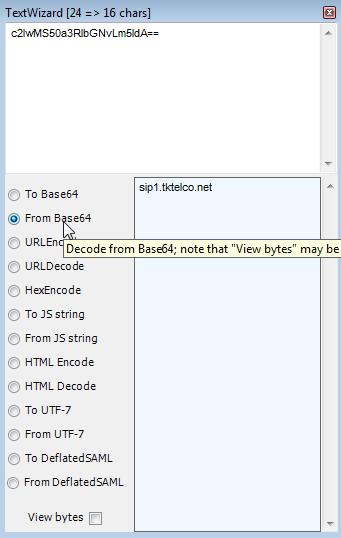
[account] vs=c2lwMS50a3RlbGNvLm5ldA== vp=NTA2MA== vu=<your username> vw=<your password>- decode the pieces, select the encoded server name
and click, Tools->Text Encode/DecodeCode: Select all
c2lwMS50a3RlbGNvLm5ldA==- paste in the individual values:
- enjoy your SIP
Yes I was able to get the SIP credentials using this procedure. But it will not login in Linksys SPA unless I put the useragent. I am using the useragent posted in this forum. Can make calls but no incoming calls. Phone rings but when I try to answer nothing happens. So wondering if I have to use a correct user agent?
Can any one please describe how to find out the useragent from your nettalk duo?
Thanks.
Can any one please describe how to find out the useragent from your nettalk duo?
Thanks.
Re: NetTalk Duo SIP: a Tutorial
This is where I am confused. I do not see the image and where do you really find the credentials? I go to the link and it's nothing there. Can you be more specific? Do you find them in Fiddler2? Is so where in Fiddler2? I am so lost in this so please clarify----------------->Your credentials will appear in a packet to https://www.nettalkusa.com/provision/?vm=...newbie wrote:How to get your NetTalk SIP Credentials
- Download and install Fiddler, NetTalk USB Drivers, and NetTalk Video phone
- Start up fiddler, and enable decrypting https (Tools->Fiddler Options->HTTPS->check "Decrypt HTTPS traffic")
- Install NetTalk USB Drivers, and connect NetTalk to your PC rather than your router
- Once NetTalk is operational, start NetTalk Video Phone
- Your credentials will appear in a packet to https://www.nettalkusa.com/provision/?vm=...
- Your credentials are Base64 Encoded:
vs is the servername, vp is the server port, vu is the user name, vw is the passwordCode: Select all
[account] vs=c2lwMS50a3RlbGNvLm5ldA== vp=NTA2MA== vu=<your username> vw=<your password>- decode the pieces, select the encoded server name
and click, Tools->Text Encode/DecodeCode: Select all
c2lwMS50a3RlbGNvLm5ldA==- paste in the individual values:
- enjoy your SIP
~La La~
-
crackerjack
- Dan Should Pay Me
- Posts: 784
- Joined: Fri Nov 16, 2007 9:32 pm
I was just searching for this for my nettalk and I'm about to lose them for another voip provider. NetTalk I am so sorry but they have very poor customer service. I am also looking for a good VOIp service with great customer service and it seems like this site I just went to (GVjack) has only email support.
crackerjack wrote:Boy, are you late to the party. If you want to make free calls, get a GVjack or Obihai and use google voice (while it is still free)
~La La~
-
crackerjack
- Dan Should Pay Me
- Posts: 784
- Joined: Fri Nov 16, 2007 9:32 pm
this site I just went to (GVjack) has only email support.
I wouldn't worry too much about that. I know email support is very responsive and the simple nature of the device almost guarantees a foolproof installation and operation. Same for the slightly more expensive obihai device.
Nettalk, on the other hand, closely parallels MJ as to the level and nature of their support...
I wouldn't worry too much about that. I know email support is very responsive and the simple nature of the device almost guarantees a foolproof installation and operation. Same for the slightly more expensive obihai device.
Nettalk, on the other hand, closely parallels MJ as to the level and nature of their support...
Good Luck
CrackerJack
MagicJack Customer #73
MagicJack user since May 2007
MagicJack abuser since June 2007
"I gots mo' numbers than a Lotto machine!!!"
CrackerJack
MagicJack Customer #73
MagicJack user since May 2007
MagicJack abuser since June 2007
"I gots mo' numbers than a Lotto machine!!!"
I understand that but for NetTalk email support isn't always good though. I would love to do chat or phone support. But if you enjoy email support that's great.
crackerjack wrote:this site I just went to (GVjack) has only email support.
I wouldn't worry too much about that. I know email support is very responsive and the simple nature of the device almost guarantees a foolproof installation and operation. Same for the slightly more expensive obihai device.
Nettalk, on the other hand, closely parallels MJ as to the level and nature of their support...
~La La~
HORRIBLE Experience with Nettalk
Hi everyone I'm new to this forum and I was wondering if anyone can help me out because up until this point I've had the most terrible experience with Nettalk EVER. We got our device and connected it on 7/10/2013. Outgoing calls work but incoming calls do not. "The number or code you have dialed is not in service please check the number or code and try again" So I filled out a trouble ticket immediately and waited for assistance. It took 48 hours for someone to get back to me. On Friday 7/12/2013 I waited 1 hour during my lunch hour for someone to pick up in their call center and over an hour on their tech chat. To no avail. Finally I got a call on my cell phone from someone because I kept updating my trouble ticket and frustration was more and more noticeable. I was told by their tech support I need to be home during their very convenient hours of Monday - Friday 10am - 4pm so they can remote access into my equipment and open some ports. We have a very advanced home network and don't want them messing with our router settings. I asked the tech who called me today to provide me with the Login Credentials to the Nettalk Device and tell me the ports that need to be open as my husband is a network engineer and can easily work on these settings without affecting our home network. What is someone like me supposed to do? Someone who works 8am-5pm Monday - Friday and cannot afford to take time off of work or wait their ridiculous hold times??? And clearly someone who has been denied the login credentials to my own device I paid good money for? Is there somewhere else I can escalate this complaint to? If anyone knows or can help me out I would greatly appreciate it, I have a 2 year old daughter at home I need to call and check on periodically and the fact this device is not working is hindering upon my ability to call my own home. One would think a telephone service provider would have more convenient hours that would appease their client base not hours that are convenient only to the workers. On a side note they must only have one person working in their call center.