First off, I did my best to search for an existing fix before posting. If I failed to find one, my apologies.
Essentially the problem is thus: MJ works fine with a new cordless phone (cord less than 6 ft, batteries charged, bla bla blah), and everything is per normal. I can't seem to make the softphone register my computer speakers, but that's a separate issue and null if the hard phone works. Anyway - when the computer goes to sleep mode all my USB peripherals shut down, including the MJ. Calls made to the MJ during sleep go directly to email voicemail. Ok, fine. But bring the computer back out of sleep, and only the software portion of MJ reboots. That is, the softphone is there on the desktop, registers incoming calls, etc. But no ring. Check the phone, no dial-tone, says "check phone line."
The only other post on the internet that seemed to mirror mine was this:
http://answers.microsoft.com/en-us/wind ... ffc3f0ff23
-- which has a reply to "contact Magic Jack" because the power-supply to the unit [and thus the phone] may be hanging up due to the sleep cycle.
Off to the MJ website...
Now I know coming in to this that MJ is a home-grown 'as seen on tv' kind of company, and if the video add on the front page about the girl's dogs being named 'Magic' and 'Jack' are any indication, they will probably be useless and frustrating to deal with...
But I check the FAQ's... 1000 reasons why it's probably your fault, no help for my issue.
Dial up the "live" help. Enter my question. I can smell a bot a mile away, but here's the conversation anyway:
Please wait for a site operator to respond.
You are now chatting with 'Rand'
Your Issue ID for this chat is LTK554030350861X
Rand: Hello, how may I help you?
Kerghan: hi -- I've browsed around the FAQ and can't seem to find this issue, so I thought I'd ask
Kerghan : When my computer returns from the "sleep" power-save mode (Win 7 x64) the software utility reboots, but the hardware connection to my cordless phone does not
Kerghan: the headset displays "no dialtone" and is inoperable
Kerghan: physically removing and rebooting the MJ works, but not rebooting the software alone
Rand: If you're using a telephone, please make sure the phone cord connecting the base of your telephone and the magicJack is securely attached to the appropriate RJ-11 ports. You may need to unplug and replug the cords if in doubt. For headsets, the pink plug must be attached to the pink port, the green plug goes to the green port.
Rand: If you're using a cordless phone, please make sure it is fully-charged. You may also need to use a corded telephone or a different one. If you have a headset please try and see if it makes a difference. We'll find out if the problem is with the telephone device. If you are using a telephone, click on the Menu option then click on "Switch to Telephone" option. However, if you're using a headset click on "Switch to Headset" option. Try to place a call afterwards.
Kerghan: the phone is a brand new direct 6 phone and the RJ-11 is less than 6 feet. All connections are sound and batteries are charged. Phone works perfectly prior to computer sleep mode
Rand: Please unplug and re-plug your magicJack device directly to your computers USB port after 2 minutes, thank you.
Kerghan: yes, that will solve the problem
Kerghan: however.
Kerghan: that will have to be done after EVERY time the computer enters sleep mode
Kerghan : I was wondering if there was a setting or command prompt to enable power to that device alone or to allow the MJ to recognize the power down / up cycle
Rand: There are a number of reasons why magicJack would suddenly stop working. Based on my experience, it's how your computer is setup/configured and the installed programs that may cause conflict to the magicJack software.
Kerghan: well that's the thing -- the softphone on the desktop works fine. it's a new computer
Kerghan: windows 7 is on default settings
Rand: Since we do not have information about your computer software and hardware configurations, it would be best for you to make calls, observe, and report any issues immediately to us so we will be able to correct it without further delay.
Kerghan: which is what I did prior to contacting you. The issue is that power to the plugged in phone is not restored after a hibernation event by the computer; whereas the software reboots normally
Kerghan: if the computer never entered sleep, there would be no problem.
Kerghan : but that is an unacceptable solution
Rand: Your issue appears to have been resolved right now. However, if you need future assistance please refer to this ticket number:<LTK554030350861X> so the next agent will be able to know where we left off.
Rand: Is there anything else I may help you with today?
Rand: I have not heard from you in a while. Do you wish to continue this chat session?
Kerghan: it does not appear that you can solve my issue at this time.
Fun, yes?
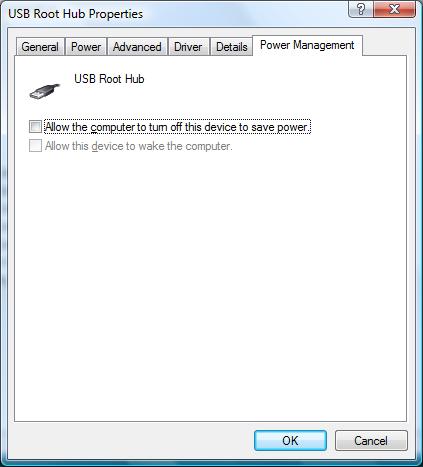
And that brings me here. Any help can be appreciated. The only other solution I can think of would be one of those special "power USB" 's that are for running peripherals 24/7 regardless of sleep mode, but I don't think I have one of those on my desktop. Mayhaps there is a command line in the MJ software or Windows that can be altered as a workaround?
Again, thank you in advance

~Kerg
PS: Technical specs: Home-build gaming computer - Intel i5 2400 on an ASUS P8P67 board, in a Cooler Master Storm Scout case, Windows 7 professional x64. External phone is an Uniden (yes, the walmart special, lol) DECT 6.0 cordless phone with base + extra station (2 phones).