I got MJ+ as a gift and when I plugged it in to the USB port of my PC the autorun began downloading the installer automatically which I assume is normal.
But when the installer runs it never finishes. I just see "Lucky you... Upgrading now." splash screen forever.
I've been to the top level of tech support on tech chat and after an hour of trying everything, nothing worked.
Has anyone else seen this issue? My PC works fine otherwise including all the USB ports. Windows 7 64 bit fully updated.
I've manually downloaded the magicJackSetup.exe but same result. Thanks for any help.
"Lucky you... Upgrading now." Message stays forev
Moderators: Bill Smith, Pilot
-
John_800001
- MagicJack Newbie
- Posts: 4
- Joined: Tue Jan 31, 2012 4:49 am

-
John_800001
- MagicJack Newbie
- Posts: 4
- Joined: Tue Jan 31, 2012 4:49 am
Yes I am administrator. I have also tried to "run as administrator" for the exe installer. However the supervisor tech never mentioned that that was important. But they also never even asked me what OS I was running.
It just amazes me that the combined intellect of Majic Jack Inc. cannot solve this. I have a very common computer setup, not too old or too new. Fully patched and updated. massive amounts of RAM and CPU power. Gigs of free hard drive space. I've downloaded the magicJackSetup.exe from multiple sources. Have uninstalled/re-installed usb ports. Verified all drivers are up to date.
And, I have verified that the MJ+ hardware works by plugging it directly in to the modem and making a call. But this stupid exe just won't run.
This is what I see for hours and hours:
http://i70.photobucket.com/albums/i97/a ... tled-2.jpg
It just amazes me that the combined intellect of Majic Jack Inc. cannot solve this. I have a very common computer setup, not too old or too new. Fully patched and updated. massive amounts of RAM and CPU power. Gigs of free hard drive space. I've downloaded the magicJackSetup.exe from multiple sources. Have uninstalled/re-installed usb ports. Verified all drivers are up to date.
And, I have verified that the MJ+ hardware works by plugging it directly in to the modem and making a call. But this stupid exe just won't run.
This is what I see for hours and hours:
http://i70.photobucket.com/albums/i97/a ... tled-2.jpg
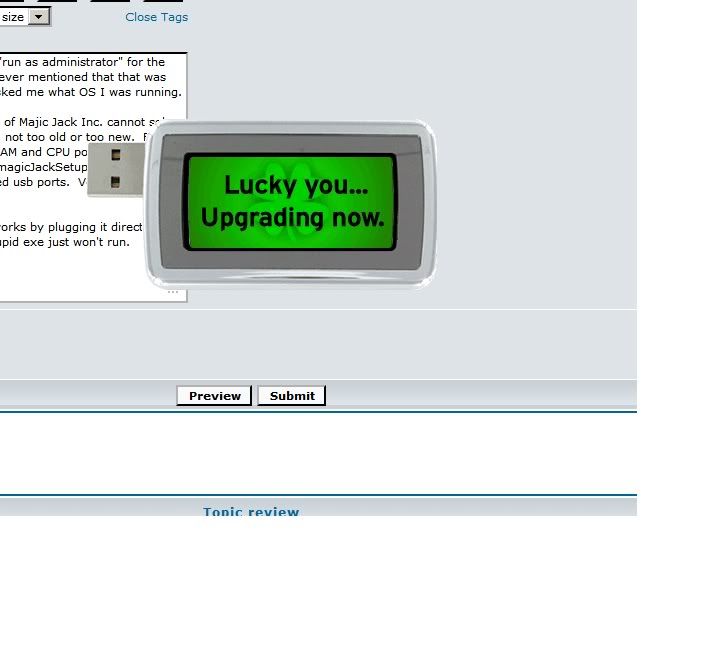
Lucky You
Sounds like a permissions issue. If I were as lucky as you I would do a complete uninstall - uninstall followed by using those MJ uninstall tools (e.g. mjRemover and USBScrub). Once uninstalled you may be able to do a clean install.
Did you stick the MJ in the hole while not logged on as admin?
Have you tried run as admin while logged on as admin (elevated permissions)?
FYI I have "run" MJ from a non-admin account and I get what you get. Run as admin from that non-admin account works fine.
R/
Mike
Did you stick the MJ in the hole while not logged on as admin?
Have you tried run as admin while logged on as admin (elevated permissions)?
FYI I have "run" MJ from a non-admin account and I get what you get. Run as admin from that non-admin account works fine.
R/
Mike
R/mw
-
John_800001
- MagicJack Newbie
- Posts: 4
- Joined: Tue Jan 31, 2012 4:49 am
Lucky You
I see. Did you uninstall with mjRemover and USBScrub? The first one purportedly does a better clean of the registry and the other will clean up the USB related entries - these may be scrogged.
Do you have a recent restore point?
R/
Mike
Do you have a recent restore point?
R/
Mike
R/mw
-
John_800001
- MagicJack Newbie
- Posts: 4
- Joined: Tue Jan 31, 2012 4:49 am
Finally got it working after another call to tech chat. They first had me confirm there were no yellow flags on any USB or CD rom devices in Device Manager which there was not.
Then had me "update driver" for every USB device entry (13 total). Previously I just did that for the USB that MJ was plugged in to. Afterwards had to unplug the MJ for 15 seconds and then plug back in.
Then the autoplay downloaded the exe installer and it worked. The installer splash looked different this time so I wonder if they updated the exe also.
------------------------
Ayla: Please right-click on the first entry then click "Update Driver Software".
Ayla: On Update Driver software window, please clcik on "Browse My Computer For Driver Software".
Ayla: click on "Let Me Pick From A list Of Device Drivers On My Computer".
Ayla: then click "Next" button.
Ayla: When you see "Windows Has Successfully Updated Your Driver Software", please click on "Close" button.
Ayla: Please do this to all entries under "Universal Serial Bus Controllers".
Then had me "update driver" for every USB device entry (13 total). Previously I just did that for the USB that MJ was plugged in to. Afterwards had to unplug the MJ for 15 seconds and then plug back in.
Then the autoplay downloaded the exe installer and it worked. The installer splash looked different this time so I wonder if they updated the exe also.
------------------------
Ayla: Please right-click on the first entry then click "Update Driver Software".
Ayla: On Update Driver software window, please clcik on "Browse My Computer For Driver Software".
Ayla: click on "Let Me Pick From A list Of Device Drivers On My Computer".
Ayla: then click "Next" button.
Ayla: When you see "Windows Has Successfully Updated Your Driver Software", please click on "Close" button.
Ayla: Please do this to all entries under "Universal Serial Bus Controllers".