***New Mods T5730 a Dual-Core 64-bit CPU & PCIe G-card

Discuss magicJack running on Thin Clients

Moderators: Bill Smith, Pilot

T5735
Dan isn't smart enough to hire me
Posts: 158
Joined: Fri Aug 01, 2014 12:44 am

Post by T5735 »

momo wrote:Yeah... I know what you mean...shipping from china takes a long time, sometimes.

I saw your added info ...
Edit: I also almost forgot to mention that the Radeon X1250 onboard video card on this little thin client will do audio over DVI with a DVI-D to HDMI adapter. I was very surprised when I plugged in my DVI-D to HDMI adapter that came with my pc's graphics card into it and audio started to play on the tv before I had plugged in a 3.5mm audio cable.

That's really interesting... Thanks for that.

I found this USA seller from Texas with a TL-68, but it's $66.88
http://www.ebay.com/itm/AMD-Turion-64-X ... 4ad926fea9

I don't know if 200MHz more, from the TL-64, is worth the higher costs, also for faster shipping
But maybe other sources not from eBay may have it cheaper.
Have you tried Amazon?

EDIT
Oops...I just checked on Amazon, and saw it was MORE expensive...
TMDTL68HAX5DM
http://www.amazon.com/Turion-Dual-Core- ... TL68HAX5DM

Remember, when you use a faster CPU, you may also need a better higher wattage power supply
T5735 wrote: I might just compromise and get one of these TL-64 2.2's for $17 and see how that does. I know you save a good bit of money by doing it but man I hate having to wait 2 to 3 weeks for stuff to get here from China.
http://www.ebay.com/itm/AMD-Turion-64-X ... 3f39f7ecb9
Yea for the price difference I think I will just roll with the TL-64. I figured I might need a bigger power supply and I actually found one from a HP printer that plugs into the thin client I will have to look and see what it is rated at tomorrow but the brick is almost twice the size as the stock one. Another application I am looking into using this thin client for in Steam in home streaming. http://store.steampowered.com/streaming/
It allows my main gaming pc to do all of the work and I can basically use the thin client like a console on my big screen tv in the other room.
momo
Dan Should Pay Me
Posts: 541
Joined: Tue Aug 26, 2008 12:36 pm

Post by momo »

I found a TL-64 in Texas for $14.88 + $4 shipping from an eBay user w/ 100% positive feedback

http://www.ebay.com/itm/AMD-TURION-64-X ... 4ad04d67f1

For around $2.00 more than the China seller, from a USA seller, may be worth the look. :)

Use thermal grease when you change it.
I used Arctic Silver 5
http://www.arcticsilver.com/as5.htm
You don't need to use much either, just a small drop in the middle of the core area is all that's needed.
(If you put too much, it's actually bad. :) and will not work as well as a small amount)

Clean-off both heat-sink and core area with 91% isopropyl Alcohol before applying the thermal grease, using a lint-free cloth.
I used lens cleaning papers for this.
No need to get special cleaners and fancy cleaning papers / kits.

Oh...I wanted to also mention, with the power supply you said you found from the HP printer...
Make sure it's also 12v DC as well as the higher wattage.

Also check that the connector is the same polarity as the ThinClient PSU
HP printers may be slightly different...HP was sneaky that way. ;)
HP T5730 - AMD Turion 64 x2 Dual-Core 2.4GHz CPU
(TMDTL68HAX5DM)
320GB WD 2.5" H.D. / 2GB RAM
(Windows 8.1 Pro 64-bit)
EVGA GeForce 7600 GT PCIe x16 card, (in x1 speed)
New 12vdc 16 amp (192w) PSU
T5735
Dan isn't smart enough to hire me
Posts: 158
Joined: Fri Aug 01, 2014 12:44 am

Post by T5735 »

momo wrote:I found a TL-64 in Texas for $14.88 + $4 shipping from an eBay user w/ 100% positive feedback

http://www.ebay.com/itm/AMD-TURION-64-X ... 4ad04d67f1

For around $2.00 more than the China seller, from a USA seller, may be worth the look. :)

Use thermal grease when you change it.
I used Arctic Silver 5
http://www.arcticsilver.com/as5.htm
You don't need to use much either, just a small drop in the middle of the core area is all that's needed.
(If you put too much, it's actually bad. :) and will not work as well as a small amount)

Clean-off both heat-sink and core area with 91% isopropyl Alcohol before applying the thermal grease, using a lint-free cloth.
I used lens cleaning papers for this.
No need to get special cleaners and fancy cleaning papers / kits.

Oh...I wanted to also mention, with the power supply you said you found from the HP printer...
Make sure it's also 12v DC as well as the higher wattage.

Also check that the connector is the same polarity as the ThinClient PSU
HP printers may be slightly different...HP was sneaky that way. ;)
Thanks for the link I just bought one. :lol: I am well antiquated with arctic silver as I do IT for a living and I used it when I changed the CPU with one of those in the lot of 5 that I won. Do you have a link to the larger power supply that you could that works with the stock port? I might just go ahead and buy it to be safe. I really hope that I can eventually have this little thin client be a cable box/game console using a xbox 360 controller using steam in home streaming. Right now I am doing the in home streaming using my HTPC and it works fantastic just essentially being a thin client itself and my main gaming i7 pc doing all of the computing load. Also I wanted to ask you about soldering the extra memory slot on the bottom and possibly a CF card slot. I have done a fair bit of soldering fixing tv's capacitors etc but never anything that small. The guns that you mentioned look real similar to this rework system my father bought me a few years ago thinking it was a nice soldering station. It is a OK industries FCR-2000 orced Convection Rework Soldering System. Could I use something like that to solder the sockets on myself?
momo
Dan Should Pay Me
Posts: 541
Joined: Tue Aug 26, 2008 12:36 pm

Post by momo »

You're welcome....and very lucky... :)
I just looked-up my receipt for my first Mods try with a TL-64 before paying the higher cost of the TL-68, and saw I paid $40 (+$4 shipping) for the TL-64 around 2 years ago. I don't know why the TL-68 is still so much more $$$ than the TL-64.
Oh well...!

The power supply that's 8.5 amps (102 watts) is here..
http://www.mini-box.com/110w-12v-8-5A-A ... er-Adapter
I'm assuming the polarity of the barrel connector is ...
positive in the center, and negative is the outer area.
Please ask the sales rep from mini-box, just to be sure.

My 192 watt PSU, (that needed a mod'd connection to the T5730) is here..
http://www.mini-box.com/12v-16A-AC-DC-Power-Adapter
(If anyone else is interested. :) )

Regarding the second RAM socket, and your hot-air soldering station.
I'm still trying to find my original listing of the distributor who had the RAM socket available 2 years ago.

When my Mom died, I didn't pay much attention to where I placed stuff when cleaning the house, but I do know I have it somewhere on one of my backup data drives. I wanted that too, and think the T5730 can actually support 2 of 4 GB modules, for a total of 8GB. I haven't tried this yet, but the spec-sheet of the chipset says it supports up to 8GB of RAM.

As for your SMD rework station... If it's a Hot-Air type, it should be fairly easy to solder the connectors, of ANY socket, or chip, using a standard hot-air tip, and solder paste. (There's a video I link to showing how it's done w/ Hot-Air)

It's when you need to remove a multi-pin device you need the special tip to heat all the pins at the same time, so it lifts-up easier.

The info of the CF connector can be found at the UK site I posted my Mods ..
http://www.parkytowers.me.uk/thin/hp/t5730/mods.shtml

Scroll-down to the Compact Flash area, further down that page.

That OK industries FCR-2000 forced Convection Rework Soldering System is really nice. That's the type I originally wanted, but didn't have the funds at the time to pay that much.

Yes, it should be good to use. Just use a thin tip that won't interfere (hit into) any other connections around the area when you use the hot-air.

You may want to practice doing several test soldering on things you don't need, just to get the feel of how it works.

Your station has an air-flow indicator so it should be fairly easy to find the right setting for it so it doesn't blow too forcefully on the pins.
If the air is too strong it can blow off other caps or small components out of place, that are around the area. If it's too weak, not enough heat will come out.

If you have several small round generic tips, you can squeeze the round shape of one of them into a longer shape, so you direct the hot-air where you want it.

I'm glad people are getting more use out of these thin clients, now that the Magicjack isn't needing a dedicated computer any longer. :)
T5735 wrote: Thanks for the link I just bought one. :lol: I am well antiquated with arctic silver as I do IT for a living and I used it when I changed the CPU with one of those in the lot of 5 that I won. Do you have a link to the larger power supply that you could that works with the stock port? I might just go ahead and buy it to be safe. I really hope that I can eventually have this little thin client be a cable box/game console using a xbox 360 controller using steam in home streaming. Right now I am doing the in home streaming using my HTPC and it works fantastic just essentially being a thin client itself and my main gaming i7 pc doing all of the computing load. Also I wanted to ask you about soldering the extra memory slot on the bottom and possibly a CF card slot. I have done a fair bit of soldering fixing tv's capacitors etc but never anything that small. The guns that you mentioned look real similar to this rework system my father bought me a few years ago thinking it was a nice soldering station. It is a OK industries FCR-2000 orced Convection Rework Soldering System. Could I use something like that to solder the sockets on myself?
HP T5730 - AMD Turion 64 x2 Dual-Core 2.4GHz CPU
(TMDTL68HAX5DM)
320GB WD 2.5" H.D. / 2GB RAM
(Windows 8.1 Pro 64-bit)
EVGA GeForce 7600 GT PCIe x16 card, (in x1 speed)
New 12vdc 16 amp (192w) PSU
T5735
Dan isn't smart enough to hire me
Posts: 158
Joined: Fri Aug 01, 2014 12:44 am

Post by T5735 »

momo wrote:You're welcome....and very lucky... :)
I just looked-up my receipt for my first Mods try with a TL-64 before paying the higher cost of the TL-68, and saw I paid $40 (+$4 shipping) for the TL-64 around 2 years ago. I don't know why the TL-68 is still so much more $$$ than the TL-64.
Oh well...!

The power supply that's 8.5 amps (102 watts) is here..
http://www.mini-box.com/110w-12v-8-5A-A ... er-Adapter
I'm assuming the polarity of the barrel connector is ...
positive in the center, and negative is the outer area.
Please ask the sales rep from mini-box, just to be sure.

My 192 watt PSU, (that needed a mod'd connection to the T5730) is here..
http://www.mini-box.com/12v-16A-AC-DC-Power-Adapter
(If anyone else is interested. :) )

Regarding the second RAM socket, and your hot-air soldering station.
I'm still trying to find my original listing of the distributor who had the RAM socket available 2 years ago.

When my Mom died, I didn't pay much attention to where I placed stuff when cleaning the house, but I do know I have it somewhere on one of my backup data drives. I wanted that too, and think the T5730 can actually support 2 of 4 GB modules, for a total of 8GB. I haven't tried this yet, but the spec-sheet of the chipset says it supports up to 8GB of RAM.

As for your SMD rework station... If it's a Hot-Air type, it should be fairly easy to solder the connectors, of ANY socket, or chip, using a standard hot-air tip, and solder paste. (There's a video I link to showing how it's done w/ Hot-Air)

It's when you need to remove a multi-pin device you need the special tip to heat all the pins at the same time, so it lifts-up easier.

The info of the CF connector can be found at the UK site I posted my Mods ..
http://www.parkytowers.me.uk/thin/hp/t5730/mods.shtml

Scroll-down to the Compact Flash area, further down that page.

That OK industries FCR-2000 forced Convection Rework Soldering System is really nice. That's the type I originally wanted, but didn't have the funds at the time to pay that much.

Yes, it should be good to use. Just use a thin tip that won't interfere (hit into) any other connections around the area when you use the hot-air.

You may want to practice doing several test soldering on things you don't need, just to get the feel of how it works.

Your station has an air-flow indicator so it should be fairly easy to find the right setting for it so it doesn't blow too forcefully on the pins.
If the air is too strong it can blow off other caps or small components out of place, that are around the area. If it's too weak, not enough heat will come out.

If you have several small round generic tips, you can squeeze the round shape of one of them into a longer shape, so you direct the hot-air where you want it.

I'm glad people are getting more use out of these thin clients, now that the Magicjack isn't needing a dedicated computer any longer. :)
T5735 wrote: Thanks for the link I just bought one. :lol: I am well antiquated with arctic silver as I do IT for a living and I used it when I changed the CPU with one of those in the lot of 5 that I won. Do you have a link to the larger power supply that you could that works with the stock port? I might just go ahead and buy it to be safe. I really hope that I can eventually have this little thin client be a cable box/game console using a xbox 360 controller using steam in home streaming. Right now I am doing the in home streaming using my HTPC and it works fantastic just essentially being a thin client itself and my main gaming i7 pc doing all of the computing load. Also I wanted to ask you about soldering the extra memory slot on the bottom and possibly a CF card slot. I have done a fair bit of soldering fixing tv's capacitors etc but never anything that small. The guns that you mentioned look real similar to this rework system my father bought me a few years ago thinking it was a nice soldering station. It is a OK industries FCR-2000 orced Convection Rework Soldering System. Could I use something like that to solder the sockets on myself?
Thanks for the links and the soldering info. I am going to have to practice this a bunch of times before I attempt it on the actual thin client. The videos you linked to make it look easy but that guy is a total pro. I was looking around ebay and found this guy who appears to have a ton of 5730's for $20 or best offer shipped. You may send him a message and ask him if has any with the rubber grommet on the end as it would already have the mini pci-e slot on the bottom and that would be one less thing to worry about. http://www.ebay.com/itm/331270408167?ss ... 1423.l2649
momo
Dan Should Pay Me
Posts: 541
Joined: Tue Aug 26, 2008 12:36 pm

Post by momo »

You're welcome. Yes it takes some practice, but it's not impossible to master too. :)

I don't think I'll be purchasing another ThinClient, but thanks for finding it, for anyone else interested.

There are also some resisters and capacitors needed with that Mini-PCIe socket, added to the motherboard, so if someone wanted to add the socket they'd need to also know these added SMD components.

http://masu.6f.sk/index.php?title=T5730_hwpcie

http://masu.6f.sk/extra/files/x86/t5730 ... nipcie.JPG

This is why I'm glad you found someone selling these with the Mini-PCIe socket already on there. ;)

Anyway...practice your soldering, and in no-time you too will become a pro at SMD Hot-Air rework / soldering.
T5735 wrote: Thanks for the links and the soldering info. I am going to have to practice this a bunch of times before I attempt it on the actual thin client. The videos you linked to make it look easy but that guy is a total pro. I was looking around ebay and found this guy who appears to have a ton of 5730's for $20 or best offer shipped. You may send him a message and ask him if has any with the rubber grommet on the end as it would already have the mini pci-e slot on the bottom and that would be one less thing to worry about. http://www.ebay.com/itm/331270408167?ss ... 1423.l2649
HP T5730 - AMD Turion 64 x2 Dual-Core 2.4GHz CPU
(TMDTL68HAX5DM)
320GB WD 2.5" H.D. / 2GB RAM
(Windows 8.1 Pro 64-bit)
EVGA GeForce 7600 GT PCIe x16 card, (in x1 speed)
New 12vdc 16 amp (192w) PSU
momo
Dan Should Pay Me
Posts: 541
Joined: Tue Aug 26, 2008 12:36 pm

PCIe mini connector info

Post by momo »

I found a site mentioning the Mini-PCIe 52-pin connector for the T5730
http://soltec.exblog.jp/13060498/

It's a Japanese site, but it looks like they have defined the exact JAE connector needed,
and have linked to a PDF from JAE, of the connectors data-sheet...
http://jae-connector.com/jp/pdf/SJ105215.pdf

The data-sheet is in English. (How nice of them :) )
It seems to give the part # too. (Bottom right-side of PDF)

If anyone from Japan is reading this post, and can translate some of the important info from the web site, about the connector, and/or resistors and capacitors needed to be added on the motherboard, please let us know.

This site also mentions the CF connector, but I didn't see any link to a Data-Sheet for it.
HP T5730 - AMD Turion 64 x2 Dual-Core 2.4GHz CPU
(TMDTL68HAX5DM)
320GB WD 2.5" H.D. / 2GB RAM
(Windows 8.1 Pro 64-bit)
EVGA GeForce 7600 GT PCIe x16 card, (in x1 speed)
New 12vdc 16 amp (192w) PSU
T5735
Dan isn't smart enough to hire me
Posts: 158
Joined: Fri Aug 01, 2014 12:44 am

Post by T5735 »

Momo I opened up that site in Google Chrome and it has a feature that will ask you to translate it for you. It isn't perfect but you can get the general idea of what they are talking about. I also found this site that talks about adding the second ram slot but it is in German so you would have to use chrome to translate it as well.
http://www.elektroda.pl/rtvforum/topic2581275.html
User avatar
Pilot
Dan isn't smart enough to hire me
Posts: 195
Joined: Sun Jun 03, 2012 1:36 pm
Location: West Coast

Post by Pilot »

or in polish..............
MagicJack user since 2007.
T5735
Dan isn't smart enough to hire me
Posts: 158
Joined: Fri Aug 01, 2014 12:44 am

Post by T5735 »

Pilot wrote:or in polish..............
Yea it does look that way. Google translate said German and I really didn't look to closely before I had it translate.
momo
Dan Should Pay Me
Posts: 541
Joined: Tue Aug 26, 2008 12:36 pm

Nice...more info from around the world..! :-)

Post by momo »

Hey..that's great..! Thanks T5735

I looked at the #8 post there...
http://www.elektroda.pl/rtvforum/topic2 ... l#12665702
...and translated the text, separately, (copy/paste) using googles site...
https://translate.google.com/?vi=c
...and it doesn't look like they added the socket.

I think they just added the RAM Module, because they don't mention adding a 2nd RAM socket. Instead, they mention adding the RAM itself, only.
(I could be wrong)

It also looks like the thread is mostly dealing with adding a 32GB Flash DOM
but they do have some interesting photos there.

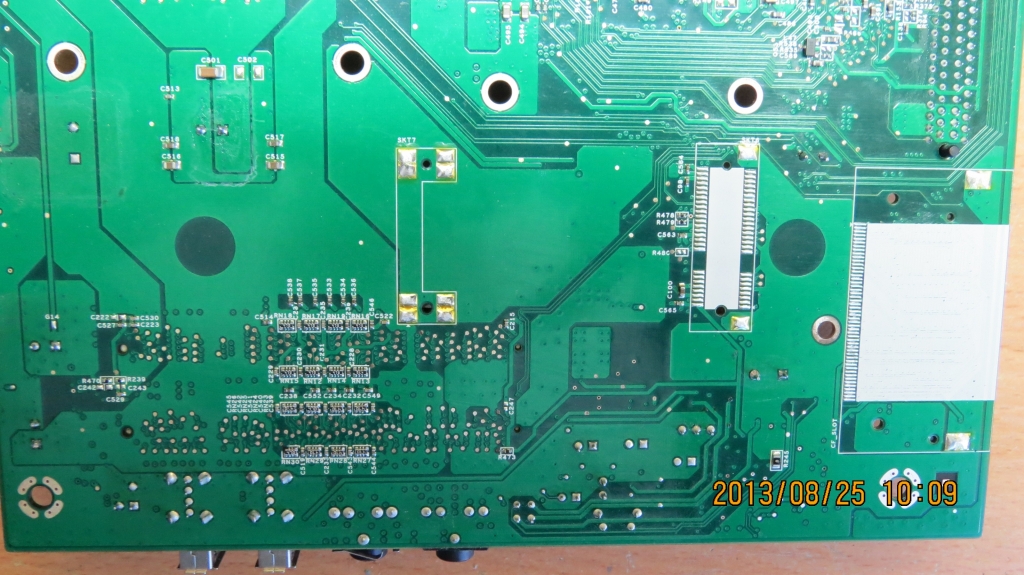
One is the back of the T5730 motherboard showing that the resisters and capacitors are already on the board, for the Mini-PCIe socket, without the socket on there yet.

http://obrazki.elektroda.pl/7150965900_1377429437.jpg

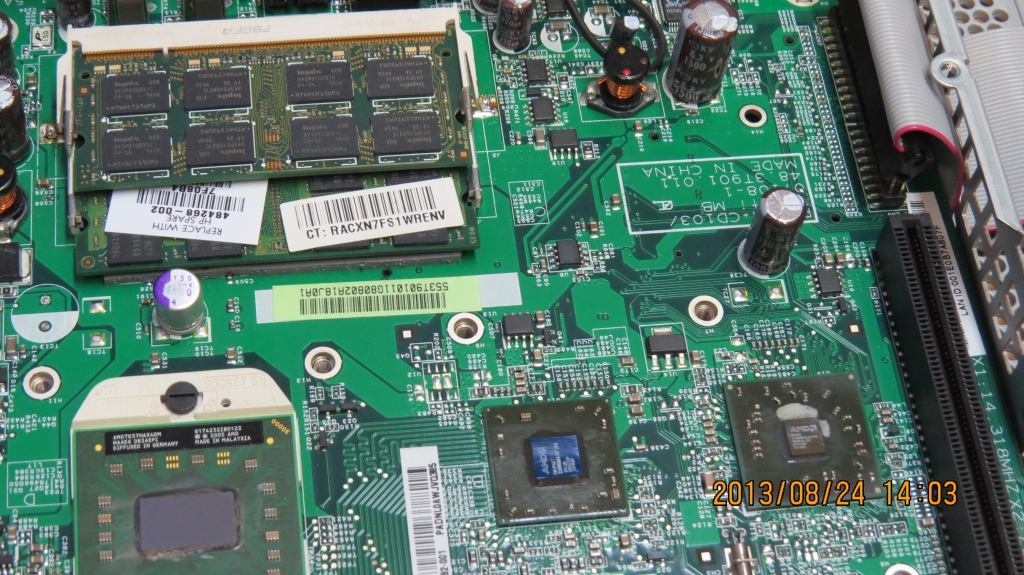
Another, in that same #8 post, shows the 2nd RAM socket on the motherboard.

http://obrazki.elektroda.pl/1754849400_1377429289.jpg

I'm wondering of anyone of them actually added the 2nd socket..!
If so, maybe someone can post a polish text message there asking if anyone there knows the 2nd RAM socket part #, and where to buy it.

Using Google Translate to do it may not make it understandable enough :)

This T5730 is quite popular around the world. Maybe they actually saw this thread, to inspire them to try the Dual-Core 64-bit CPU. ;)

Seems someone also just purchased the TL-64 CPU from that eBay site guy in Texas, mentioned to you in the post above. (Aug 5th 2014 purchase)

http://offer.ebay.com/ws/eBayISAPI.dll? ... 7675.l2564


@pilot
Hey...PILOT...what's up with all the SPAM posts on here.
I see you tagged another few in the MagicJack Technical Support area.

Isn't there any moderators watching here any longer?
I did a Google search for one of the SPAM'rs names, and found him posting on many other sites too, with the same nonsense about Cell-Phone Jammers.
They banned his account on most of those sites.
That same thing needs to be done here too..! ;)

EDITED...
Ha ha.. I just noticed... The SPAM was already removed...!
Nice..! 8)
T5735 wrote:Momo I opened up that site in Google Chrome and it has a feature that will ask you to translate it for you. It isn't perfect but you can get the general idea of what they are talking about. I also found this site that talks about adding the second ram slot but it is in German so you would have to use chrome to translate it as well.
http://www.elektroda.pl/rtvforum/topic2581275.html
HP T5730 - AMD Turion 64 x2 Dual-Core 2.4GHz CPU
(TMDTL68HAX5DM)
320GB WD 2.5" H.D. / 2GB RAM
(Windows 8.1 Pro 64-bit)
EVGA GeForce 7600 GT PCIe x16 card, (in x1 speed)
New 12vdc 16 amp (192w) PSU
T5735
Dan isn't smart enough to hire me
Posts: 158
Joined: Fri Aug 01, 2014 12:44 am

Post by T5735 »

I wonder if there were different versions of the 5730 for different countries? Maybe the ones in Europe came with two ram slots? On a side note after reading about all of these soldering posts I took a look at my t5740 which only uses the mini pci-e cards and discovered that the spots were there for the full sized cards so I took out the reflow machine and moved them so now I can use the much cheaper $11 BCM70012 cards instead of the $25 BCM70015 cards. :D
http://www.getpartsforless.com/media/ca ... 25-001.jpg
momo
Dan Should Pay Me
Posts: 541
Joined: Tue Aug 26, 2008 12:36 pm

Did you get THAT good with hot-air soldering, already? !!!

Post by momo »

Yes, It's possible a second RAM socket may already be mounted on some European models of the T5730.
I'd still like to find out if someone, from that polish electronics hobby site, successfully added it to theirs. Oh well..!

I'm a bit confused with your statement, about what you moved. :)
Are you saying you unsoldered the mini-PCIe socket on your T5740, and soldered it to another location on the motherboard?

If so, you've REALLY gotten VERY GOOD with reflow hot-air soldering..! :shock:

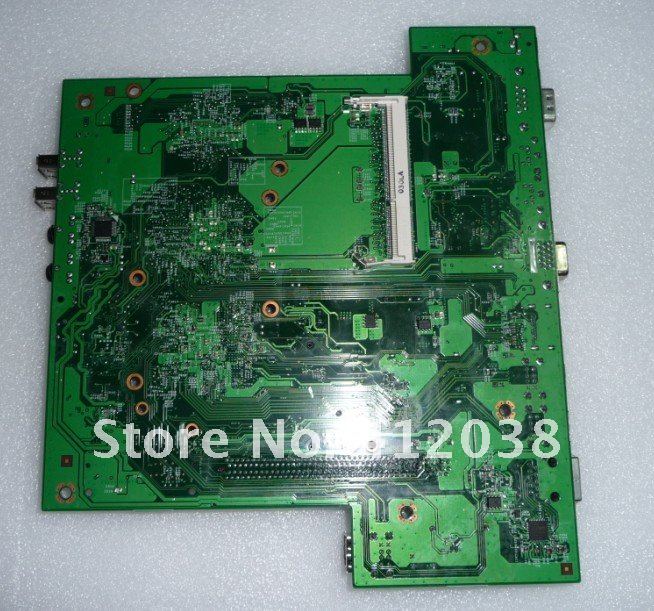
I looked around the internet at stock T5740 motherboards, and found there's another RAM socket mounted on the bottom...
http://i01.i.aliimg.com/img/pb/382/426/ ... 82_113.jpg

Is this true of yours?

The Google search result link...
https://www.google.com/#q=hp+t5740+motherboard+photo
T5735 wrote:I wonder if there were different versions of the 5730 for different countries? Maybe the ones in Europe came with two ram slots? On a side note after reading about all of these soldering posts I took a look at my t5740 which only uses the mini pci-e cards and discovered that the spots were there for the full sized cards so I took out the reflow machine and moved them so now I can use the much cheaper $11 BCM70012 cards instead of the $25 BCM70015 cards. :D
http://www.getpartsforless.com/media/ca ... 25-001.jpg
HP T5730 - AMD Turion 64 x2 Dual-Core 2.4GHz CPU
(TMDTL68HAX5DM)
320GB WD 2.5" H.D. / 2GB RAM
(Windows 8.1 Pro 64-bit)
EVGA GeForce 7600 GT PCIe x16 card, (in x1 speed)
New 12vdc 16 amp (192w) PSU
T5735
Dan isn't smart enough to hire me
Posts: 158
Joined: Fri Aug 01, 2014 12:44 am

Post by T5735 »

No I only unsolder-ed the little metal clip that goes on the end of the card to keep it seated into the socket. If you look at the picture I linked you can see behind the current location of where the link is now approximately twice the length it currently is now you will see their are two solder pads. I just unsoldered that metal clip and then soldered it back down onto those two pads. This makes me able to use the larger older and cheaper cards as well as the newer cards because they come with an adapter plate attached to them to make them fit the older slots.
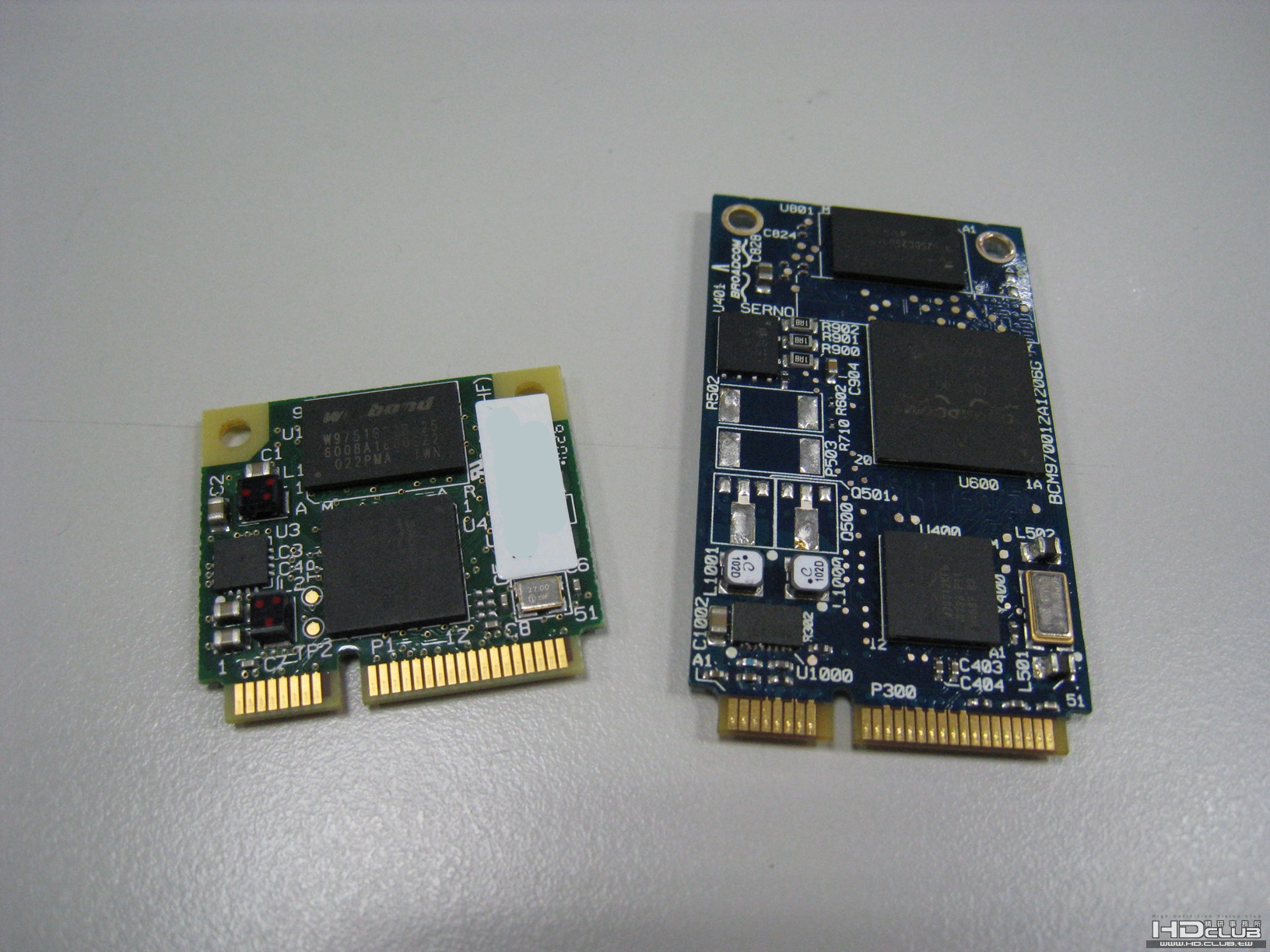
This is what the older BCM70012 looks like.
http://i00.i.aliimg.com/wsphoto/v0/1850 ... E-Card.jpg
This is what the newer BCM70015 looks like with the adapter plate on it.
http://www.laptopbattery-fan.co.uk/imag ... M70015.jpg
This is them side by side.
http://www.hd.club.tw/data/attachment/f ... 8326ea.jpg

Yes the T5740/45 does have two ram slots on it with one being on the bottom of the motherboard. It can take up to 16gigs of DDR3 ram. I have 4 gigs in my one I use as my XBMC Openelec box and it works great.
momo
Dan Should Pay Me
Posts: 541
Joined: Tue Aug 26, 2008 12:36 pm

Oh...now I understand.. :) it's still good soldering by you.

Post by momo »

OK, that makes it clearer. 8)
You put it where text on the motherboard is showing F4: F5: 1.5 A/8 V right?

If that's the spot, it's still nice soldering by you.
You had to unsolder three solder-pads on the old clips position, one being on the opposite side...without overheating the board, not pulling off the trace-pattern.
How'd you like using the Hot-Air Reflow station?
Did you practice first, or dive into the task?

I see the T5740/45 MoBo has a SATA controller/connector already.
That's convenient. :)

Is it SATA III or just II ?
T5735 wrote:No I only unsolder-ed the little metal clip that goes on the end of the card to keep it seated into the socket. If you look at the picture I linked you can see behind the current location of where the link is now approximately twice the length it currently is now you will see their are two solder pads. I just unsoldered that metal clip and then soldered it back down onto those two pads. This makes me able to use the larger older and cheaper cards as well as the newer cards because they come with an adapter plate attached to them to make them fit the older slots.
This is what the older BCM70012 looks like.
http://i00.i.aliimg.com/wsphoto/v0/1850 ... E-Card.jpg
This is what the newer BCM70015 looks like with the adapter plate on it.
http://www.laptopbattery-fan.co.uk/imag ... M70015.jpg
This is them side by side.
http://www.hd.club.tw/data/attachment/f ... 8326ea.jpg

Yes the T5740/45 does have two ram slots on it with one being on the bottom of the motherboard. It can take up to 16gigs of DDR3 ram. I have 4 gigs in my one I use as my XBMC Openelec box and it works great.
HP T5730 - AMD Turion 64 x2 Dual-Core 2.4GHz CPU
(TMDTL68HAX5DM)
320GB WD 2.5" H.D. / 2GB RAM
(Windows 8.1 Pro 64-bit)
EVGA GeForce 7600 GT PCIe x16 card, (in x1 speed)
New 12vdc 16 amp (192w) PSU
T5735
Dan isn't smart enough to hire me
Posts: 158
Joined: Fri Aug 01, 2014 12:44 am

Post by T5735 »

It was actually only two tabs as the one in the center is not soldered. I did practice a little bit on a bad power board I had for a Toshiba tv. I just took the smallest tip I had and just lifted up on the clip with the heat on it until it broke free and then just held it in place on the other spot until the solder melted and pushed it into place. It only took a few minutes and everything is still working fine so I guess I did it right. :shock:
Yes it does have a full SATA III connector right on the motherboard. I have never tried it as I didn't have the right cable to provide power to the hard drive so I ordered one off ebay for $1.12 shipped so I will give you a update when it gets here in a month or so from China. :(
http://www.ebay.com/itm/201111513675?ss ... 1497.l2649
momo
Dan Should Pay Me
Posts: 541
Joined: Tue Aug 26, 2008 12:36 pm

Post by momo »

Lucky you, that just two pads were soldered, of the three.
Otherwise, it wouldn't have been as easy.
Especially when one pad is on an opposite side. :P

The main thing to remember, when using Hot-Air to unsolder, is to let the air do all the work, and not try to lift the item off until you see the solder fully melt.
Otherwise, pulling on the item could pull off the trace pads along with the part.

I've done that, before I got use to using it. :roll:

Now I just put VERY TINY pull force on the part as I see the solder change shape and melt, until the part simply "lets-go" from the board, by itself.

Yeah... Soldering on a part is really simple. After you get some soldering time, and get use to it, you won't want to use ANYTHING else.

It's just so clean and quick, I can't see using a standard soldering iron anymore.

Wow that china seller is really inexpensive..!
Just the wait for it is a killer.
I've gotten a package from China in 2 weeks sometimes, so it may come fairly quick too.
T5735 wrote:It was actually only two tabs as the one in the center is not soldered. I did practice a little bit on a bad power board I had for a Toshiba tv. I just took the smallest tip I had and just lifted up on the clip with the heat on it until it broke free and then just held it in place on the other spot until the solder melted and pushed it into place. It only took a few minutes and everything is still working fine so I guess I did it right. :shock:
Yes it does have a full SATA III connector right on the motherboard. I have never tried it as I didn't have the right cable to provide power to the hard drive so I ordered one off ebay for $1.12 shipped so I will give you a update when it gets here in a month or so from China. :(
http://www.ebay.com/itm/201111513675?ss ... 1497.l2649
HP T5730 - AMD Turion 64 x2 Dual-Core 2.4GHz CPU
(TMDTL68HAX5DM)
320GB WD 2.5" H.D. / 2GB RAM
(Windows 8.1 Pro 64-bit)
EVGA GeForce 7600 GT PCIe x16 card, (in x1 speed)
New 12vdc 16 amp (192w) PSU
T5735
Dan isn't smart enough to hire me
Posts: 158
Joined: Fri Aug 01, 2014 12:44 am

Post by T5735 »

Well I have been playing around with my ipod hard drive setup and I have encountered a problem that I need some advice on. I got my 44 pin ide cable in from china along with 44 pin to 50 pin Toshiba adapter. It all works fine and I have full windows 7 64 bit pro running on it but I can't get the metal top on the case because I can't lay the drive and adapter flat in the case as their is a 1500uf 6.3v capacitor that goes all the way to the top of the metal lid. I have been looking around and found these.
http://www.ebay.com/itm/4-1500uF-6-3V-N ... 1e8da8d16b
They appear to be half the height of the capacitor that is in the thin client but they are rated exactly the same. Do you guys think I would be alright to remove the capacitor that is in the thin client now and replacing it with the shorter one? Another option is the buy a longer ide cable and cut through the perferated side and through the opening where the CF card slot would have gone and mount the hard drive under the motherboard. I would have to remote a couple of the metal threaded studs that are connected to the plastic plate on the bottom that facilitate mounting the thin clients monitor mounting bracket but I don't think that would be a big deal. What do you guys think?
http://i.imgur.com/aoWx9AB.jpg
momo
Dan Should Pay Me
Posts: 541
Joined: Tue Aug 26, 2008 12:36 pm

Post by momo »

Hi T5735
That cable from China came in fairly quickly..! 8)
I see why it was under $2 ... w/ free shipping ... It's very short. :lol:

If the caps are the same ones mentioned in the Japanese site I linked to in a previous post, then you can do what they did also.
http://soltec.exblog.jp/13060498/

They removed them, and put them on their sides.
You'll need to remove the entire motherboard to do this, but you'd still need to remove it anyway if you buy new caps too.

Scroll-down that sites page to where they show the photo of the area you mentioned.
I translated the Japanese on Google, but it doesn't say much more than what the photo shows, anyway. :roll:

Edited...
I just realized I can link to the exact photo...
http://www.exblog.jp/blog_logo.asp?slt= ... 423468.jpg

observe the polarity when you re-attach them

If the leads on the caps are too short to reach the pads on the board, when on their sides, try to extend them by adding wires from the board, or the caps, or you may need to buy the same value axial types that haven't been cut yet, that you found on eBay, ...but then you'll wait longer, and need to spend more money.

I'm sure you can figure some way to extend the wires. :P

By the way... It looks nice, so far, (from the photo you linked to)


Hey...on a side note...I looked at that Texas eBay seller I mentioned earlier in this thread, of the TL-68 and TL-64 CPU and he's sold more of them in the last few weeks...plus his TL-68 one came down in price by $12 ..to $56 now.

So people seem to be upgrading their T5730 systems too, maybe from reading this thread.

Did you get a new power supply too, from the company I mentioned, or have you found one from another unit you already had?

T5735 wrote:Well I have been playing around with my ipod hard drive setup and I have encountered a problem that I need some advice on. I got my 44 pin ide cable in from china along with 44 pin to 50 pin Toshiba adapter. It all works fine and I have full windows 7 64 bit pro running on it but I can't get the metal top on the case because I can't lay the drive and adapter flat in the case as their is a 1500uf 6.3v capacitor that goes all the way to the top of the metal lid. I have been looking around and found these.
http://www.ebay.com/itm/4-1500uF-6-3V-N ... 1e8da8d16b
They appear to be half the height of the capacitor that is in the thin client but they are rated exactly the same. Do you guys think I would be alright to remove the capacitor that is in the thin client now and replacing it with the shorter one? Another option is the buy a longer ide cable and cut through the perferated side and through the opening where the CF card slot would have gone and mount the hard drive under the motherboard. I would have to remote a couple of the metal threaded studs that are connected to the plastic plate on the bottom that facilitate mounting the thin clients monitor mounting bracket but I don't think that would be a big deal. What do you guys think?
http://i.imgur.com/aoWx9AB.jpg
HP T5730 - AMD Turion 64 x2 Dual-Core 2.4GHz CPU
(TMDTL68HAX5DM)
320GB WD 2.5" H.D. / 2GB RAM
(Windows 8.1 Pro 64-bit)
EVGA GeForce 7600 GT PCIe x16 card, (in x1 speed)
New 12vdc 16 amp (192w) PSU
T5735
Dan isn't smart enough to hire me
Posts: 158
Joined: Fri Aug 01, 2014 12:44 am

Post by T5735 »

momo wrote:Hi T5735
That cable from China came in fairly quickly..! 8)
I see why it was under $2 ... w/ free shipping ... It's very short. :lol:

If the caps are the same ones mentioned in the Japanese site I linked to in a previous post, then you can do what they did also.
http://soltec.exblog.jp/13060498/

They removed them, and put them on their sides.
You'll need to remove the entire motherboard to do this, but you'd still need to remove it anyway if you buy new caps too.

Scroll-down that sites page to where they show the photo of the area you mentioned.
I translated the Japanese on Google, but it doesn't say much more than what the photo shows, anyway. :roll:

Edited...
I just realized I can link to the exact photo...
http://www.exblog.jp/blog_logo.asp?slt= ... 423468.jpg

If the leads on the caps are too short to reach the pads on the board, when on their sides, try to extend them by adding wires from the board, or the caps, or you may need to buy the same value axial types that haven't been cut yet, that you found on eBay, ...but then you'll wait longer, and need to spend more money.

I'm sure you can figure some way to extend the wires. :P

By the way... It looks nice, so far, (from the photo you linked to)


Hey...on a side note...I looked at that Texas eBay seller I mentioned earlier in this thread, of the TL-68 and TL-64 CPU and he's sold more of them in the last few weeks...plus his TL-68 one came down in price by $10 ..to $56 now.

So people seem to be upgrading their T5730 systems too, maybe from reading this thread.

Did you get a new power supply too, from the company I mentioned, or have you found one from another unit you already had?

T5735 wrote:Well I have been playing around with my ipod hard drive setup and I have encountered a problem that I need some advice on. I got my 44 pin ide cable in from china along with 44 pin to 50 pin Toshiba adapter. It all works fine and I have full windows 7 64 bit pro running on it but I can't get the metal top on the case because I can't lay the drive and adapter flat in the case as their is a 1500uf 6.3v capacitor that goes all the way to the top of the metal lid. I have been looking around and found these.
http://www.ebay.com/itm/4-1500uF-6-3V-N ... 1e8da8d16b
They appear to be half the height of the capacitor that is in the thin client but they are rated exactly the same. Do you guys think I would be alright to remove the capacitor that is in the thin client now and replacing it with the shorter one? Another option is the buy a longer ide cable and cut through the perferated side and through the opening where the CF card slot would have gone and mount the hard drive under the motherboard. I would have to remote a couple of the metal threaded studs that are connected to the plastic plate on the bottom that facilitate mounting the thin clients monitor mounting bracket but I don't think that would be a big deal. What do you guys think?
http://i.imgur.com/aoWx9AB.jpg
I was thinking of doing exactly the same thing as the people no the Japanese site. I ordered those caps from ebay and they should get here in a few days so hopefully the leads on them are long enough. I actually ordered two ide cables that little 2" cable and a 8" one that would be long enough if I wanted to mount the hard drive under the motherboard. I am going to wait for the new caps to come in and take the motherboard out and weigh my options. I am now moving on to trying to figure out how I am going to deal with the USB situation. I am going to have a few things that will be running off USB sitting under the motherboard like a IR sensor board and a XBOX RF receiver board. Do you think I should just directly solder the USB cables to the bottom of the rear of the motherboard where the USB ports are connected? It is either that or use a cheap USB hub and strip it down and solder or plug it into one of the internal ports and then solder the other devices to it. I went ahead and ordered a few different usb hubs at the same time I ordered everything else to give me some options. So far windows 7 is running well on it albeit a little slow. I am unsure if it is because of the 4200 rpm hard drive or just the system itself. Like when I click on firefox or chrome it takes about 15 seconds for it to finally appear but when it does the browser works fine and web browsing is normal. When I played a game via steam in home streaming on it the game for the most part played "ok" but you could tell their was a little bit of jitteryness if that is even a word. I am wondering if I installed a 32gb DOM in this thing and put windows 7 on it if that would fix any of my problems? Also I have almost given up on getting audio to go through the DVI port. I got it to work with puppy linux but I have tried just about everything with windows to no avail. :(
momo
Dan Should Pay Me
Posts: 541
Joined: Tue Aug 26, 2008 12:36 pm

Post by momo »

T5735 wrote: I was thinking of doing exactly the same thing as the people on the Japanese site. I ordered those caps from ebay and they should get here in a few days so hopefully the leads on them are long enough. I actually ordered two ide cables that little 2" cable and a 8" one that would be long enough if I wanted to mount the hard drive under the motherboard. I am going to wait for the new caps to come in and take the motherboard out and weigh my options. I am now moving on to trying to figure out how I am going to deal with the USB situation. I am going to have a few things that will be running off USB sitting under the motherboard like a IR sensor board and a XBOX RF receiver board. Do you think I should just directly solder the USB cables to the bottom of the rear of the motherboard where the USB ports are connected? It is either that or use a cheap USB hub and strip it down and solder or plug it into one of the internal ports and then solder the other devices to it. I went ahead and ordered a few different usb hubs at the same time I ordered everything else to give me some options. So far windows 7 is running well on it albeit a little slow. I am unsure if it is because of the 4200 rpm hard drive or just the system itself. Like when I click on firefox or chrome it takes about 15 seconds for it to finally appear but when it does the browser works fine and web browsing is normal. When I played a game via steam in home streaming on it the game for the most part played "ok" but you could tell their was a little bit of jitteryness if that is even a word. I am wondering if I installed a 32gb DOM in this thing and put windows 7 on it if that would fix any of my problems? Also I have almost given up on getting audio to go through the DVI port. I got it to work with puppy linux but I have tried just about everything with windows to no avail. :(
wow, you got the 'upgrade fever' ;) alright... It's good to have options though.

The speed of the drive will make things load faster or slower, but the jitteryness may be the slower CPU, or the slower miniPCIe card you have.

If you use a 32GB DOM and it's not faster than the 4200 RPM drive you're using, not much of a change will take place.
This was why I wanted to use a SATA Controller in a miniPCIe adapter if I added that connector on the bottom.
As it is now, with the WesternDigital 320GB 2.5" drive in , and my full-sized PCIe EVGA 7600 Graphics card, I'm getting 5.2 rating on the entire system with Win 8.1 Pro 64-bit.
So for me, it's my drive holding back a higher rating.

There are so many factors that slow the system down.
I remember that the extra 200MHz added with the TL-68, instead of the TL-64, made a difference for me too.

Edited...
I forgot to ask you, what speed is your memory module.
Does it have the 400 MHz rating as I mentioned in a post earlier in this thread, or is it the slower 300 MHz rating?
http://www.phoneservicesupport.com/post77646.html#77646

That also made a difference for me with the smoothness of playing back, and recording the HD content.

(I used a CPU monitoring program that also shows the speed of the memory, from CPUz I think. I can look if you want to know, it's free for the non-pro version)

I forgot to mention your USB issue.
Can you use the two 'hidden' USB slots, normally in the area above the IDE connector?
I wouldn't solder anything to a USB slot, you never know when you need to remove it sometime...it will be a pain in the *ARSE*... :)

Also, remember... If you're adding stuff to the motherboard, like these USB devices, if they take the full 1/2 Amp, your power supply will need more wattage, or it will shut-down when overloading.

I had this happen, before I had the 16 Amp PSU, and it popped my drive, and I needed to get another one.
Luckily it was still under warranty.

You may not need that big a PSU, but the 8 Amp one I mentioned in a post earlier, may be good enough for you
Last edited by momo on Mon Aug 18, 2014 1:17 am, edited 1 time in total.
HP T5730 - AMD Turion 64 x2 Dual-Core 2.4GHz CPU
(TMDTL68HAX5DM)
320GB WD 2.5" H.D. / 2GB RAM
(Windows 8.1 Pro 64-bit)
EVGA GeForce 7600 GT PCIe x16 card, (in x1 speed)
New 12vdc 16 amp (192w) PSU
T5735
Dan isn't smart enough to hire me
Posts: 158
Joined: Fri Aug 01, 2014 12:44 am

Post by T5735 »

momo wrote:
T5735 wrote: I was thinking of doing exactly the same thing as the people on the Japanese site. I ordered those caps from ebay and they should get here in a few days so hopefully the leads on them are long enough. I actually ordered two ide cables that little 2" cable and a 8" one that would be long enough if I wanted to mount the hard drive under the motherboard. I am going to wait for the new caps to come in and take the motherboard out and weigh my options. I am now moving on to trying to figure out how I am going to deal with the USB situation. I am going to have a few things that will be running off USB sitting under the motherboard like a IR sensor board and a XBOX RF receiver board. Do you think I should just directly solder the USB cables to the bottom of the rear of the motherboard where the USB ports are connected? It is either that or use a cheap USB hub and strip it down and solder or plug it into one of the internal ports and then solder the other devices to it. I went ahead and ordered a few different usb hubs at the same time I ordered everything else to give me some options. So far windows 7 is running well on it albeit a little slow. I am unsure if it is because of the 4200 rpm hard drive or just the system itself. Like when I click on firefox or chrome it takes about 15 seconds for it to finally appear but when it does the browser works fine and web browsing is normal. When I played a game via steam in home streaming on it the game for the most part played "ok" but you could tell their was a little bit of jitteryness if that is even a word. I am wondering if I installed a 32gb DOM in this thing and put windows 7 on it if that would fix any of my problems? Also I have almost given up on getting audio to go through the DVI port. I got it to work with puppy linux but I have tried just about everything with windows to no avail. :(
wow, you got the 'upgrade fever' ;) alright... It's good to have options though.

The speed of the drive will make things load faster or slower, but the jitteryness may be the slower CPU, or the slower miniPCIe card you have.

If you use a 32GB DOM and it's not faster than the 4200 RPM drive you're using, not much of a change will take place.
This was why I wanted to use a SATA Controller in a miniPCIe adapter if I added that connector on the bottom.
As it is now, with the WesternDigital 320GB 2.5" drive in , and my full-sized PCIe EVGA 7600 Graphics card, I'm getting 5.2 rating on the entire system with Win 8.1 Pro 64-bit.
So for me, it's my drive holding back a higher rating.

There are so many factors that slow the system down.
I remember that the extra 200MHz added with the TL-68, instead of the TL-64, made a difference for me too.

Edited...
I forgot to ask you, what speed is your memory module.
Does it have the 400 MHz rating as I mentioned in a post earlier in this thread, or is it the slower 300 MHz rating?
http://www.phoneservicesupport.com/post77646.html#77646

That also made a difference for me with the smoothness of playing back, and recording the HD content.

(I used a CPU monitoring program that also shows the speed of the memory, from CPUz I think. I can look if you want to know, it's free for the non-pro version)

I forgot to mention your USB issue.
Can you use the two 'hidden' USB slots, normally in the area above the IDE connector?
I wouldn't solder anything to a USB slot, you never know when you need to remove it sometime...it will be a pain in the *ARSE*... :)
I will have to take a look at the RAM tomorrow and see what speed it is. I am still running the 1800mhz cpu I got for a few dollars in this one as I have not bought a new cpu yet. I am wondering if this one would be better than the TL-64 as it has 2mb of cache as opposed to the 1mb on the TL-64 and the FSB on this one is 1800 instead of 800 like the TL-64?
http://www.ebay.com/itm/NEW-OEM-AMD-Tur ... 338aca234c
momo
Dan Should Pay Me
Posts: 541
Joined: Tue Aug 26, 2008 12:36 pm

Post by momo »

no, no...the socket on the CPU you link to is not S1G1... It won't fit or work..!
It MUST be a S1G1 socket.


The TL-68 (TMDTL68HAX5DM) is better than the TL-64.
I think the FSB speed is as fast as the one you mentioned you're using already, but that's not as important as the actual speed of the processor, because the FSB of the ThinClient T5730 is just 200MHz.

Yeah..I was shocked too, when I learned that.
It's not going to use the full FSB speed of the CPU anyway.
This is why the GHz speed of the processor is more important, with the RAM speed too.

I also added text to my post above, before you quoted me, here.
Did you see my extra stuff I added? :)
You're too quick for my typing and editing, when you reply..ha ha..!

Oh...by the way...the cache doesn't do much for speed of the unit anyway, so don't dwell on it too much.
HP T5730 - AMD Turion 64 x2 Dual-Core 2.4GHz CPU
(TMDTL68HAX5DM)
320GB WD 2.5" H.D. / 2GB RAM
(Windows 8.1 Pro 64-bit)
EVGA GeForce 7600 GT PCIe x16 card, (in x1 speed)
New 12vdc 16 amp (192w) PSU
T5735
Dan isn't smart enough to hire me
Posts: 158
Joined: Fri Aug 01, 2014 12:44 am

Post by T5735 »

momo wrote:The TL-68 is better than the TL-64.
I think the FSB speed is as fast as the one you mentioned you're using already, but that's not as important as the actual speed of the processor, because the FSB of the ThinClient T5730 is just 200MHz.

Yeah..I was shocked too, when I learned that.
It's not going to use the full FSB speed of the CPU anyway.
This is why the GHz speed of the processor is more important, with the RAM speed too.

I also added text to my post above, before you quoted me, here.
Did you see my extra stuff I added? :)
You're too quick for my typing and editing, when you reply..ha ha..!

Oh...by the way...the cache doesn't do much for speed of the unit anyway, so don't dwell on it too much.
I was actually thinking about just soldering onto the pins that were coming out of the bottom of the rear of the motherboard where the twin stacked usb ports were. My line of thinking was just to solder the line come from the usb hub to it and then have everything else connected to it. I am going to use one of the internal usb ports for a USB 150N adapter.
http://www.ebay.com/itm/291026808908?ss ... 1497.l2649 I am going to drill a larger hole though one of the already present square holes and run this to the stock location on the side of the case behind the internal USB ports where the optional OEM wireless antenna would be.
http://www.ebay.com/itm/161385586233?ss ... 1497.l2649
I guess I could just plug the stripped down USB hub into the other internal port and then have everything else attached to the hub. That would make it easier if I had to take the motherboard out again I wouldn't have anything else permanently attached to it. As far as the power supply goes I am going to have to figure something out because like you say this stuff does put a drain on things. I keep on looking at the flea market and junk stores to see if I can find something but so far no luck. If I found a suitable PSU with the wrong connector how hard is it to solder on the correct one to it? This is the power supply I am using right now.
http://i.imgur.com/Pq57CfY.jpg
T5735
Dan isn't smart enough to hire me
Posts: 158
Joined: Fri Aug 01, 2014 12:44 am

Post by T5735 »

Momo also maybe you can help me out with this. I was doing some research and came across these Turion II cpu's. They seem to be newer than the Turion 64's and they are cheaper on ebay.
http://www.ebay.com/itm/AMD-Mobile-Turi ... 1e8ce3f516
This Turion II Ultra Dual Core P560 is 2.5ghz and from my research it is the same socket S1 as the Turion 64's but it is revision S1G3 and G4 according to this.
http://www.cpu-world.com/CPUs/K10/TYPE- ... obile.html
I also found this post on Toms Hardware discussing it. I will wait and see what you say but for $12 I might take a gamble on it and just experiment.
Here is a comparison to the TL-64.
http://www.cpu-world.com/Compare/44/AMD ... _P560.html
and a comparison to a TL-68.
http://www.cpu-world.com/Compare/403/AM ... _P560.html
momo
Dan Should Pay Me
Posts: 541
Joined: Tue Aug 26, 2008 12:36 pm

Post by momo »

T5735 wrote:
momo wrote:The TL-68 is better than the TL-64.
I think the FSB speed is as fast as the one you mentioned you're using already, but that's not as important as the actual speed of the processor, because the FSB of the ThinClient T5730 is just 200MHz.

Yeah..I was shocked too, when I learned that.
It's not going to use the full FSB speed of the CPU anyway.
This is why the GHz speed of the processor is more important, with the RAM speed too.

I also added text to my post above, before you quoted me, here.
Did you see my extra stuff I added? :)
You're too quick for my typing and editing, when you reply..ha ha..!

Oh...by the way...the cache doesn't do much for speed of the unit anyway, so don't dwell on it too much.
I was actually thinking about just soldering onto the pins that were coming out of the bottom of the rear of the motherboard where the twin stacked usb ports were. My line of thinking was just to solder the line come from the usb hub to it and then have everything else connected to it. I am going to use one of the internal usb ports for a USB 150N adapter.
http://www.ebay.com/itm/291026808908?ss ... 1497.l2649 I am going to drill a larger hole though one of the already present square holes and run this to the stock location on the side of the case behind the internal USB ports where the optional OEM wireless antenna would be.
http://www.ebay.com/itm/161385586233?ss ... 1497.l2649
I guess I could just plug the stripped down USB hub into the other internal port and then have everything else attached to the hub. That would make it easier if I had to take the motherboard out again I wouldn't have anything else permanently attached to it. As far as the power supply goes I am going to have to figure something out because like you say this stuff does put a drain on things. I keep on looking at the flea market and junk stores to see if I can find something but so far no luck. If I found a suitable PSU with the wrong connector how hard is it to solder on the correct one to it? This is the power supply I am using right now.
http://i.imgur.com/Pq57CfY.jpg
The PSU you have now is JUST 50 watts (slightly over 4 Amps)
The new CPU takes 35 watts, then the other stuff you'll add will surely take over 10 or more watts, so there will be no margin left.

The one I linked to from mini-box.com that is 8 Amps has a connector like the T5730 uses already. Just ask the company of its polarity is CENTER Plus, and Negative is the outer area. If it is, you won't need to make any new connector as I needed to do.

You also didn't see my added bold-type edit to my last post...you're so quick I can't keep up with your replies...:lol:
The CPU you linked to is NOT the correct socket.
It's a S1G2
You need a S1G1 style...like this one...
http://www.ebay.com/itm/AMD-Turion-64-X ... 4ad926fea9

Unfortunately he's sold them all already...unless he has more not listed on eBay yet. Or others have some too, for a similar price.

I thought you said you purchased one of the TL-64 from him the end of July or Aug 5th... :roll: ... (In a previous post) oh well... No worry, they'll always be available from somewhere, but that was cheap, compared to what I paid ($94)

As for the soldering of the data wires, of the USB...another no no... :)
It will slow-down the data transfer if the spacing of the two inner-wires are not shielded properly, or are not spaced properly.

It will still work though, just slower because it messes-up the 50-ohm matching of the impedance.
HP T5730 - AMD Turion 64 x2 Dual-Core 2.4GHz CPU
(TMDTL68HAX5DM)
320GB WD 2.5" H.D. / 2GB RAM
(Windows 8.1 Pro 64-bit)
EVGA GeForce 7600 GT PCIe x16 card, (in x1 speed)
New 12vdc 16 amp (192w) PSU
T5735
Dan isn't smart enough to hire me
Posts: 158
Joined: Fri Aug 01, 2014 12:44 am

Post by T5735 »

momo wrote:
T5735 wrote:
momo wrote:The TL-68 is better than the TL-64.
I think the FSB speed is as fast as the one you mentioned you're using already, but that's not as important as the actual speed of the processor, because the FSB of the ThinClient T5730 is just 200MHz.

Yeah..I was shocked too, when I learned that.
It's not going to use the full FSB speed of the CPU anyway.
This is why the GHz speed of the processor is more important, with the RAM speed too.

I also added text to my post above, before you quoted me, here.
Did you see my extra stuff I added? :)
You're too quick for my typing and editing, when you reply..ha ha..!

Oh...by the way...the cache doesn't do much for speed of the unit anyway, so don't dwell on it too much.
I was actually thinking about just soldering onto the pins that were coming out of the bottom of the rear of the motherboard where the twin stacked usb ports were. My line of thinking was just to solder the line come from the usb hub to it and then have everything else connected to it. I am going to use one of the internal usb ports for a USB 150N adapter.
http://www.ebay.com/itm/291026808908?ss ... 1497.l2649 I am going to drill a larger hole though one of the already present square holes and run this to the stock location on the side of the case behind the internal USB ports where the optional OEM wireless antenna would be.
http://www.ebay.com/itm/161385586233?ss ... 1497.l2649
I guess I could just plug the stripped down USB hub into the other internal port and then have everything else attached to the hub. That would make it easier if I had to take the motherboard out again I wouldn't have anything else permanently attached to it. As far as the power supply goes I am going to have to figure something out because like you say this stuff does put a drain on things. I keep on looking at the flea market and junk stores to see if I can find something but so far no luck. If I found a suitable PSU with the wrong connector how hard is it to solder on the correct one to it? This is the power supply I am using right now.
http://i.imgur.com/Pq57CfY.jpg
The PSU you have now is JUST 50 watts (slightly over 4 Amps)
The new CPU takes 35 watts, then the other stuff you'll add will surely take over 10 or more watts, so there will be no margin left.

The one I linked to from mini-box.com that is 8 Amps has a connector like the T5730 uses already. Just ask the company of its polarity is CENTER Plus, and Negative is the outer area. If it is, you won't need to make any new connector as I needed to do.

You also didn't see my added bold-type edit to my last post...you're so quick I can't keep up with your replies...:lol:
The CPU you linked to is NOT the correct socket.
It's a S1G2
You need a S1G1 style...like this one...
http://www.ebay.com/itm/AMD-Turion-64-X ... 4ad926fea9

Unfortunately he's sold them all already...unless he has more not listed on eBay yet. Or others have some too, for a similar price.

I thought you said you purchased one of the TL-64 from him the end of July or Aug 5th... :roll: ... (In a previous post) oh well... No worry, they'll always be available from somewhere, but that was cheap, compared to what I paid ($94)

As for the soldering of the data wires, of the USB...another no no... :)
It will slow-down the data transfer if the spacing of the two inner-wires are not shielded properly, or are not spaced properly.

It will still work though, just slower because it messes-up the 50-ohm matching of the inductance.
Sorry about the fast posting. :lol: I just did some further research and like you said in the post above it looks like the TL-68 is the fastest we can hope for in the S1G1 sockets. :cry: I was hoping to be able to find an alternative that was cheaper but it looks like I will just bite the bullet and buy a TL-64 and hope it is good enough. I actually did order one back then but something with my paypal account got all messed up and it along with another item I ordered got canceled.

http://www.tomshardware.com/forum/34170 ... otherboard
The S1 socket are not compatible backward. And yes those are the CPUs that fit in the S1G2 .
These CPUs are for the S1G1:
Turion 64 X2 TL-50
Turion 64 X2 TL-52
Turion 64 X2 TL-56
Turion 64 X2 TL-60
Turion 64 X2 TL-64
Athlon 64 X2 TK-42
Athlon 64 X2 TK-53
Athlon 64 X2 TK-55
Athlon 64 X2 TK-57
Turion 64 X2 TL-58
Turion 64 X2 TL-62
Turion 64 X2 TL-66
Turion 64 X2 TL-68

If I can find a S1G2 cpu for dirt cheap like a few dollars I might order one just to see what happens. :lol:
momo
Dan Should Pay Me
Posts: 541
Joined: Tue Aug 26, 2008 12:36 pm

Post by momo »

From what the DataSheet says, for the chipset within the T5730, it uses a S1G1 socket.
I'm not sure if it means the amount of pins, and it's configuration, or the inner workings of the CPU.

Maybe you can ask the seller to photograph the back of the CPU, and ask the AMD company about that part of it.
I wouldn't feel comfortable giving that information.

I'd love to update to a faster CPU too. ;)

I'm not sure if it will work,...but anything is possible.

Thing is...it may not make a difference with the T5730, even if it will fit, because the chipset may not support the extra features within those CPUs
T5735 wrote:Momo also maybe you can help me out with this. I was doing some research and came across these Turion II cpu's. They seem to be newer than the Turion 64's and they are cheaper on ebay.
http://www.ebay.com/itm/AMD-Mobile-Turi ... 1e8ce3f516
This Turion II Ultra Dual Core P560 is 2.5ghz and from my research it is the same socket S1 as the Turion 64's but it is revision S1G3 and G4 according to this.
http://www.cpu-world.com/CPUs/K10/TYPE- ... obile.html
I also found this post on Toms Hardware discussing it. I will wait and see what you say but for $12 I might take a gamble on it and just experiment.
Here is a comparison to the TL-64.
http://www.cpu-world.com/Compare/44/AMD ... _P560.html
and a comparison to a TL-68.
http://www.cpu-world.com/Compare/403/AM ... _P560.html
HP T5730 - AMD Turion 64 x2 Dual-Core 2.4GHz CPU
(TMDTL68HAX5DM)
320GB WD 2.5" H.D. / 2GB RAM
(Windows 8.1 Pro 64-bit)
EVGA GeForce 7600 GT PCIe x16 card, (in x1 speed)
New 12vdc 16 amp (192w) PSU
momo
Dan Should Pay Me
Posts: 541
Joined: Tue Aug 26, 2008 12:36 pm

Post by momo »

Wow, you beat my edit again... I changed inductance, to impedance..with my USB soldering inner-wires... answer :lol:

Well... So you found confirmation about the S1G1 socket not compatible with the S1G2 and S1G3 socket CPU ... I'm glad you're quick.. ;)
Too bad, I wanted to update too if possible

I figured so... But didn't know for sure.
Besides, the T5730 isn't the fastest FSB anyway, so it doesn't matter using an Ultra CPU anyway.

Try to get the fastest speed CPU you can afford, with the fastest RAM.
These are the most important things for us, with the T5730, because of the slower FSB.
The next important is the drive speed.
If you can find a combo Mini-PCIe graphics and SATA II or III , then THAT will speed up Windows 7 64-bit loading files and the Rating value of the system.
Is there a way to have your mini pice graphics card, with adding a SATA controller too?

If not, it's more important to have the CPU and RAM as fast as possible, so running programs or playing HD videos will be faster, and smoother.

If you're going to experiment with the S1G2 CPU...try it on one of your other T5730's you have, that's not needed, and hasn't been modded yet..'cause it may blow-out the mother board or power supply , or both. :shock: ;)
T5735 wrote:
momo wrote:
T5735 wrote: I was actually thinking about just soldering onto the pins that were coming out of the bottom of the rear of the motherboard where the twin stacked usb ports were. My line of thinking was just to solder the line come from the usb hub to it and then have everything else connected to it. I am going to use one of the internal usb ports for a USB 150N adapter.
http://www.ebay.com/itm/291026808908?ss ... 1497.l2649 I am going to drill a larger hole though one of the already present square holes and run this to the stock location on the side of the case behind the internal USB ports where the optional OEM wireless antenna would be.
http://www.ebay.com/itm/161385586233?ss ... 1497.l2649
I guess I could just plug the stripped down USB hub into the other internal port and then have everything else attached to the hub. That would make it easier if I had to take the motherboard out again I wouldn't have anything else permanently attached to it. As far as the power supply goes I am going to have to figure something out because like you say this stuff does put a drain on things. I keep on looking at the flea market and junk stores to see if I can find something but so far no luck. If I found a suitable PSU with the wrong connector how hard is it to solder on the correct one to it? This is the power supply I am using right now.
http://i.imgur.com/Pq57CfY.jpg
The PSU you have now is JUST 50 watts (slightly over 4 Amps)
The new CPU takes 35 watts, then the other stuff you'll add will surely take over 10 or more watts, so there will be no margin left.

The one I linked to from mini-box.com that is 8 Amps has a connector like the T5730 uses already. Just ask the company of its polarity is CENTER Plus, and Negative is the outer area. If it is, you won't need to make any new connector as I needed to do.

You also didn't see my added bold-type edit to my last post...you're so quick I can't keep up with your replies...:lol:
The CPU you linked to is NOT the correct socket.
It's a S1G2
You need a S1G1 style...like this one...
http://www.ebay.com/itm/AMD-Turion-64-X ... 4ad926fea9

Unfortunately he's sold them all already...unless he has more not listed on eBay yet. Or others have some too, for a similar price.

I thought you said you purchased one of the TL-64 from him the end of July or Aug 5th... :roll: ... (In a previous post) oh well... No worry, they'll always be available from somewhere, but that was cheap, compared to what I paid ($94)

As for the soldering of the data wires, of the USB...another no no... :)
It will slow-down the data transfer if the spacing of the two inner-wires are not shielded properly, or are not spaced properly.

It will still work though, just slower because it messes-up the 50-ohm matching of the inductance.
Sorry about the fast posting. :lol: I just did some further research and like you said in the post above it looks like the TL-68 is the fastest we can hope for in the S1G1 sockets. :cry: I was hoping to be able to find an alternative that was cheaper but it looks like I will just bite the bullet and buy a TL-64 and hope it is good enough. I actually did order one back then but something with my paypal account got all messed up and it along with another item I ordered got canceled.
http://www.tomshardware.com/forum/34170 ... otherboard
The S1 socket are not compatible backward. And yes those are the CPUs that fit in the S1G2 .
These CPUs are for the S1G1:
Turion 64 X2 TL-50
Turion 64 X2 TL-52
Turion 64 X2 TL-56
Turion 64 X2 TL-60
Turion 64 X2 TL-64
Athlon 64 X2 TK-42
Athlon 64 X2 TK-53
Athlon 64 X2 TK-55
Athlon 64 X2 TK-57
Turion 64 X2 TL-58
Turion 64 X2 TL-62
Turion 64 X2 TL-66
Turion 64 X2 TL-68

If I can find a S1G2 cpu for dirt cheap like a few dollars I might order one just to see what happens. :lol:
Last edited by momo on Mon Aug 18, 2014 2:43 am, edited 1 time in total.
HP T5730 - AMD Turion 64 x2 Dual-Core 2.4GHz CPU
(TMDTL68HAX5DM)
320GB WD 2.5" H.D. / 2GB RAM
(Windows 8.1 Pro 64-bit)
EVGA GeForce 7600 GT PCIe x16 card, (in x1 speed)
New 12vdc 16 amp (192w) PSU
T5735
Dan isn't smart enough to hire me
Posts: 158
Joined: Fri Aug 01, 2014 12:44 am

Post by T5735 »

Wow, you beat my edit again... I changed inductance, to impedance..with my USB soldering inner-wires... answer Laughing

Well... So you found confirmation about the S1G1 socket not compatible with the S1G2 and S1G3 socket CPU ... I'm glad you're quick.. Wink
Too bad, I wanted to update too if possible

I figured so... But didn't know for sure.
Besides, the T5730 isn't the fastest FSB anyway, so it doesn't matter using an Ultra CPU anyway.

Try to get the fastest speed you can afford, with the fastest RAM.
These are the most important things for us, with the T5730, because of the slower FSB.
The next important is the drive speed.
If you can find a combo Mini-PCIe graphics and SATA Ii or III THAT will speed up Windows 7 64-bit. Is there a way to have your mini pice with adding a SATA controller too?

If not, it's more important to have the CPU and RAM as fast as possible, so running programs or playing HD videos will be faster, and smoother.
Yea I actually thought about using one of these.
http://www.ebay.com/itm/Bundle-Deal-2-P ... 5d4d846130 and hooking a SSD to it. I also considered using a 44 pin IDE to Sata converter and hooking up a SSD that way but then again you would be bottle necked by the PATA interface but it would still be significantly faster than this little 1.8" 4200 rpm ipod hard drive I am using now.
momo
Dan Should Pay Me
Posts: 541
Joined: Tue Aug 26, 2008 12:36 pm

Post by momo »

T5735 wrote: Yea I actually thought about using one of these.
http://www.ebay.com/itm/Bundle-Deal-2-P ... 5d4d846130 and hooking a SSD to it. I also considered using a 44 pin IDE to Sata converter and hooking up a SSD that way but then again you would be bottle necked by the PATA interface but it would still be significantly faster than this little 1.8" 4200 rpm ipod hard drive I am using now.
You beat me again... I added this to my previous post...
If you're going to experiment with the S1G2 CPU...try it on one of your other T5730's you have, that's not needed, and hasn't been modded yet..'cause it may blow-out the mother board or power supply , or both. :shock: :wink:
------
:lol:
If you get the SATA controller, what will you do for your graphics card?

I tried a IDE to SATA converter...it's not good...unless the one I tried was crap, but yes, bottle-neck is true too.
HP T5730 - AMD Turion 64 x2 Dual-Core 2.4GHz CPU
(TMDTL68HAX5DM)
320GB WD 2.5" H.D. / 2GB RAM
(Windows 8.1 Pro 64-bit)
EVGA GeForce 7600 GT PCIe x16 card, (in x1 speed)
New 12vdc 16 amp (192w) PSU
T5735
Dan isn't smart enough to hire me
Posts: 158
Joined: Fri Aug 01, 2014 12:44 am

Post by T5735 »

momo wrote:
T5735 wrote: Yea I actually thought about using one of these.
http://www.ebay.com/itm/Bundle-Deal-2-P ... 5d4d846130 and hooking a SSD to it. I also considered using a 44 pin IDE to Sata converter and hooking up a SSD that way but then again you would be bottle necked by the PATA interface but it would still be significantly faster than this little 1.8" 4200 rpm ipod hard drive I am using now.
You beat me again... I added this to my previous post...
If you're going to experiment with the S1G2 CPU...try it on one of your other T5730's you have, that's not needed, and hasn't been modded yet..'cause it may blow-out the mother board or power supply , or both. :shock: :wink:
:lol:
If you get the SATA controller, what will you do for your graphics card?
I will have to remove the Broadcom Crystal HD BCM970012 if I use that. I would only do that if I found a expansion module and used a full sized graphics card. I bought a IDE to sata converter board along with my other stuff so I might do some experimenting with some 7200rpm laptop hard drives and see if the speed gets any better. If it does I might invest in a small 1.8 SSD and just run it off of the IDE port and keep my HD decoder card in the mini pci-e slot.
momo
Dan Should Pay Me
Posts: 541
Joined: Tue Aug 26, 2008 12:36 pm

Post by momo »

T5735 wrote:
momo wrote:
T5735 wrote: Yea I actually thought about using one of these.
http://www.ebay.com/itm/Bundle-Deal-2-P ... 5d4d846130 and hooking a SSD to it. I also considered using a 44 pin IDE to Sata converter and hooking up a SSD that way but then again you would be bottle necked by the PATA interface but it would still be significantly faster than this little 1.8" 4200 rpm ipod hard drive I am using now.
You beat me again... I added this to my previous post...
If you're going to experiment with the S1G2 CPU...try it on one of your other T5730's you have, that's not needed, and hasn't been modded yet..'cause it may blow-out the mother board or power supply , or both. :shock: :wink:
:lol:
If you get the SATA controller, what will you do for your graphics card?
I will have to remove the Broadcom Crystal HD BCM970012 if I use that. I would only do that if I found a expansion module and used a full sized graphics card. I bought a IDE to sata converter board along with my other stuff so I might do some experimenting with some 7200rpm laptop hard drives and see if the speed gets any better. If it does I might invest in a small 1.8 SSD and just run it off of the IDE port and keep my HD decoder card in the mini pci-e slot.
I tried a IDE to SATA converter...it's not good...unless the one I tried was crap, but yes, bottle-neck is true too.
The converter I tried even stopped the drive LED from lighting on the T5730 :)

But I'm thinking ...how fast is your HD decoder card?
Could that be slowing up the playback of your HD?

You won't know for sure unless you try the faster CPU first.
The 1.8GHz is a bit slow, and I remember the 2.2GHz upgrade made a big difference, but the faster 400MHz RAM made the final smoother playback, even with the TL-64
And when I put the TL-68, it also seemed that extra 200MHz made a difference to the entire rating of the OS.

Maybe Windows 8.1 pro 64-bit is different from Win 7 / 64-bit too, rating wise,
But I also tried win 7 before I had win 8, and the two things making the most smoother playback was the CPU and the RAM speed even with win 7 / 64-bit

Does your HD decoder have a built-in graphics accelerator?
If not, that could make the frame-rate 'sputter' too.
HP T5730 - AMD Turion 64 x2 Dual-Core 2.4GHz CPU
(TMDTL68HAX5DM)
320GB WD 2.5" H.D. / 2GB RAM
(Windows 8.1 Pro 64-bit)
EVGA GeForce 7600 GT PCIe x16 card, (in x1 speed)
New 12vdc 16 amp (192w) PSU
T5735
Dan isn't smart enough to hire me
Posts: 158
Joined: Fri Aug 01, 2014 12:44 am

Post by T5735 »

You know I just remembered that I had taken the BCM970012 out to use in my 5740 after I moved the mounting brackets on it to test. I ordered some new capacitors that should be here this week so when they come in and I take the motherboard out to solder those in I will put it back in and see if that fixes things. I still think the problem is probably the 4200rpm hard disk. I took my 2 gig stick of crucial ram out and found the part number and this is the stick I have.
http://www.crucial.com/usa/en/ct25664ac667
I will try to get some close ups of the actual chips on the back to see if you can tell me what mhz memory I have.
This is a pretty good description of the little graphics accelerator HD decoder card I have.
http://www.silentpcreview.com/LogicSupp ... eo_decoder
momo
Dan Should Pay Me
Posts: 541
Joined: Tue Aug 26, 2008 12:36 pm

You're lucky. :)

Post by momo »

Hi, I took a look at the HD Decoder card info link, and you're very lucky... :)
It has a hardware accelerator....

"...Logic Supply's Broadcom Hardware Decoder BCM970012 is an unusual product. It is a PCIe Mini Card that provides video/audio hardware acceleration and enables support for H.264 and VC-1 video decoding like playback of Blu-ray discs and streaming 1080p high definition multimedia content. ..."

I can't tell much about the RAM speed, with the link to the RAM module, but you'd get more info from the CPUz companies Hardware Monitor program, or another one that gives similar info of the system.

I didn't know about the speed difference either, with my module, until I purchased another one on eBay and randomly got the one with the Hynix chips on them that showed a faster MHz speed when I tried the system monitoring program.

Shown in photo --> http://www.phoneservicesupport.com/post77646.html#77646

When you get the other caps, and put the HD Decoder board back in, to test, you may find it's OK after all, if you don't have it in now, and forgot about that when you tested it earlier this week... :)
I hope these caps you ordered from China are rated EXACTLY the same, or better than the originals, because some caps from China can be counterfeit, and may explode over time from the voltage / current and heat.

Too bad you have to remove the entire T5730 motherboard, just to install the HD Decoder card in it.
You may not need new memory for the T5730 if all the HD stuff plays back smoothly with the HD Decoder.

I'd still like to get that second RAM socket installed, and maybe even try a 4GB module to see if a total of 8GB is possible, as the chipset DataSheet says.
I have a second 2GB module waiting to try anyway ...ha ha.

I may even consider putting the Mini-PCIe socket on the bottom of the motherboard, for a SATA III controller, but it's not a worry yet, until I can't get any more PATA hard drives any longer, if this one goes bad.

Buy that time, I may just get an entirely different system. :lol:

Oh...I forgot to ask...what did you decide about your power supply?
The 50 watt one may not be enough power for you when all this is completed, and you start adding USB stuff or other stuff later-on.
T5735 wrote:You know I just remembered that I had taken the BCM970012 out to use in my 5740 after I moved the mounting brackets on it to test. I ordered some new capacitors that should be here this week so when they come in and I take the motherboard out to solder those in I will put it back in and see if that fixes things. I still think the problem is probably the 4200rpm hard disk. I took my 2 gig stick of crucial ram out and found the part number and this is the stick I have.
http://www.crucial.com/usa/en/ct25664ac667
I will try to get some close ups of the actual chips on the back to see if you can tell me what mhz memory I have.
This is a pretty good description of the little graphics accelerator HD decoder card I have.
http://www.silentpcreview.com/LogicSupp ... eo_decoder
HP T5730 - AMD Turion 64 x2 Dual-Core 2.4GHz CPU
(TMDTL68HAX5DM)
320GB WD 2.5" H.D. / 2GB RAM
(Windows 8.1 Pro 64-bit)
EVGA GeForce 7600 GT PCIe x16 card, (in x1 speed)
New 12vdc 16 amp (192w) PSU
T5735
Dan isn't smart enough to hire me
Posts: 158
Joined: Fri Aug 01, 2014 12:44 am

Re: You're lucky. :)

Post by T5735 »

momo wrote:Hi, I took a look at the HD Decoder card info link, and you're very lucky... :)
It has a hardware accelerator....

"...Logic Supply's Broadcom Hardware Decoder BCM970012 is an unusual product. It is a PCIe Mini Card that provides video/audio hardware acceleration and enables support for H.264 and VC-1 video decoding like playback of Blu-ray discs and streaming 1080p high definition multimedia content. ..."

I can't tell much about the RAM speed, with the link to the RAM module, but you'd get more info from the CPUz companies Hardware Monitor program, or another one that gives similar info of the system.

I didn't know about the speed difference either, with my module, until I purchased another one on eBay and randomly got the one with the Hynix chips on them that showed a faster MHz speed when I tried the system monitoring program.

Shown in photo --> http://www.phoneservicesupport.com/post77646.html#77646

When you get the other caps, and put the HD Decoder board back in, to test, you may find it's OK after all, if you don't have it in now, and forgot about that when you tested it earlier this week... :)
I hope these caps you ordered from China are rated EXACTLY the same, or better than the originals, because some caps from China can be counterfeit, and may explode over time from the voltage / current and heat.

Too bad you have to remove the entire T5730 motherboard, just to install the HD Decoder card in it.
You may not need new memory for the T5730 if all the HD stuff plays back smoothly with the HD Decoder.

I'd still like to get that second RAM socket installed, and maybe even try a 4GB module to see if a total of 8GB is possible, as the chipset DataSheet says.
I have a second 2GB module waiting to try anyway ...ha ha.

I may even consider putting the Mini-PCIe socket on the bottom of the motherboard, for a SATA III controller, but it's not a worry yet, until I can't get any more PATA hard drives any longer, if this one goes bad.

Buy that time, I may just get a entirely different system. :lol:

Oh...I forgot to ask...what did you decide about your power supply?
The 50 watt one may not be enough power for you when all this is completed, and you start adding USB stuff or other stuff later-on.
T5735 wrote:You know I just remembered that I had taken the BCM970012 out to use in my 5740 after I moved the mounting brackets on it to test. I ordered some new capacitors that should be here this week so when they come in and I take the motherboard out to solder those in I will put it back in and see if that fixes things. I still think the problem is probably the 4200rpm hard disk. I took my 2 gig stick of crucial ram out and found the part number and this is the stick I have.
http://www.crucial.com/usa/en/ct25664ac667
I will try to get some close ups of the actual chips on the back to see if you can tell me what mhz memory I have.
This is a pretty good description of the little graphics accelerator HD decoder card I have.
http://www.silentpcreview.com/LogicSupp ... eo_decoder
I actually spent an extra dollar and ordered made in Japan Panasonic capacitors from Radio Shack via Ebay. They should be here this week. I am hoping once I get everything back together with the mini pci-e graphics card that it will run smoother. I also would like to add at least another 2gb stick to see how much that helps as well but that will be a project for another day. I am going to stick with the stock PSU right now and just roll with it until I find that I need another one. I found that the IR receiver and xbox RF receiver that I am using both only use 3v and are stepped down with diodes. I am unsure if the mini 150 usb wireless dongle that I am using uses the full 5v or not and who knows what the little toshiba ipod hard drive draws. I do think I am going to go ahead and strip the USB sockets off of the hub I got from china and solder the USB cables directly to it to save room.
momo
Dan Should Pay Me
Posts: 541
Joined: Tue Aug 26, 2008 12:36 pm

So...how'd it all go?

Post by momo »

T5735 wrote: I actually spent an extra dollar and ordered made in Japan Panasonic capacitors from Radio Shack via Ebay. They should be here this week. I am hoping once I get everything back together with the mini pci-e graphics card that it will run smoother. I also would like to add at least another 2gb stick to see how much that helps as well but that will be a project for another day. I am going to stick with the stock PSU right now and just roll with it until I find that I need another one. I found that the IR receiver and xbox RF receiver that I am using both only use 3v and are stepped down with diodes. I am unsure if the mini 150 usb wireless dongle that I am using uses the full 5v or not and who knows what the little toshiba ipod hard drive draws. I do think I am going to go ahead and strip the USB sockets off of the hub I got from china and solder the USB cables directly to it to save room.
Hi, I figured I'd wait to reply, until I heard from you again, being no actual question was addressed to me in the above quote.

But it's been quite a long time since you should have gotten those caps, to try the mod, so I'm wondering if everything went OK for you?

I hope you were right about not needing to get another PSU :shock:
HP T5730 - AMD Turion 64 x2 Dual-Core 2.4GHz CPU
(TMDTL68HAX5DM)
320GB WD 2.5" H.D. / 2GB RAM
(Windows 8.1 Pro 64-bit)
EVGA GeForce 7600 GT PCIe x16 card, (in x1 speed)
New 12vdc 16 amp (192w) PSU
T5735
Dan isn't smart enough to hire me
Posts: 158
Joined: Fri Aug 01, 2014 12:44 am

Post by T5735 »

I got the caps in and soldered them in just fine. The hard drive fits inside of the case now and I successfully installed my internal IR sensor and that works as well. The internal USB ports seem to work when they want to. Sometimes they work fine other times Windows can't even see the USB wireless adapter. With the HD decoder card installed it will play HD video but it just isn't quite there. It will play fine but it is like a millisecond behind. It is not bad but it is enough to really annoy me. I need to go ahead and order a TL-64 and see if that helps things. Lately I have been working on my T5740 more and have installed full windows 7 pro on it using the SATA III ports that are on the motherboard and it works well.
momo
Dan Should Pay Me
Posts: 541
Joined: Tue Aug 26, 2008 12:36 pm

Post by momo »

T5735 wrote:I got the caps in and soldered them in just fine. The hard drive fits inside of the case now and I successfully installed my internal IR sensor and that works as well. The internal USB ports seem to work when they want to. Sometimes they work fine other times Windows can't even see the USB wireless adapter. With the HD decoder card installed it will play HD video but it just isn't quite there. It will play fine but it is like a millisecond behind. It is not bad but it is enough to really annoy me. I need to go ahead and order a TL-64 and see if that helps things. Lately I have been working on my T5740 more and have installed full windows 7 pro on it using the SATA III ports that are on the motherboard and it works well.
Hi there. I was beginning to worry... :wink:

Glad to hear most of it worked out for you (hard drive fitting, and caps working)
Regarding your issue with the internal USB ports intermittently working, was that wireless adapter connected to the ports by way of the hub you got from China?
Or is it using one of the USB cables that were soldered onto the connector?

It's possible it may just be the cheap china made USB hub circuit itself, causing the problem.

Of if you're using a wireless adapter that was connected to one of those internal USB ports connector cables that were soldered, have you tried it on one of the other ones, or on your T5740 to see if it gives the same intermittent issues?

If I knew you were thinking of using a soldered USB cable to connect ANYTHING of RF nature to it, I would have mentioned that's even worse than any other type of circuit being used on those soldered cables.

At least your T5740 worked out well for you :roll: that built-in SATA III is nice isn't it.. 8)
Are you (or have you) put back the HD decoder card to it, or will you kept it in the T5730 ?

If the T5730 still has un-smooth HD playback issues, it could very well be the slower 1.8GHz CPU that's in there now. The TL-64 CPU should at least show you if any change at all will be noticed with the faster speed.

Did you get a chance to run a board monitoring program, to see what speed the RAM module is working at?
If it shows it's 300MHz instead of 400MHz ...that may also factor into the glitchy playback on HD content. Making it a combination of both the slower CPU and RAM causing it. That's what made mine do it.

Oh well...keep me informed if you can.
Good luck.
HP T5730 - AMD Turion 64 x2 Dual-Core 2.4GHz CPU
(TMDTL68HAX5DM)
320GB WD 2.5" H.D. / 2GB RAM
(Windows 8.1 Pro 64-bit)
EVGA GeForce 7600 GT PCIe x16 card, (in x1 speed)
New 12vdc 16 amp (192w) PSU
T5735
Dan isn't smart enough to hire me
Posts: 158
Joined: Fri Aug 01, 2014 12:44 am

Post by T5735 »

The wireless adapter is plugged directly into the internal USB port and had a 6" rp sma extension cable going to the stock external antenna port. I run the exact same setup on the T5740 and it is rock solid so it has something to do with the internal USB ports on the T5735. I did solder my USB IR receiver onto the USB hub and it works just fine that way. I will try to get some pictures of all of the stuff I did this week. I did try to put the small ipod hard drive under the motherboard but their just isn't enough room. :(
momo
Dan Should Pay Me
Posts: 541
Joined: Tue Aug 26, 2008 12:36 pm

Post by momo »

T5735 wrote:The wireless adapter is plugged directly into the internal USB port and had a 6" rp sma extension cable going to the stock external antenna port. I run the exact same setup on the T5740 and it is rock solid so it has something to do with the internal USB ports on the T5735. I did solder my USB IR receiver onto the USB hub and it works just fine that way. I will try to get some pictures of all of the stuff I did this week. I did try to put the small ipod hard drive under the motherboard but their just isn't enough room. :(
I may be getting confused with your term of 'internal' USB port.
I'm seeing it as the two hidden ports near the IDE connector.

Do you mean, even trying it on ANY of the USB ports gives the same performance issues on that T5730, but not on the T5740 USB ports?

Of that's the case, that's really strange.
Maybe you may need to reinstall the USB drivers for the USB ports on the OS of the T5730

I once had a similar issue where it didn't operate consistently, and tried uninstalling the driver, from the device manager, then rebooting the OS, and letting it reinstall the drivers again, and it fixed the strange issues I had with them after that.

I'm not sure it will help, but it can't hurt to try it, and may actually help.
The OS can sometimes get screwed-up in the strangest ways, and won't fix itself until the driver is removed and reinstalled, for the port(s) not working.
HP T5730 - AMD Turion 64 x2 Dual-Core 2.4GHz CPU
(TMDTL68HAX5DM)
320GB WD 2.5" H.D. / 2GB RAM
(Windows 8.1 Pro 64-bit)
EVGA GeForce 7600 GT PCIe x16 card, (in x1 speed)
New 12vdc 16 amp (192w) PSU
T5735
Dan isn't smart enough to hire me
Posts: 158
Joined: Fri Aug 01, 2014 12:44 am

Post by T5735 »

momo wrote:
T5735 wrote:The wireless adapter is plugged directly into the internal USB port and had a 6" rp sma extension cable going to the stock external antenna port. I run the exact same setup on the T5740 and it is rock solid so it has something to do with the internal USB ports on the T5735. I did solder my USB IR receiver onto the USB hub and it works just fine that way. I will try to get some pictures of all of the stuff I did this week. I did try to put the small ipod hard drive under the motherboard but their just isn't enough room. :(
I may be getting confused with your term of 'internal' USB port.
I'm seeing it as the two hidden ports near the IDE connector.

Do you mean, even trying it on ANY of the USB ports gives the same performance issues on that T5730, but not on the T5740 USB ports?

Of that's the case, that's really strange.
Maybe you may need to reinstall the USB drivers for the USB ports on the OS of the T5730

I once had a similar issue where it didn't operate consistently, and tried uninstalling the driver, from the device manager, then rebooting the OS, and letting it reinstall the drivers again, and it fixed the strange issues I had with them after that.

I'm not sure it will help, but it can't hurt to try it, and may actually help.
The OS can sometimes get screwed-up in the strangest ways, and won't fix itself until the driver is removed and reinstalled, for the port(s) not working.
Yea I am talking about the two internal port near the IDE interface. If the driver were the problem I don't think that all of the external USB ports would work perfectly with the same USB wireless adapter. I will try that and see what happens but I don't think it will make a difference. I have actually been looking at these on ebay and they might work better for what I am wanting to do. They have HD 3200 video, two ram slots and S1G2 sockets on them. http://www.ebay.com/itm/HP-gt7725-Thin- ... 5b03bd29ac
momo
Dan Should Pay Me
Posts: 541
Joined: Tue Aug 26, 2008 12:36 pm

Post by momo »

T5735 wrote: Yea I am talking about the two internal port near the IDE interface. If the driver were the problem I don't think that all of the external USB ports would work perfectly with the same USB wireless adapter. I will try that and see what happens but I don't think it will make a difference. I have actually been looking at these on ebay and they might work better for what I am wanting to do. They have HD 3200 video, two ram slots and S1G2 sockets on them. http://www.ebay.com/itm/HP-gt7725-Thin- ... 5b03bd29ac
Ahh, so that brings up my original question with the internal USB ports on the T5730
Are the internal USB ports the ones you soldered the USB cable to?
And, or, is the USB hub connected to it as well?

Because if all the 'external' USB ports work perfectly with the wireless adapter, but just the two 'internal' USB ports do not, something is interfering with just those two ports.

If it's not the driver screwing up, and I agree with you --it's most likely not if the external ports are working--
Than some hardware issue is messing it up.
Either the soldered USB cable, or the USB hub that was added --unless you had this issue with those two ports even BEFORE you soldered the cable to one of them, or used that China USB hub on it. :) --

My question is... Do you really need to use those two internal USB ports that badly?
Are the other 6 external USB ports all filled up?

That other ThinClient is nice though (your eBay link) I guess you'll need to decide if you want to give-up all you've done to the T5730 and get a 'new' one to play with now. :roll: or see of the soldered cable, or hub is the problem.

I don't know if you've had issues with the internal USB ports on the T5730 before adding the soldered cable to it, (if it is), or the hub from china, but I've not needed to use my internal USB ports much, for anything permanent.
So I can't say if I've ever had intermittent problems with those two ports, as you have with the wireless adapter.
HP T5730 - AMD Turion 64 x2 Dual-Core 2.4GHz CPU
(TMDTL68HAX5DM)
320GB WD 2.5" H.D. / 2GB RAM
(Windows 8.1 Pro 64-bit)
EVGA GeForce 7600 GT PCIe x16 card, (in x1 speed)
New 12vdc 16 amp (192w) PSU
krzysiek841
MagicJack Contributor
Posts: 54
Joined: Sun Aug 31, 2014 9:18 am
Location: Germany

Post by krzysiek841 »

Hello !
nice topic !
i have a 5735 thin client.
have somebody from you the pci-e to pci-e x1 board to seeel ?
the expaniosn kit from t5740 the same (will it fit) ?
i have allready the expanion kit but only with the pci board.
please let me know. With shipping to germany. I will pay via paypal.
Thanks
momo
Dan Should Pay Me
Posts: 541
Joined: Tue Aug 26, 2008 12:36 pm

Post by momo »

krzysiek841 wrote:Hello !
nice topic !
i have a 5735 thin client.
have somebody from you the pci-e to pci-e x1 board to seeel ?
the expaniosn kit from t5740 the same (will it fit) ?
i have allready the expanion kit but only with the pci board.
please let me know. With shipping to germany. I will pay via paypal.
Thanks
Hello krzysiek841
The T5740/T5745 kit PCIe x1 riser card is wired differently and will NOT work on the T5730/T5735

I tried searching on Google and on eBay, world-wide, in USA, England, and Germany for the ...
hp gz286aa t5730/t5735 pci expansion module
... and did not find any in stock :( from stores listing it online.

If any DO show on eBay, they want over $200 (USD) for it.
WOW..! That's amazing

At least it will soon be Oktoberfest in Munich Germany.
Easier for you to have that. :roll:

Image

Maybe one of the expansion kits will show on eBay again, soon, hopefully.

I hope you find one.
HP T5730 - AMD Turion 64 x2 Dual-Core 2.4GHz CPU
(TMDTL68HAX5DM)
320GB WD 2.5" H.D. / 2GB RAM
(Windows 8.1 Pro 64-bit)
EVGA GeForce 7600 GT PCIe x16 card, (in x1 speed)
New 12vdc 16 amp (192w) PSU
T5735
Dan isn't smart enough to hire me
Posts: 158
Joined: Fri Aug 01, 2014 12:44 am

Post by T5735 »

I did fine these which "should" work as the cases are identical and the pci slots are in the same place. The guy said he would take a offer of $25.
http://www.ebay.com/itm/131264638006?_t ... EBIDX%3AIT
momo
Dan Should Pay Me
Posts: 541
Joined: Tue Aug 26, 2008 12:36 pm

Post by momo »

T5735 wrote:I did find these which "should" work as the cases are identical and the pci slots are in the same place. The guy said he would take a offer of $25.
http://www.ebay.com/itm/131264638006?_t ... EBIDX%3AIT
That's quite interesting, but is it wired to work for the T5730/T5735 slot?
If so, this may be a better choice than the original HP one for the T5730.
No modification of the x1 socket would be needed.

... it looks like it may be wired for a x4 connector, at least, if it's not a full x16.

Thing is, his auction page says there are NO refunds/returns for international sales.

Maybe krzysiek841 will be lucky and this will work for him.

I looked on my T5730 PCIe card, comparing with the photo on that auction page, (only from that one sided photo view),
and the connections look like it's OK, but I can't be sure without actually testing each pin with a meter.

If there's even one ground pin or other pin different from the T5730, it could blow out krzysiek841's T5735 :shock:
HP T5730 - AMD Turion 64 x2 Dual-Core 2.4GHz CPU
(TMDTL68HAX5DM)
320GB WD 2.5" H.D. / 2GB RAM
(Windows 8.1 Pro 64-bit)
EVGA GeForce 7600 GT PCIe x16 card, (in x1 speed)
New 12vdc 16 amp (192w) PSU
momo
Dan Should Pay Me
Posts: 541
Joined: Tue Aug 26, 2008 12:36 pm

Post by momo »

On closer study of the photo and my T5730 PCIe riser card, I see several pin wire differences.

Near the 'key' opening on the board... for one place.

Ground pin differences, as well as a PCIe wiring difference.

Even if the case looks similar, and the position of the connector is the same, the wired connector on both systems look different.
HP T5730 - AMD Turion 64 x2 Dual-Core 2.4GHz CPU
(TMDTL68HAX5DM)
320GB WD 2.5" H.D. / 2GB RAM
(Windows 8.1 Pro 64-bit)
EVGA GeForce 7600 GT PCIe x16 card, (in x1 speed)
New 12vdc 16 amp (192w) PSU
krzysiek841
MagicJack Contributor
Posts: 54
Joined: Sun Aug 31, 2014 9:18 am
Location: Germany

Post by krzysiek841 »

thanks for the answer
a have already a beter CPU turion x2 2200MHz i am currently waiting for a second ram socket. i have already build in a cf socket and it seams to work.

found something:
http://www.lmc.com.au/products/Notebook ... e_[GZ286AA]

and there to for 25€: but their website is temporaily dead
http://www.getpartsforless.com/
i have bought from this site. currently waiting
Last edited by krzysiek841 on Sun Sep 07, 2014 9:39 am, edited 1 time in total.
momo
Dan Should Pay Me
Posts: 541
Joined: Tue Aug 26, 2008 12:36 pm

Post by momo »

krzysiek841 wrote:thanks for the answer
a have already a beter CPU turion x2 2200MHz i am currently waiting for a second ram socket. i have already build in a cf socket but it seams to not work. why ? the bios shows no device. must i do some more mods when i want to have CF and IDE inside ? for example windows or linux on the IDE and other data on the CF ...
Hi,
I never tried to use a CF socket, but I'm told it must be one that has pin 1 on the opposite side, from what a standard CF socket has.

What is your part# of the CF socket?
Did you make sure pin-1 is on the opposite side when ordering it?

Image
---The tiny - ^ Pin1 white DOT shows on the left-side---

I'm not sure if it matters that both CF and IDE are used together.
Perhaps someone who uses a CF socket can mention that, but it is a reversed socket for pin-1

Also, the RAM socket uses a REVERSED socket.
Last edited by momo on Sun Sep 07, 2014 11:54 pm, edited 1 time in total.
HP T5730 - AMD Turion 64 x2 Dual-Core 2.4GHz CPU
(TMDTL68HAX5DM)
320GB WD 2.5" H.D. / 2GB RAM
(Windows 8.1 Pro 64-bit)
EVGA GeForce 7600 GT PCIe x16 card, (in x1 speed)
New 12vdc 16 amp (192w) PSU
Post Reply