***New Mods T5730 a Dual-Core 64-bit CPU & PCIe G-card

Discuss magicJack running on Thin Clients

Moderators: Bill Smith, Pilot

Post Reply
momo
Dan Should Pay Me
Posts: 541
Joined: Tue Aug 26, 2008 12:36 pm

Post by momo »

T5735 wrote:I just tested the resistance of the resistor on R473 and it comes out to 4.780. I used my Greenlee digital multimeter made by Fluke and the free one that they give you at Harbor Freight and they both gave the same reading.
Ooooo I love it when I'm right.. :P 4.7k ohm

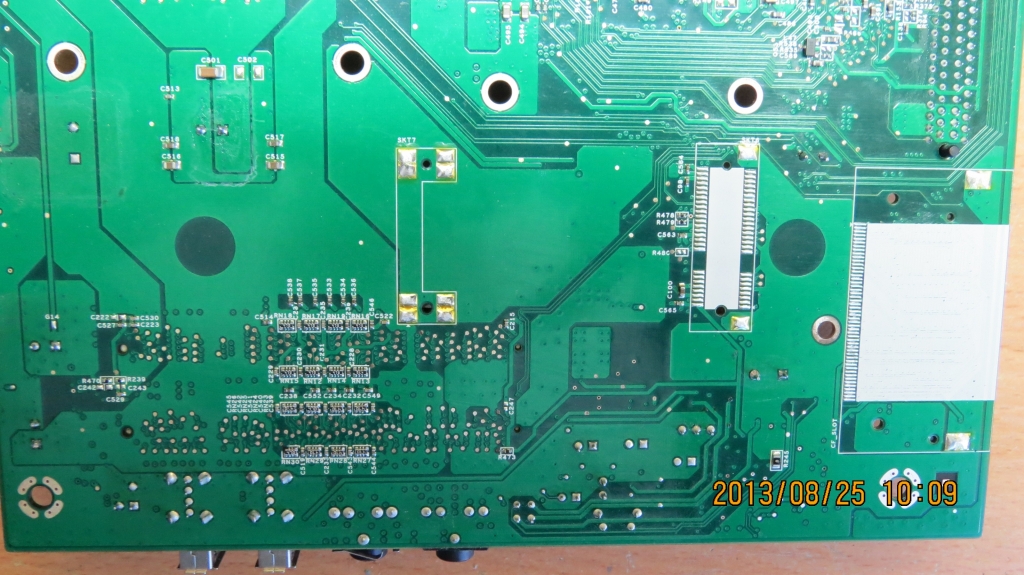
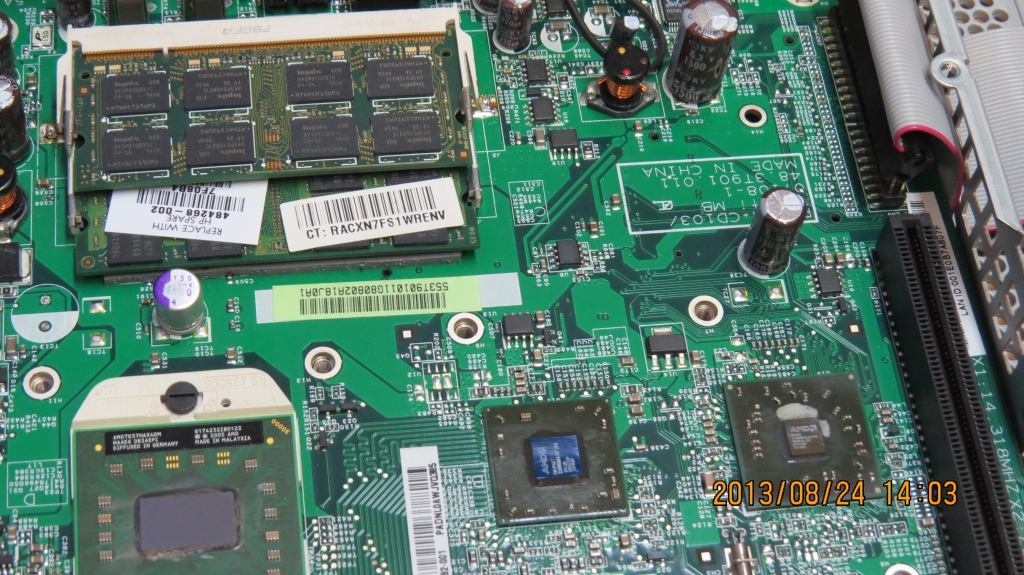
I'm wondering if the members on the polish site knows this resister is needed too. Maybe, if they don't have it on, it's not activating part of the module.
That may be why they get a lower GB module working, and not the full 2GB

This most likely also means that the missing cap is either .1 or .01 uF
being used as a EMI/RFI bypass, from the voltage line, to ground.
To suppress interference from the power trace.

I'm going to check the design hints on that RAM module DataSheet, or another one, if that doesn't have design hints, and board layout examples.
It may suggest the value capacitor used on that line.

It may also play a part in a timing loop for the RAM, I'm not sure about that part, and I may just be over-thinking that part of it, too. :)

Anyway, ... that's good. We're getting all the info together.

After I get my other personal shit finished, I'll have time to check out if the distributor has the socket similar to the FOXCONN part.

I hope that other site from Poland answers krzysiek841
I'd like to see them get back into this, with us.
HP T5730 - AMD Turion 64 x2 Dual-Core 2.4GHz CPU
(TMDTL68HAX5DM)
320GB WD 2.5" H.D. / 2GB RAM
(Windows 8.1 Pro 64-bit)
EVGA GeForce 7600 GT PCIe x16 card, (in x1 speed)
New 12vdc 16 amp (192w) PSU
T5735
Dan isn't smart enough to hire me
Posts: 158
Joined: Fri Aug 01, 2014 12:44 am

Post by T5735 »

The guy I got the thin client from on ebay contacted me and was very sorry and is sending the appropriate cables in the mail today. Momo do you know a way I can test the capacitors with my digital multimeter? If their is a way I will do it so it will take some of the guess work out of it. This is the multimeter I have.
http://www.greenlee.com/products/DMM%25 ... t_id=17752
momo
Dan Should Pay Me
Posts: 541
Joined: Tue Aug 26, 2008 12:36 pm

Post by momo »

T5735 wrote:The guy I got the thin client from on ebay contacted me and was very sorry and is sending the appropriate cables in the mail today. Momo do you know a way I can test the capacitors with my digital multimeter? If their is a way I will do it so it will take some of the guess work out of it. This is the multimeter I have.
http://www.greenlee.com/products/DMM%25 ... t_id=17752
As far as I know, NO. :) unless a DMM has a built-in Capacitance measuring feature. :roll:

There is a way to measure an unknown capacitor or inductor using an oscilloscope and a frequency generator.
It uses the parts resonant frequency and some math, with known part values, to do it.
A DMM with a capacitance measuring feature has a similar circuit built-in.

If you don't have an oscilloscope, the videos are still cool to watch.

The first video shows this.
Measure Capacitors and Inductors with an Oscilloscope and some basic parts
http://www.youtube.com/watch?v=74fz9iwZ_sM

The second video shows how resonant frequency is measured and why component lead-length and placement is so critical in RF circuits.
This was why I mentioned soldering wires to a USB port can sometimes degrade it's speed, and operation.

Why component Lead-length matters in RF circuits
This video shows how to measure resonant frequency of capacitors
http://www.youtube.com/watch?v=C3wYMZ_cjdQ

An important piece of info is, when a part is measured while it's still in the circuit,
the measurement can be 'off-set' by the components around it.
Especially with capacitors, and inductors, because the current flow during the
measurement will also flow thru the other parts connected to it.

Even the PCB trace can change the actual value of the measurement you get.

With the resistor you measured, while still in the circuit, it was accurate enough
for our purposes.

By the way, I'm glad the eBay seller is sending the missing cables.
Didn't you say he also left out the power supply to it?
HP T5730 - AMD Turion 64 x2 Dual-Core 2.4GHz CPU
(TMDTL68HAX5DM)
320GB WD 2.5" H.D. / 2GB RAM
(Windows 8.1 Pro 64-bit)
EVGA GeForce 7600 GT PCIe x16 card, (in x1 speed)
New 12vdc 16 amp (192w) PSU
T5735
Dan isn't smart enough to hire me
Posts: 158
Joined: Fri Aug 01, 2014 12:44 am

Post by T5735 »

I actually used to have a Oscilloscope but I either gave it away or sold donated it a long time ago. He is sending me the power cord and dual monitor cable. I still don't know if I should order a 32gb disk on module or chance it and get a 64gb ssd and hope it works with the 44 pin to sata adapter. I did find this video where a guy is is using a 160gb sata drive with an adapter to the 44 pin ide connection and he loaded windows 7 just fine. It started to load fine for me as well with the mechanical hard drive so I am guessing the ssd would work as well.
https://www.youtube.com/watch?v=TBEMqHICirM
momo
Dan Should Pay Me
Posts: 541
Joined: Tue Aug 26, 2008 12:36 pm

Post by momo »

T5735 wrote:I actually used to have a Oscilloscope but I either gave it away or sold donated it a long time ago. He is sending me the power cord and dual monitor cable. I still don't know if I should order a 32gb disk on module or chance it and get a 64gb ssd and hope it works with the 44 pin to sata adapter. I did find this video where a guy is is using a 160gb sata drive with an adapter to the 44 pin ide connection and he loaded windows 7 just fine. It started to load fine for me as well with the mechanical hard drive so I am guessing the ssd would work as well.
https://www.youtube.com/watch?v=TBEMqHICirM
OK, i thought the power pack was supposed to be included in the auction.
I guess that's why it was so inexpensive a price for the system. :)

I'll tell ya something, when I tried that IDE to SATA II adapter I have, on my T5730,
I was able to connect a 1TB Western Digital 2.5 inch SATA II drive to it,
and it worked with Windows 8.1 Pro 64-bit

The only reason I took it off was because the adapter was not letting the
drive activity LED come on.
If I ever look into what's wrong with that wiring in that adapter, I'm going to use it again. :P

I don't know how high a TB capacity the controller chip on those Chinese adapters support,
But this one worked with 1TB, and may even support 2TB
HP T5730 - AMD Turion 64 x2 Dual-Core 2.4GHz CPU
(TMDTL68HAX5DM)
320GB WD 2.5" H.D. / 2GB RAM
(Windows 8.1 Pro 64-bit)
EVGA GeForce 7600 GT PCIe x16 card, (in x1 speed)
New 12vdc 16 amp (192w) PSU
momo
Dan Should Pay Me
Posts: 541
Joined: Tue Aug 26, 2008 12:36 pm

Post by momo »

The controller IC on my adapter has a ... JMicron JM20330
http://www.mcuol.com/aspx/down.aspx?id=1266

This is mine, and where I got it.
http://www.microsatacables.com/44-pin-i ... rd-adapter

They were very nice about sending me a second one to try, FREE
when I told them it didn't let the drive activity LED on my ThinClient to light up.
They let me keep both, and fully refunded my original payment, when it still didn't light.

They don't make this product, so it's not their fault I had a problem with it.

I think the one you showed me, you had, uses the same chip.
That's why I wondered if your drive activity LED didn't light as well.
I was curious to see if it's a fault of the design, or the controller IC itself.
momo wrote:
T5735 wrote:I actually used to have a Oscilloscope but I either gave it away or sold donated it a long time ago. He is sending me the power cord and dual monitor cable. I still don't know if I should order a 32gb disk on module or chance it and get a 64gb ssd and hope it works with the 44 pin to sata adapter. I did find this video where a guy is is using a 160gb sata drive with an adapter to the 44 pin ide connection and he loaded windows 7 just fine. It started to load fine for me as well with the mechanical hard drive so I am guessing the ssd would work as well.
https://www.youtube.com/watch?v=TBEMqHICirM
OK, i thought the power pack was supposed to be included in the auction.
I guess that's why it was so inexpensive a price for the system. :)

I'll tell ya something, when I tried that IDE to SATA II adapter I have, on my T5730,
I was able to connect a 1TB Western Digital 2.5 inch SATA II drive to it,
and it worked with Windows 8.1 Pro 64-bit

The only reason I took it off was because the adapter was not letting the
drive activity LED come on.
If I ever look into what's wrong with that wiring in that adapter, I'm going to use it again. :P

I don't know how high a TB capacity the controller chip on those Chinese adapters support,
But this one worked with 1TB, and may even support 2TB
HP T5730 - AMD Turion 64 x2 Dual-Core 2.4GHz CPU
(TMDTL68HAX5DM)
320GB WD 2.5" H.D. / 2GB RAM
(Windows 8.1 Pro 64-bit)
EVGA GeForce 7600 GT PCIe x16 card, (in x1 speed)
New 12vdc 16 amp (192w) PSU
T5735
Dan isn't smart enough to hire me
Posts: 158
Joined: Fri Aug 01, 2014 12:44 am

Post by T5735 »

That microsatacables site is the same site that I bought my sata right angle adapter to be able to put my 7200rpm 2.5" laptop hard drive in my 5740 using is supplied sata III ports. The thin client did come with a power adapter and he is sending it along with a power cable and dual monitor cable. He has already given me a fedex tracking number and everything. I will have to hook up my laptop hard drive to this new GT7725 and see how it works with it. If I get a SSD it will still be limited by the pata port speeds though. :cry:
momo
Dan Should Pay Me
Posts: 541
Joined: Tue Aug 26, 2008 12:36 pm

Post by momo »

T5735 wrote:That microsatacables site is the same site that I bought my sata right angle adapter to be able to put my 7200rpm 2.5" laptop hard drive in my 5740 using is supplied sata III ports. The thin client did come with a power adapter and he is sending it along with a power cable and dual monitor cable. He has already given me a fedex tracking number and everything. I will have to hook up my laptop hard drive to this new GT7725 and see how it works with it. If I get a SSD it will still be limited by the pata port speeds though. :cry:
Oh, so the eBay seller did leave out the power adapter... I thought I saw that. :)

Hey, amazing, you know micro SATA cables too. :)
Nice place..!
So if your adapter doesn't stop the TC's drive activity LED from lighting during drive usage,
I guess it would mean the one I have has a design fault.

If so, I wonder if the same model they sell now, was ever updated, or still has that fault. :roll:

I'm not fully sure, did you say you wanted to get a IDE to SATA II adapter, or you had one already. That right-angle adapter isn't a IDE to SATA, or is it?
Last edited by momo on Fri Sep 12, 2014 10:40 pm, edited 1 time in total.
HP T5730 - AMD Turion 64 x2 Dual-Core 2.4GHz CPU
(TMDTL68HAX5DM)
320GB WD 2.5" H.D. / 2GB RAM
(Windows 8.1 Pro 64-bit)
EVGA GeForce 7600 GT PCIe x16 card, (in x1 speed)
New 12vdc 16 amp (192w) PSU
T5735
Dan isn't smart enough to hire me
Posts: 158
Joined: Fri Aug 01, 2014 12:44 am

Post by T5735 »

I actually got my 44 pin IDE to SATA adapter from china on ebay. I bought this adapter so I could get my laptop hard drive inside the case of my 5740. It has SATA III connections on the motherboard.
http://www.microsatacables.com/sata-22- ... le-adapter
momo
Dan Should Pay Me
Posts: 541
Joined: Tue Aug 26, 2008 12:36 pm

Post by momo »

T5735 wrote:I actually got my 44 pin IDE to SATA adapter from china on ebay. I bought this adapter so I could get my laptop hard drive inside the case of my 5740. It has SATA III connections on the motherboard.
http://www.microsatacables.com/sata-22- ... le-adapter
Ahhhhh, so the one you got from China is the one I saw you link a picture from.
I think it also has the same controller IC.

But you didn't remember if you saw the TC's drive activity LED working with the adapter connected. :(

If you ever find a need to use it again, let me know if the drive LED still lights with yours.
Just curious if I should check my adapters wiring on that section.
8)
HP T5730 - AMD Turion 64 x2 Dual-Core 2.4GHz CPU
(TMDTL68HAX5DM)
320GB WD 2.5" H.D. / 2GB RAM
(Windows 8.1 Pro 64-bit)
EVGA GeForce 7600 GT PCIe x16 card, (in x1 speed)
New 12vdc 16 amp (192w) PSU
momo
Dan Should Pay Me
Posts: 541
Joined: Tue Aug 26, 2008 12:36 pm

Post by momo »

I found this Mini PCI Express USB 3.0 Controller Card
http://www.pridopia.co.uk/7202me.html

And this Mini PCI Express Internal SATA III 6.0 Gbps Controller Card
http://www.pridopia.co.uk/1061me.html

(With other Mini-PCIe stuff from England)
http://www.pridopia.co.uk/mini-pcie.html

But no one seems to combine the SATA III and USB 3.0 controllers, on one Mini-PCIe card. :roll:

I wonder if these are selling at any USA online sites.
Shipping fees from England to USA are around $27.65 :!:


Oh..!...on a 'side-note'
I checked the polish modding site, again (post#8 ) http://www.elektroda.pl/rtvforum/topic2 ... l#12665702
and a photo there shows they did add the extra 4.7k ohm separate resistor,
but they didn't add the separate missing capacitor.
http://obrazki.elektroda.pl/7150965900_1377429437.jpg

Their socket looks better than our choices too... I wonder what part# (manufacturer)
http://obrazki.elektroda.pl/1754849400_1377429289.jpg

I also wonder why they chose not to add the capacitor,
... could that be why it's not working on a 64-bit OS? (I Don't know) maybe it is a BIOS issue.

I'd like to ask them what value they used for the separate resistor,
and how they decided on it, but they're not answering krzysiek841's post.. :!:
At least we can be sure it's a 4.7k ohm, by you measuring the other ThinClient.
Oh well...! ...wonder, wonder, wonder... :roll:

Continuing my 'wonder, wonder, wonder...:)
I'm wondering if someone does know BIOS manipulation,
If it's possible to isolate the section in your new TC's BIOS dealing with the
RAM control, and add it to the T5730's BIOS.

YEAH...easy as PIE..hahahahaha... :!: :roll: :lol:
Last edited by momo on Sat Sep 13, 2014 2:41 pm, edited 1 time in total.
HP T5730 - AMD Turion 64 x2 Dual-Core 2.4GHz CPU
(TMDTL68HAX5DM)
320GB WD 2.5" H.D. / 2GB RAM
(Windows 8.1 Pro 64-bit)
EVGA GeForce 7600 GT PCIe x16 card, (in x1 speed)
New 12vdc 16 amp (192w) PSU
T5735
Dan isn't smart enough to hire me
Posts: 158
Joined: Fri Aug 01, 2014 12:44 am

Post by T5735 »

Yea I found that site some time back as well but like you said the shipping is crazy. I believe I found that SATA III card on newegg here in the US but it was expensive as well. Just curious what do you need the USB 3.0 connection for? I know it is slower but USB 2.0 would work for me.
http://www.newegg.com/Product/Product.a ... 6816124059
I also found this site that has a few different cards.
http://www.sybausa.com/flyer/2012/email/Oct_2.html
momo
Dan Should Pay Me
Posts: 541
Joined: Tue Aug 26, 2008 12:36 pm

Post by momo »

The one shown on newegg has vertical mounted SATA connectors, not good for us
the cable wouldn't fit when the board is placed back in the case.

The other one was flat, horizontal mounted connectors.

Anyway... There are Ssssooooo many new USB 3.0 things coming out.
If I'm going to add a Mini-PCIe socket to this ThinClient, I'd want to have USB 3.0 on it too..!

It's a 5GB transfer speed instead of 480MB speed.
Tell me THATS not useful :D
HP T5730 - AMD Turion 64 x2 Dual-Core 2.4GHz CPU
(TMDTL68HAX5DM)
320GB WD 2.5" H.D. / 2GB RAM
(Windows 8.1 Pro 64-bit)
EVGA GeForce 7600 GT PCIe x16 card, (in x1 speed)
New 12vdc 16 amp (192w) PSU
momo
Dan Should Pay Me
Posts: 541
Joined: Tue Aug 26, 2008 12:36 pm

Post by momo »

The added edit to your post of the other card
http://www.sybausa.com/productInfo.php?iid=1354
also vertical mounted SATA connectors

Did you check my edit to the other post... My 'wonder, wonder, wonder' additions..?
http://www.phoneservicesupport.com/post84364.html#84364
HP T5730 - AMD Turion 64 x2 Dual-Core 2.4GHz CPU
(TMDTL68HAX5DM)
320GB WD 2.5" H.D. / 2GB RAM
(Windows 8.1 Pro 64-bit)
EVGA GeForce 7600 GT PCIe x16 card, (in x1 speed)
New 12vdc 16 amp (192w) PSU
T5735
Dan isn't smart enough to hire me
Posts: 158
Joined: Fri Aug 01, 2014 12:44 am

Post by T5735 »

I wonder how hard it would be to just buy a side mounted sata port and desolder the ports that are on the board and solder a side mounted port onto it? Also I wonder if you could just get SATA III to USB adapter of some kind to utilize the other port?
momo
Dan Should Pay Me
Posts: 541
Joined: Tue Aug 26, 2008 12:36 pm

Post by momo »

T5735 wrote:I wonder how hard it would be to just buy a side mounted sata port and desolder the ports that are on the board and solder a side mounted port onto it? Also I wonder if you could just get SATA III to USB adapter of some kind to utilize the other port?
The biggest problem with extending a connection like that is the change it would make to the speed.

As my other post mentioned on the pages before,
dealing with the length of leads, or even adding a cable,
if it's not handled exactly right, the circuit will not work well, or not at all.

These speeds of 5GB is like dealing with RF, it acts like it, and looks like it to the circuit.
All sorts of troubles can happen if lead-dressing, or other lengths are not made right.
Plus shielding to keep other signals from interfering with it, and it with other signals.

That's why that missing cap is important too. It calms any stray interference.

Yes, even the memory can be effected by stray high-speed signals getting into its signal-path.
HP T5730 - AMD Turion 64 x2 Dual-Core 2.4GHz CPU
(TMDTL68HAX5DM)
320GB WD 2.5" H.D. / 2GB RAM
(Windows 8.1 Pro 64-bit)
EVGA GeForce 7600 GT PCIe x16 card, (in x1 speed)
New 12vdc 16 amp (192w) PSU
momo
Dan Should Pay Me
Posts: 541
Joined: Tue Aug 26, 2008 12:36 pm

Post by momo »

You know... I just thought of something that may screw-up my mini-PCIe plans.

I may not be able to have my graphics card (PCIe x16 in x1 mode)
working with the mini-PCIe socket at the same time on this T5730

I've no idea how HP wired things up, regarding functionality,
and combined uses with the slot on top and the one under the motherboard,
working together, at the same time.

Crap... :!: :shock: :roll: :cry: :?
HP T5730 - AMD Turion 64 x2 Dual-Core 2.4GHz CPU
(TMDTL68HAX5DM)
320GB WD 2.5" H.D. / 2GB RAM
(Windows 8.1 Pro 64-bit)
EVGA GeForce 7600 GT PCIe x16 card, (in x1 speed)
New 12vdc 16 amp (192w) PSU
momo
Dan Should Pay Me
Posts: 541
Joined: Tue Aug 26, 2008 12:36 pm

Post by momo »

I was speaking to the tech at the place in England about these cards,
asking if a combo is available.

He said a special bridge chip IC is needed to activate one or the other function
to be used together.

They have this --> http://www.pridopia.co.uk/8603me-d.html
and he's willing to modify the cable connector so it's horizontally mounted
(Right-angle) to not interfere with the TC's case on the bottom of the board.

It's still an expensive solution, at £67.99 (that's euros not dollars :shock: )

I still don't know if both top and bottom PCIe sockets will function together,
or if even having a connection on both will not interfere with each when not active.

Any thoughts??? :?:
HP T5730 - AMD Turion 64 x2 Dual-Core 2.4GHz CPU
(TMDTL68HAX5DM)
320GB WD 2.5" H.D. / 2GB RAM
(Windows 8.1 Pro 64-bit)
EVGA GeForce 7600 GT PCIe x16 card, (in x1 speed)
New 12vdc 16 amp (192w) PSU
momo
Dan Should Pay Me
Posts: 541
Joined: Tue Aug 26, 2008 12:36 pm

Post by momo »

If there was a mini-PCIe shielded extender cable that connected on the board,
instead of the standard socket, that could be good too.

Or ... Using the socket on the board, with an extension cable that's shielded may work.
Like a Flex-board type of extender.
Not 52 separate wires in a thick-ass cable. :D


But as I said before, at these speeds, wire length is critical.

Any time you mess-up the resonant frequencies of these circuits, it can stop them from working.
And it's easy to mess-up a 5GB speed signal with a simple wire that's too long, or not shielded.

Same idea with an HDMI cable. Some are made cheaply, and function badly.

It IS do-able though. Finding the right cable is the problem.
Many of these connections on the PCB are not meant to be extended.
HP T5730 - AMD Turion 64 x2 Dual-Core 2.4GHz CPU
(TMDTL68HAX5DM)
320GB WD 2.5" H.D. / 2GB RAM
(Windows 8.1 Pro 64-bit)
EVGA GeForce 7600 GT PCIe x16 card, (in x1 speed)
New 12vdc 16 amp (192w) PSU
T5735
Dan isn't smart enough to hire me
Posts: 158
Joined: Fri Aug 01, 2014 12:44 am

Post by T5735 »

I will see if I can't get the expansion bay I have for my GT7725 to work on my 5730 tomorrow. If it will work with the video card in the expansion module and my HD decoder card in the bottom mini pci-e we will know if they will work together.
momo
Dan Should Pay Me
Posts: 541
Joined: Tue Aug 26, 2008 12:36 pm

Post by momo »

T5735 wrote:I will see if I can't get the expansion bay I have for my GT7725 to work on my 5730 tomorrow. If it will work with the video card in the expansion module and my HD decoder card in the bottom mini pci-e we will know if they will work together.
I hope you're not saying you're going to use the riser-card from the GT7725 on the T5730

If so, it may blow out the T5730 if the ground and other signal pins don't match the T5730 connector on top.
HP T5730 - AMD Turion 64 x2 Dual-Core 2.4GHz CPU
(TMDTL68HAX5DM)
320GB WD 2.5" H.D. / 2GB RAM
(Windows 8.1 Pro 64-bit)
EVGA GeForce 7600 GT PCIe x16 card, (in x1 speed)
New 12vdc 16 amp (192w) PSU
T5735
Dan isn't smart enough to hire me
Posts: 158
Joined: Fri Aug 01, 2014 12:44 am

Post by T5735 »

I guess I wont try it then. I just figured pci-e was pci-e.
momo
Dan Should Pay Me
Posts: 541
Joined: Tue Aug 26, 2008 12:36 pm

Post by momo »

T5735 wrote:I guess I wont try it then. I just figured pci-e was pci-e.
Yes, PCIe is PCIe but with the HP riser it's not :)

If you can show me photos of your riser-card, front and back, I'll see if it's similar to the T5730's riser.

Hey, I found this... As a mini-PCIe extender...
http://www.amazon.com/Generic-Express-E ... +extension

But using simple ribbon cable without ground shielding around the signal wires creates all sorts of RF noise with fast digital signal lines.
HP T5730 - AMD Turion 64 x2 Dual-Core 2.4GHz CPU
(TMDTL68HAX5DM)
320GB WD 2.5" H.D. / 2GB RAM
(Windows 8.1 Pro 64-bit)
EVGA GeForce 7600 GT PCIe x16 card, (in x1 speed)
New 12vdc 16 amp (192w) PSU
momo
Dan Should Pay Me
Posts: 541
Joined: Tue Aug 26, 2008 12:36 pm

Post by momo »

Here's my albums links. :)
I really like this photo site

I posted the T5730 Expansion Riser-Card there.
Direct link to the T5730 Album is --> http://imgur.com/a/54Flr

All my Albums link is ---> http://MoMoModifications.imgur.com

Or use these direct links to any of the large T5730 riser's images...

Back side
http://i.imgur.com/K9e0btk.jpg

Front side
http://i.imgur.com/pM5MPT9.jpg

Second lighting view Front side
http://i.imgur.com/xB4Id0e.jpg

Second lighting view Back side
http://i.imgur.com/K97iale.jpg
HP T5730 - AMD Turion 64 x2 Dual-Core 2.4GHz CPU
(TMDTL68HAX5DM)
320GB WD 2.5" H.D. / 2GB RAM
(Windows 8.1 Pro 64-bit)
EVGA GeForce 7600 GT PCIe x16 card, (in x1 speed)
New 12vdc 16 amp (192w) PSU
T5735
Dan isn't smart enough to hire me
Posts: 158
Joined: Fri Aug 01, 2014 12:44 am

Post by T5735 »

Here are some pictures of the pci riser card that came in my GT7725.
http://imgur.com/a/oA4Xd
momo
Dan Should Pay Me
Posts: 541
Joined: Tue Aug 26, 2008 12:36 pm

Post by momo »

T5735 wrote:Here are some pictures of the pci riser card that came in my GT7725.
http://imgur.com/a/oA4Xd
Yeah...on a quick look over, comparing both cards... There are major differences.

Don't try it in your T5730 :!:
HP T5730 - AMD Turion 64 x2 Dual-Core 2.4GHz CPU
(TMDTL68HAX5DM)
320GB WD 2.5" H.D. / 2GB RAM
(Windows 8.1 Pro 64-bit)
EVGA GeForce 7600 GT PCIe x16 card, (in x1 speed)
New 12vdc 16 amp (192w) PSU
momo
Dan Should Pay Me
Posts: 541
Joined: Tue Aug 26, 2008 12:36 pm

Post by momo »

To know for sure, I'll need to put them side by side, or super-imposed under each,
With the proper rotation and orientation of each.

Let me see if I can quickly do one on my iPad, using a compositing App.
HP T5730 - AMD Turion 64 x2 Dual-Core 2.4GHz CPU
(TMDTL68HAX5DM)
320GB WD 2.5" H.D. / 2GB RAM
(Windows 8.1 Pro 64-bit)
EVGA GeForce 7600 GT PCIe x16 card, (in x1 speed)
New 12vdc 16 amp (192w) PSU
T5735
Dan isn't smart enough to hire me
Posts: 158
Joined: Fri Aug 01, 2014 12:44 am

Post by T5735 »

Did you ever try any of those cheap riser cards you found on ebay? If I can order one for cheap I can use it with the GT7725 enclosure on the T5730 and test it that way.
momo
Dan Should Pay Me
Posts: 541
Joined: Tue Aug 26, 2008 12:36 pm

Post by momo »

T5735 wrote:Did you ever try any of those cheap riser cards you found on ebay? If I can order one for cheap I can use it with the GT7725 enclosure on the T5730 and test it that way.
Yeah, not from eBay, but from microSATAcables.
That's how I almost blew out my T5730. It's not wired as a standard PCIe socket, on the HP

Are you saying eBay has HP risers?
HP T5730 - AMD Turion 64 x2 Dual-Core 2.4GHz CPU
(TMDTL68HAX5DM)
320GB WD 2.5" H.D. / 2GB RAM
(Windows 8.1 Pro 64-bit)
EVGA GeForce 7600 GT PCIe x16 card, (in x1 speed)
New 12vdc 16 amp (192w) PSU
momo
Dan Should Pay Me
Posts: 541
Joined: Tue Aug 26, 2008 12:36 pm

Post by momo »

Quick comparison of the GT7725 riser (bottom) and T5730 (Top)
http://i.imgur.com/VFVW6oh.jpg

The left side, near the opening 'key' looks the same, but...

There are ground additions near the large ground trace area (mid board)
(where the connection pins go to the socket on the TC.)
Shown on the bottom view of the composite photo GT7725 riser.
Plus the extra signal lines for the PCIe itself, of course.

I'd need to really get into making a continuity trace of the HP PCIe socket
to be absolutely sure, but looking at this, there are too many differences
to simply plug it in, and take a chance, on both machines, swapping one another's riser.

-------------------------------------------------------------------------------------
**** Edited... This is no longer a possibility. The wiring is different. ****
It's possible the HP PCIe socket is wired the same on each machine of these 2
and the cards are simply taking the signals or grounds and power pins off, as needed for the cards.
Last edited by momo on Sun Sep 14, 2014 2:55 pm, edited 2 times in total.
HP T5730 - AMD Turion 64 x2 Dual-Core 2.4GHz CPU
(TMDTL68HAX5DM)
320GB WD 2.5" H.D. / 2GB RAM
(Windows 8.1 Pro 64-bit)
EVGA GeForce 7600 GT PCIe x16 card, (in x1 speed)
New 12vdc 16 amp (192w) PSU
momo
Dan Should Pay Me
Posts: 541
Joined: Tue Aug 26, 2008 12:36 pm

Post by momo »

Here's the back-side of each riser.
Again, top of photo is the T5730 riser, and bottom of photo is the GT7725 riser.
http://i.imgur.com/FKenWUi.jpg

Maybe more eyes comparing will speed this up.

It is a good possibility HP made the PCIe socket the same on both ThinClients
and the risers simply tap-off what signals and power pins (ground and plus) are needed.
I notice the GT7725 riser doesn't have a parallel or serial port connection,
so it's possible they use the same wiring.

But I can't be sure without extensive meter testing.
Last edited by momo on Sat Sep 13, 2014 11:36 pm, edited 1 time in total.
HP T5730 - AMD Turion 64 x2 Dual-Core 2.4GHz CPU
(TMDTL68HAX5DM)
320GB WD 2.5" H.D. / 2GB RAM
(Windows 8.1 Pro 64-bit)
EVGA GeForce 7600 GT PCIe x16 card, (in x1 speed)
New 12vdc 16 amp (192w) PSU
T5735
Dan isn't smart enough to hire me
Posts: 158
Joined: Fri Aug 01, 2014 12:44 am

Post by T5735 »

I do have several extra T5735s I can test with so if I do end up burning on up it wont be a huge deal. I might try this out tomorrow and see what happens.
momo
Dan Should Pay Me
Posts: 541
Joined: Tue Aug 26, 2008 12:36 pm

Post by momo »

T5735 wrote:I do have several extra T5735s I can test with so if I do end up burning one up it wont be a huge deal. I might try this out tomorrow and see what happens.
If you feel that brave, I salute you. 8)

I just hope it doesn't make too loud an explosion, if we're wrong. :P

It's also possible, it may damage the riser itself.
If that's the only one you have, I'd feel very bad if it's damaged.
HP T5730 - AMD Turion 64 x2 Dual-Core 2.4GHz CPU
(TMDTL68HAX5DM)
320GB WD 2.5" H.D. / 2GB RAM
(Windows 8.1 Pro 64-bit)
EVGA GeForce 7600 GT PCIe x16 card, (in x1 speed)
New 12vdc 16 amp (192w) PSU
momo
Dan Should Pay Me
Posts: 541
Joined: Tue Aug 26, 2008 12:36 pm

Post by momo »

Looking at the risers back-side, there are grounded areas on yours (GT7725)
that the T5730 riser doesn't have grounded.
So I really can't be sure the socket is the same wiring on both.

It's also possible, it may damage the riser itself.
If that's the only one you have, I'd feel very bad if it's damaged.
Last edited by momo on Sat Sep 13, 2014 11:49 pm, edited 1 time in total.
HP T5730 - AMD Turion 64 x2 Dual-Core 2.4GHz CPU
(TMDTL68HAX5DM)
320GB WD 2.5" H.D. / 2GB RAM
(Windows 8.1 Pro 64-bit)
EVGA GeForce 7600 GT PCIe x16 card, (in x1 speed)
New 12vdc 16 amp (192w) PSU
T5735
Dan isn't smart enough to hire me
Posts: 158
Joined: Fri Aug 01, 2014 12:44 am

Post by T5735 »

I guess I wont chance it then. It just seems weird that they would change from a standard pci-e slot for a thin client.
momo
Dan Should Pay Me
Posts: 541
Joined: Tue Aug 26, 2008 12:36 pm

Post by momo »

T5735 wrote:I guess I wont chance it then. It just seems weird that they would change from a standard pci-e slot for a thin client.
I was told it's because the riser on the T5730 is using some lines on the PCIe socket for
parallel and serial ports, and a regular PCI 32 connector.

The GT7725 may also use those for the PCI 32 riser,
but it looks like it's using all the x16 PCIe lines
with no parallel or serial ports on its riser.

The ground lines on your riser, need to be compared on the T5730 PCIe socket,
to see if that sockets pins are grounded, as the GT7725 is too.

Even if one pin isn't, then the sockets are wired differently on both computers.

I really hope they ARE the SAME, 'cause I don't need parallel or serial ports,
and would rather have a full x16 PCIe socket, and be able to use a riser like your GT7725
HP T5730 - AMD Turion 64 x2 Dual-Core 2.4GHz CPU
(TMDTL68HAX5DM)
320GB WD 2.5" H.D. / 2GB RAM
(Windows 8.1 Pro 64-bit)
EVGA GeForce 7600 GT PCIe x16 card, (in x1 speed)
New 12vdc 16 amp (192w) PSU
momo
Dan Should Pay Me
Posts: 541
Joined: Tue Aug 26, 2008 12:36 pm

Post by momo »

A continuity test using a Digital Multi Meter can be done with the power OFF
(and power-cords disconnected) on each machines PCIe sockets.

That's really the safest way to tell.

Placing the black probe (negative) to ground, and using the Red (positive) probe to the
PCIe sockets pins, comparing each machine, using the photo composite of the risers.

If you see a direct short,(reading near zero) or hear the beep (if your DMM has that feature)
that pin is connected to ground.
HP T5730 - AMD Turion 64 x2 Dual-Core 2.4GHz CPU
(TMDTL68HAX5DM)
320GB WD 2.5" H.D. / 2GB RAM
(Windows 8.1 Pro 64-bit)
EVGA GeForce 7600 GT PCIe x16 card, (in x1 speed)
New 12vdc 16 amp (192w) PSU
T5735
Dan isn't smart enough to hire me
Posts: 158
Joined: Fri Aug 01, 2014 12:44 am

Post by T5735 »

momo wrote:A continuity test using a Digital Multi Meter can be done with the power OFF
(and power-cords disconnected) on each machines PCIe sockets.

That's really the safest way to tell.

Placing the black probe (negative) to ground, and using the Red (positive) probe to the
PCIe sockets pins, comparing each machine, using the photo composite of the risers.

If you see a direct short,(reading near zero) or hear the beep (if your DMM has that feature)
that pin is connected to ground.
I probably wont take it that far as I am going to be using the GT7725 for what I want to do now. I am still going to play around with upgrading the 5730 but I want to get my GT7725 up and working first.
momo
Dan Should Pay Me
Posts: 541
Joined: Tue Aug 26, 2008 12:36 pm

Post by momo »

If your meter doesn't have a dedicated continuity test...
a resistance test with the lowest resistance setting is used.

You'd just need to look at the meter with each pin tested to see it's reading,
rather than listening for the beep :)
HP T5730 - AMD Turion 64 x2 Dual-Core 2.4GHz CPU
(TMDTL68HAX5DM)
320GB WD 2.5" H.D. / 2GB RAM
(Windows 8.1 Pro 64-bit)
EVGA GeForce 7600 GT PCIe x16 card, (in x1 speed)
New 12vdc 16 amp (192w) PSU
momo
Dan Should Pay Me
Posts: 541
Joined: Tue Aug 26, 2008 12:36 pm

Post by momo »

T5735 wrote:
momo wrote:A continuity test using a Digital Multi Meter can be done with the power OFF
(and power-cords disconnected) on each machines PCIe sockets.

That's really the safest way to tell.

Placing the black probe (negative) to ground, and using the Red (positive) probe to the
PCIe sockets pins, comparing each machine, using the photo composite of the risers.

If you see a direct short,(reading near zero) or hear the beep (if your DMM has that feature)
that pin is connected to ground.
I probably wont take it that far as I am going to be using the GT7725 for what I want to do now. I am still going to play around with upgrading the 5730 but I want to get my GT7725 up and working first.
Of course, there's no rush. I was just saying there's a way to know for sure,
without needing to power the computers, and taking a chance of damaging anything.
HP T5730 - AMD Turion 64 x2 Dual-Core 2.4GHz CPU
(TMDTL68HAX5DM)
320GB WD 2.5" H.D. / 2GB RAM
(Windows 8.1 Pro 64-bit)
EVGA GeForce 7600 GT PCIe x16 card, (in x1 speed)
New 12vdc 16 amp (192w) PSU
momo
Dan Should Pay Me
Posts: 541
Joined: Tue Aug 26, 2008 12:36 pm

Post by momo »

I'm getting bleary-eyed already, and tired.

Time for me to rest.

I'll speak to ya tomorrow or Monday.
Have fun with your new GT7725

GoodNight..! :wink: 8)
HP T5730 - AMD Turion 64 x2 Dual-Core 2.4GHz CPU
(TMDTL68HAX5DM)
320GB WD 2.5" H.D. / 2GB RAM
(Windows 8.1 Pro 64-bit)
EVGA GeForce 7600 GT PCIe x16 card, (in x1 speed)
New 12vdc 16 amp (192w) PSU
momo
Dan Should Pay Me
Posts: 541
Joined: Tue Aug 26, 2008 12:36 pm

Post by momo »

I didn't have to measure anything to see a difference in wiring on each systems PCIe socket.

On the composite view of the back-side, where both are shown... http://i.imgur.com/FKenWUi.jpg
Looking at the area going to the x1 wires of the riser-cards graphics-board socket ...

My T5730 is getting its x1 signal pair from a totally different set of pins,
on the main PCIe connector, than your GT7725 riser-card does.

Yours gets its 1st x1 set from near that board opening (right-side of picture area)
shown to the left of that opening 'key' of the risers edge pins,
counting pins from that 'key' openings -left side- area, 2nd and 3rd pins
(Not counting from the extreme edge of the boards 1st pin)

Mine gets its x1 signal pair from further left, pins 16 and 17 on the PCIe socket.
(again, counting from the opening 'key', starting at the -left- of that opening area.)

Pins...................| |............
The opening area ^ board edge

No need to even test the ground pins at all.
The two PCIe sockets ARE wired differently.

Yours being wired EXACTLY as a standard PCIe x16 socket should be.
Mine is not. Simple..! :) case closed. :P that one difference is enough.

If you'd like me to circle the areas on the photo, let me know.
But I'm glad I didn't let you simply plug in the GT7725 riser into your T5735 :!:
HP T5730 - AMD Turion 64 x2 Dual-Core 2.4GHz CPU
(TMDTL68HAX5DM)
320GB WD 2.5" H.D. / 2GB RAM
(Windows 8.1 Pro 64-bit)
EVGA GeForce 7600 GT PCIe x16 card, (in x1 speed)
New 12vdc 16 amp (192w) PSU
T5735
Dan isn't smart enough to hire me
Posts: 158
Joined: Fri Aug 01, 2014 12:44 am

Post by T5735 »

I think I will just resign myself to keep looking on ebay for a cheap expansion module for my t5730 instead of trying to monkey around with the gt7725s module. I did go ahead and buy this since it was only $30 shipped to see if I can make it work. http://www.ebay.com/itm/221546835312
It is only SATA II but with the limitations of the 44 pin on board IDE slot it really doesn't matter if it is SATA III as opposed to II when it comes to speed and it will still be faster than any mechanical hard drive that I would have put in there. Now I just need to find me a second 2gb stick of ram.
momo
Dan Should Pay Me
Posts: 541
Joined: Tue Aug 26, 2008 12:36 pm

Post by momo »

T5735 wrote:I think I will just resign myself to keep looking on ebay for a cheap expansion module for my t5730 instead of trying to monkey around with the gt7725s module. I did go ahead and buy this since it was only $30 shipped to see if I can make it work. http://www.ebay.com/itm/221546835312
It is only SATA II but with the limitations of the 44 pin on board IDE slot it really doesn't matter if it is SATA III as opposed to II when it comes to speed and it will still be faster than any mechanical hard drive that I would have put in there. Now I just need to find me a second 2gb stick of ram.
Two(2) wise decisions. :)
1. Yeah, the T5735 would have been damaged, or both that and the risers trace wires too.

2. That SSD is a very good deal. As new, a 64 GB drive like that could be over $150

So you're going to use the SSD on the T5735 with that china based IDE to SATA II adapter?
If so, let me know if the drive activity LED works, or it shuts down with it connected.
It didn't stop my adapter from working, just the LED, and it was as fast as the IDE interface would allow (as you acknowledged) so yeah, no SATA III needed on a T5735 or 30. :)
Maybe that question will finally be answered for me. About the LED.

By the way, I saw plenty 2GB 200-pin 800MHz PC2-6400 DDR2 sticks on eBay for under $25 for two of them.

Plus I found a seller of the expansion module for under $15

Interested?
HP T5730 - AMD Turion 64 x2 Dual-Core 2.4GHz CPU
(TMDTL68HAX5DM)
320GB WD 2.5" H.D. / 2GB RAM
(Windows 8.1 Pro 64-bit)
EVGA GeForce 7600 GT PCIe x16 card, (in x1 speed)
New 12vdc 16 amp (192w) PSU
T5735
Dan isn't smart enough to hire me
Posts: 158
Joined: Fri Aug 01, 2014 12:44 am

Post by T5735 »

momo wrote:
T5735 wrote:I think I will just resign myself to keep looking on ebay for a cheap expansion module for my t5730 instead of trying to monkey around with the gt7725s module. I did go ahead and buy this since it was only $30 shipped to see if I can make it work. http://www.ebay.com/itm/221546835312
It is only SATA II but with the limitations of the 44 pin on board IDE slot it really doesn't matter if it is SATA III as opposed to II when it comes to speed and it will still be faster than any mechanical hard drive that I would have put in there. Now I just need to find me a second 2gb stick of ram.
Two(2) wise decisions. :)
1. Yeah, the T5735 would have been damaged, or both that and the risers trace wires too.

2. That SSD is a very good deal. As new, a 64 GB drive like that could be over $150

So you're going to use the SSD on the T5735 with that china based IDE to SATA II adapter?
If so, let me know if the drive activity LED works, or it shuts down with it connected.
It didn't stop my adapter from working, just the LED, and it was as fast as the IDE interface would allow (as you acknowledged) so yeah, no SATA III needed on a T5735 or 30. :)
Maybe that question will finally be answered for me. About the LED.
I am actually going to use it on the GT7725 and load windows 7 64 bit on it. I am hoping if I add a decent HD5450 video card I have laying around I can use it for windows media center to watch HD cable TV on as well as XBMC and Steam to stream games to my TV via my main gaming pc in the office. It will sort of act as a defacto game console. I already have it setup that way on my HTPC but this will allow me to put one on other TV's. It is neat to be able to play every single NES,Super Nintendeo, Sega Genesis, N64, Playstation, Dreamcast, PS2 etc game all on one console. This isn't my exact setup but it is pretty close and gives you an idea of what it will be like. https://www.youtube.com/watch?v=eGS_4304yMo
momo
Dan Should Pay Me
Posts: 541
Joined: Tue Aug 26, 2008 12:36 pm

Post by momo »

Wow, that's a wild setup
https://www.youtube.com/watch?v=eGS_4304yMo

All that's free to get those movies?
No cable TV payments or access to a downloads payment needed?...!?

I may consider it 8)
HP T5730 - AMD Turion 64 x2 Dual-Core 2.4GHz CPU
(TMDTL68HAX5DM)
320GB WD 2.5" H.D. / 2GB RAM
(Windows 8.1 Pro 64-bit)
EVGA GeForce 7600 GT PCIe x16 card, (in x1 speed)
New 12vdc 16 amp (192w) PSU
T5735
Dan isn't smart enough to hire me
Posts: 158
Joined: Fri Aug 01, 2014 12:44 am

Post by T5735 »

Yea it it totally free as the movies are streamed off of servers in Russia and Hong Kong so the gov't can't shut them down. Also it technically isn't illegal either because the way the law is written it is only illegal to upload the content and this program just streams it. I use the Genesis and Ice films plugin on mine.
momo
Dan Should Pay Me
Posts: 541
Joined: Tue Aug 26, 2008 12:36 pm

Post by momo »

T5735 wrote:Yea it it totally free as the movies are streamed off of servers in Russia and Hong Kong so the gov't can't shut them down. Also it technically isn't illegal either because the way the law is written it is only illegal to upload the content and this program just streams it. I use the Genesis and Ice films plugin on mine.
When I get the time, I'm going to check it further.
I'm still taking care of some important stuff that's taking up most of my time and energy. :roll:
HP T5730 - AMD Turion 64 x2 Dual-Core 2.4GHz CPU
(TMDTL68HAX5DM)
320GB WD 2.5" H.D. / 2GB RAM
(Windows 8.1 Pro 64-bit)
EVGA GeForce 7600 GT PCIe x16 card, (in x1 speed)
New 12vdc 16 amp (192w) PSU
momo
Dan Should Pay Me
Posts: 541
Joined: Tue Aug 26, 2008 12:36 pm

Post by momo »

T5735 wrote:I am actually going to use it on the GT7725 and load windows 7 64 bit on it. I am hoping if I add a decent HD5450 video card I have laying around I can use it for windows media center to watch HD cable TV on as well as XBMC and Steam to stream games to my TV via my main gaming pc in the office. It will sort of act as a defacto game console. I already have it setup that way on my HTPC but this will allow me to put one on other TV's. It is neat to be able to play every single NES,Super Nintendeo, Sega Genesis, N64, Playstation, Dreamcast, PS2 etc game all on one console. This isn't my exact setup but it is pretty close and gives you an idea of what it will be like. https://www.youtube.com/watch?v=eGS_4304yMo
I guess you won't need the IDE to SATA II adapter on the GT7725.
Or, does the GT7725 NOT have a built-in SATA controller?

If not, and you do try your china-based IDE to SATA adapter on it,
I'd still be interested to know if the drive activity LED was not lighting. :)

Thanks. 8)

Let me also know when you get the expansion kit you ordered.
My theory is, even if they send the kit for the T5710,
the two riser-cards should still be the same as the ones that come with the T5730/35

If I remember correctly, my T5710 risers looked the same as the T5730's risers.
Just the metal enclosures were different.
HP T5730 - AMD Turion 64 x2 Dual-Core 2.4GHz CPU
(TMDTL68HAX5DM)
320GB WD 2.5" H.D. / 2GB RAM
(Windows 8.1 Pro 64-bit)
EVGA GeForce 7600 GT PCIe x16 card, (in x1 speed)
New 12vdc 16 amp (192w) PSU
T5735
Dan isn't smart enough to hire me
Posts: 158
Joined: Fri Aug 01, 2014 12:44 am

Post by T5735 »

The GT7725 is just a upgraded 5730 so there is no on board SATA ports. I am going to use the adapter I got off ebay from China. I will be sure to let you know if the HDD lights work or not. If they don't it really doesn't matter to me as I never use them in the first place. I never plug them into the motherboard on my computers I build because the LED's annoy me.
Post Reply