Curious whether anybody uses Quality of Service setups or a router with a hardware 'priority' port to run magic jack, while other users are HEAVILY using the net... basically does it actually work? Have you found one option to be better than another? (ie DDWRT, Tomato, vs stock firmware which might support) Any special settings needed?
I'm asking for friends who want to use MJ to replace a house phone, but multiple house users tend to heavily abuse torrents and such and don't even know whether it will be possible. I'm quite aware that under normal conditions/equally shared it will have problems.
your experiences - QoS for MJ under heavy torrent/use?
Moderators: Bill Smith, Pilot
-
stillsearching
- MagicJack Newbie
- Posts: 9
- Joined: Tue Dec 20, 2011 11:35 pm
QoS for MJ under heavy torrent/use
I've done some limited testing with Tomato. Please keep in mind UDP is UDP and delivery is not guaranteed.
The most important step is to get the actual outbound rate correct. The default rule set should work well with a VOIP rule set above bulk. To keep it simple I set from:mac address of my MJ box and all UDP with class: highest. With this arrangement surfing and such is still snappy, VOIP works, and all the torrent stuff falls to the bottom.
I have a stand-alone MJ box though. If your MJ is on your surfing box you can still filer on your mac but tweak the port range (e.g. udp dest 5060,5070,10000-30000). More control with more router processing: L7:sip L7:rtp.
I hope this helps. Set a conservative outbound rate. If qos breaks down, consider the outbound rate you set as too high and lower it. Leaving inbound rate limits to None is OK.
The most important step is to get the actual outbound rate correct. The default rule set should work well with a VOIP rule set above bulk. To keep it simple I set from:mac address of my MJ box and all UDP with class: highest. With this arrangement surfing and such is still snappy, VOIP works, and all the torrent stuff falls to the bottom.
I have a stand-alone MJ box though. If your MJ is on your surfing box you can still filer on your mac but tweak the port range (e.g. udp dest 5060,5070,10000-30000). More control with more router processing: L7:sip L7:rtp.
I hope this helps. Set a conservative outbound rate. If qos breaks down, consider the outbound rate you set as too high and lower it. Leaving inbound rate limits to None is OK.
R/mw
-
bitstopjoe
- Future magicJack CEO
- Posts: 2844
- Joined: Sat Sep 13, 2008 5:25 pm
- Location: North East Pennsylvania
I am using a piece of hardware for my QOS ( Hawking BroadBand Booster HBB1) which is sadly discontinued. I am able to do FULL speed upload and download and it has NO impact at all on my VOIP calls, none.
Best thing I ever used, it goes between your modem and router.
Thank you again Darkman ( a user here) for sending it to me for free about a year or so ago...
If you can find a used one online I say give it a try as it has worked for me perfectly. I have dry loop DSL, 6 mps down and 1 mp up..
Best thing I ever used, it goes between your modem and router.
Thank you again Darkman ( a user here) for sending it to me for free about a year or so ago...
If you can find a used one online I say give it a try as it has worked for me perfectly. I have dry loop DSL, 6 mps down and 1 mp up..
Joe Sica
-
stillsearching
- MagicJack Newbie
- Posts: 9
- Joined: Tue Dec 20, 2011 11:35 pm
Re: QoS for MJ under heavy torrent/use
I understand nothing of what you just said. :( Maybe I will if I go over a configuration guide with Tomato if settings for things are marked clearly or there's some good guides out there of how to set things up. I'm not a computer expert, mostly want to set a few settings and not touch it again, however i'll be doing it on more than one WRT54G for both myself and friends. (can put on DDWRT or Tomato, which is better?)mwCT wrote:I've done some limited testing with Tomato.
No MJ will be on a torrenting box, although it may be on a general web browsing machine which also wants high priority. Others will be MJ+ on it's own port.
Re: QoS for MJ under heavy torrent/use
For a start, recommend you check out this link:
http://www.polarcloud.com/tomato
and
http://www.polarcloud.com/img/ssqosc108.png
In general, you do not need to add the oink oink line, but you could add a VOIP line here for UDP.
Here's a forum link for another opinion on VOIP:
http://www.phoneservicesupport.com/toma ... 11547.html
http://www.polarcloud.com/tomato
and
http://www.polarcloud.com/img/ssqosc108.png
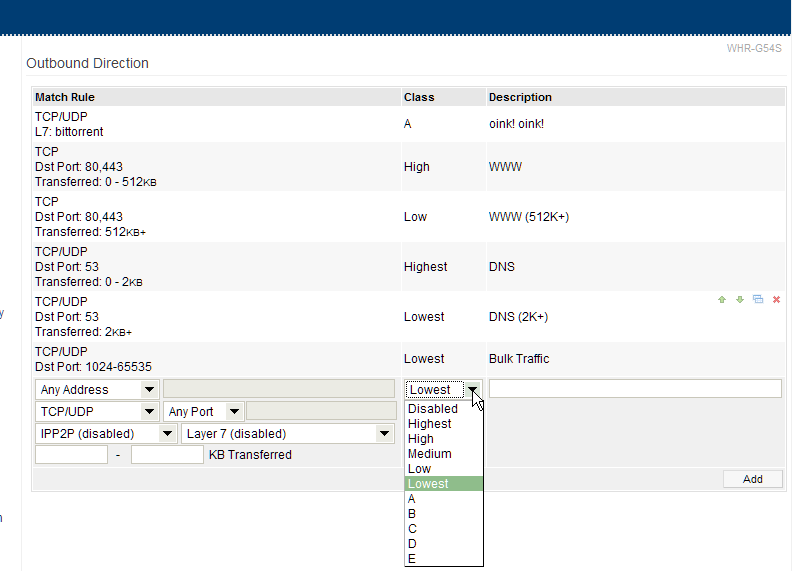
In general, you do not need to add the oink oink line, but you could add a VOIP line here for UDP.
Here's a forum link for another opinion on VOIP:
http://www.phoneservicesupport.com/toma ... 11547.html
R/mw
My Rules
This works quite well (Tomato default with MJ Box rule) with a conservatively set outbound limit and inbound set to None (you cannot control inbound; don't forget your ISP is shaping for you). All the torrents fall to the bottom. It's a fair.
Outbound Direction
Match Rule Class Description
TCP
Dst Port: 80,443
Transferred: 0 - 512KB High WWW
TCP
Dst Port: 80,443 Low WWW (512K+)
TCP/UDP
Dst Port: 53
Transferred: 0 - 2KB Highest DNS
TCP/UDP
Dst Port: 53 Lowest DNS (2K+)
From 00:11:22:33:44:55
UDP
Dst Port: 5060,5070,10000-65535 Highest VOIP Box
TCP/UDP
Dst Port: 1024-65535 Lowest Bulk Traffic
Outbound Direction
Match Rule Class Description
TCP
Dst Port: 80,443
Transferred: 0 - 512KB High WWW
TCP
Dst Port: 80,443 Low WWW (512K+)
TCP/UDP
Dst Port: 53
Transferred: 0 - 2KB Highest DNS
TCP/UDP
Dst Port: 53 Lowest DNS (2K+)
From 00:11:22:33:44:55
UDP
Dst Port: 5060,5070,10000-65535 Highest VOIP Box
TCP/UDP
Dst Port: 1024-65535 Lowest Bulk Traffic
R/mw
However i'll be doing it on more than one WRT54G
If you do only put the NAT/QOS on the WRT54G connected to your WAN/Modem. Recommend you utilize the others as switches (e.g. LAN to LAN) (on the same subnet).
R/mw
However i'll be doing it on more than one WRT54G
Also, disable DHCP on all your WRT54Gs except the one with the WAN connection (your gateway). You shouldn't have more than one box handing out addresses.
R/mw