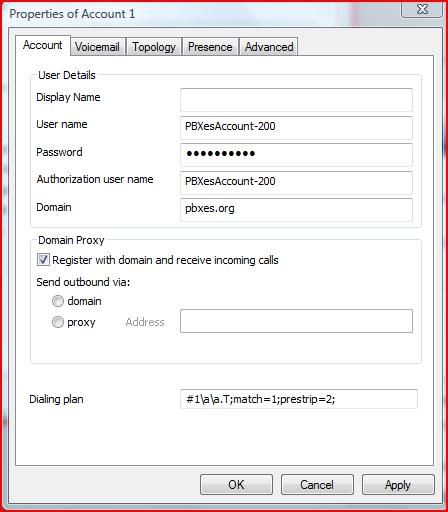
steve_togo wrote:MagicDump wrote:User name: or auth ID (YourPbxes account)-200 eg (stevepbx=200)
Password: Your Extension Password eg. (200)
Proxy: (pbxes.org)
Thank you Magicdump and Mberlant for the help, I was able to configure the PBX settings successfully. But I still have a couple of general questions and it would be great if you can help me out as I am not able to figure out using search.
1. If i register to the Magic Jack servers using PBXES site, How can I know the registration interval ie., How frequently is the Magic Jack trunk registering thru this site.
2. Can I manually Set the User Agent string in PBXES site for Magic Jack trunk, I have done this in my SPA2102 so I am not sure how to set in the website as my ATA now registers as an extension to PBXES site.
3. In your screen shot I see an option called Callthru and you have set it with a value of 9, I tried to understand and if I make a call it is asking for a password when i input the value stored in that prompt it is telling me wrong password. In your case this is 9.
4. Can I record calls using this service?
5. I checked the call monitor and I noticed some calls which I don't understand it is using my other SIP trunks.
6. My web browser is complaining of an invalid certificate, I am not sure if anyone else has this issue.
7. Is there any advantage of using this with Voxalot?
8. Any ways to integrate this with Google Voice?
9. I am unable to understand the below two statements
Dial tone (9#) + (200#)
Dial Tone (9#) + (USA or Canada Number#)
(9#) + 1 + (last 7 digicts of any Gizmo5 Number#)
MagicDump wrote:
2. Anyone can call your Magicjack Number at the Dial tone (9#) + (200#), and your cell Phone or land line will Ring.
3. You can call your Magicjack Number at the Dial Tone (9#) + (USA or Canada Number#).
4. You can Call your Magicjack Number at the Dial Tone (9#) + 1 + (last 7 digicts of any Gizmo5 Number#)
Actually I was unable to register initially and i figured out my ATA was using TCP to connect, But after I changed to UDP its working fine now.
Thanks,
Steve
Hi Steve,
I want it to apologize for a misunderstanding; all you want it to do was to call from your wifi Cell Phone (Gizmo5 account) to your ATA at home, and that can be accomplish simply by registering your other Gizmo5 account to your ATA and for that you don’t need your Magicjack involve. Since the SPA 2102 has dual FXS port you can use Line1 for Magickjack and Line2 for the other Gizmo5 account, like I do with my PAP2T.
In order for anyone to take advantage of the above setup will be if you have a Cell or Land Line Plan that allow incoming and outgoing free local calls in the USA or Canada.
One of the advantages of this setup is that anyone can call you from any Free SIP account like Gizmo5, Callcentrin, Voxalot, iNum, eNum, etc. and it will be forwarded to your Cell or Land line using Magicjack as the outgoing Trunk. In this example I only use Gizmo5 but you can see I have other accounts incoming trunks registered.
The free account with PBXes.com have a lot of limitations and one of them is not been able to modify t he source code which is very inconvenient. For that reason I have not been able to set the User Agent string which can get you in trouble with Magicjack TOS. But the way I see it IMHO they have nothing to loose because the free PBXes account will give you only 2000 min a month, and as long as you don’t abuse any system I think will be OK.
There is an example of what the source code look like for the Magicjack sip.conf Trunk but you wont be able to change it.
You are allowed to view source code in order to gain a deeper understanding of the inner workings of PBXes. It does not allow for modification. A license to modify source code is granted to holders of PBXes PRO.
canreinvite=no
context=from-pstn
disallow=h263&h263p
dtmfmode=auto
fromdomain=proxy1.miami.talk4free.com
fromuser=EXXXXXXXXXX01
host=proxy1.miami.talk4free.com
insecure=very
language=en
port=5070
promiscredir=yes
qualify=no
secret=XXXXXXXXXXXXXXXXXXXX
type=peer
username=EXXXXXXXXXX01
I will try to answer your questions to the best of my knowledge if you still want to use this setup.
1. If i register to the Magic Jack servers using PBXES site, How can I know the registration interval ie., How frequently is the Magic Jack trunk registering thru this site.
Once you register your Magicjack with PBXes.com, it will stay registered. To deactivate the Trunk go to Trunks->SIP/Magicjack->Account->register and set it to no (just outbound calls)
2. Can I manually Set the User Agent string in PBXES site for Magic Jack trunk, I have done this in my SPA2102 so I am not sure how to set in the website as my ATA now registers as an extension to PBXES site.
Not, with the free PBXes Account.
3. In your screen shot I see an option called Callthru and you have set it with a value of 9, I tried to understand and if I make a call it is asking for a password when i input the value stored in that prompt it is telling me wrong password. In your case this is 9.
The Callthru is one the nicest thing about this setup; it will allow you to get a dial tone by calling your Magicjack number from any local Cell or Land Line Phone, the number 9 is just a password to get the dial tone it can be of any length, once you call your Magicjack number the system will ask you to enter a password, you will them dial “9” and also you have to dial the “#”, then you will hear a dial tone. In this setup if you dial a 10 digits USA or Canada number and ended with “#” it will dial out using your Magicjack Outbound Trunk, and also if you dial a 1 + a last 7 digits of any Gizmo5 number plus a”#” it will use the Gizmo5 outbound Trunk.
4. Can I record calls using this service?
Not with the free PBXes account.
5. I checked the call monitor and I noticed some calls which I don't understand it is using my other SIP trunks.
What you see in your Call monitor is extension 200 which is the one where all incoming calls are forwarded to, from there if the call is no answered it will get forwarded to your Cell or Land Line, See if you register a soft phone like xLite or an ATA with that extension Number you will be able to answer the call before it gets forwarded to your cell. Like for example you are out of the country and you don’t want the call to be forwarded to your Cell or Land Line Phone you will use xLite soft phone to get the call just make sure you answer within 20 sec.
6. My web browser is complaining of an invalid certificate, I am not sure if anyone else has this issue.
I think that is a new thing now with the browser but you only have to allow it once, not sure.
7. Is there any advantage of using this with Voxalot?
Is up to you Voxalot is a great service but I personally like Gizmo5 better, you wont be able to install a Voxalot soft phone in your wifi cell phone as easy as Gizmo5.
8. Any ways to integrate this with Google Voice?
I never got a chance to play with the Grand Central Number and I will love to, I miss the chance to get one, sorry.
9. I am unable to understand the below two statements
Dial Tone (9#) + (USA or Canada Number#)
(9#) + 1 + (last 7 digicts of any Gizmo5 Number#)
Call Magicjack Number the system will ask you for password Dial “9” “#” (dial 9 and # )
You will get a dial tone then dial a 10 digit number for USA and Canada or Dial 1+last 7 number of a Gizmo5 number, the system will ad 747 for you
I hope it Help
Magicdump